Posted by: kurtsh | December 15, 2017

BETA: Microsoft Whiteboard (Preview)

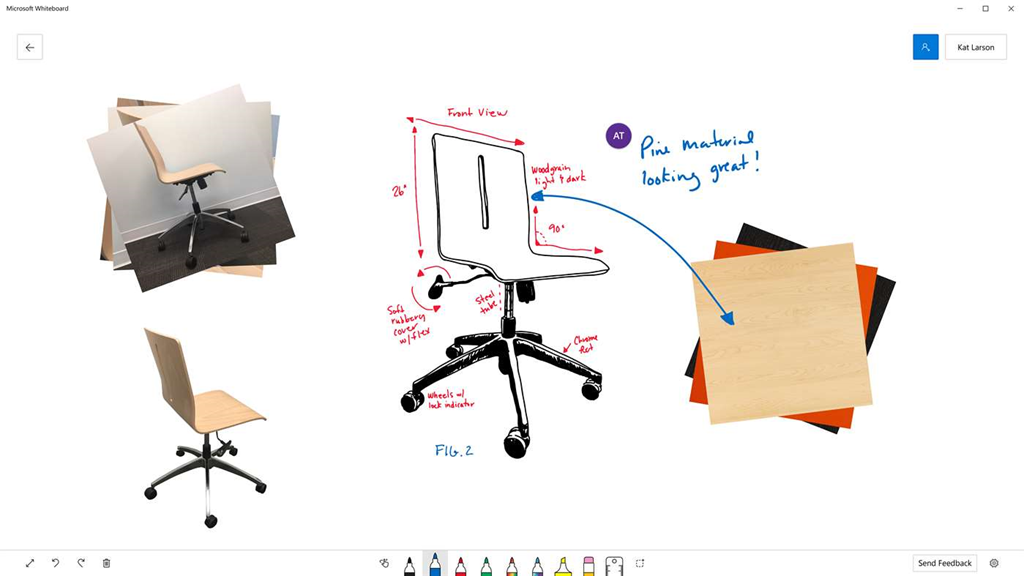
imageMicrosoft Whiteboard is a new Windows 10/Office 365 product that is kinda like a online collaborative version of OneNote. You can drop anything you want into whiteboard like you can OneNote, but it’s designed for lots of people to work on simultaneously.

The content is persistent – as in you can save & come back to it, which is important for iterating through brainstorming sessions.  And it works on all sorts of Windows 10 devices & is digital ink aware – in other words, it accepts pen/eraser input extremely well.

Microsoft Whiteboard Preview

Microsoft Whiteboard is a freeform digital canvas where people, ideas, and content can come together for creative collaboration. The app is built for anyone who engages in creative, freeform thinking before getting to their final output. It’s designed for teams that need to ideate, iterate, and work together both in person and remotely, and across multiple devices.

Collaborate Effortlessly
The limitless surface ensures that imagination has room to grow, and there’s always space for everyone’s ideas. Bring in teammates whether they’re across the hall or in a different part of the world with real-time collaboration across multiple devices. You can see where everyone is on the board and the updates they’re making – whether they’re adding images, putting up sticky notes, or creating diagrams. Now even remote workers can easily join in and contribute to the discussion.

Work Naturally
Microsoft Whiteboard lets you create in whatever way feels most natural to you. The pen-first, touch-first technology lets you make fluid gestures with your fingers or draw out finer details with your pen. Using your pen, you can jot down notes, draw precise illustrations, or search for images on the web. Using your fingers, you can swipe to different sections of your board, turn the virtual ruler to the angle you want, and drag and drop images to create a photo stack. Whether you use pen or touch, Microsoft Whiteboard recognizes your intent and delivers your desired outcomes in an instant.

Create Digitally
With Microsoft Whiteboard, you can use intelligent ink that recognizes your freeform drawings and turns them into standard shapes so it’s easy to create great-looking tables, diagrams, and flowcharts. And unlike traditional whiteboards, the app automatically saves your boards so you can pick up where you left off or share links to your boards so others can build on top of your work. No more need to take photos of your canvas or to email photos to others when you need to get them up to speed.

OFFICE 365 SUBSCRIPTION REQUIRED TO COLLABORATE
There’s one asterisk in the announcement page that’s pretty important:

The Microsoft Whiteboard Preview is rolling out to all English versions of Windows 10 within the next 24 hours, and will roll out to additional languages in the coming months. The app is free to use for anyone with a Windows 10 device, but one participant with an Office 365 personal, work, or school account is needed for multi-party collaboration. For SurfaceHub customers, the Microsoft Whiteboard Preview will eventually replace the native whiteboard app currently running on your SurfaceHub. In the meantime, you can install the preview of the Microsoft Whiteboard alongside your existing app. 

USING WORK OFFICE 365 ACCOUNTS:
I’ve also found the following comment in the Product Site FAQ, that’s rather important:

I am using an Office 365 work account from my organization. Why can’t I log into the Microsoft Whiteboard Preview?

While Microsoft Whiteboard is in Preview mode, your IT administrator will have to enable the app for use in your organization. They can do this in the Office 365 administrator portal where they enable or disable apps for users.

Read more about Microsoft Whiteboard here:

We are pleased to announce this year’s Microsoft Education Exchange (E2) event will be held in Singapore, from March 13 through March 15, 2018. We chose Singapore as host country because of its highly regarded education system, quoted to be “the world’s best education system,” according to an OECD-led study. Singapore is rated first in math and science and has one of the highest literacy rates in the world. E2 2018 will be hosted in Singapore with the support of local and international governments.

Watch as Anthony Salcito and Eve Psalti announce the details for the 2018 Education Exchange (E²) event. The event will be held in Singapore on March 13 -15 and will celebrate our global community of educators and thought leaders, plus get the latest and greatest news from Microsoft Education product experts and VP of Education, Anthony Salcito.

E2 2018 Microsoft Education Singapore

Read more about the event here:

Posted by: kurtsh | December 10, 2017

VIDEO: “3D Holiday” – Microsoft’s Holiday Message

Here’s Microsoft’s holiday message for 2017:

Watch the :60 message here on Youtube and the :15 digitals: Lizard and Pirate and Three Eyed Monster.

If you’re interested in learning more about 3D Holiday, we have some details here.  And if you’re interested in creating some of this yourself on Windows 10, visit Remix3D.com to create your own world with the characters featured in the spot.

imageFACEBOOK PHOTO FRAME:
We are also sponsoring a Facebook photo frame.

Starting Monday, go in to your Facebook account and click “Update your profile picture”, then “Add frame”, where you will find our holiday frame. Select and publish!

Posted by: kurtsh | December 10, 2017

INFO: Office 365 Update – December 2017

Wanna hear what the latest updates are in Office 365?  Check out the December 2017 update video below.

https://youtu.be/SbqFWwnZD4Y

RESOURCES:
If you’d like to keep track of past & future updates, here’s some means of subscribing to them:

Posted by: kurtsh | December 9, 2017

EVENT: Microsoft Ignite 2018 Pre-Registration

Jimageoin us September 24 – 28, 2018 in Orlando, FL for Microsoft Ignite.

Sign up now for early registration access and have first choice of hotels in March.

Posted by: kurtsh | December 8, 2017

INFO: Yammer Vision & Roadmap for FY18 (2017-2018)

The video below is a recording of the 1 hour “Yammer Vision & Roadmap” presentation as delivered at Microsoft Ignite on 9/25/17. (BRK2103)

The content is also available in more detail at the Microsoft Ignite site – including references to OTHER Yammer-related sessions delivered at Ignite:

BRK2103: Connecting your company with Yammer: Vision and roadmap

Posted by: kurtsh | December 8, 2017

DOWNLOAD: Office 365 Teamwork Guides

imageWe’ve published 4 new guides to help folks understand how to leverage the technology within Office 365 to enhance TEAMWORK.

  • Unblocking workplace collaboration
  • 5 tips to improve collaboration
  • 5 faces of today’s employees
  • The ultimate guide to chat-based tools

Download the guides from here:

(My apologies if you initially received a weird notification about a post called #SavePlayer1. This post originally & accidentally contained content targetted for my personal blog.  I’ve replaced the content of this post with the actual content that was supposed to be here)

imageWell, I missed this AMA – sorry, but I’ve been super-heads down on work.  But fortunately, you can review all the questions and answers in the archive about “Azure Stack” directly from the engineering team.

Here’s a sample of the questions asked & answered:

  • Who is responsible for lighting up… let’s say Azure Container|Kubernetes Service on Azure Stack? Is the the AKS team, or the Azure Stack team?

  • How does the support work? The Azure Stack team can’t possibly be the product experts that the AKS team are. Yet, from what I know about Azure Stack, I know there are enough incompatibility points (lol, MSI? lol, metadata service) that will require feature work from the AKS team to make it work in Azure Stack. Or an Azure Stack employee basically working extremely closely with AKS team members. No? How does that relatioship work reliably for the customer who doesn’t care about this distinction?

  • What complex workloads can you actually deploy with an ARM template to both Azure Cloud and Azure Stack? Same APIs, same features, same runtimes? Can you point me to these example ARM templates?

  • How many customers are willing to publicly talk about Azure Stack success stories? Can you point to a company that is purely, straight-forwardly deploying identical workloads in Azure Stack and Azure Public Cloud today?

  • Why do customers buy Azure Stack?

    • too timid to go public cloud in one step?
    • bursting capacity?
    • etc?
  • Now that Azure is launching a VMware side-by-side service, isn’t there a risk that Azure Stack will become irrelevant in the marketplace?
  • What is next for Azure Stack? what other services and capabilities will you be adding to Azure stack in the next 6 months?
  • Is it possible that I can manage Azure and AzureStack from just the Azure portal in the future? Like the Azure Stack environment should just appear as a region when deploying a resource. If a particular service isn’t available in Azure Stack then the Azure Stack region should not be displayed
  • Will Azure Stack become modular in the future? If I buy a 4 node model can I add more servers if I want to scale out?
  • Why is it so damn expensive(especially in terms of requiring certified hardware)? Also when is Service Fabric coming?
  • What is the impetus for forcing Azure Stack to be sold only as a part of a solution and not installable on what might be otherwise compatible hardware?
  • …

Read the full AMA here:

REDDIT: [AMA] Azure Stack Engineering Team!https://www.reddit.com/r/AZURE/comments/7hug28/ama_azure_stack_engineering_team/

imageUPDATE 11/30/17 3:10PM:
Thanks to Jonathan for notifying me about the broken link in this post. Link is fixed and now goes directly to the study.

ORIGINAL POST:
Get a clear and thorough overview of Microsoft Advanced Threat Analytics. Learn how it helps protect on-premises networks from both internal and external threats.

“Overall, Microsoft Advanced Threat Analytics is a perfect example of a Real-Time Security Intelligence solution with a background in the field of cybersecurity. It’s focused on detection of several specific kinds of internal and external threats, and, as opposed to products evolving from traditional SIEMs, is much leaner and easier to deploy.” Alexei Balaganski, Lead Analyst, KuppingerCole

In this advanced threat analysis, you’ll examine the ways our User and Entity Behavioral Analytics  (UEBA) solution, Microsoft Advanced Threat Analytics helps you:

  • Detect abnormal behavior, malicious attacks, and security issues in your environment
  • Get a quick threat overview and timeline of activities with the innovative, web-based management console
  • Integrate with leading SIEM solutions like IBM QRadar, HP ArcSight, RSA Security Analytics, and Splunk
  • Deploy without changing your existing infrastructure

Download the report here:

Posted by: kurtsh | November 30, 2017

HOWTO: Set up ‘just-in-time’ Skype meeting reminders

Have you ever hit the snooze button on an Outlook reminder for a Skype for Business meeting/concall, only to forget about it later & end up joining the call late? 

Or have you for some reason not gotten a Outlook meeting reminder at all, and then missed the meeting altogether?

SKYPE MEETING REMINDERS
One of my favorite features in Skype for Business is it’s ability to send me an IM to join a meeting ‘just-in-time’ when a Skype meeting is starting that I’m supposed participate in.

With this, I immediately get a “toast” IM at the precise time that the meeting is starting – with a button to join the meeting at that exact moment.  It won’t automatically join the meeting – but it does give me the opportunity to easily join the meeting manually with a single click.

With this feature, I NEVER miss a meeting from my desktop.

Note however that this reminder system is SEPARATE from Outlook & it’s disabled by default if you have Outlook running.

HOW TO TURN SKYPE MEETING REMINDERS ON
In order to turn this on:

  1. Go to Options on the Skype for Business client:
    image
  2. Click on Skype Meetings. 
    Under “Meeting reminders”, UNCHECK the box that reads “Don’t show notifications when Outlook is running”

image

« Newer Posts - Older Posts »

Categories