imageUPDATE 6/29/17:
Guidance from support below updated with more recent content.

—-

ORIGINAL POST 6/28/17:
The recent outbreak known commonly as the Petya Ransomware, has been addressed by Microsoft in several areas.

MICROSOFT MALWARE PROTECTION CENTER: PETYA RANSOMWARE ANALYSIS
The Microsoft Malware Protection Center (MMPC) wrote a really exhaustive article on the new Petya Ransomware on their blog.

The post covers:

  • Delivery and installation
  • Multiple lateral movement techniques
        • Lateral movement using credential theft and impersonation
        • Lateral movement using EternalBlue and EternalRomance
  • Encryption
  • Detection and investigation with Windows Defender Advanced Threat Protection
  • Protection against this new ransomware attack
  • Resources
  • Indicators of Compromise

If you’re interested in background on the malware, this is really good post to read:

    MICROSOFT SECURITY RESPONSE CENTER: UPDATE ON PETYA MALWARE
    The Microsoft Security Response Center has written a post to address Petya, based on their own investigation.

    The MSRC talks about it’s origins, initial targets, what previous security patch addresses the vulnerability it leverages, and general guidance around the malware – including protection technologies to leverage in the future.

      ENTERPRISE CUSTOMER GUIDANCE
      The following was disseminated to our customers with Premier Support contracts.

      Background
      Microsoft’s antivirus software detects and protects against this ransomware. Our initial analysis found that the ransomware uses multiple techniques to spread, including ones which were addressed by a security update (MS17-010) previously provided for all platforms from Windows XP to Windows 10. We are continuing to investigate, and our support teams are fully mobilized and engaged globally to help any impacted customers.

      Windows Defender, System Center Endpoint Protection, and Forefront Endpoint Protection detect this threat family as Ransom:Win32/Petya. Ensure you have a definition version equal to or later than:

      • Threat definition version: 1.247.197.0
      • Version created on: 12:04:25 PM : Tuesday, June 27 2017 (Pacific Time)
      • Last Update: 12:04:25 PM : Tuesday, June 27 2017 (Pacific Time)

      In addition, the free Microsoft Safety Scanner http://www.microsoft.com/security/scanner/ is designed to detect this threat as well as many others. If you use a solution from an antivirus provider other than Microsoft, please check with that company.

      New guidance from the MMPC Blog
      On Tuesday June 27, 2017, the Microsoft Malware Protection Center (MMPC) released a detailed analysis of the Petya Ransomware attack in a new blog post:

      This MMPC blog provides the most cogent and detailed analysis available on how the malware works and guidance for network administrators and security professionals concerning how to mitigate against specific attack methods.

      New guidance from the MSRC Blog
      On Wednesday June 28, 2017, the Microsoft Security Response Center (MSRC) released a new blog post to provide additional insights and guidance customers can use to improve protections in the enterprise:

      Recommendations from the MSRC blog include:

      • If for some reason you cannot apply the update, a possible workaround to reduce the attack surface is to disable SMBv1 with the steps documented at Microsoft Knowledge Base Article 2696547.
      • Consider implementing techniques like network segmentation and least privileged accounts that will further limit the impact of these types of malware attacks.
      • For those using Windows 10, leverage capabilities like Device Guard to lock down devices and allow only trusted applications, effectively preventing malware from running.
      • Finally, consider leveraging Windows Defender Advanced Threat Protection, which automatically detects behaviors used by this new ransomware.

      New guidance from the Azure Security Center Blog
      On Wednesday June 28, 2017, the Microsoft Azure Security Center released a new blog discussing ​measures that Azure customers can take to prevent and detect Petya malware through Azure Security Center:

      Recommendations
      In addition to the recommendations we included in our previous alert on Tuesday, we strongly recommend reviewing the information provided in these blogs for specific steps you can take to mitigate against Petya Ransomware.

      Additional Resources

      Regarding Information Consistency
      We strive to provide you with accurate information in static (this mail) and dynamic (web-based) content. Microsoft’s security content posted to the web is occasionally updated to reflect late-breaking information. If this results in an inconsistency between the information here and the information in Microsoft’s web-based security content, the information in Microsoft’s web-based security content is authoritative

        UPDATE 3/23/2020:
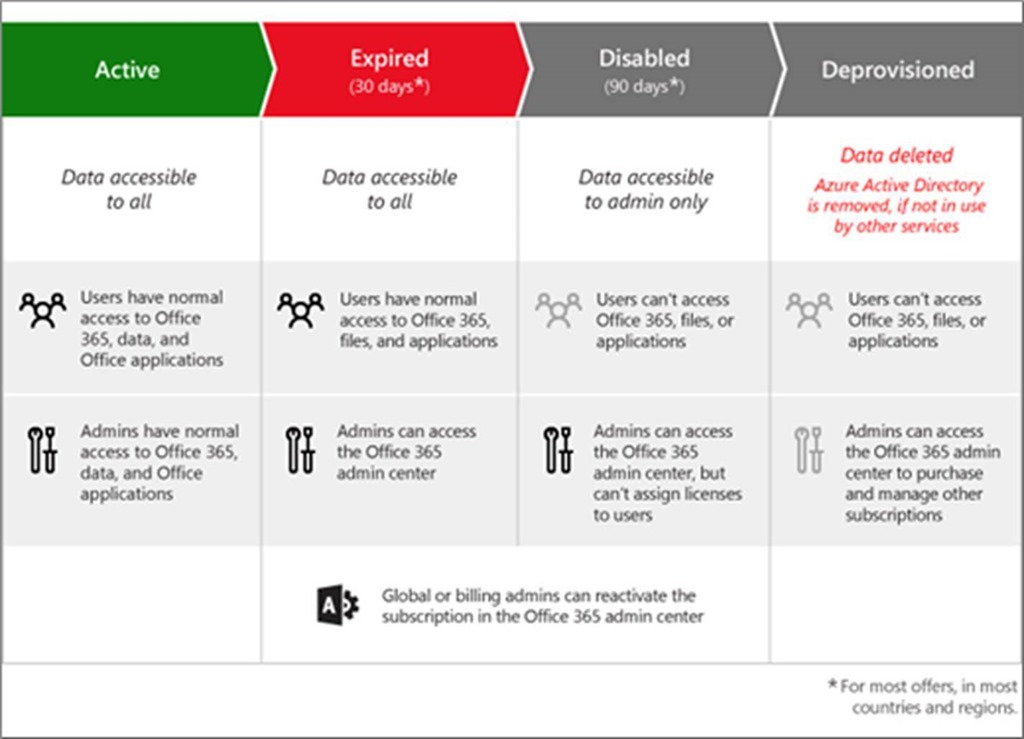
        Here’s some details on retention of data post expiration of an Office 365 subscription:
        https://docs.microsoft.com/en-us/office365/Enterprise/office-365-data-retention-deletion-and-destruction-overview 

        ORIGINAL POST JUNE 17, 2017:
        imageWhen a subscription to Office 365 expires, as an IT Professional, it’s important to understand what the implications are, i.e. what’s going to happen after the subscription lapses?

        The information I’m highlighting below is written documentation / material that is publically available online & accessible as a reference for yourself & for your organization.

        Note: This is simply the information I’ve collected from Microsoft online sources.  It may not be complete & may not represent all scenarios.

        “ONLINE SERVICES TERMS” DOCUMENTATION ON OFFICE 365 EXPIRATION
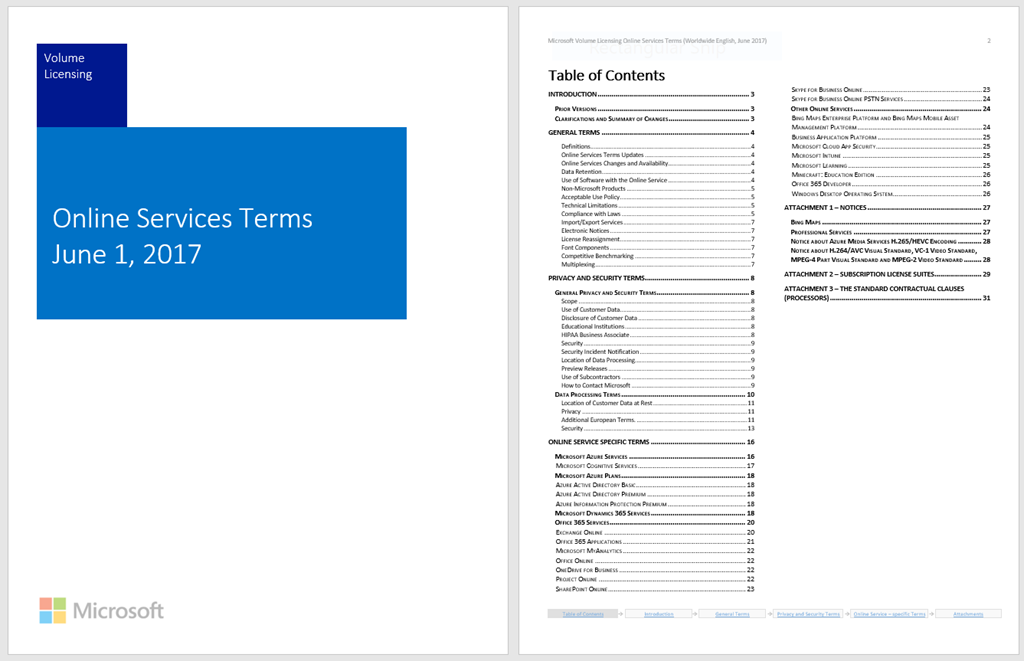
        The Online Services Terms is a reference similar to the old “Product Use Rights”, except it’s for cloud services.  It’s a monthly updated Word document that you can download (see below) and contains the latest terms of service.  (Think of stuff like “SLAs”, “Usage rights”, “Microsoft’s obligations”, “customer obligations”, etc.)

        image

        Regarding the expiration of an Office 365 subscription, according to the Online Services Terms, there are 3 bullets that standout to me around the expiration/termination of an Office 365 subscription:

        • Page 4: Data Retention
          “Microsoft will retain Customer Data stored in the Online Service in a limited function account for 90 days after expiration or termination of Customer’s subscription so that Customer may extract the data. After the 90-day retention period ends, Microsoft will disable Customer’s account and delete the Customer Data.”
        • Page 10: Privacy
          “No more than 180 days after expiration or termination of Customer’s use of an Online Service, Microsoft will disable the account and delete Customer Data from the account.”
        • Page 14: Data Retention after Expiration or Termination
          “The expiration or termination of Customer’s Online Service subscription will not change Customer’s obligation to pay for hosting of Customer Data during any Extended Term.”

        STATES OF OFFICE 365 ACCESS POST EXPIRATION
        From the Office support web site, there is an article that describes the states that a tenant goes through once an Office 365 subscription expires.

        OFFICE APPLICATION REDUCED FUNCTIONALITY MODE & EXPIRATION NOTICE
        According to the Office support site, deployed Office applications will be affected as well, as described below:

        image

        Posted by: kurtsh | June 26, 2017

        TRAINING: Power BI Webcasts On-Demand & Whitepapers

        imageIf you’re interested in learning Power BI, the following should be helpful.

        WEBINARS
        The following webinars can help you to understand and use Power BI. To watch the webinars, click the link to register or watch.

        View the entire list here:

        WHITEPAPERS
        Whitepapers allow you to explore Power BI topics at a deeper level. Here you can find a list of available whitepapers for Power BI.

        View the entire list here:

        imageThe future isn’t random. It’s the result of the choices that we make now. We’ll be talking about technologies and industries that will define the next decade and beyond.

        Join our host Cristina Quinn, a science and technology reporter, as she dives into everything from Minecraft to cyber warfare. You can wait for the future to happen to you or engage with it right now and ahead of the curve on .future— a branded podcast from Microsoft, produced in partnership with Gimlet Creative.

        imageOn Oct 31, 2017, RPC over HTTP will be deprecated in Exchange Online in favor of MAPI over HTTP, a modern protocol that was launched in May 2014.

        This change affects you if you’re running Outlook 2007 because it won’t work with MAPI over HTTP. (The successor protocol to RPC over HTTP)

        It also affects Outlook 2016, Outlook 2013, and Outlook 2010 users who aren’t running updated versions of the products that may still leverage RPC over HTTP instead of the current MAPI over HTTP standard.

        Why MAPI over HTTP?
        MAPI over HTTP provides the following benefits:

        1. Provides faster connection times to Exchange
        2. Improves the connection resiliency when the network drops packets in transit
        3. Enables more secure login scenarios like Multi-factor authentication for Office 365
        4. Provides the extensibility foundation for 3rd party identity providers
        5. Removes the complexity of RPC over HTTP’s dependency on the legacy RPC technology

        How do we address the sunsetting of RPC over HTTP?
        To continue email connectivity:

        • Outlook 2007 customers will have to update to a newer version of Outlook or use Outlook on the web.
        • Outlook 2016, Outlook 2013, and Outlook 2010 users must make sure that the latest cumulative update for the version of Office installed is applied.

        Microsoft recommends customers keep their users updated to the most recent product update, as several MAPI over HTTP bugs have been fixed between since December 2015. Office 365 customers should review this how-to article which outlines the steps necessary to upgrade users to the latest version of Office.

        Additionally, customers may need to ensure their Outlook clients are not using a registry key to block MAPI over HTTP. Details about this registry key can be found in this KB article on our support site.

        Lastly, customers should ensure that they do not have any Outlook add-ins or 3rd party apps that rely on the RPC over HTTP protocol to connect to Office 365 data.

        How can I confirm a client is enabled for MAPI over HTTP?
        By default, when a mailbox is created in or migrated to Exchange Online, it is enabled for MAPI. You can confirm/verify that your mailboxes are enabled for MAPI connections using the following command from a Remote EXO PowerShell session to your tenant:

        This might come in handy if you find someone is connecting via RPC/HTTP instead of MAPI/HTTP.

        Another way to check is to look at Outlook’s Connection status (for older versions of Outlook): How to Check Outlook’s connection status – Connecting RPC will show RPC/HTTP in the Protocol column, Connecting MAPI/HTTP will show HTTP in the Protocol column.

        Does this deprecation affect Outlook for Mac, iOS, Android, Windows 10 Mobile or the web?
        No. This only applies to Outlook for Windows.

        Does this deprecation in Office 365 affect customers using Exchange on-premises (Exchange 2007-2016)?
        No. Customers using RPC over HTTP to connect Outlook and Exchange on-premises can continue to do so. This only affects mailboxes in Exchange Online.

        For official information about what steps to take, or for a greater explanation of why this is happening, go to:

        imageThis eBook provides an overview of Microsoft SharePoint and OneDrive for Business security and compliance capabilities.

        Microsoft has been building enterprise software for decades and running some of the largest online services in the world. We draw from this experience to keep making Microsoft SharePoint Online and OneDrive for Business more secure for users, implementing and continuously improving security-aware software development, operational management, and threat-mitigation practices that are essential to the strong protection of your services and data.

        The collaboration landscape has changed. Connectivity is ubiquitous, and the ability to work remotely has become an ingrained part of the work practice. People have come to expect to be able to access email and documents from anywhere on any device—and for that experience to be seamless.

        ————

        The eBook covers:

        • Platform security
        • Information governance
        • Secure access & sharing
        • Awareness and insights
        • Compliance & trust

        Get the book here:

        imageWith the release of Microsoft Stream, the Stream product group wants to be able to answer your questions!

        To learn more about Microsoft Stream, join the “Ask Microsoft Anything” session on the Microsoft Tech Community site.

        Today, Microsoft Stream became generally available for Office 365 customers.

        Introducing the new enterprise video service – Microsoft Stream

        Microsoft Stream helps customers create a more collaborative and productive organization through the power of intelligent enterprise video.

        imageMicrosoft Stream integrates across Office 365 applications like Microsoft Teams, Yammer, SharePoint and more to enable users the ability to seamlessly bring videos and channels right into their apps.  It will be available to enterprise customers, as well as education and kiosk plans. 

        Stream has the following goals:

        Make it easy to participate

        • Organize your content easily with channels & groups
        • Watch trending videos or save them for later on your watch list
        • Upload, manage, and share videos from your personalized home page
        • Like videos, add comments, and follow your favorite channels
        • Seamlessly share videos in Office 365 applications including Teams, SharePoint, Yammer, and OneNote

        Add intelligence to every video

        • Face timeline powered by automatic face detection makes navigating a video more interactive
        • Automatic closed captions enhance accessibility getting your video to an even broader audience
        • Auto generated speech to text transcript adds easy discoverability – jump to the moment that matters most
        • Clickable time codes in the comments section, transcript or table of contents take you to the specific point in the video being referenced

        Videos for a secure & connected organization

        • Stay close to your content – cloud-based access means you’re always connected
        • Videos are secure & encrypted across any device
        • Video that works where you are – create or watch on any device anywhere
        • Create groups to make access based management easy with Office 365 Groups
        • Manage sharing permissions on videos with Azure Active Directory

        Governance designed for your organization

        • Manage licensing for employees and open support tickets with Microsoft
        • Assign admins to manage the experience
        • Restrict who can upload and create channels
        • Moderate and edit content on an owners behalf when needed
        • Set enterprise wide content policies and require employees to optionally accept terms before the upload

        Read more on the product site below:

        imageEver wanted to be able to easily speak to your computer & accurately have your speech be turned into text while using Outlook, Word, or PowerPoint?

        Dictate is an free Microsoft Office add-in for Outlook, Word and PowerPoint which converts speech to text using the state of the art speech recognition behind Cortana and Microsoft Translator. Currently available for Windows OS.

        Dictate, a Microsoft Garage Project

        Dictate is unique in that has the following features:

        • Supports more than 20 languages for dictation
        • Real time translation to 60 languages
        • Commands like "new line", “stop dictation” and "enter" to give more control while dictating
        • Two modes of punctuations: Auto and manual for English
        • Visual feedback to indicate that speech is being processed

        Here’s a quick example of what I cranked out in just 60 seconds.  Note: I didn’t correct anything written.

        image

        It supports the following commands:

        • New Line: Takes cursor to new line
        • Delete: Removes the last line you dictated
        • Stop Dictation: Terminates the dictation session
        • Full stop or period: Types period character (.)
        • Question mark: Types (?)
        • Open Quote: Types (“)
        • Close Quote: Types (”)
        • Colon: Types (:)
        • Comma: Types (,)

        Get started by downloading the free “Dictate” for Microsoft Office 2013/2016 (32-bit/64-bit) today!

        imageThere are 76 video recordings posted from the Microsoft Data Insights Summit 2017 (June 12-13, 2017) as of this week.

        SUMMARIES:
        There are summaries posted of both days:

        KEYNOTES:
        The opening keynote is here:

        Opening Keynote Session: James Phillips, Corporate Vice President, Microsoft

        RECORDINGS:
        Video recording session categories include:

        • Keynotes
        • General or Introductions
        • Dashboards/Reports & Design
        • Developer
        • Administration & Governance
        • Advanced Analytics
        • Business Applications for Connected Data
        • Data Prep & Modeling
        • Distribution & Deployment

        View the video recordings here:

        « Newer Posts - Older Posts »

        Categories