Posted by: kurtsh | July 3, 2018

INFO: Updating Surface Pro 3 TPM firmware

imageGot a Surface Pro 3?  Have you updated the TPM module’s firmware?  Get ready for some big fun, if not. 

There’s a vulnerability in TPM that was reported a while ago that requires an update to the TPM chip firmware from 5.0.1089.2 to 5.62.3162.2.  Doing so is really laborious.

Because TPM touches certificates & the drive encryption, it’s a fairly involved & carefully orchestrated process that can take 30 minutes or more.  It involves:

  1. Downloading & installing an Update tool to the local machine
  2. Running the tool to format & create a bootable USB drive then unplug the drive
  3. Suspend Bitlocker on your machine (Super critical step!)
  4. Go into the UEFI boot menu of the Surface (Volume UP+Power)
      1. Delete all Secure Boot Keys
      2. Disable Secure Boot Control
      3. Save the configuration
  5. Reboot the computer (It will display a RED boot screen) then shut it down.
  6. Plug in & boot up the bootable USB drive that was created (Volume DOWN+Power)
  7. Update the TPM firmware using the steps from the booted USB key
  8. Boot up Windows & verify that the TPM chip has been properly updates through TPM.MSC
  9. Shutdown the PC & boot into the UEFI menu (Volume UP+Power)
  10. Enable Secure Boot Control
  11. Install Factory Default Keys
  12. Resume Bitlocker
  13. Reset Windows Hello for Business PIN by deleting the certificate container for Hello (certutil –deleteHelloContainer)

WHEW!
Not gonna lie – this isn’t for the light hearted.  I was very surprised that this process was what was required.

For detailed instructions, go to the following page:

NOT JUST FOR SURFACE DEVICES
While I described the hair-raising process that is required for Surface Pro 3s, this is technically required for ALL devices that have a TPM chip from what I understand – including Surface Pro 4, Surface Book, etc. although there are different less involved processes for those.

There are instructions available for this update for various hardware vendors including HP, Lenovo, Toshiba, Acer, Fujitsu, Panasonic, and others, on the Microsoft Support site so head on over there to see what the process is for your machine:

imageA few months ago Paul Bowden, a Software Development Engineer from Microsoft for Office Deployment & Manageability did a presentation on “Deployment & Management of Office 365 ProPlus on Mac”.

I’ve not seen this information elsewhere so I thought I’d post his presentation here:

  1. Office for Mac Community links and sites for more info
  2. Native applications on the Mac versions, sizes, and contents of each app
  3. Benefits of deployment architecture
  4. How to deploy the bits in the enterprise
        1. Deploying Office with Jamf
  5. Deployment source automation (cached vs ondemand)
  6. Network endpoints
  7. Activation and licensing
  8. License storage & conversion
        1. VL to O365 license conversion
  9. Office for Mac update channels
  10. Update cadence recommendations
  11. Microsoft AutoUpdate (MAU)
  12. MAU caching server
  13. Roadmap
        1. Today’s current deployment model of 4GB pagages
        2. The future of Office update management
  14. Deploying application settings
        1. Comparisons with Office on PC/Windows

Grab the deck here:

[I’ve shared this before but it’s been updated a bit and is a worthwhile companion to the “Azure Strategic Implementation Guide”]

image"Azure Onboarding Guide for IT Organizations”, is a popular document for our customers in IT and is usually a good resource to review top to bottom as a starting point to understanding the considerations to adopting Azure cloud services as an organization.

It covers:

  1. Moving to the cloud
  2. Managing security, compliance, and data privacy
  3. Azure enterprise administration
  4. Integrating Azure into the corporate network
  5. Extending Active Directory to Azure
  6. Operating Azure IaaS Services
  7. Migrating existing services to Azure
  8. Offering management for cloud-based services

(When you review it, you’ll notice that it’s more tactical as opposed to the eBook I shared earlier entitled, “Azure Strategy & Implementation Guide” making it a good guide for IT pros.)

imageGartner Group just published a analysis report on Microsoft Teams entitled, “Why Microsoft Teams Will Soon Be Just as Common as Outlook”. 

It is only available to Gartner customers & subscribers however the table of contents alone is a fascinating overview of questions that I’m sure many people have about Teams and it’s role in enterprise collaboration.

Taken from summary:

Microsoft Teams is playing an increasingly unifying and expanding role in Office 365. This report guides technical professionals on getting the most value out of Teams, analyzes Teams’ impact on the rest of Office 365, and assesses Teams’ strengths and weaknesses.

Download the report here if you are a Gartner subscriber:

imageOur LinkedIn subsidiary announced that military spouses will be eligible to receive LinkedIn Premium upgrades, including access to the LinkedIn Learning library. (Many assets formerly from the acqusition of Lynda.com)

Faced with frequent moves and deployments, military spouses have a unique challenge when it comes to growing their careers – in fact, they are four times more likely to be unemployed than their civilian counterparts. In order to help set them up for success, re-skilling and re-training are key as well as identifying remote and flexible work options.

imageTo help solve this pressing challenge, LinkedIn is expanding our military and veterans program to include military spouses through a new partnership with the U.S. Department of Defense’s Spouse Education and Career Opportunities program. Beginning this July, we’ll provide one year of LinkedIn Premium to every military spouse during each of their moves to new installations to help their career transitions, and once again upon conclusion of military service.

This will include free access to our online library of more than 12,000 LinkedIn Learning courses, including our newly-launched learning path designed to help military spouses succeed in flexible, freelance, or remote work opportunities. We’ll be working to foster this community through the DoD’s growing military spouse LinkedIn group, as well as directing employers to this community as a top source of talent.

Read the entire announcement here.

For details on how to enroll, check out the Spouce Education & Career Opportunities site on Millitary OneSource at:

imageAzure compliance offerings are based on various types of assurances, including formal certifications, attestations, validations, authorizations, and assessments produced by independent third-party auditing firms, as well as contractual amendments, self-assessments, and customer guidance documents produced by Microsoft.

Each offering description in this document provides an up to date scope statement indicating which Azure customer-facing services are in scope for the assessment, as well as links to downloadable resources to assist customers with their own compliance obligations. Azure compliance offerings are grouped into four segments: globally applicable, US government, industry specific, and region/country specific.

Download the paper here.

imageRecently, I’ve received several requests to help a customer deploy “Windows Defender for the Enterprise”, provide great management & reporting, and otherwise displace their existing solution on their desktops & servers.

Here are a few articles online that help provide background on how to use & deploy Windows Defender in the Enterprise:

Here are some presentations from Microsoft Ignite that may also help people understand Windows Defender:

imageAnnouncing the Azure Active Directory password protection Ask Microsoft Anything (AMA)!

An AMA is a live online event similar to a “YamJam” on Yammer or an “Ask Me Anything” on Reddit. This AMA gives you the opportunity to connect with members of the product engineering team who will be on hand to answer your questions and listen to feedback.

Join the Azure Active Directory team on the Microsoft Tech Community to discuss the public preview of Azure AD Password Protection and Smart Lockout announced here. The AMA will begin on Thursday, June 28th at 9am PT in the Azure Active Directory AMA group. 

Posted by: kurtsh | June 21, 2018

RELEASE: Azure Security and Compliance Blueprints

imageAzure Security and Compliance Blueprints are resources to assist you in building and launching cloud-powered applications that help you comply with stringent regulations and standards. Blueprints include:

  • Industry-specific overview and guidance
  • Customer responsibilities matrix
  • Reference architectures with threat models
  • Control implementation matrices
  • Automation to deploy reference architectures

PCI DSS

HIPAA/HITRUST

  • Azure Security and Compliance Blueprint – HIPAA/HITRUST Health Data and AI – The Azure Security and Compliance Blueprint – HIPAA/HITRUST Health Data and AI offers a turn-key deployment of an Azure PaaS solution to demonstrate how to securely ingest, store, analyze, and interact with health data while being able to meet industry compliance requirements. The blueprint helps accelerate cloud adoption and utilization for customers with data that is regulated.

GDPR

  • Azure Security and Compliance Blueprint: Analytics for GDPR – This Azure Security and Compliance Blueprint provides guidance to deploy a data analytics architecture in Azure that assists with the requirements of the GDPR. This solution demonstrates ways in which customers can meet specific security and compliance requirements and serves as a foundation for customers to build and configure their own data analytics solutions in Azure.
  • Azure Security and Compliance Blueprint: Data Warehouse for GDPR – This Azure Security and Compliance Blueprint provides guidance to deploy a data warehouse architecture in Azure that assists with the requirements of the GDPR.
  • Azure Security and Compliance Blueprint – IaaS Web Application for GDPR – This Azure Security and Compliance Blueprint provides guidance to deploy an infrastructure as a service (IaaS) environment suitable for a simple Internet-facing web application. This solution demonstrates ways in which customers can meet specific security and compliance requirements of the GDPR and serves as a foundation for customers to build and configure their own IaaS web application solutions in Azure.
  • Azure Security and Compliance Blueprint – PaaS Web Application for GDPR – This Azure Security and Compliance Blueprint provides guidance to deploy a platform as a service (PaaS) environment suitable for a simple Internet-facing web application. This solution demonstrates ways in which customers can meet the specific security and compliance requirements of the GDPR and serves as a foundation for customers to build and configure their own PaaS web application solutions in Azure.

UK-OFFICIAL

FFIEC

  • Azure Security and Compliance Blueprint – FFIEC Financial Services Regulated Workloads – This blueprint is designed to meet the requirements of stringent compliant standards set by the American Institute of Certified Public Accountants such as – SOC 1, SOC 2, the Payment Card Industry Data Security Standards council’s DSS 3.2, and FFIEC for the collection, storage, and retrieval of sensitive financial data. It demonstrates the proper handling of such data by deploying a solution that manages financial data in a secure, compliant, multi-tier environment. The solution is deployed as an end-to-end Azure-based PaaS solution.

FedRAMP

  • Azure Security and Compliance Blueprint: Analytics for FedRAMP – This Azure Security and Compliance Blueprint provides guidance for how to deliver a Microsoft Azure analytics architecture that helps implement a subset of FedRAMP High controls. This solution provides guidance on the deployment and configuration of Azure resources for a common reference architecture, demonstrating ways in which customers can meet specific security and compliance requirements and serves as a foundation for customers to build and configure their own analytics solutions in Azure.
  • Azure Security and Compliance Blueprint: Data Warehouse for FedRAMP Automation – This Azure Security and Compliance Blueprint provides guidance for how to deliver a Microsoft Azure data warehouse architecture that helps implement a subset of FedRAMP High controls. This solution provides guidance on the deployment and configuration of Azure resources for a common reference architecture, demonstrating ways in which customers can meet specific security and compliance requirements and serves as a foundation for customers to build and configure their own data warehouse solutions in Azure.
  • Azure Security and Compliance Blueprint: IaaS Web Application for FedRAMP – This Azure Security and Compliance Blueprint Automation provides guidance for the deployment of a FedRAMP-compliant infrastructure as a service (IaaS) environment suitable for a simple Internet-facing web application.
  • Azure Security and Compliance Blueprint: PaaS Web Application for FedRAMP – This Azure Security and Compliance Blueprint provides guidance for how to deliver a Microsoft Azure platform as a service (PaaS) architecture that helps implement a subset of FedRAMP High controls.
Posted by: kurtsh | June 19, 2018

INFO: Azure DDoS Protection Standard

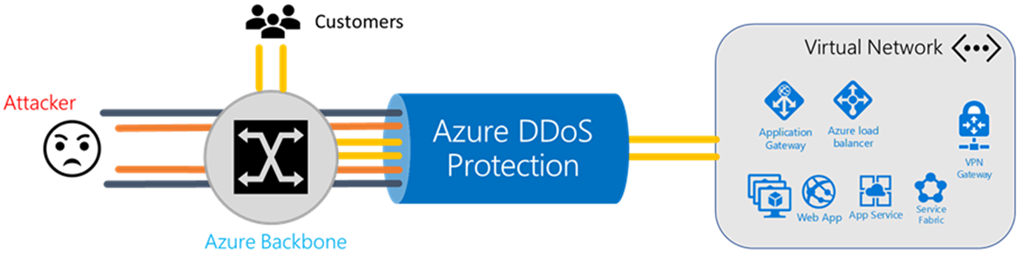
imageDistributed denial of service (DDoS) attacks are some of the largest availability and security concerns facing customers that are moving their applications to the cloud. A DDoS attack attempts to exhaust an application’s resources, making the application unavailable to legitimate users. DDoS attacks can be targeted at any endpoint that is publicly reachable through the internet.

Azure DDoS protection, combined with application design best practices, provide defense against DDoS attacks. Azure DDos protection provides the following service tiers:

  • Basic: Automatically enabled as part of the Azure platform, at no additional charge. Always-on traffic monitoring, and real-time mitigation of common network-level attacks, provide the same defenses utilized by Microsoft’s online services. The entire scale of Azure’s global network can be used to distribute and mitigate attack traffic across regions. Protection is provided for IPv4 and IPv6 Azure public IP addresses.
  • Standard: Provides additional mitigation capabilities over the Basic service tier that are tuned specifically to Azure Virtual Network resources. DDoS Protection Standard is simple to enable, and requires no application changes. Protection policies are tuned through dedicated traffic monitoring and machine learning algorithms. Policies are applied to public IP addresses associated to resources deployed in virtual networks, such as Azure Load Balancer, Azure Application Gateway, and Azure Service Fabric instances. Real-time telemetry is available through Azure Monitor views during an attack, and for history. Application layer protection can be added through the Azure Application Gateway Web Application Firewall. Protection is provided for IPv4 Azure public IP addresses.

Read more about Azure DDOS Protection here:

« Newer Posts - Older Posts »

Categories