Want to know how to identify & manage all the Power BI/Power Platform Gateways in your organization?
image

WHAT IS THE “POWER PLATFORM ON-PREM DATA GATEWAY”?
The Power Platform On-premises Data Gateway acts as a bridge, providing quick and secure data transfer between on-premises data (data that is not in the cloud) and the Power BI, Microsoft Flow, Logic Apps, and PowerApps services.

You can use the Power Platform Admin center to get visibility into all on-premises data gateways in a tenant.

ADMINISTERING YOUR POWER ON-PREM PLATFORM DATA GATEWAYS
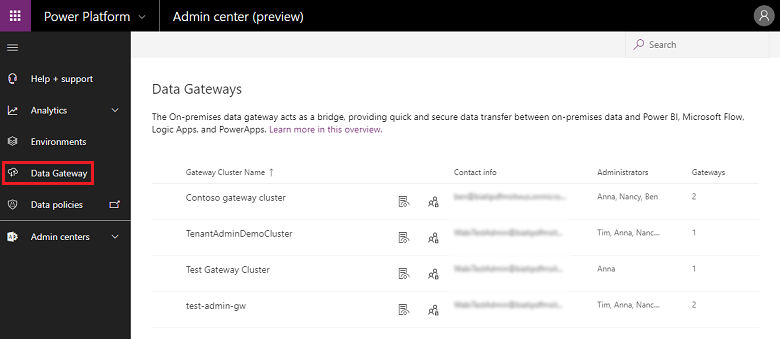
Once in the Power Platform Admin Center, the “Data Gateway” page lists all on-premises data gateway clusters installed on the tenant. (Requires being a Azure AD tenant Global Admin or Office 365 Global Admin for the Data Gateway page to be visible)

In addition, you can review the following information about these clusters:

  • Gateway Cluster Name: The name of the gateway cluster.
  • Contact Info: Admin contact information for the gateway cluster.
  • Administrators: The list of gateway administrators.
  • Gateways: The number of gateway members in the gateway cluster.

Administration allows you to:

  1. Add or remove gateway admins
  2. Search all gateway clusters, view their details, and administer them

For more details, read the docs pages here:

imageThe Microsoft Flow Conference was an amazing event, full of useful demos, great humor and mountains of valuable information!

We had 16 sessions ranging from beginner to intermediate all the way to into advanced techniques. We also had sessions that focused on the community, on real world scenarios and even about non-connected connectors.

Here’s some of the sessions posted online:

  • Meet Microsoft Flow  – Melissa Hubbard
  • Flow Buttons | What & How – Jerry Weinstock
  • PowerApps And Flow, Better Together – Mark Stokes
  • How we use Microsoft Flow: Real world use cases  – Sandro Pereira
  • 5 Tips when Introducing Microsoft Flow to your customers  – Kent Weare
  • Microsoft Flow’s unconnected connectors – Sandy Ussia
  • Upgrade your skills: Modern out-of-box Approvals – Laura Rogers
  • Use your on-prem data with Microsoft Flow – Daniel Glenn

Read more about the online sessions here:

Posted by: kurtsh | January 23, 2019

INFO: Determining entitled Software Assurance Benefits

Calculating expected Software Assurance benefits for purchases made on volume licensing agreements sometimes feels like a voodoo science.  This is in some ways because:

  1. There are several different benefits granted (Planning Services, Training Vouchers, 24/7 Problem Resolution Support, etc.)
  2. The grant sizes of each benefit differs depending on two things:
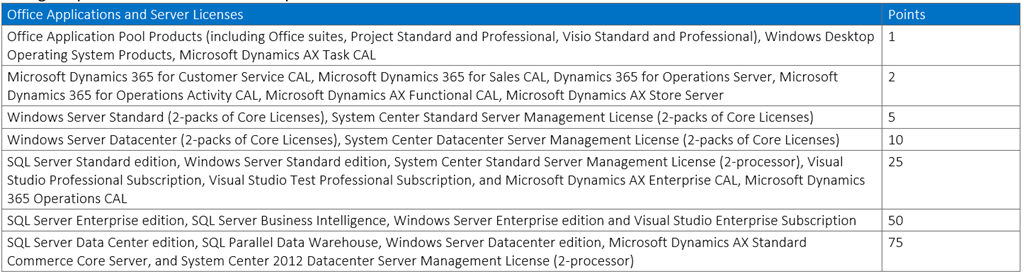
      1. The number of “Software Assurance Benefits (SAB) Points’ accrued by the volume of total eligible product licensed on the agreement
      2. A specific scale for that benefit – and this differs for each benefit.

For example:

  1. A total number of SAB points can be calculated per agreement or per purchase.  Here’s an example of the point calculation table. (This can CHANGE to refer to the current “Product Terms” documentation – not this table.)
    image
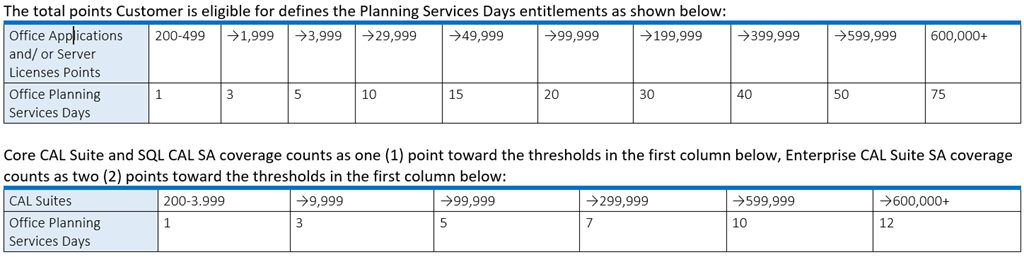
  2. For a given benefit, such as “Planning Services Days”, there is a scale for how many days are granted based on the volume of SAB points attained.
    The table below is an example of the scale used for Planning Services days grants.  (The table below may not be accurate so refer to the “Product Terms” documentation for actual quantities.)
    image

The documentation for what benefits exist and how they are granted is located in the “Microsoft Product Terms” documentation, published & updated monthly for download as a Word .DOC document on the Microsoft site.

In the January 2019 English publication of the Product Terms, page 78 has the information on Software Assurance Benefits.

Do you use Outlook & Exchange?  Have you ever been told:

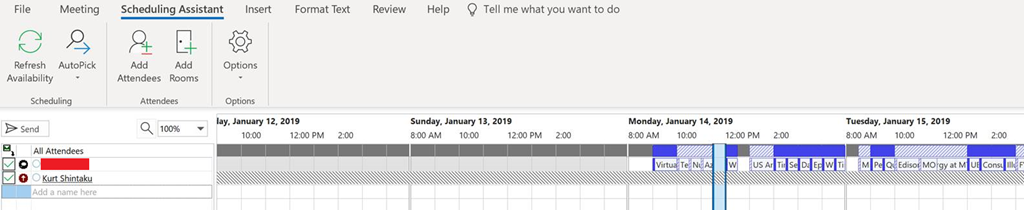
  • “Hey, I tried scheduling a meeting with you but can’t see your free/busy in Scheduling Assistant.”
  • “I can’t see your calendar.”

Their view of your free/busy looks something like this:

image

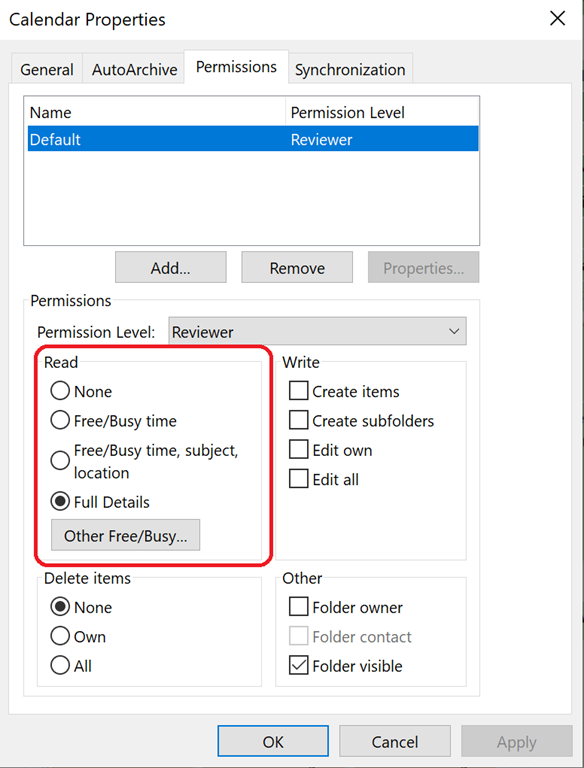
Meanwhile, you have granted READ access with FULL DETAILS by default to everyone, like this:

CalendarPermissions

FIXING THE “I CAN’T SEE YOUR CALENDAR/FREE-BUSY” ISSUE
The fix is pretty simple & it has nothing to do with your Exchange email account. 

The problem is with the cached entry on the other person’s Outlook instance for your email address.  It’s out of date & needs to be deleted.

Simply have the other person do the following: (Again, this is not done on your system but on the PC of the person having the problem viewing your free/busy or calendar.

  1. Open a new email.
  2. Type in the first few characters of your name – but do not hit enter.  This will display a drop down list of all predicted email addresses – including yours.
  3. Hover over the entry for your email address.  And X will appear on the far right.
  4. Click the X.  The entry for your email address will disappear.

That’s it.  Your calendar or free/busy should now be visible to the user.

WHY DOES THIS HAPPEN?
Occasionally, an instance of Outlook will have a problem updating the Offline Global Address book.  (Usually due to size, bandwidth, or poor network connectivity)

If this happened, and your “entry” changed in the GAL for whatever reason, anyone that can’t download an updated copy of the Offline Global Address Book may run into issues viewing your calendar or free/busy. 

Deleting the cached entry will force Outlook to look up your credentials again from the ONLINE Global Address Book, which it normally doesn’t do because it takes longer time than using the Offline Global Address book.

Posted by: kurtsh | January 16, 2019

WHITEPAPER: “Reimagining retail in the digital age”

imageThe retail industry is undergoing seismic shifts stoked by swift and unprecedented technology innovation. This change presents both a challenge and an opportunity for retailers faced with adapting to a shopping landscape being upended by a $2.3 trillion global ecommerce market, and the rise of savvy, ever connected consumers with the world’s biggest virtual mall at their fingertips.

For retailers and brands navigating this new world, digital intelligence and innovation—be it an artificial intelligence powered chatbot that fields customer service requests or a hyper-local store assortment informed by the Internet of Things—are critical to driving sales and margins in today’s on-demand consumer economy.

Digital technology is the connective tissue adding ease, convenience, customization, and automation to every aspect of a retail organization—from its business processes, operations, and how employees work, to the customer experiences provided and the very products and services offered.

In this paper, we explore the opportunities birthed by digital transformation, and how Microsoft can help retailers reimagine their businesses and survive and thrive in today’s competitive environment.

Posted by: kurtsh | January 14, 2019

INFO: Resources for shifting to a “Modern Desktop”

imageThis is a great post from Jared Spataro, our VP for Microsoft 365, highlighting the new resources we’ve announced to help customers move to a “Modern Desktop”, meaning one that leverages Windows 10 & Office 365 ProPlus.

The blog focuses on 4 resources/announcements customers should leverage to get to a Modern Desktop:

  • DESKTOP ANALYTICS
    Cloud-based analytics tools called “Desktop Analytics” that provide inventory & usage information about Windows 10 & Office 365 ProPlus & integrate with SCCM to make modern desktop deployment even easier.
  • DESKTOP ASSURE
    A program to ensure app compatibility for upgrades and updates of Windows and Office.
  • LONGER SERVICING FOR WINDOWS 10
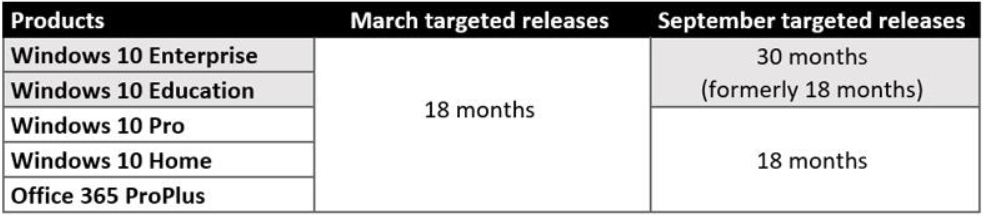
    • [NEW] September releases of Windows 10 Enterprise and Education edition are supported for 30 months.
    • [NEW] Windows 10 Enterprise & Education edition Versions 1607, 1703, 1709, and 1803 are also supported for 30 months.
    • [SAME AS PREVIOUS] Otherwise
      • March releases of Windows 10 Enterprise and Education edition are supported for 18 months.
      • Windows 10 Pro, Home, & Office 365 ProPlus will continue to be supported for 18 months.
  • EXTENDED SUPPORT FOR OFFICE 365 PROPLUS, OFFICE 2016 & WINDOWS 7
    • Windows 7 has Extended Security Updates available at a subscription cost, enabling paid-for support up to 2023
      • Note: This announcement was posted before the announcement of Windows Virtual Desktop which ALSO provides Extended Security Updates – except at no additional cost to the subscriber of Windows Virtual Desktop services.
    • Office 365 ProPlus is supported on Windows 8.1 until 2023
    • Office 365 ProPlus is supported on Windows Server 2016 until 2025
    • Office 2016 will be supported on Office 365 until October 2023

Read the details of these announcements here:

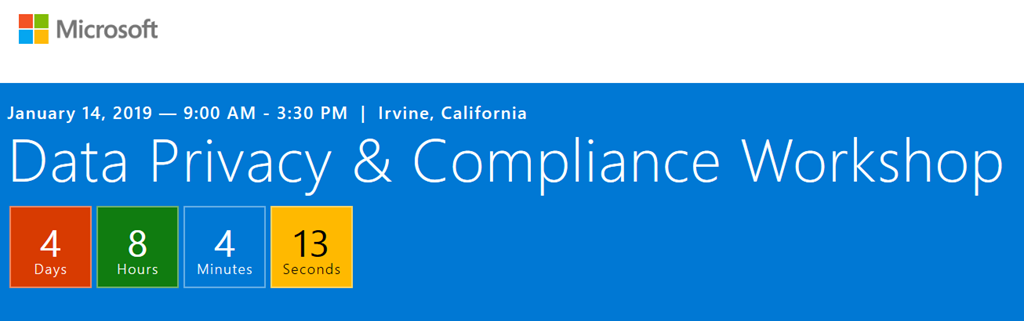
imageJoin us for a workshop on data privacy and compliance at Microsoft Technology Centers in the US

With evolving data regulations, you need a trusted source for information, best practices, and strategies.  This January, Microsoft is hosting Data Privacy and Compliance Workshops, at US Microsoft Technology Centers. This hands-on session will be invaluable for you and your legal, compliance, risk, and/or security teams.

Attend this session to learn about:

  • Key changes and regulations affecting personal privacy, controls, notifications, transparent policies, IT, and training.
  • How Microsoft runs on trust and uses AI ethically as part of this commitment.
  • How Microsoft 365 Security and Compliance technology can help you along your journey toward compliance with a geographic or industry regulation such as the GDPR, ISO, SOX, HIPAA, etc.
  • See and experience how Microsoft 365 simplifies your compliance journey.
  • Next steps for assessing if your company is ready for evolving regulations across assess, protect, and response. 

Cities/Dates:

image_aedb6fcf-2d19-4216-a6ac-c7a0af5a836d20180930_162704

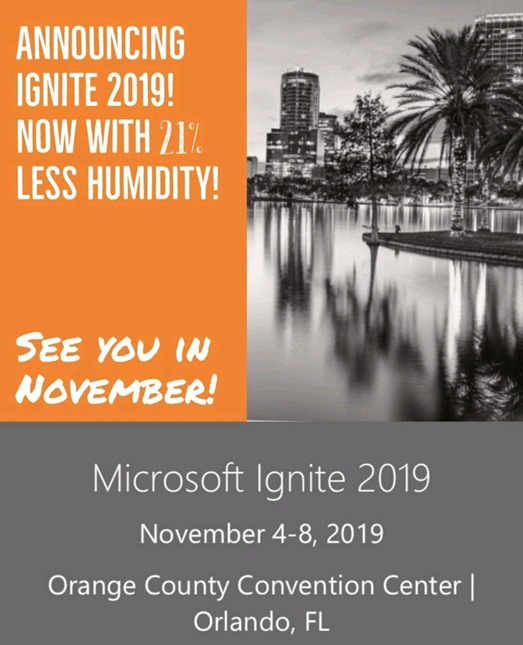
Microsoft Ignite 2019

November 4-8, 2019
Orange County Convention Center
Orlando, FL

Pre-register here:
https://msignite.eventcore.com/

On-demand Sessions from last year’s Ignite 2018:
https://myignite.techcommunity.microsoft.com/videos

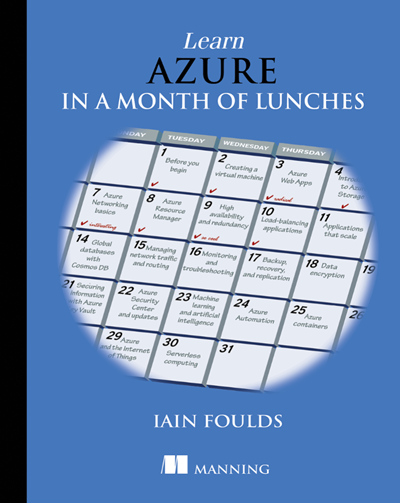
We’ve released a free eBook, “Free eBook, “Learn Azure in a Month of Lunches: A practical guide to learning Azure cloud computing skills quickly”.

imageMore than 100 Azure services offer everything you need to build and run your applications with all the performance, redundancy, security, and scale that the cloud has to offer. But knowing where to begin with all these services can seem overwhelming.

Read this e-book to build your cloud computing skills quickly and efficiently. You’ll be productive immediately, and when you finish, you’ll be well on your way to Azure mastery.

Learn Azure in a Month of Lunches breaks down the most important Azure concepts into bite-sized lessons with exercises and labs—along with project files available in GitHub—to reinforce your skills. Learn how to:

  • Use core Azure infrastructure and platform services—including how to choose which service for which task.
  • Plan appropriately for availability, scale, and security while considering cost and performance.
  • Integrate key technologies, including containers and Kubernetes, artificial intelligence and machine learning, and the Internet of Things. 

Download the 373 pg eBook here:

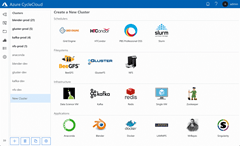
In August, we announced the general availability of Azure CycleCloud, a tool for creating, managing, operating, and optimizing HPC clusters of any scale in Azure born from Microsoft’s acquisition last August of Cycle Computing.

imageWe are excited to announce the general availability of Azure CycleCloud, a tool for creating, managing, operating, and optimizing HPC clusters of any scale in Azure.

With Azure CycleCloud, we are making it even easier for everyone to deploy, use, and optimize HPC burst, hybrid, or cloud-only clusters. For users running traditional HPC clusters, using schedulers including SLURM, PBS Pro, Grid Engine, LSF, HPC Pack, or HTCondor, this will be the easiest way to get clusters up and running in the cloud, and manage the compute/data workflows, user access, and costs for their HPC workloads over time.

With a few clicks, HPC IT administrators can deploy high-performance clusters of compute, storage, filesystem, and application capability in Azure. Azure CycleCloud’s role-based policies and governance features make it easy for their organizations to deliver the hybrid compute power where needed while avoiding runaway costs. Users can rely on Azure CycleCloud to orchestrate their job and data workflows across these clusters.

Azure CycleCloud is free to download and use to help get innovative HPC workloads like this one running on Azure, with easy management and cost control. If you have HPC and AI workloads that need to leverage Azure’s specialized compute capabilities to get answers back faster, try it for free today!

To read the entire announcement, visit:

For more on Azure CycleCloud, visit:

Get the Azure CycleCloud software here:

imageRead this white paper on “Using Azure for Silicon Development with Electronic Design Automation (EDA) Software”

« Newer Posts - Older Posts »

Categories