|
Join our webinar. The event will take place on Monday, September 16, 2019 at 07:00 PT / 10:00 ET / 14:00 GMT.
(Afterward, we will be post recordings of the webinar at https://aka.ms/AATPRecordings. You can find recordings of previous webinars there as well. ) |
Posted by: kurtsh | September 4, 2019
TRAINING: Azure ATP Webinar: Deployment and Configuration

Comments Off on TRAINING: Azure ATP Webinar: Deployment and Configuration
Posted in Uncategorized
Posted by: kurtsh | August 7, 2019
EVENT: “.NET Conf” – Virtual Event, Sept 23-25, 2019
 .NET Conf is a FREE, 3 day virtual developer event co-organized by the .NET community and Microsoft. This year .NET Core 3.0 will launch at .NET Conf 2019! Come celebrate and learn about the new release. You won’t want to miss this one.
Subscribe to notifications to keep up with .NET Conf news!
.NET Conf provides a wide selection of live sessions streaming here that feature speakers from the community and .NET product teams. It’s a chance to learn, ask questions live, and get inspired for your next software project.
You will learn to build for web, mobile, desktop, games, services, libraries and more for a variety of platforms and devices all with .NET. We have sessions for everyone, no matter if you are just beginning or are a seasoned engineer. We’ll have presentations on .NET Core and ASP.NET Core, C#, F#, Azure, Visual Studio, Xamarin, and much more.
Learn more at the web site:
- EVENT: “.NET Conf” – Online, Sept 23-25, 2019
https://www.dotnetconf.net/
Comments Off on EVENT: “.NET Conf” – Virtual Event, Sept 23-25, 2019
Posted in Uncategorized
Posted by: kurtsh | July 31, 2019
DOWNLOAD: Gartner Report: “Microsoft Extends Support Policy, Improves Tools and Reinforces the Need for Windows Enterprise”
 Two recent changes to Microsoft’s Windows support policies will help customers plan upgrade strategies and stay up to date.
- As of September 6, 2018, March releases of Windows 10 Enterprise and Education will be supported for 18 months and September releases for 30 months.
- Windows 7 End of Support happens January 14, 2020. But for customers who need more time to prepare for their upgrades, paid Windows 7 Extended Security Updates are now available to through January 2023.
This Gartner report (Microsoft Extends Support Policy, Improves Tools and Reinforces the Need for Windows Enterprise, published 17 October 2018 by analysts Stephen Kleynhans and Michael Silver) addresses these recent changes and gives suggestions for how I&O leaders can incorporate them into their management and upgrade schedules and strategies.
Download the complimentary report to learn more.
- GARTNER: “Microsoft Extends Support Policy, Improves Tools and Reinforces the Need for Windows Enterprise”
https://info.microsoft.com/ww-modern-desktop-gartner-report-whitepaper.html?LCID=EN-US
Comments Off on DOWNLOAD: Gartner Report: “Microsoft Extends Support Policy, Improves Tools and Reinforces the Need for Windows Enterprise”
Posted in Uncategorized
Posted by: kurtsh | July 31, 2019
INFO: Skype for Business Online to Be Retired in 2021
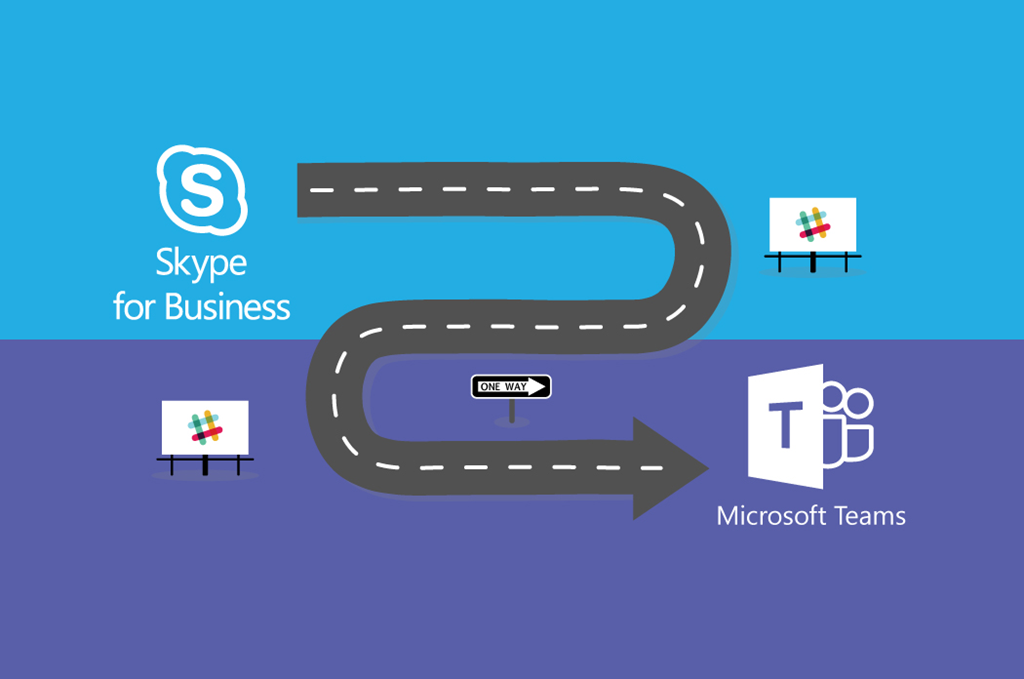 Today we’re announcing that Skype for Business Online will be retired on July 31, 2021. This post provides details on the retirement plan, a brief explanation of why we’re making this announcement now, and a summary of what we’re doing to help customers migrate to Teams.
What is the Skype for Business Retirement plan?
Skype for Business Online will be retired on July 31, 2021, and after that date the service will no longer be accessible. Between now and then, current Skype for Business Online customers will experience no change in service, and they’ll be able to continue to add new users as needed. However, starting September 1, 2019, we will onboard all new Office 365 customers directly to Teams for chat, meetings, and calling. Please note that the Skype Consumer service and Skype for Business Server will both be unaffected by this announcement.…
Read the full announcement here:
- Skype for Business Online to Be Retired in 2021 https://techcommunity.microsoft.com/t5/Microsoft-Teams-Blog/Skype-for-Business-Online-to-Be-Retired-in-2021/ba-p/777833
Comments Off on INFO: Skype for Business Online to Be Retired in 2021
Posted in Uncategorized
Posted by: kurtsh | July 30, 2019
NEWS: Microsoft acquires BlueTalon
 Microsoft just announced the acquisition of BlueTalon to assist with privacy & governance of data.
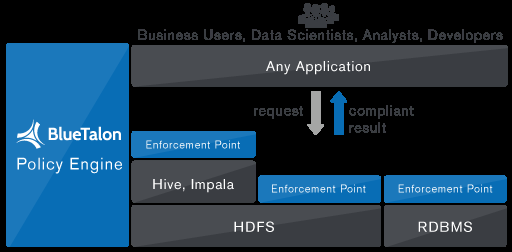
BlueTalon’s “Policy Engine” is a solution for identifying, controlling access to, & protecting data associated with users stored in Hadoop, SQL & NoSQL databases and big-data environments while providing control the column, row, cell or partial-cell level.
Today we are excited to announce the acquisition of BlueTalon, a leading provider of Unified Data Access Control solutions for modern data platforms. BlueTalon works with leading Fortune 100 companies to eliminate data security blind spots and gain visibility and control of data. BlueTalon provides a customer-proven, data-centric solution for data access management and auditing across the diverse systems resident in modern data estates.
Read more here:
- Microsoft acquires BlueTalon, simplifying data privacy and governance across modern data estates
https://blogs.microsoft.com/blog/2019/07/29/microsoft-acquires-bluetalon-simplifying-data-privacy-and-governance-across-modern-data-estates/ - SITE: BlueTalon
https://bluetalon.com
Comments Off on NEWS: Microsoft acquires BlueTalon
Posted in Uncategorized
Posted by: kurtsh | July 30, 2019
RELEASE: Microsoft Forms Pro
 Forms Pro is a simple, yet comprehensive enterprise survey solution for businesses to capture and analyze feedback to improve how they engage across their business.
We are excited to announce that effective July 1, 2019, Microsoft Forms Pro will be generally available to Dynamics 365 and Office 365 customers.
Forms Pro will be included with Dynamics 365 Enterprise USLs and as a paid capacity add-on for Dynamics 365 Professional customers. Reference the Dynamics 365 Licensing Guide for details.
- Microsoft Forms Pro
Create, send, and analyze surveys with ease to collect timely feedback and make informed decisions.
https://formspro.microsoft.com/en-us/ - Purchase Microsoft Forms Pro
https://docs.microsoft.com/en-us/forms-pro/purchase - Microsoft Forms Pro documentation
https://docs.microsoft.com/en-us/forms-pro/ - Get started with Forms Pro
https://docs.microsoft.com/en-us/forms-pro/get-started - Flow for Forms Pro
https://ms.flow.microsoft.com/en-us/connectors/shared_microsoftformspro/microsoft-forms-pro/
Comments Off on RELEASE: Microsoft Forms Pro
Posted in Uncategorized
Posted by: kurtsh | July 30, 2019
DOWNLOAD: New Microsoft 365 Data Reporting White Papers
 NEW! Check out our latest white papers to help you learn how to use Microsoft 365 and SharePoint to transform your organizational data, analytics and reporting.
- Using SharePoint and Teams as a Modern Dashboarding Platform (https://aka.ms/sharepoint/dashboard-wp )
SharePoint has a long history of providing a first-class platform for business intelligence dashboards based on Power BI, Excel Online, Power BI Report server, and related tools. Adding conversations and other collaborative content brings context to the content and helps to foster a data culture. SharePoint pages, as well as lists, can be integrated into Microsoft Teams, bringing all this richness to the Teams collaborative environment. This paper will outline the various approaches to building dashboards in SharePoint, Microsoft Teams and SharePoint Server. - Using SharePoint as a data source for Modern Reporting (https://aka.ms/sharepoint/reporting-wp)
SharePoint is a great organizational data store. SharePoint lists offer a quick and easy way for users to store and share millions of items, while document libraries have become the industry standard for document management, supplying secure, reliable storage. SharePoint libraries supply the backbone for document storage in all of Office 365. There are several different platforms and technologies for working with SharePoint data, such as Power Query, Excel, Power BI, SQL Server Reporting Services and SQL Server Integration Services. This white paper examines the different platforms and approaches that can be used to report on SharePoint data and explains the procedures. - Using Power BI with Complex SharePoint Field Types (https://aka.ms/sharepoint/datatypes-wp)
SharePoint lists supply a quick and easy way for users to store and share millions of list-based items. Text and number fields are straightforward, but complex field types in SharePoint present several challenges. Power BI provides tools to aid with these challenges, and these tools are the focus of this white paper.
Comments Off on DOWNLOAD: New Microsoft 365 Data Reporting White Papers
Posted in Uncategorized
Posted by: kurtsh | July 29, 2019
DOWNLOAD: Microsoft Teams Emoji Shortcuts Reference
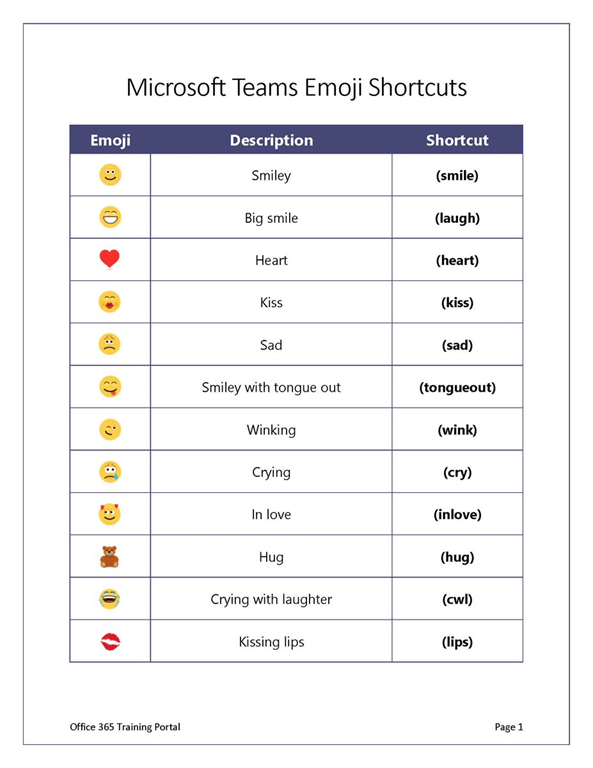 The folks at Office365 Training Portal have produced a downloadable .PDF that documents all the Emoji that can be posted into Teams discussions using “parentheses notation” such as:
- (smile)
- (laugh)
- (heart)
- …
Get the document for free here:
- DOWNLOAD: Microsoft Teams Emoji Shortcuts Reference
https://office365trainingportal.com/wp-content/uploads/2019/07/Microsoft-Teams-Emoji-Shortcuts.pdf
Comments Off on DOWNLOAD: Microsoft Teams Emoji Shortcuts Reference
Posted in Uncategorized
Posted by: kurtsh | July 29, 2019
INFO: Microsoft 365 guest sharing settings reference
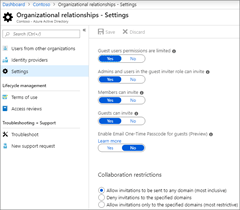
Wanna see all the controls you have around “guest sharing” in Microosft 365?
The link below is a new reference for the various settings that can affect guest sharing for the Microsoft 365 workloads: Teams, Office 365 Groups, SharePoint, and OneDrive. These settings are located in the Azure Active Directory, Microsoft 365, Teams, and SharePoint admin centers.
- Microsoft 365 guest sharing settings reference
https://docs.microsoft.com/en-us/Office365/Enterprise/microsoft-365-guest-settings
Comments Off on INFO: Microsoft 365 guest sharing settings reference
Posted in Uncategorized
Posted by: kurtsh | July 29, 2019
EVENT: Q&A with Windows 10 & Office 365 Deployment PM, Michael Niehaus
 Michael Niehaus, Microsoft Principal Program Manager for Autopilot & Deployment, announced at his blog that he’s going to be doing a public Teams meeting to answer questions about pretty much anything.
If you know who Michael is, you know he’s the preeminent authority on Windows 10 & Office 365 ProPlus deployment & servicing & the primary speaker on these topics at Microsoft Ignite & similar conferences. If you’ve ever had a Win10/O365ProPlus question that needed answering, this is a great opportunity to ask “the source”.
One of the things that I’ve wanted to do for a while is to have an open Q&A call – you know, the typical “office hours” concept from your college days, where someone says they’ll be available during certain times for any questions you might have. In my case, I’m not an instructor, and true to the domain name of this site I fully expect to do this from “out of the office” – with any luck, I’ll be sitting at home in my recliner, contemplating what I might want for breakfast before heading into the office.
To cover a broad range of time zones, I’ve picked 8am Pacific Daylight Time (PDT), on Thursday, August 1st. Here are the connection details:
Conference ID: 330 973 15#
Using the Teams client (locally installed or via the web) is preferred, just in case there is any screen sharing needed, but feel free to call in if that’s easier.
If no one shows up, I’ll chalk this up as a failed experiment and go back to my breakfast. Otherwise, I’ll look at doing this once a month.
For those with doubts about the time zone math, the zip file below contains an ICS file that you can import to your favorite e-mail client (e.g. Outlook):
Details below:
- DATE/TIME:
8:00AM PDT
Thursday, August 1st, 2019 - CONCALL INFORMATION:
Join Microsoft Teams Meeting
Conference ID: 330 973 15#
Local numbers
Comments Off on EVENT: Q&A with Windows 10 & Office 365 Deployment PM, Michael Niehaus
Posted in Uncategorized
 kurtsh
 Kurt Shintaku's Blog
You must be logged in to post a comment.