Per DefenseOne:

Microsoft Wins Massive JEDI Cloud Contract
After months of speculation, intrigue, lawsuits, and presidential leaning-in, Microsoft has won the Pentagon’s $10 billion JEDI cloud storage contract, upsetting the presumed frontrunner Amazon. 

The outcome comes as a surprise to many observers who described Amazon as the almost-certain winner of the Joint Enterprise Defense Infrastructure, or JEDI, program. Amazon was considered by many to be the only qualified bidder because it had the largest enterprise cloud infrastructure and already had reached the necessary highest security level, known as Impact Level 6.

Read more here:

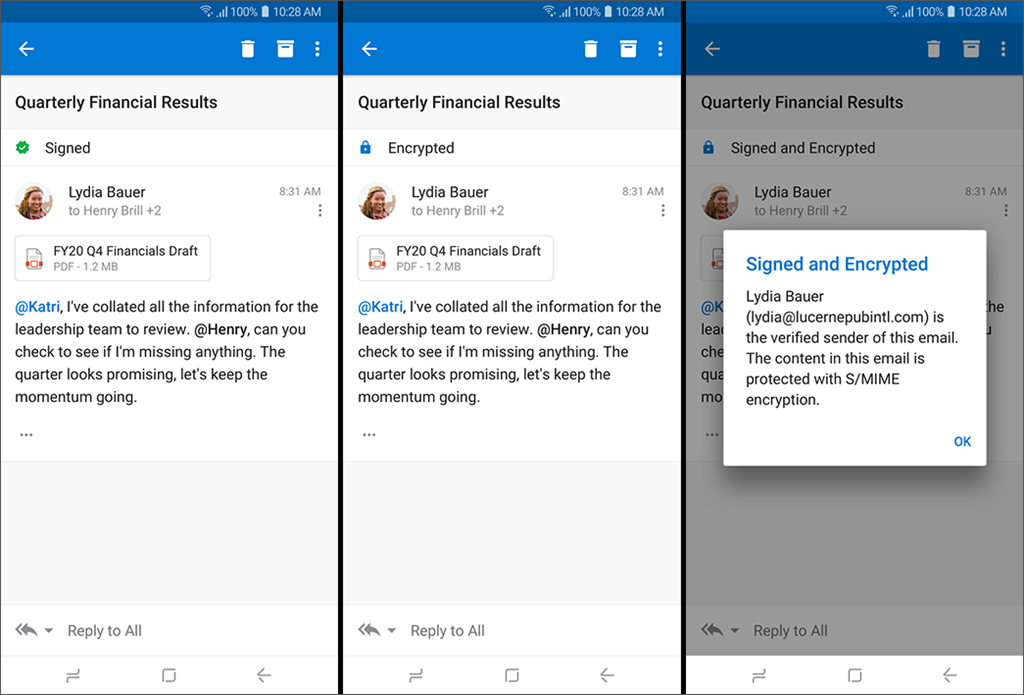
imageNeed to classify messages while on the go? Do we have a solution for you! Sensitivity labeling is rolling out to both Outlook for iOS and Android! (Requires an @Office365 mailbox)

Summary: How to classify and/or protect messages when using Outlook for iOS and Android.

Protecting company or organizational data is extremely important. Outlook for iOS and Android supports two scenarios for classifying and/or protecting content:

  1. Sensitivity labeling

  2. Secure/Multipurpose Internet Mail Extension (S/MIME)

Sensitivity labeling and S/MIME in Outlook for iOS and Android are supported with Office 365 accounts using the native Microsoft sync technology.

For more information see:

imageHopefully you’ve seen that we’re announced a preview of our new Office 365 ProPlus Delivery Optimization feature – which help to reduce network bandwidth usage when Office 365 ProPlus is updated… all without pre-staging the content in a local file share.

The question is:  How do you enable this feature Enterprise-wide?

Use Intune to enable Delivery Optimization for Office 365 installs
If you’ve got Intune, you’re in luck.  Michael Niehaus, Microsoft Deployment PM has written up a great post on how to use Intune to push a policy to the device that enables Delivery Optimization for your Office 365 ProPlus deployed clients.

He lays it out step by step. Smile

Read the post here:

EPILOGUE:
Oliver Kieselbach on Twitter, however, made the comment however that you might have issues with the ADMX definition and if so, to download the ZIP file below:

If someone has issues with the ADMX definition… here a zip download to the ADMX file with correct formatting (the character set from the blog was wrong)
https://oliverkieselbach.files.wordpress.com/2019/10/customofficedosettings.zip

Posted by: kurtsh | October 24, 2019

PREVIEW: Delivery Optimization and Office 365 ProPlus

imageDelivery Optimization for Office 365 ProPlus updates saves valuable corporate internet bandwidth, and avoids having to pre-stage a file share.

Reg add:

HKLM\SOFTWARE\Policies\Microsoft\office\16.0\common\officeupdate /v SetDOAsPrimary /t REG_DWORD /d 1

What is Delivery Optimization?

Delivery Optimization is a peer-to-peer distribution technology available in Windows 10 that allows devices to share content, such as updates, that the devices have downloaded from Microsoft over the internet. This can help reduce network bandwidth because a device can get portions of the update from another device on its local network instead of having to download the update completely from Microsoft.

Office 365 ProPlus on devices running Windows 10 can take advantage of Delivery Optimization during installation and when receiving updates, if certain requirements are met.

Read more here:

imageThe Office 365 team wrote up the following blog post, highlighting some EPIC sessions being delivered at Microsoft Ignite 2019. 

If you’re not going to Ignite 2019… y’kinda missing out because this year is gonna be waaaaaaaaay better than past years.  There’s a massive number of product groups that have double downed on this Ignite and will be there to establish contacts with, ask questions of, and get involved with through new programs, etc.

That being said, here’s some of the sessions they are highlighting:

Read the entire post here:

imageIf you’re getting started with the Microsoft PowerPlatform – including PowerApps & Microsoft Flow, you’ll want to check out these resources.

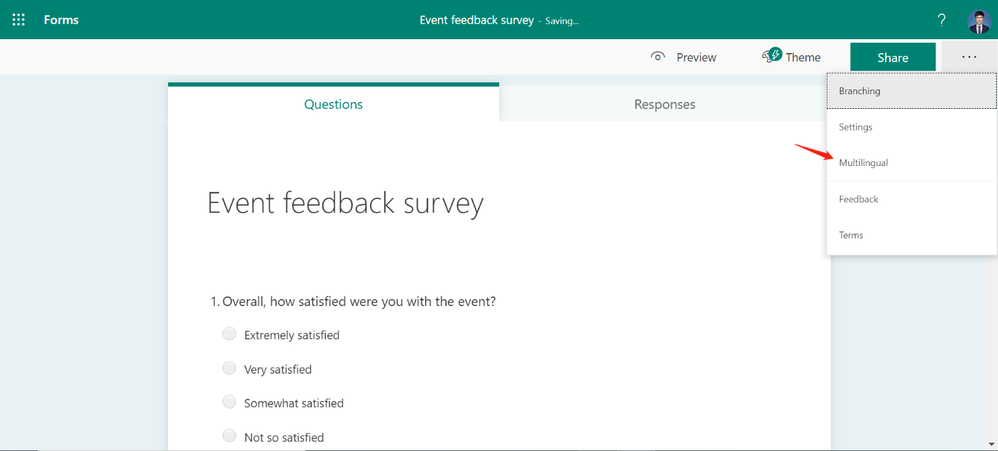
New features now available for Forms!

imageWith Forms, Microsoft strives to deliver the best user experience for form designers, respondents, and collaborators. We believe that a key element in creating the best user experience is starting with an intuitive design. We are excited to share two recent advancements in Forms’ design: Multilingual Support, and Office Suite Header.

Read more here:

imageFrom Microsoft’s Global Digital Safety Advocate:

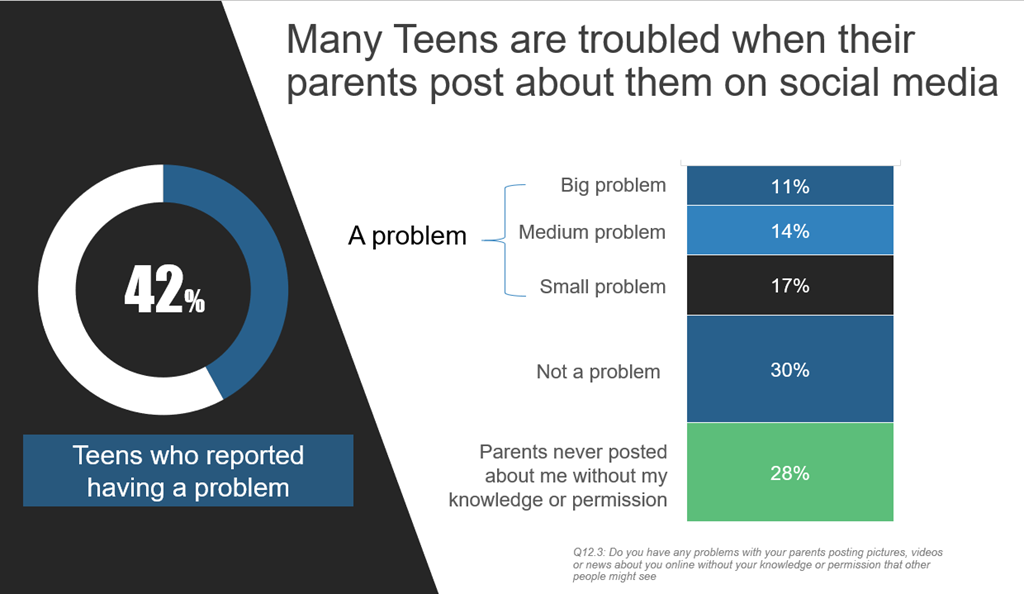
Teens around the world say parents share (or “sharent”) too much about them on social media – so much so that it’s become a concern for more than four in 10.

Forty-two percent of teenagers in 25 countries[1] say they have a problem with their parents posting about them on social media. Of that sum, 11% say it’s a big problem; 14% say it’s of medium concern, and 17% consider it a small issue – all according to preliminary results of a new Microsoft study about the state of digital civility today. In addition, two-thirds (66%) of teens say they’ve fallen victim to at least one online risk at some point, with the same percentage worried that a similar negative online experience will happen to them again.

..

Read the study’s details at the link below:

imageWith the Modern Workplace needing to support working anywhere, anytime and on any device, the organization may face new challenges. Common issues can be summarized and grouped into three core areas.

First, Security and Access Control, second, Device and Data Management and third, Compliance. Each area has its challenges and issues, which means that for an organization to support a digital workplace, needs to be mitigated and understood.

Learn how to transform your business and remain secure and compliant in a rapidly evolving world…

Download the whitepaper at:

(Found at https://resources.techcommunity.microsoft.com/security-compliance-and-administration/)

Posted by: kurtsh | October 13, 2019

DOWNLOAD: Office Remote for Windows 10 & Android

image[I’m writing this because Office Remote mysteriously & silently disappeared from the Google Play Store back in 2018.  I’m currently pinging Darren Edge internally who’s the Director responsible for Office Remote in the early part of the decade to find out what happened. 

I suspect that the effort to keep it maintained per Microsoft engineering & development guidelines didn’t warrant keeping it listed… so yes, that’s a bummer.  But 1.2.0.0 of the Android “Office Remote” client remains available as a downloadable .APK from 3rd parties but it does mean you have to sideload it so caveat installer.]

Office Remote turns your phone into a smart remote that interacts with Microsoft Office on your PC. The app lets you control Word, Excel, and PowerPoint from across the room, so you can walk around freely during presentations. It also shows you your speaker notes and the presentation timer to help you present more effectively.

New PowerPoint Features in v1.1.3.0:

We added a large thumbnail of the slide that is currently presented, as well as a smaller preview of your next slide. We managed to do this without impacting your notes.

You now get an instant laser pointer by simply touching this new thumbnail with your finger.

Play and pause your embedded videos from Office Remote.

With Office Remote, you can start your PowerPoint presentation, advance the slides, see your speaker notes, and control an on-screen laser pointer with a touch of your finger —all from your phone. You can also navigate between Excel worksheets and graphs, and control data slicers from the palm of your hand. And you can scroll through a Word document or quickly jump to specific sections or comments.

Office Remote has the following features:

PowerPoint:

  • Jump to the next, previous, and last slide
  • View slide thumbnails and jump to a slide
  • View speaker notes on phone
  • View presentation timer and slide numbers
  • Laser pointer using touch on your phone

Excel:

  • Change worksheets by swiping
  • Use Slicers, PivotTable, and Filters
  • Jump to any named object in your workbook
  • Move up or down the worksheet
  • Change the zoom level

Word:

  • Jump to headings
  • Jump to comments
  • Screen up/down
  • Line up/down
  • Change the zoom level

App requirements:

  • Microsoft Office 2013. This app does not work with Office 2013 RT or earlier versions of Office.
  • Bluetooth on your PC – The desktop add-in for Office Remote must be installed on your PC 

Installation:
There are two components:

—————

A word on downloading .APK files from external sources
Downloading APKs outside of a trusted store like this is inherently risky.  There are ways that you can scan .APKs for threats and viruses, but you can never really be sure. 

If you want to pursue downloading the APK from a 3rd party source, read the following to understand how to scan APKs for threats:
https://www.maketecheasier.com/scan-apk-files-for-virus/

I’ve personally scanned the APKMirror.com file using Metadefender & VirusTotal but you should probably do the same for any APK you plan to sideload.

« Newer Posts - Older Posts »

Categories