imageLearn about administration and governance of the Microsoft Power Platform by reading our updated Power Apps and Power Automate Governance and Deployment Whitepaper.
The whitepaper, first released in Aug 2018, has been updated to include latest features as well as best practices for planning, securing, deploying, and supporting applications built on the Power Platform.

The whitepaper is covering the following sections:

  • Platform Architecture
  • Secure
  • Monitor
  • Alert & Act
  • Deploy, ALM and Azure DevOps
  • Educate and Support

Download the whitepaper here:

Posted by: kurtsh | December 22, 2019

WHITEPAPER: Microsoft Endpoint Manager FAQ

imageSince announcing our new product, Microsoft Endpoint Manager – which includes System Center Configuration Manager & Microsoft Intune – there’s been a lot of questions.

These are answered in this whitepaper, “Microsoft Endpoint Manager FAQ”.  Find the answers to questions such as:

  • Does this mean we don’t need to buy Intune or Autopilot licenses anymore?
  • Is there any change in licensing for Microsoft Endpoint Manager? We are licensed for ConfigMgr already, but not Intune. Do we have to buy Intune to enable Microsoft Endpoint Manager?
  • We are licensed for Intune. Do we have to buy ConfigMgr to enable Microsoft Endpoint Manager?
  • Is ConfigMgr going away? Can I still use the ConfigMgr console?
  • Is Intune going away?
  • Do we need to buy anything additional to get Productivity Score/Technology Experience analytics?
  • I thought co-management was supposed to a “bridge” to modern management. Now you’re saying it’s a “destination”. Which is it?
  • Will traditional ConfigMgr management for PCs now go away?
  • Do we need to have Azure Active Directory (AAD) deployed to move to Microsoft Endpoint Manager?
  • I currently use Microsoft BitLocker Administration and Monitoring (MBAM) to manage BitLocker across my enterprise. Can I move my BitLocker management to Microsoft Endpoint Manager?

Download the whitepaper here:

imageWe’re shipping the final stable release of the new Microsoft Edge, based on Chromium, on January 15th, 2020.

WHY SHOULD YOU CARE?
The new Microsoft Edge is a dramatic leap forward in browser technology for both enterprise & consumer users.

  1. CHROME PLUG IN SUPPORT
    Nearly all Chrome plug ins work in the new Edge straight from the Chrome store.  You literally visit the store from Edge, select a Chrome plug in, click install, and you’re done.
  2. CHROME COMPATIBILITY
    Edge is compatible with virtually every web site that is Chrome compatible by leveraging the Chromium HTML engine.  If Chrome can access it, so can Edge.
  3. LEGACY IE COMPATIBILITY
    For Enterprise customers, the new Edge is 100% compatible with sites that require Internet Explorer. Edge can switch seamlessly to the Internet Explorer HTML engine for compatibility.
  4. LIGHTER & LESS TRACKING
    180 services, including all the tracking services from Chromium, has been removed from new Edge.
  5. ENTERPRISE MANAGEMENT
    New Edge has all the Enterprise manageability, group policies, & security controls IT is familiar with in IE/legacy Edge
  6. SPEED & POWER OPTIMIZATION
    New Edge inherits the speed/performance of predecessors & now has Edge’s power optimization, so it won’t kill your laptop’s battery.
  7. SECURITY THROUGH HARDWARE ISOLATION
    New Edge security supports Hardware-based isolation of browsing sessions of unknown sites to protect users from malware. (bleepingcomputer.com/news/microsoft…)
  8. NO MORE NOTIFICATION REQUESTS
    New Edge has a feature to BLOCK all website requests to "send notifications". (kurtsh.com/2019/10/28/how…)
  9. PRIVACY & TRACKING PREVENTION
    New Edge actively shields user’s privacy with "Edge Tracking Prevention" – blocking even Google. (bleepingcomputer.com/news/microsoft…)
  10. BLOCK MALWARE SITES
    New Edge inherits SmartScreen technology to proactively prevent users from visiting known bad/malware web sites.
  11. STYLUS & DIGITAL INKING
    New Edge inherits all of the digital ink support from past Edge releases, providing tablet & stylus users the best experience available.
  12. ACCESSIBILITY BUILT-IN
    New Edge maintains all the Accessibility focus from previous releases and is contributing accessibility improvements to the open source community by submitting them as additions to Chromium’s code base.

…so download the new Edge & give it a try! Releasing this January 15, 2020. Get the beta here:

And for you IT professionals, we’re creating a Security Baseline for enterprise deployment of the new Microsoft Edge. Review & submit feedback here:

Interested in Edge’s progress?  Check out the Edge Development blog here:

image

Did you miss Microsoft Ignite this year?

It isn’t too late to save. Purchase the print or eBook format of any of the bestsellers from the show and save 40%* discount using code IGNITE2019 at checkout through the end of 2019.

Receive free ground shipping in the U.S. on every order. eBooks are delivered in three formats—PDF, EPUB, and MOBI—to read on your preferred device.

Check out some of our bestsellers below:

Posted by: kurtsh | December 20, 2019

PREVIEW: Microsoft Community Training

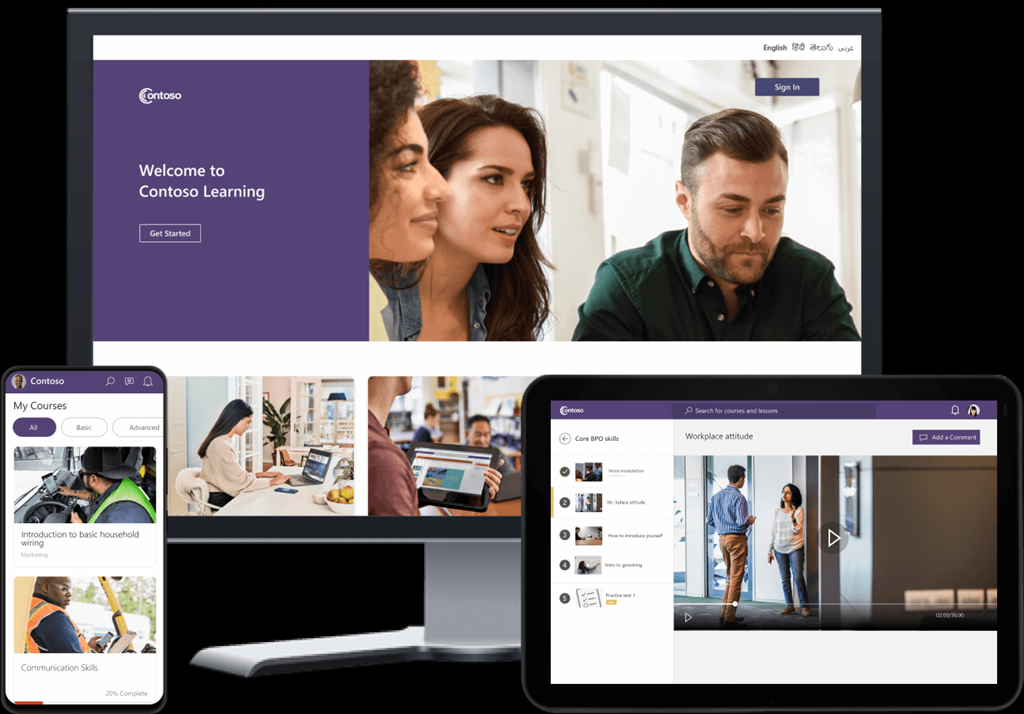
imageMicrosoft Community Training supports personalized learning for a large-scale mobile-based community. It is affordable, easy to manage and provides robust security and privacy protection.

Learning made easy
Clean and visual interfaces provide an intuitive and engaging learning experience for learners of all backgrounds.

Anytime, anywhere learning
Supports learning in low bandwidth networks and even offline. Learners can access courses anytime, anywhere from their choice of device.

Enable your grassroots
User management and monitoring tools for your managers, ground staff and facilitators to reach out to your distributed communities and drive adoption and engagement of your learning programs.

Make it your own
Personalize the look and feel of your learning portal. Configure content and users as per your needs. Integrate with your existing systems.

Assess and Measure
Out-of-the-box reports and exhaustive instrumentation. Create rich custom reporting to track progress and measure outcomes.

HOW MUCH IS IT?
There is actually no cost for the Community Training technology.  It’s available exclusively as a hosted solution for Azure users and so the only cost is the use of Azure infrastructure – which is essentially an App Service & a Database. 

This cost will scale depending on the number of users you have & the kind of performance you’d like – so you’re never paying for anything you don’t need. For example, for 1000 users, pricing is roughly ~$180/mo for a basic configuration.  More on pricing is available here & here.

INTERESTED?
For more information, visit:

imageSharePoint powers content collaboration, intranets, and employee engagement across Microsoft 365—including Office, Microsoft Teams, OneDrive, and more—and is deeply integrated with the security and compliance of Microsoft 365, the world’s productivity cloud. Over 400,000 organizations now have SharePoint in Microsoft 365. With over 100 million monthly commercial active users, customers are turning to SharePoint for their mission critical content and processes, from financial contracts and global infrastructure projects, to building plans and employee benefits.

Today, we’re honored that for the third year in a row Gartner has recognized Microsoft as a Leader in the Content Services Platforms Magic Quadrant for 2019. Once again, Microsoft placed highest in Ability to Execute.

Gartner defines these essential characteristics for modern content services platforms:

  • Cloud scale—The ability to scale to meet the demands of the workforce. Provision of seamless connectivity to a broad ecosystem of suppliers, partners, and customers while delivering continuous innovation is essential.
  • Protection—The provision of deeply embedded, flexible, and intelligent information governance, security, and privacy controls. This is essential to operate in a world of ever-increasing threats and regulatory demands.
  • Fast time to value—The ability to deliver business value quickly, through the provision of prebuilt applications and citizen-developer-based tools, for example.
  • User-centricity—A consumerized user experience with embedded mobility and consistency across devices. A focus on the overall user experience is of paramount importance for driving adoption and realizing the expected benefits of this technology.
  • Intelligence—Advances in artificial intelligence (AI) techniques, including machine learning and deep neural networks, have enabled innovations for classification, productivity, and automation scenarios. Such capabilities should be embedded in all key areas of the platform—from security to collaboration—to align with the evolving expectations of the market.

For more on the announcement and to download the Gartner Report, visit:

Posted by: kurtsh | December 19, 2019

PREVIEW: New features in Azure Synapse Analytics

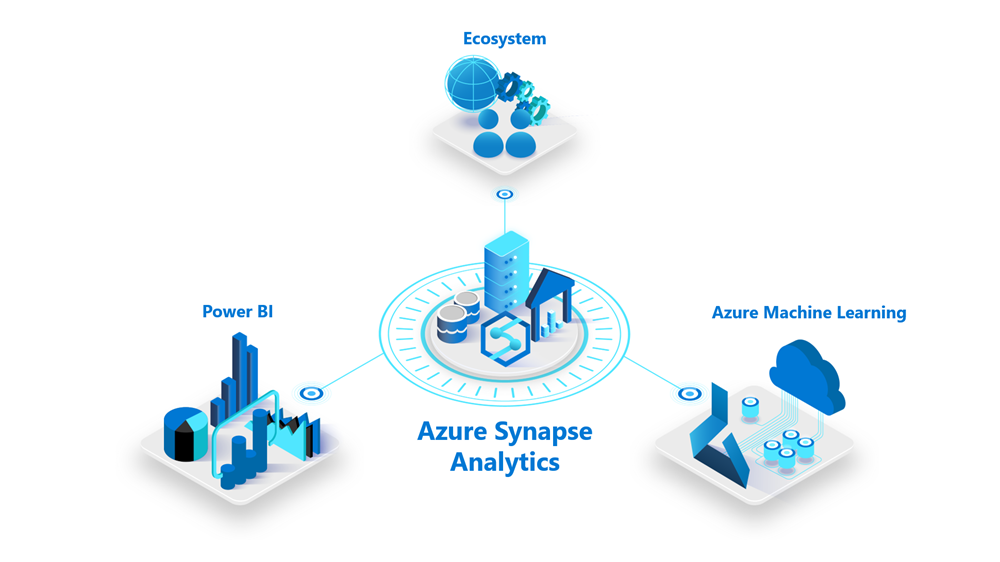
imagePreview new features in Azure Synapse Analytics: Accelerate your analytics journey with a limitless analytics service.

Sign up to:

  • Try out new preview features in Azure Synapse Analytics
  • Test preview features in a production environment.
  • Provide feedback directly to the Azure Synapse Analytics engineering team.

Features of interest include:

  • SQL analytics (on-demand & provisioned compute)
  • Apache Spark integration (big data processing)
  • Data Ingestion
  • Synapse studio (unified experience)

Tell us a little about yourself and your analytics interests. If you’re selected to participate in the preview, we’ll contact you about next steps.

To learn more about Azure Synapse Analytics, sign up for the virtual event, Accelerate Time-to-Insight with Azure Synapse Analytics. Watch a hands-on demo and participate in a live Q&A with Azure engineering and analytics experts.

Posted by: kurtsh | December 13, 2019

INFO: Microsoft Intune & Cloud Storage “costs”

imageEver wonder how much cloud storage space costs for Microsoft Intune software distribution?

The short answer is:

  1. There’s no limit on the amount of storage; storage comes with the purchase of a Microsoft Intune license.
  2. There is a 8GB maximum file size limit on any individual desktop file uploaded.

Taken from the Microsoft Intune documentation:

All apps that you create by using the software installer installation type (for example, a line-of-business app) are packaged and uploaded to Intune cloud storage. A trial subscription of Intune includes 2 gigabytes (GB) of cloud-based storage that is used to store managed apps and updates. A full subscription does not limit the total amount of storage space.

For more information, read the following:

Posted by: kurtsh | December 12, 2019

DOWNLOAD: Microsoft 365 E3 & E5 licensing diagrams

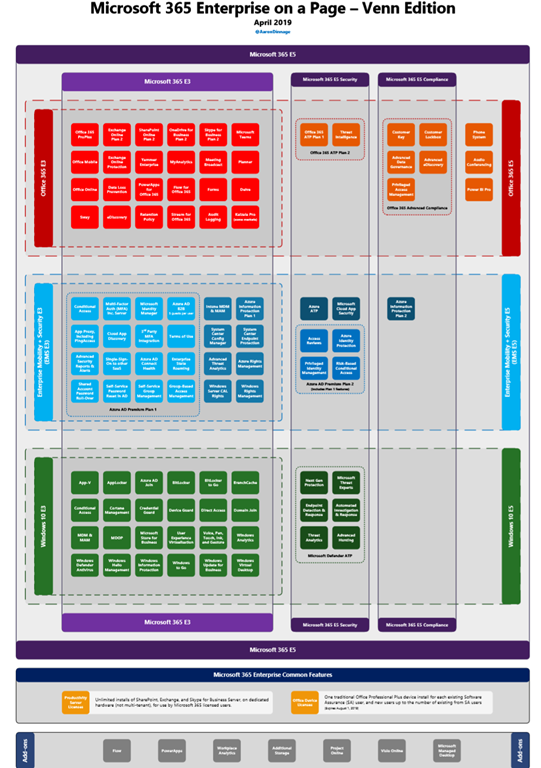
imageOne of our Modern Workplace Specialists put the following diagrams together illustrating what suite each Microsoft 365 entitlement comes from and I thought it was worthwhile to share:

The first file is a hyperlinked PDF that shows all the components of:

  • Office 365 E3 & E5
  • Enterprise Mobility & Security E3 & E5
  • Windows 10 E3 & E5

The second document is a PowerPoint that has the same content but editable.

Download the files here:

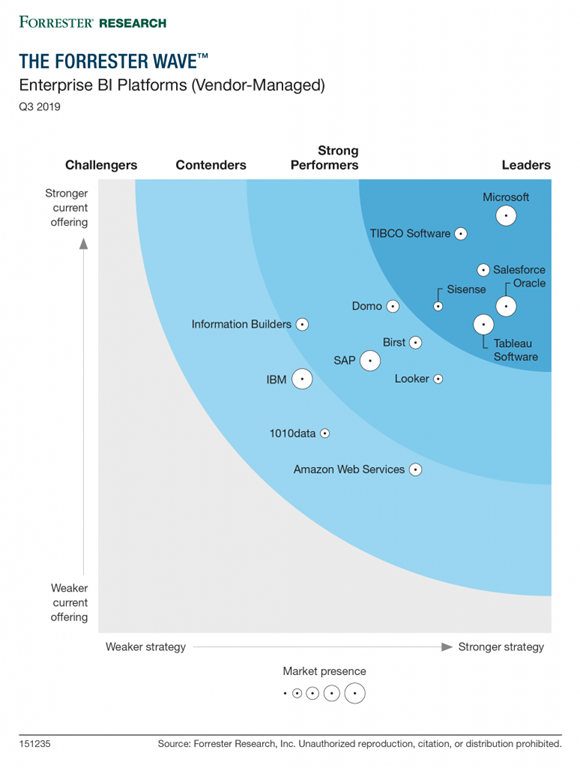
imageDiscover why Forrester has recognized Microsoft as a Leader in enterprise business intelligence (BI) platforms.

In this report, you’ll get expert guidance in evaluating vendor-managed BI platforms and a detailed analysis of the strengths and weaknesses of each vendor. Learn how Microsoft stacks up and explore the differentiated features in the current enterprise BI market:

  • Augmented BI, such as machine learning and natural language querying.
  • Platform extensibility and customization capabilities.
  • Features necessary to work with big data.
  • Built-in data preparation tools.
  • Deployment options, including cloud, on-premises, and mobile.

Get the report here:

https://info.microsoft.com/ww-landing-Forrester-Wave-Enterprise-BI-platforms-website.html?LCID=EN-US

« Newer Posts - Older Posts »

Categories