imageLast year over 30,000 people joined us for the Microsoft Flow Online Conference.

Now, we are coming back and want YOU to join us for the 2020 POWER PLATFORM ONLINE CONFERENCE!

Come and join some of the best teachers, trainers and Power Platform MVP’s from around the world as they bring 9 hours of back-to-back training and tutorial sessions live and on-demand to you!

The day will consist of 18 unique 30 minute sessions ranging from beginner at the start of the day all the way to advanced content toward the end of the day. This ensures that no matter what your skill set is, you will be able to get valuable insights and new skills to help take your #LessCodeMorePower game to the next level.

Join us for a fun day of laughs and learning, right from the comfort of your own living room or office!

Posted by: kurtsh | February 1, 2020

RELEASE: New & Improved Power Automate Community Cookbook

Download recipes for PowerAutomate to do some cool things like:

  • Auto-lock your workstation
  • Auto-create a ICS Calendar invite
  • Trigger based on location/GeoFence
  • Create a Planner task from a Flagged Email
  • Send session slides to all attendees

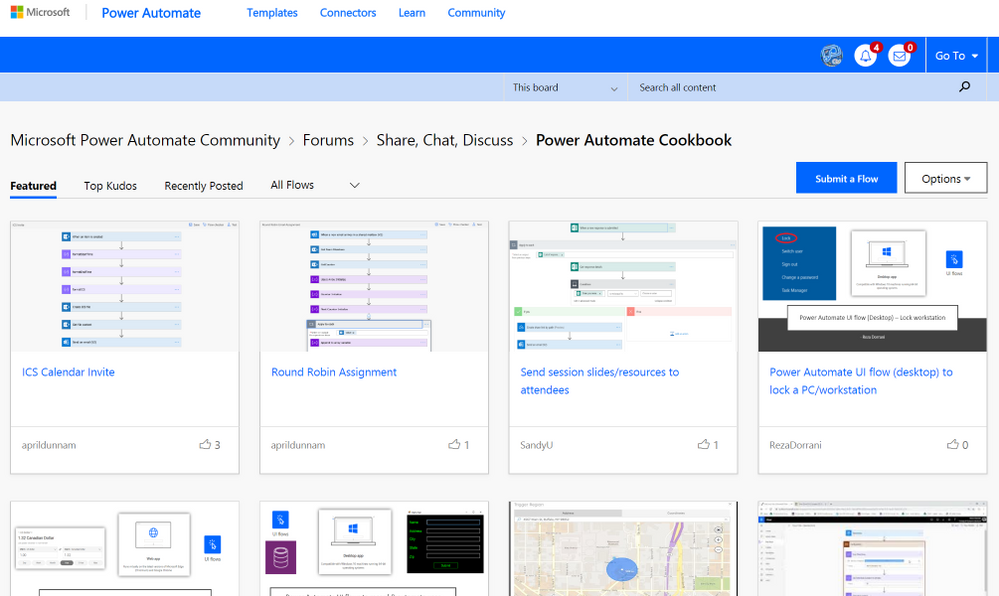
imageHave you had some time to check out the new & improved Power Automate Community Cookbook?! If not, you should head over there and experience the new format asap! (Seen in screenshot below) Some of the awesome new features we have added to the new and improved cookbook are:

  • A new "gallery like" feel with tiles and thumbnail images
  • Ability to sort recipes by category and/or top kudos & posting date
  • Required .zip file attachment for uploading your exported flows
  • Ability to add an optional instructional video to your recipe

Read the rest of the announcement here:

imageThe Microsoft Azure Active Directory deployment webinar series is coming back in 2020!

This round will have a companion Ask-Microsoft-Anything (AMA) blog, so reply here with your burning Identity questions and priorities for the coming year and we’ll share out best practices from our experts.

Check out the schedule here:

Posted by: kurtsh | February 1, 2020

HOWTO: Obtain Diagnostics Logs for Microsoft Teams

imageNeed help troubleshooting the Microsoft Teams client?

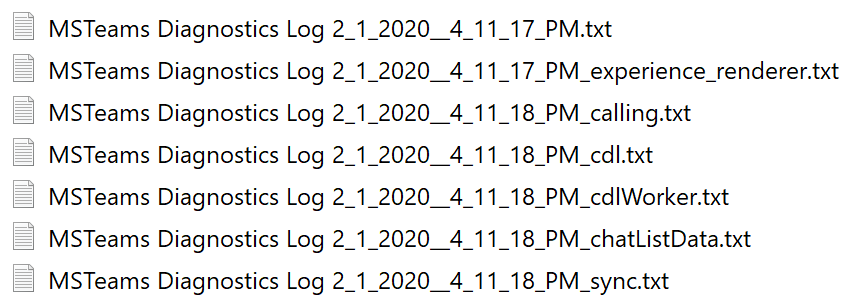
While in context of Microsoft Teams app, hit CTRL+ALT+SHIFT+1 and you’ll get a diagnostic log for Teams for Windows in your DOWNLOAD folder with a lot of useful info that informs how Teams loads and recent activity. (Use Command+Option+Shift+1 for Teams on Mac)

Diagnostic logs show data for the following processes:

  • Login
  • Connection requests to middle tier services
  • Call/conversation

For information about all things log related for Teams – audit logs, media logs, desktop logs, etc. – check out Rakesh Chaturvedi’s Blog, “MyTechNetBlog”:

imageSUMMARY:

  1. You can drastically reduce bandwidth consumption when distributing new Microsoft Teams updates as part of Office 365 Pro Plus, using Delivery Optimization.
  2. Delivery Optimization includes peer-to-peer update sharing at remote locations like branch offices, eliminating the need for each client to individually download Teams/Office 365 Pro Plus updates over a WAN.
  3. This is possible using SCCM (now known as Endpoint Configuration Manager) if Express Updates are configured. SCCM Express Updates enable a client to download only the changes between the current month’s update and the previous month’s update.

BACKGROUND:

Windows 10 & Office 365 Pro Plus updates, upgrades, and applications can contain packages with very large files. Downloading and distributing updates can consume quite a bit of network resources on the devices receiving them. You can use Delivery Optimization to reduce bandwidth consumption by sharing the work of downloading these packages among multiple devices in your deployment. Delivery Optimization can accomplish this because it is a self-organizing distributed cache that allows clients to download those packages from alternate sources (such as other peers on the network) in addition to the traditional Internet-based servers. You can use Delivery Optimization in conjunction with Windows Update, Windows Server Update Services (WSUS), Windows Update for Business, or Microsoft Endpoint Configuration Manager (when installation of Express Updates is enabled).

(Delivery Optimization is a cloud-managed solution. Access to the Delivery Optimization cloud services is a requirement. This means that in order to use the peer-to-peer functionality of Delivery Optimization, devices must have access to the internet.)

Please note that with the new inclusion of Microsoft Teams in Office 365 Pro Plus, it’s now possible for endpoints to have the delivery of Microsoft Teams updates optimized for distribution using Endpoint Configuration Manager. (formerly known as SCCM)

Please see details below.

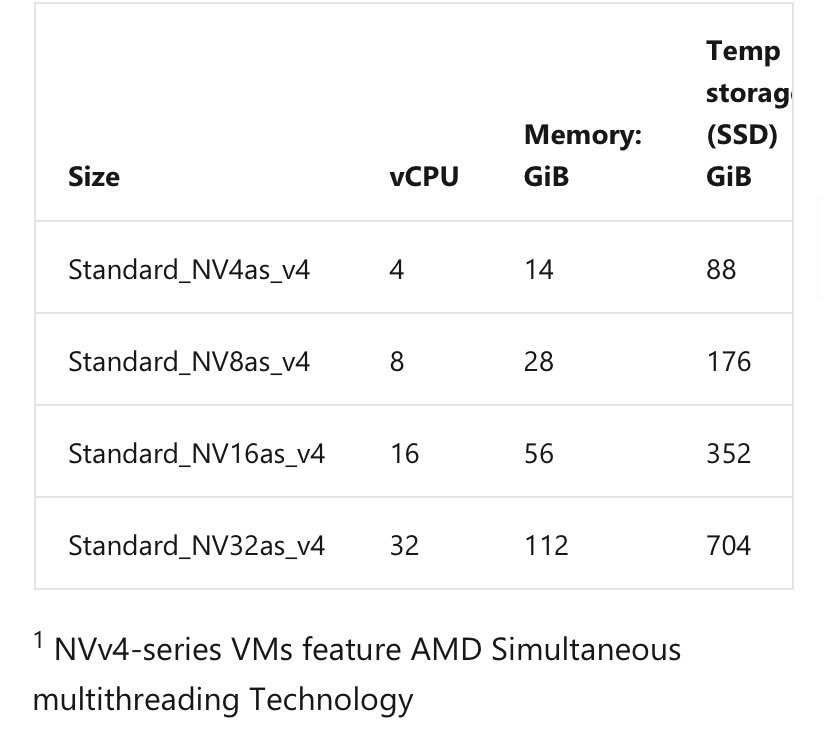
imageLearn how to deploy the preview Virtual Machines of our new AMD EPYC Rome NV v4 (including AMD Vega 10 GPU partition & Premium SSD performance!) VMs in Windows Virtual Desktop (WVD) on Azure. 

Get access to the new preview VMs through the form below, the check out the following video how to use your new access with Windows Virtual Desktop!

Pre-requisites

Are you interested in moving to, say, Exchange Online, but have challenges due to your security organization wanting to “whitelist almost every IP Address” and causing problems with things like configuring ADConnect?

The primary concern is usually around data exfiltration risks. The addition of Tenant Restrictions feature should provide confidence in following our published IP/URL guidance:

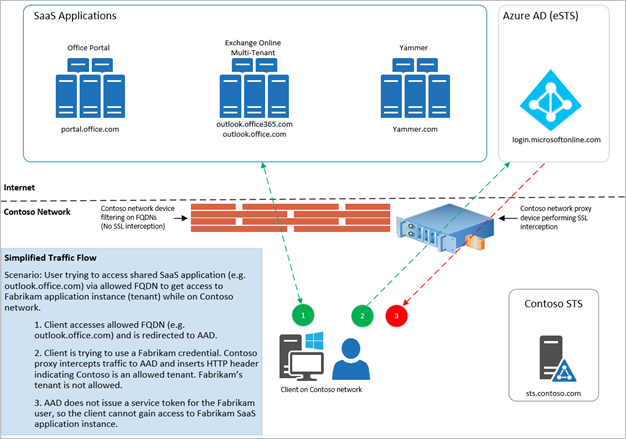
imageLarge organizations that emphasize security want to move to cloud services like Office 365, but need to know that their users only can access approved resources. Traditionally, companies restrict domain names or IP addresses when they want to manage access. This approach fails in a world where software as a service (or SaaS) apps are hosted in a public cloud, running on shared domain names like outlook.office.com and login.microsoftonline.com. Blocking these addresses would keep users from accessing Outlook on the web entirely, instead of merely restricting them to approved identities and resources.

The Azure Active Directory (Azure AD) solution to this challenge is a feature called tenant restrictions. With tenant restrictions, organizations can control access to SaaS cloud applications, based on the Azure AD tenant the applications use for single sign-on. For example, you may want to allow access to your organization’s Office 365 applications, while preventing access to other organizations’ instances of these same applications. 

With tenant restrictions, organizations can specify the list of tenants that their users are permitted to access. Azure AD then only grants access to these permitted tenants.

This article focuses on tenant restrictions for Office 365, but the feature should work with any SaaS cloud app that uses modern authentication protocols with Azure AD for single sign-on.

Note:
Tenant Restrictions has the interesting side effect of uncovering shadow IT applications that have been operating.  It’s important to prepare to respond to unknown business applications potentially breaking because some applications might have been sanctioned but failed to go through the proper internal registration so Tenant Restrictions can create some noise – but it’s all about providing sunlight on potential exposures & protecting the company.

Read more about Tenant Restrictions here:

UPDATE 2/11/20:    
The Office 365 product team has changed direction.

“…we heard that customers don’t want Office 365 ProPlus to change search defaults without an opt-in, and they need a way to govern these changes on unmanaged devices.”

As a result, “the Microsoft Search in Bing extension will not ship with Version 2002 of Office 365 ProPlus.” 

Read the announcement for more details:

UPDATE 1/30/20:
FYI: The version “2002” is in fact, correct, and not a typo.  It represents “Year 2020 & Month February (02)”. 

ORIGINAL POST:
Starting with Version 2002 of Office 365 ProPlus, an extension for Microsoft Search in Bing will be installed that makes Bing the default search engine for the Google Chrome web browser only on devices in a limited number of locations. This extension will be installed with new installations of Office 365 ProPlus or when existing installations of Office 365 ProPlus are updated.

If you don’t want the extension installed, follow these steps. Also, if Bing is already the default search engine, the extension doesn’t get installed.

Read more here:

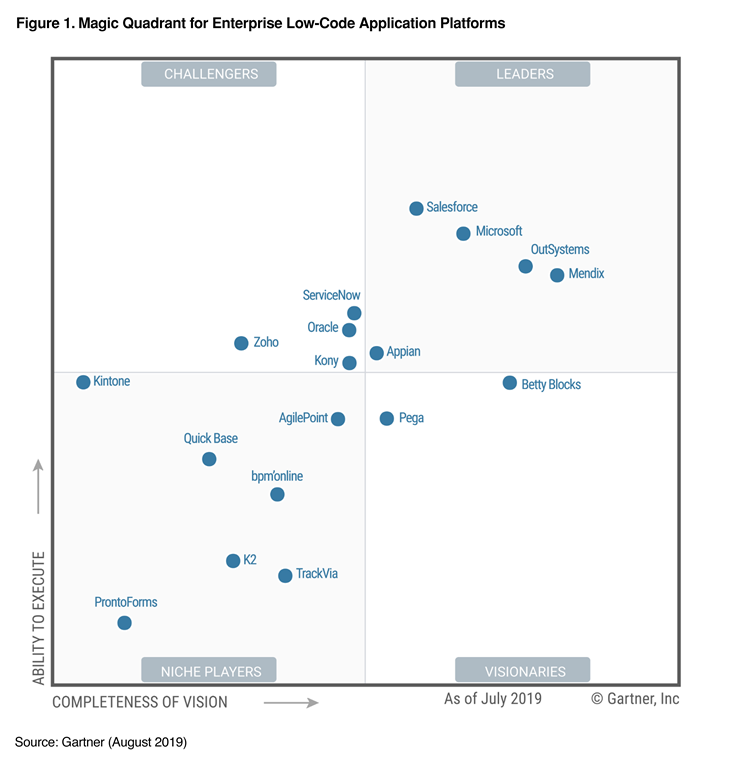
imageGartner has recognized Microsoft as a Leader in enterprise low-code application platforms.

In this report, you’ll learn about Gartner’s assessment of the products in this market and explore the features and capabilities that set each of them apart.

Discover how integrated Azure services, intuitive design tools anyone can use, and fast deployment times contributed to high levels of customer satisfaction and helped position Microsoft as a Magic Quadrant Leader among enterprise low-code application platforms.

image

imageWe just announced a new date and location for Microsoft Ignite 2020!

Save September 21-25, 2020 and join us in New Orleans, LA.

Pre-register today for an amazing week of technical training and more:

« Newer Posts - Older Posts »

Categories