Did you miss the Windows Server Summit 2025 this past April?  Don’t worry – we recorded all the sessions for you!

Watch all the sessions on-demand at your leisure through the links below.  (Don’t miss the session on the new “Hotpatching” capability – server patching without reboots – only available with Windows Server 2025 with Azure Arc!)

Keynote

Upgrade & Migration

Security & Identity

Core Services

Server Management

Training & Support

Windows 11 is secure by design and secure by default, with layers of defense enabled on day one to enhance your protection without the need to first configure settings. This secure-by-design approach spans the Windows edition range including Pro, Enterprise, IoT Enterprise, and Education editions. 

Support for Windows 10 is ending soon on October 14, 2025. Upgrading or replacing outdated devices before Windows 10 support ends is a critical priority for building a strong security posture. Discover why organizations of all sizes, including 90% of Fortune 500 companies, are relying on Windows 11.

The following online-only “Windows 11 Security Book” covers:

  • Hardware security
  • Operating System security
  • Application security
  • Identity protection
  • Privacy
  • Cloud services
  • Security foundation

This edition includes updates with Windows 11, version 24H2, features and enhancements. Read at:

Are you interested in stopping:

  • DNS Hijacking: By ensuring that only DNS resolutions from trusted PDNS servers are used, ZTDNS helps prevent attackers from redirecting traffic to malicious sites.​
  • Malicious Communications: Blocking outbound connections to IP addresses not resolved through trusted DNS queries helps disrupt phishing and even non-administrative malware stagers and beacons.
  • Data Exfiltration: Restricting outbound traffic to approved domains reduces the risk of sensitive data being transmitted to unauthorized destinations without conducting analysis of domain name resolution patterns.

If so, take a look at Zero Trust DNS which is now available for preview in Windows 11 Insider Build 27766+.

What is Zero Trust DNS?

ZTDNS integrates the Windows DNS client with trusted Protective DNS (PDNS) servers to control outbound IP traffic based on domain names. When ZTDNS is configured on a Windows 11 device to use PDNS servers that support DNS over HTTPS (DoH) or DNS over TLS (DoT), ZTDNS ensures that:​

  • The Windows DNS client forces the use of encrypted DNS and queries are only sent to the configured PDNS servers.
  • Outbound traffic is permitted only to IP addresses resolved by these trusted PDNS servers or to IP ranges with a manual exception plumbed by the IT administrator.
  • All other IPv4 and IPv6 outbound traffic is blocked by default, adhering to the “deny by default” principle of Zero Trust.
  • A log of attempted outbound connections is maintained on the device.

This approach reduces the need for deep packet inspection or reliance on insecure signals like plain-text DNS or Server Name Indication (SNI) when attempting to determine the domain name associated with outbound traffic. This makes ZTDNS an important tool in the Zero Trust toolbelt since DNS traffic and SNI are increasingly being encrypted. It also aligns with Zero Trust principles by assuming all destinations are untrusted by default, only allowing connections to destinations explicitly permitted through DNS resolutions provided by trusted PDNS servers.

For more information, visit our previous blog post on design of ZTDNS.

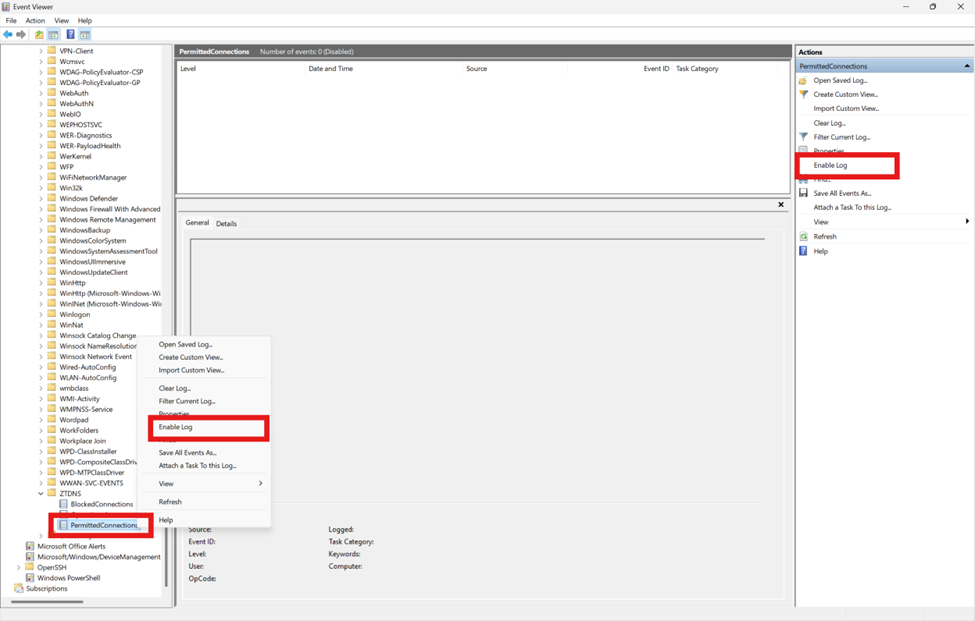
To get started deploying Zero Trust DNS or get started with Windows 11 Canary Insider Builds:

#cybersecurity #microsoft #windows11 #zerotrust #dns

Are you an Azure Government customer planning on using Azure Arc-enabled Windows Management services? PLEASE READ THIS POST!

If you have Software Assurance on your Windows Server core licenses & want to enable Windows Management features like Azure Update Manager, Azure Policy, Azure Change Mgmt & Inventory, etc. without getting billed for these Windows Mgmt services in Azure Government (as you are entitled to by virtue of your Software Assurance on your Windows Server cores) you must use the Powershell script written by Scott Metzel, and written about by John Kelbley on the Azure Advanced Migration blog

WHY?
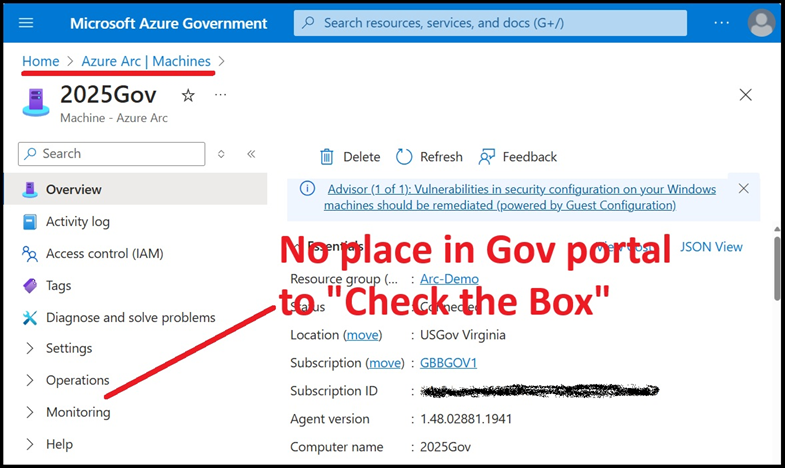
This is because (at least as of April 2025) the Azure Portal UI in Azure Government is currently missing the “Windows Server SA attestation” checkbox that normally mitigates these Azure charges. To get by this, you need to “check the box” using Powershell instead to avoid being billed for these services.

Visit the following for more details & to download the script:

Posted by: kurtsh | April 27, 2025

DOWNLOAD: M365 Copilot Audit Power BI Report

The M365 Copilot Audit Report displays interactions your employees are having with M365 Copilot.

This report uses data from the Purview Audit log and Entra ID exports that get saved into 2 CSV files. The first csv file is storing Copilot Interaction events and other csv is exporting user details (Display Name, UPN, Position, City, Country) for users that have M365 copilot license assigned.

Power BI report is reading data from those these two files and can display users Display names or anonymize them. Report contains Overall and Adoption pages that allow M365 Champs to monitor behavior of M365 Copilot licensed users.

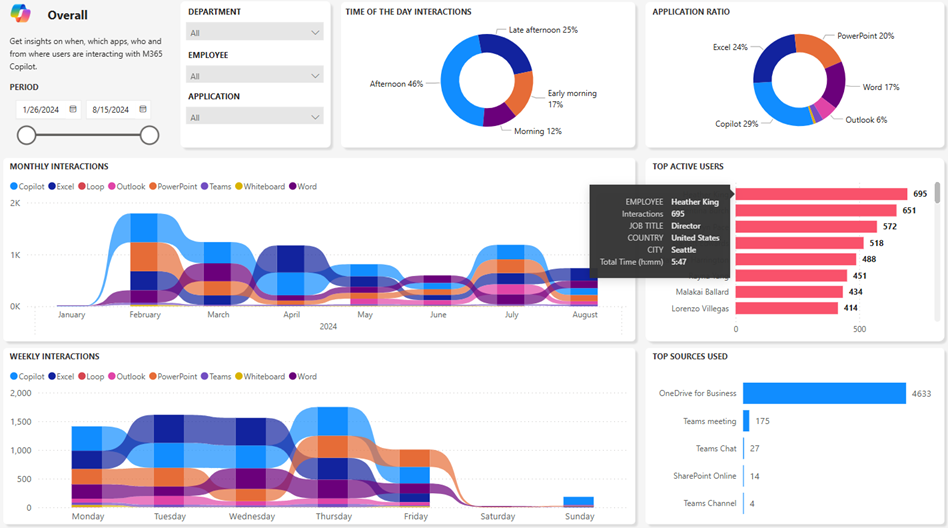
Five Power BI reports are included in this download: Overall, Impact, Decomposition, Adoption & Trend. The image above is a snapshot of the “Overall” report. Information available includes:

  1. Time of the day interaction
  2. Application ratio
  3. Monthly interactions
  4. Weekly Interactions
  5. Top active users
  6. Top sources
  7. Time spent in minutes
  8. Time spent in hours and minutes
  9. Time decomposition by departments and positions
  10. Employee names anonymizer
  11. Active vs total licenses assigned
  12. Trend comparison between two departments
  13. Slicers
    • Time range
    • Application
    • Employee
    • Position
    • Departments

REQUIREMENTS:
The reports use Power BI Desktop & the rest of the prerequisites including required permissions are listed in the README of the GitHub repository. The reports work with GCC cloud instances for government institutions (who don’t have the “Copilot Dashboard” available through Viva Insights yet) so get the Power BI reports from the GitHub repository below for free:

April 2025 version of MCRA is out!  This release of the Microsoft Cybersecurity Reference Architectures (MCRA) focuses heavily on updates related to standards and mappings, products and technology changes, and more.
 
Key changes since the previous December 2023 release:

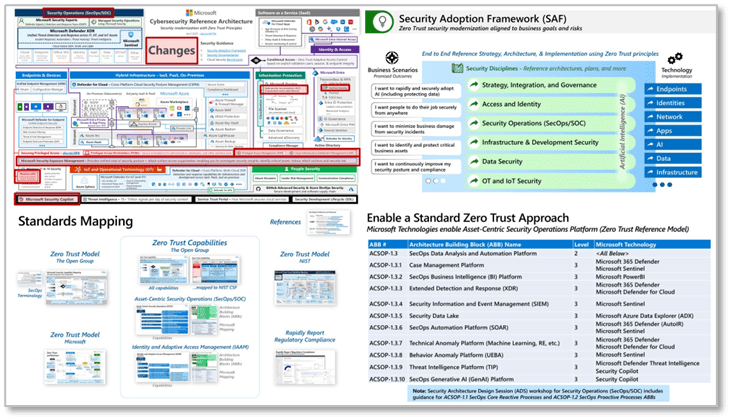
  • Updated main capabilities diagram to add Microsoft Security Exposure Management, Windows LAPS, passkeys, and Microsoft Entra Verified ID as well as to show Microsoft Security Copilot as a broad capability.
  • Replaced several references of Secure Score with Exposure Management
  • Clarified representations of Microsoft Security Copilot to show broader capabilities beyond Security Operations
  • Added Microsoft Entra ID Governance to Adaptive Access diagram
  • Updated several slides in introduction sequence and added new “Security must be integrated everywhere” slide.
  • Updated slides in Artificial Intelligence (AI) section
  • Added ‘Standards Mapping’ section and included proposed drafts of Zero Trust Reference Model standard from The Open Group (and Microsoft product mapping to them)
  • Added roles list from The Open Group to people section
  • Added Prioritization slide to the Threats section from upcoming draft Security Matrix standard from The Open Group
  • Updated threat intelligence daily signals to 78+ Trillion and updated links/resources on various slides.
  • Updated closing slides to show the full security modernization journey and associated Microsoft Unified engagements

Download the PowerPoint file (including slide notes) from the usual site:

(All hail Mark Simos, Microsoft Principal Cybersecurity Architect, Program Manager, and creator of the MCRA!)

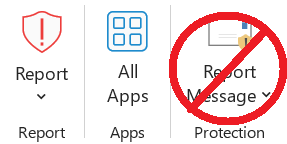
The Microsoft Report Message and Report Phishing add-ins are now in maintenance mode and will eventually be deprecated.

We recommend transitioning from the add-ins to the built-in Report button. The Report button is supported in virtually all consumer and enterprise Outlook clients.

For more information, see the Frequently asked questions section in this article.

Posted by: kurtsh | April 7, 2025

INFO: Microsoft Accessibility & WCAG conformance

Microsoft has specific documentation about the scope of our adherence to WCAG (2.1 & beyond) documented here.  Microsoft audits how our products and services support the recognized the Web Content Accessibility Guidelines (WCAG) & publishes the results in our conformance reports.  Some products are even more explicit.  For example:

  • The Power BI Service has an entire section on building accessible reports.  Power BI Paginated Reports is explicitly documented online.
    The conformance report is available here.  There are separate reports for Power BI Desktop, Power BI for Android, Power BI for iOS, etc.
  • Microsoft Forms’ conformance report is available here.

For further information:

  • Consumer Disability Answer Desk:  Disability Answer Desk provides product support for our customers with disabilities, including Microsoft Office, Windows, and Xbox.
    https://www.microsoft.com/en-us/Accessibility/disability-answer-desk
  • Enterprise Disability Answer Desk:  The enterprise Disability Answer Desk is a support resource for organizations that have questions about the accessibility of Microsoft products and product conformance with accessibility standards. The support team can help resolve issues relating to assistive technology, as well as find conformance documentation.
    https://support.microsoft.com/en-us/accessibility/enterprise-answer-desk?culture=en-us&country=us
  • Ask Microsoft Accessibility: The Ask Microsoft Accessibility bot is a tool that helps users find information about the accessibility of Microsoft products and services. It uses only the publicly available information on microsoft.com as a reference and does not answer general accessibility questions or questions about code.
    https://askma.microsoft.com/
Posted by: kurtsh | April 2, 2025

TRAINING: Complimentary Power BI courses

This is a listing of active, complimentary training opportunities as of April 2nd, 2025 for Microsoft Power BI users – both end users as well as data analysts/IT professionals.

SELF-PACED WRITTEN TRAINING
Microsoft Learn, our online library of text-based training materials has a number of complimentary offerings & lessons that are easy to consume at your own pace.

ON DEMAND VIDEO-RECORDED COURSES
Complimentary video-recorded versions of the Instructor-led courses, available to be taken at your leisure.

ON DEMAND VIDEO-RECORDED ADOPTION TRAINING
Complimentary 1-hour pre-recorded “end user overviews” of Power BI. A 1-hour lesson isn’t going to train anyone to use the tools out of the gate but they’ll explain how Power BI can be used & what it’s capabilities are.

3RD PARTY ON-DEMAND TRAININGS (COMPLIMENTARY)
NetCom Learning, a Microsoft Learning Partner, hosts a number of complimentary on-demand trainings on their web site.

  • Master Class: Accelerate your Business growth with Microsoft Power BI
    2 Hour Master Class on Microsoft Power BI Power BI is one of the most widely used data visualization and BI tools in the industry, utilized by data analysis professionals around the world. Mastering this powerful tool can empower businesses with valuable insights and drive better decision-making.
  • Master Class: Accelerate your Business growth with Microsoft Power BI
    2 Hour Master Class on Microsoft Power BI Power BI is one of the most widely used data visualization and BI tools in the industry, utilized by data analysis professionals around the world. Mastering this powerful tool can empower businesses with valuable insights and drive better decision-making.
  • Accelerate your Business growth with Microsoft Power BI
    Master the techniques to empower your business with business intelligence applications like Power BI today. Power BI is a powerful tool that helps users create interactive visualization using business intelligence. Partake in the exhaustive, instructor-led webinar on “Getting Started with Power BI” and understand what power BI is and gain a thorough understanding of its various applications.
  • Top 5 Strategies to Kickstart Your Data Analytics Resolutions Using Power BI
    Do you know how the massive amounts of data generated every single day are managed? We need effective algorithms to process this data, and it is made possible by the application of Data Analytics. Data Analytics is the application of structured statistical and mathematical practices on collected data to distinguish underlying patterns. It helps businesses make smarter decisions, improves organizational efficiency, and controls risks. Power BI allows the predictive power of advanced analytics to enable users to create predictive models from their data, enabling organizations to make data-based decisions across all fields.
  • Analyzing Data with Power BI Desktop
    Want to let your teams build data models, advanced queries, and develop reports that visualize data? Power BI Desktop is Microsoft’s most powerful data analysis and visualization software. It is the answer to your question. It not only helps you and your workforce gain more data insights (stored in cloud/on your computer), but it also lets you develop visual representations of the data.

INSTRUCTOR-LED COURSES
For managed customers only that are sponsored members of the “Microsoft Enterprise Skills Initiative” training program. If you don’t know what this is, you’re not a sponsored member so skip this section.
These are rigorous courses with both class instruction from a certified trainer as well as hands-on-labs & direct Q&A.
(ESI users: Please login using your authorized user account to register yourself for any of these courses.  Rough syllabi are available online)

Registration now live for the Microsoft AI Skills Fest, April 8 – May 28, 2025

Join us April 8, 2025, at the Microsoft AI Skills Fest—a once-in-a-lifetime opportunity to join learners from around the globe to attempt a GUINNESS WORLD RECORDS™ title for the most users to take an online multilevel AI lesson in 24 hours.

Then to deepen your skills, continue with 50 days of curated AI training in your preferred way, including hackathons, live in-person and virtual events, self-paced tutorials, community events, Microsoft Learn Challenges, and more.

Who is AI Skills Fest for?

Tech professionals: Build your dream AI-powered solutions. Join us to learn how Microsoft’s AI apps and services can help you create innovative solutions quickly. Acquire skills in agents, AI Security, Azure AI Foundry, GitHub Copilot, Fabric, and more. Explore Tech sessions

Business professionals: Build AI skills that can help you improve productivity and gain better insights. Discover how to use Microsoft Copilot to simplify time consuming and repetitive tasks, giving you more space to create and innovate—while still using the tools you already know and love. Explore Business sessions

Students: You’ve already got great ideas—now gain the skills to help you realize your vision. Whether you’re starting with AI or hoping to strengthen your technical skills, we have a learning experience for you. See what you can become when you are empowered by AI. Explore Student sessions

Business leaders: Unlock your team’s innovation. At Microsoft, we’re committed to empowering you and your team with the skills you need to succeed in the AI economy. Leverage upskilling opportunities across key organizational roles that will set you up for the future. Explore Leader sessions

Register today for the “Microsoft AI Skills Fest” – April 8 – May 28, 2025

Questions about AI Skills Fest? Visit:

« Newer Posts - Older Posts »

Categories