Posted by: kurtsh | March 18, 2025

EVENT: Microsoft Secure – Online – April 9, 2025

Discover AI innovations for the security lifecycle designed to give you smarter, faster, stronger security.  At Microsoft Secure, you’ll get a first look into AI-first tools coming soon to help you in your day-to-day work. Plus, we’ll share how you can maximize what you’ve got in your hands right now.   

In 60 minutes, you’ll learn how you can: 

  • Harden your defenses: Learn how to secure your data used by AI, AI apps, and AI cloud workloads. Discover the latest tools and techniques to fortify your defenses against evolving threats. 
  • Secure your AI investments: Use data security, protection against AI-specific cyberthreats, and compliance tools to secure your AI investments. Our experts will share best practices and strategies to safeguard your AI initiatives, ensuring they remain resilient against emerging threats. 
  • Discover AI-first tools and best practices: Hear about new AI-first tools, demos, and best practices across your favorite Microsoft Security solutions. These sessions will provide you with practical insights and hands-on experiences to strengthen your security posture and leverage AI-driven solutions effectively.  
  • Keep up with what’s happening in security: Get the latest reports on security trends and platform innovations directly from Microsoft Security leaders. This is your chance to gain insights that can help you stay ahead of emerging threats. 

AGENDA:
Check out the full agenda here.

DATE:
April 9, 2025

REGISTRATION:
Register now and pick the broadcast that works for your time zone. 

ANNOUNCEMENT BLOG:
https://techcommunity.microsoft.com/blog/microsoft-security-blog/ai-innovation-requires-ai-security-hear-what%E2%80%99s-new-at-microsoft-secure/4394130
Microsoft Events at RSAC™ 2025 Conference
Event Date: April 27th-May 1st 2025
Venue Name: Palace Hotel
Venue Address: 2 New Montgomery St, San Francisco, CA 94105

Protecting your business is more challenging than ever before, as you face a rapidly growing threat landscape and manage an increasingly complex technology estate. Microsoft Security can help. Throughout the RSAC™ 2025 Conference, Microsoft Security will offer tailored experiences to equip you with innovative AI-first, end-to-end protection and threat intelligence, so you can be more secure, stay compliant, and lower your total cost of ownership. From Sunday to Thursday during RSAC™ 2025, join Microsoft Security for the chance to:

  • Kick off RSAC™ a day early at our Pre-Day–hear from Microsoft leaders, and learn from your peers at our networking reception or CISO Dinner
  • Learn from Microsoft Security business leaders and technical experts during the RSAC™ keynote and our other conference sessions
  • See live, hands-on demos and theatre sessions all week at the Microsoft booth at Moscone Center
  • Network with your peers and hear from Microsoft experts at the Microsoft Security Hub
  • Ask your most pressing questions in 1:1 customer meetings at the Microsoft Security Hub
  • Recap our product innovation and tour the Microsoft Experience Center at Silicon Valley at our Post-Day Forum

Secure your spot today.

Date/Time:
April 27th-May 1st 2025

Location:
Palace Hotel – 2 New Montgomery St, San Francisco, CA 94105

Registration:
Microsoft RSAC 2025 events Registration

Questions:
Have questions about the events? Contact the Security Events Team

Our Speakers:

  • Vasu Jakkal – CVP, Microsoft Security Business
  • Charlie Bell – Executive Vice President, Microsoft Security

So you have a Unified Enterprise contract with Microsoft. You have access to ‘reactive technical support’ as well as both a Customer Success Account Manager & a bucket of Proactive Services that provide training & technical guidance from subject matter experts across Microsoft products & services.

But did you know your organization can get specific engineers & architects for key workloads & projects you may be planning or driving called Value Acceleration Services?

The following are examples of additive ‘dedicated’, ‘enhanced’ or ‘mission critical’ solutions that your organization can obtain on top of an existing Unified Enterprise contract from Microsoft:

  • Designated Engineering (DE) – Non-dedicated resource, allocated for weeks-months
    Solution-specific expertise that empowers you to embrace cloud transformation and optimize your Microsoft solutions.
    • Employee Workplace DE – Empower your employee to excel by fostering an intelligent, adaptable, and secure work environment with expert-led services for Employee Communications, Communities, Workplace, Analytics, and Feedback through Microsoft Viva.
    • Power Platform/Dynamics DE – Use intelligent applications to deliver operational excellence and create more engaging customer experiences with expert-led services for Power Platform, Dynamics 365 Customer Engagement, and Dynamics 365 Finance and Operations.
    • Data & AI DE – Capture emerging opportunities by using data as a strategic asset and shifting from hindsight to foresight with expert-led services for Migrate and Modernize your Data Estate and Analytics.
    • Azure Infrastructure DE – Accelerate the responsiveness of your business, improve service levels, and reduce costs using intelligent processes with expert-led services for Migrate and Modernize Infrastructure and Workloads.
    • Developer DE – Unify people, process, and technology to innovate at scale and bring better products to customers faster with expert-led services for Cloud Native, Modernize Enterprise Applications and Enable and Accelerate Developer Productivity.
    • Security DE – Protect your data, devices, and passwords, so you can focus on growing your business confidently with expert-led services for Zero Trust, Protect & Govern Sensitive Data, and Security & Compliance.
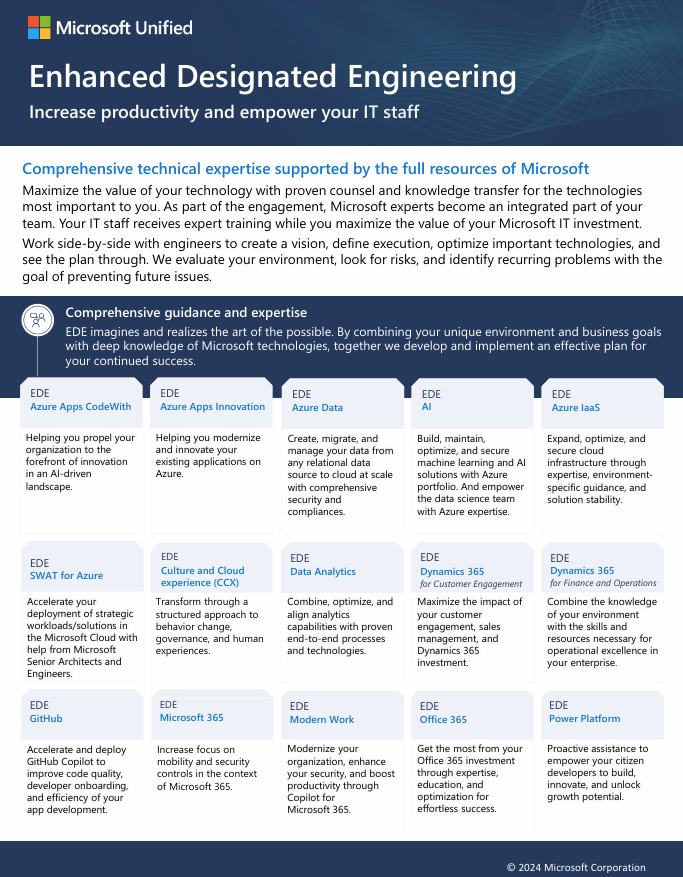
  • Enhanced Designated EngineeringDedicated resource, allocated for 1 year or more
    Comprehensive technical expertise supported by the full resources of Microsoft.

Unified Mission Critical Services

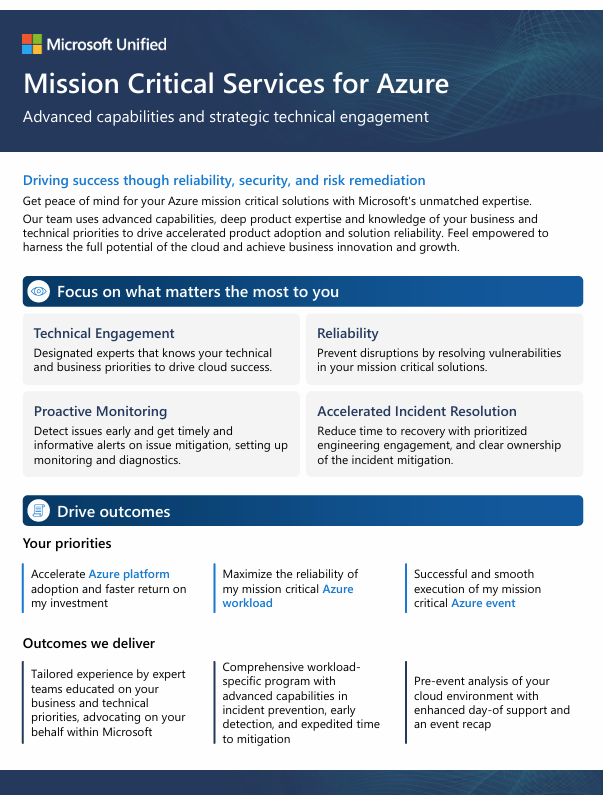
  • Mission Critical Services for Azure
    Partners with you to ensure your most significant Azure products, workloads, and events run smoothly. During critical incidents, this experience expedites recovery and ensures business continuity.
  • Mission Critical Services for Microsoft Security Cloud
    Provides superior engineering engagement, empowering you to escalate critical issues directly to Microsoft Security engineering teams. Our experts ensure your Security products are working effectively to protect you against the modern threat landscape.
  • Unified Enhanced Response
    Empower and care for your business with accelerated response times for key severities and additional Microsoft experts for streamlined resolution across all products.
  • Cybersecurity Incident Response
    Our end-to-end approach is specifically designed to rapidly contain the actions of an active adversary, perform deep investigation, remove the attacker’s control, and deploy critical security controls to help prevent re-compromise.
  • Office 365 Engineering Direct
    Gain an exclusive line to Office 365 product engineering teams and minimize downtime with advanced monitoring, escalation, and incident analysis for your cloud productivity solutions.
  • Support for Mission Critical
    Achieve peak performance of your most business-critical solutions, with in-depth support and preventative services to identify potential risks and create the most stable environment possible.
  • Developer Support
    Advance your DevOps processes, application architecture, and AI integration with help from cloud and application development experts as you build, deploy, and manage solutions.
  • GitHub Engineering Direct
    Manage your GitHub environment more effectively with expedited access to GitHub support, administration assistance, and GitHub health checks, led by a Customer Reliability Engineer.

Are you a government organization looking to secure your organizations data in preparation for deploying Artificial Intelligence solutions like Microsoft 365 Copilot? Do you need to proactively monitor Artificial Intelligence’s use in your organization?

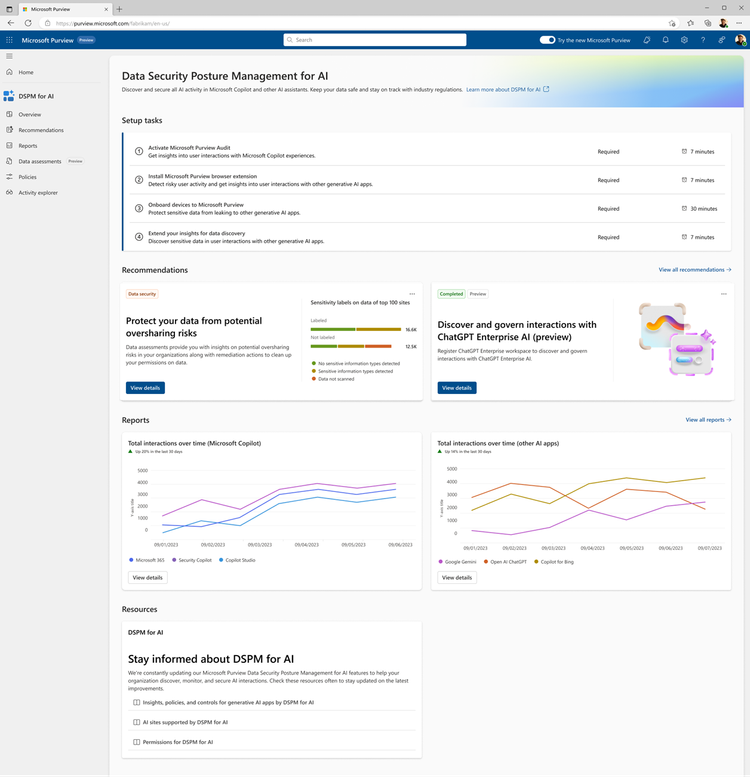
I’m pleased to announce that Microsoft Purview Data Security Posture Management (DSPM) for AI (formerly known as Microsoft Purview AI Hub) is now available in Microsoft 365 GCC cloud instances!

DSPM for AI provides a central management location to help you quickly secure data for AI apps and proactively monitor AI use. These apps include Microsoft 365 Copilot, other copilots from Microsoft, and AI apps from third-party large language modules (LLMs).

Data Security Posture Management for AI offers a set of capabilities so you can safely adopt AI without having to choose between productivity and protection:

  • Insights and analytics into AI activity in your organization
  • Ready-to-use policies to protect data and prevent data loss in AI prompts
  • Compliance controls to apply optimal data handling and storing policies
  • Data assessments to identify, remediate, and monitor potential oversharing of data will be coming to DSPM for AI in April 2025

For details of DSPM for AI, visit, this blog post:

Documentation is available at:

For a demonstration of DSPM for AI from our Microsoft Purview for State & Local Government team, check out:

Licensing requirements:
Functionality available in DSPM for AI depends on the level of licensing one has with Microsoft 365:

  • Microsoft G5 or G5 Compliance Licensing:
    • Full access to Data Security Posture Management for Al, including advanced analytics and comprehensive security solutions.
    • Enhanced Al data loss prevention with adaptive protection, dynamically assigning appropriate Data Loss Prevention policies to users based on their risk levels.
    • Comprehensive analytics to detect Al interactions, providing insights into unethical use, user risk, and more across the organization
    • Pre-configured one-click policies across Microsoft Purview solutions to identify and mitigate data security risks.
    • Guided assistance to Al regulations, helping to stay compliant and up-to-date with Al regulations.
    • Support for additional 1st party copilots, enterprise apps, and 3rd party apps (Copilot Studio and ChatGPT Enterprise)
    • Data assessments and oversharing assessments (when available in GCC)
  • Microsoft G3 Licensing:
    • Core functionality, including Data Loss Management (DLM) and Manual Information Protection (MIP)
    • Activity Explorer events for Microsoft 365 Copilot only, without prompts/responses shown in the event
    • Limited analytics and reporting capabilities compared to G5
    • No data assessments
  • Microsoft 365 Copilot GCC Licensing:
    • Some features of DSPM for Al are available, but with limited functionality compared to G5 and G3

Power BI Admin Monitoring Deep Dive in GCC – Power BI in Government

March 27, 2025 – 11:00AM-12noon PT

Description: This Community Call on “Power BI Admin Monitoring & Logging” will cover an introduction to the topic, an overview of key concepts, and a detailed look at the features and tools available for monitoring and logging in Power BI. It will also include best practices, real-world use cases, and a Q&A session to address attendees’ questions. The webinar will conclude with a recap of key points and additional resources.

No need to register!
At the date and time of the meeting click on this link to join the Community Call:
https://aka.ms/JoinCommunityCall 
(The Teams Meeting link will activate 10 mins before meeting date/time)

——————-

Join us for future community calls!

Power BI in Government for State & Local Government Community Calls 
Presented by Microsoft

Join us for our dynamic State and Local Government Power BI Community calls!
Held regularly, these sessions are your gateway to innovation and knowledge.
Check out the schedule for our upcoming and past calls.

Last month’s presentation:  Using Power BI with OneDrive/SharePoint Document Library
Jan 30th2025 Presentation – Power BI in Government

Everyone is concerned about security, but are you concerned about data governance?

  • CLASSIFICATION: How can our organization automatically discover & classify files, messages, chats & database data?
  • POLICIES: How can we establish policies to reset permissions, encrypt, quarantine, or even delete these files, messages, chats or database data?
  • BLOCK AI: Is there a way to block Artificial Intelligence from examining/reasoning over certain classifications of data in our organization?
  • RETENTION/DELETION: How about retention policies mandating copies for 3 years? Or deletion policies for data older than 7 years? How can we establish all of that?

Microsoft Defender & Purview Security Governance & Compliance – for Microsoft 365
The following technologies are what’s covered in Microsoft 365 G5 license in terms of Security, Governance & Compliance. 

Reminder: Over 20+ Unified Enterprise services offerings for Planning, Implementing, Supporting both “Defender” & “Purview” security, compliance & governance services are available through your Unified Enterprise contract. This provides subject matter expertise to your team through your contract, utilizing the proactive credit on contract, requiring no additional contracting involved.

Microsoft Purview Data Governance – For Data, Databases, Azure Data Services
Data Governance – specifically for Azure-based data sources & other databases is a different topic.  Originally called “Azure Purview”, Purview Data Governance has the ability to inherit & leverage certain “centralized features” from Microsoft 365 Purview such as “data classification definitions”, however it is a separate service specifically targeting the governance of data with “databases”. 

To be clear, while it is related to Purview for Microsoft 365, Purview Data Governance is charged separately to Azure based on usage/consumption & is not part of Microsoft 365. It covers:

Posted by: kurtsh | March 3, 2025

INFO: Microsoft 365 Copilot App Keyboard Shortcuts

If you’re lucky enough to have a Copilot key on your keyboard, you know how convenient it is to be able to quickly call up the Microsoft 365 Copilot wherever you are in the Window interface. And most power users are aware of the Win+C keyboard shortcut which OPENS the Microsoft 365 Copilot app on Windows desktop to quickly ask questions or start a Copilot action.

But is there a keyboard shortcut to HIDE the Microsoft 365 Copilot app?

CTRL+SHIFT+WIN+ALT?
Yeah, it’s Ctrl+Shift+Win+Alt. This Opens/Hides the Microsoft 365 Copilot app on Windows desktop. It’s kind of a messy keyboard combo but I’ve found that I’ve gotten used to it vs. hitting Win+C because it’s sort of a button smash & quickly opens Microsoft 365 Copilot… and quickly hides it when I press it again.

One other way is to remap keys using PowerToys at the link below.
Microsoft PowerToys | Microsoft Learn

  1. Download and install the Microsoft PowerToys tool from the official Microsoft website.
  2. Open the PowerToys utility and select the Keyboard Manager tab.
  3. Click the Remap a key button.
  4. Select the Copilot key from the Physical Key drop-down menu.
  5. Select the key to which you want to remap the Copilot key from the Map to drop-down menu, and you can choose to try the same Copilot key or turn on Copilot’s features (if available).
  6. Click OK to save the changes.

Posted by: kurtsh | March 3, 2025

EVENT: OneDrive Commercial Customer Office Hours

The OneDrive Customer Office Hour is for admins, partners, and power users to ask the OneDrive team questions, share feedback, and learn more about the features we’re building. For a full description visit https://learn.microsoft.com/en-us/sharepoint/onedrive-office-hours.

Typically, the webinar is delivered by Trent Green, Senior Product Manager for OneDrive & is run every 3rd Wednesday of the month from 8:00AM-9:00AM PST.

Agenda     

  • Upcoming events & updates (Rob N)  
  • What’s new on the OneDrive Roadmap (Irfan S)
  • Unlicensed OneDrive User Accounts + Q&A. (Trent G) 

*This webinar will be recorded and viewable after session has ended.

Next OneDrive Office Hours:
Wed, March 19th, 2025 8:00 AM – 9:00 AM (UTC-08:00) Pacific Time (US & Canada)

Add to Calendar:

Past Office Hours Recordings:

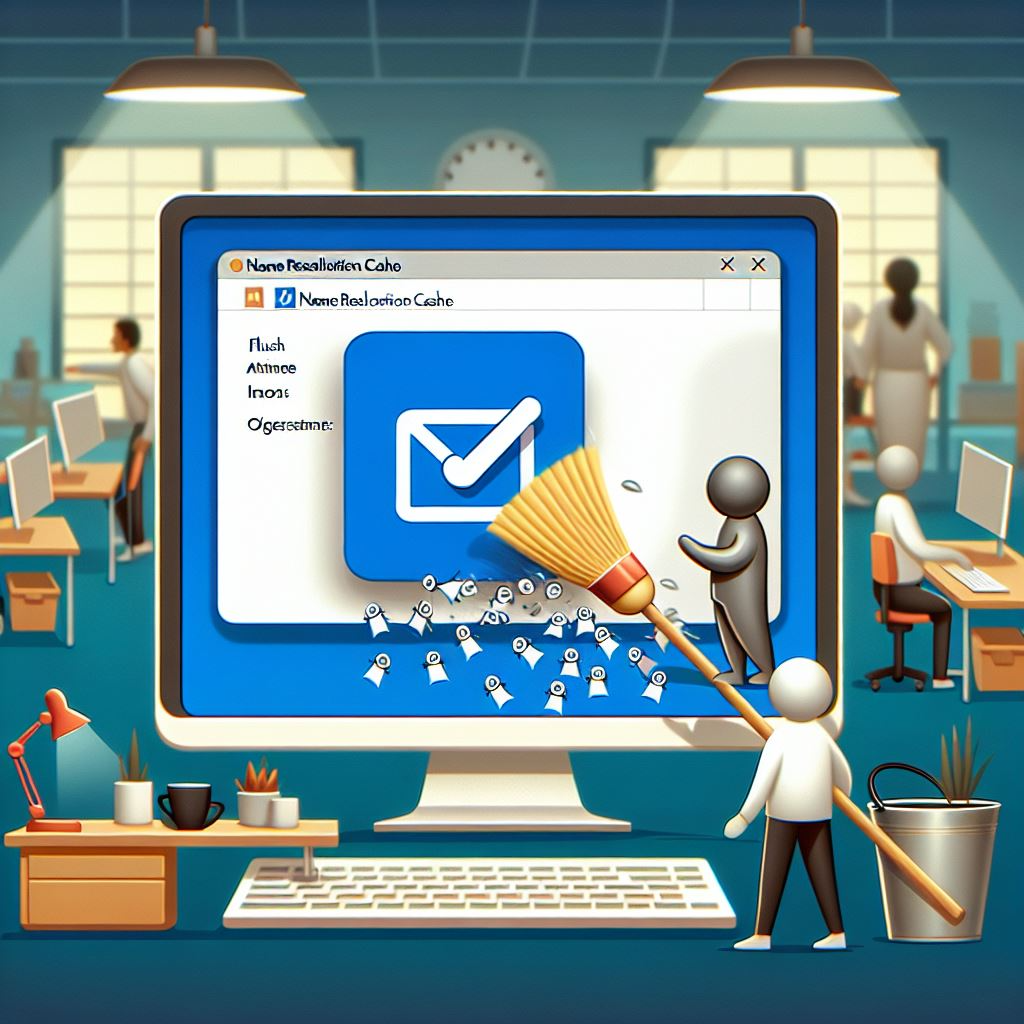
Because of CA Assembly Bill 1637, many municipal government organizations find themselves needing to change their Top-level domain names from .ORG/.COM to .GOV by January 1, 2029.

In order to plan (or execute) on this order, many county & city IT departments may want to “flush the cache” of their Microsoft Outlook desktop installs, so users no longer type names and obtain the ‘legacy domain-based’ email addresses like user@countyname.ORG & instead resolve to user@countyname.GOV.

Here are some ways to clear/flush the email name resolution cache on managed Outlook installations:

  • Remove all addresses from the Auto-Complete list via UI or Command Line
    If you want to reset the Auto-Complete list to remove all addresses at once:  In the Microsoft 365 version of Outlook, the Auto-Complete list is kept in a special hidden message in your mailbox. Resetting the list can be done in the following ways:
    • Button: Empty Auto-Complete List
      Using the “Empty Auto-Complete List” button does exactly what is says. You can find the option here;
      File-> Options-> section Mail-> option group: Send messages-> button: Empty Auto-Complete List
    • Startup switch: cleanautocompletecache
      By starting Outlook with the cleanautocompletecache startup switch you’ll achieve the exact same results as using the button “Empty Auto-Complete List.
      You can execute this switch in the following way (note the space in the command);
      Start-> type; outlook.exe /cleanautocompletecache
  • PowerShell script to remove all addresses from the Auto-Complete list
    This script removes the AutoComplete cache files, forcing Outlook to look up addresses in the Global Address List (GAL) instead of the local cache.

# Get the current user’s profile path

$profilePath = [System.Environment]::GetFolderPath(‘LocalApplicationData’)

# Define the path to the AutoComplete cache file

$autoCompletePath = “$profilePath\Microsoft\Outlook\RoamCache”

# Remove the AutoComplete cache files

Remove-Item “$autoCompletePath\Stream_Autocomplete*” -Force

# Restart Outlook

Start-Process “outlook.exe”

(from GitHub – michelderooij/Clear-AutoComplete: Script to clear one or more locations where recipient information is cached.)

Posted by: kurtsh | March 2, 2025

INFO: Microsoft Copilot Chat in Edge

For folks curious as to the what Copilot Chat in Edge is & how it can be useful to their end users, here is an index of documentation we have on Microsoft Copilot Chat in Edge.

PRODUCT PAGE: Microsoft Copilot Chat in Edge
https://www.microsoft.com/en-us/edge/features/microsoft-365-copilot-chat

  • Summarize a PDF open in Edge
  • Generate content for emails, reports, social media and more
  • Create images for any occasion
  • Gain a deeper understanding
  • Understand the implications of a decision
  • Learn new skills
  • Analyze data
  • Write better code faster
  • FAQ about Copilot Chat in Edge

DOCUMENTATION: Copilot Chat in Edge
https://learn.microsoft.com/en-us/copilot/edge

  • Enable Copilot Chat in Edge
  • Data Use by Copilot Chat in Edge
  • Copilot Chat in Edge features
  • How Data Loss Prevention is enforced with Copilot Chat in Edge
  • How to manage Copilot Chat in Edge

SUPPORT: Using Microsoft Copilot in Edge at work
https://support.microsoft.com/en-us/topic/using-microsoft-copilot-in-edge-at-work-012b3674-bab8-4f99-8585-c961dac68642

  • Copilot for commercial use and enterprise data protection
  • How Copilot answers your prompts
  • Data and consent used by Copilot in Edge sidebar
  • How Data Loss Prevention is enforced with Copilot in Edge
  • Information use and storage
  • Our commitment to responsible AI
  • Glossary of terms
  • Frequently Asked Questions (FAQ)
    • Are prompts and responses in Copilot used to train foundation models?
    • What’s the best way to verify the accuracy of information provided by Copilot?
    • What features are available in Microsoft Copilot with enterprise data protection?
    • How does Copilot handle uploaded files?
    • Why am I still seeing Notebook and Compose in Copilot in the Microsoft Edge sidebar?

REFERENCE: Copilot in Edge webpage summarization behavior
https://learn.microsoft.com/en-us/DeployEdge/edge-learnmore-copilot-page-summary-results
The following chart explains the current behavior of Copilot in Edge webpage summarization on various document types. This information will be updated when support for summarization increases. This chart covers the behavior in Copilot both when enterprise data protection is applied and when it is not. Support for these document types only applies to Copilot in Edge.

Document typeCopilot and Copilot with Enterprise Data Protection
Intranet Sites such as SharePointSummarization is supported
* Embedded Office docs in SharePoint aren’t supported
Public Sites such as WikipediaSummarization is supported
Outlook Web AppSummarization is supported
PDFsSummarization is supported
Office DocumentsSummarization isn’t supported
Sites protected by Purview DLP Policies **Summarization isn’t supported
Sites protected by MAM Policies ^^Summarization isn’t supported
Sites protected by MDA Policies ++Summarization isn’t supported

« Newer Posts - Older Posts »

Categories