imageIn this free Microsoft Learn learning path, "Implement Windows Server IaaS VM Security" you’ll learn about auditing VM security, managing updates, managing network security, implementing application control and managing storage encryption for IaaS VMs.

Includes the following modules, each with 8-12 units:

Prerequisites

  • Experience with managing Windows Server operating system and Windows Server workloads in on-premises scenarios, including AD DS, DNS, DFS, Hyper-V, and File and Storage Services.
  • Experience with common Windows Server management tools (implied by the first prerequisite).
  • Basic knowledge of core Microsoft compute, storage, networking, and virtualization technologies (implied by the first prerequisite).
  • Basic knowledge of on-premises resiliency Windows Server-based compute and storage technologies (Failover Clustering, Storage Spaces).
  • Basic experience with implementing and managing IaaS services in Microsoft Azure.
  • Basic knowledge of Azure Active Directory.
  • Basic understanding security-related technologies (firewalls, encryption, multi-factor authentication, SIEM/SOAR).
  • Basic knowledge of PowerShell scripting.
  • An understanding of the following concepts as related to Windows Server technologies:
    • High Availability and Disaster Recovery
    • Automation
    • Monitoring

Start the training path here:

Posted by: kurtsh | September 7, 2020

OFFER: $50 credit to (active) Harman Kardon Invoke owners

imageThis week Microsoft & Harman Kardon announced an offer to give all active Harman Kardon “Invoke” intelligent speaker owners $50 in Microsoft Store credit.

CHANGES TO THE “HARMAN KARDON INVOKE”
In January 2021, Microsoft & Harman Kardon will be removing Cortana functionality for the “Invoke” speaker.

The Invoke hardware will STILL be functional as a Bluetooth-connected speaker through a firmware update that will be made available in early 2021.  The update must be made within 6 months of it’s availability.

OBTAINING THE $50 MICROSOFT CREDIT:
Additionally, to quote the support site:

Microsoft is offering the opportunity to receive one Microsoft $50 gift card per active Invoke. This offer is for the owner of the latest U.S based Microsoft account used to set up an Invoke speaker that sent a voice request to the Cortana service after July 31, 2020 and prior to July 31, 2021.

In other words, this offer  is only applicable to individuals that had a Harman Kardon Invoke speaker set up & had actually used it in the past year.

I’ve gone through the process myself and it took less than 60 seconds.  Simply go to the redemption web site at , and login with the Microsoft account you used to set up the Harman Kardon Invoke.  It will ask for the MAC address of the Harman Kardon Invoke speaker you are using (which is under the unit) and it’s immediately spit out a 25-digit Microsoft redemption code/”gift card”.

You can immediately redeem the code by clicking a button and it’ll add $50 in credit to your Microsoft Account – usable for anything you use your Microsoft Account to buy things such as:

  • Microsoft Store applications
  • Xbox games
  • Microsoft 365/Office 365 consumer subscriptions
  • Xbox Live/Xbox Game Pass subscriptions
  • Visual Studio subscriptions
  • OneDrive storage expansion
  • Skype voice calling credit

Further details are available at the sites below:

image

Registration for Microsoft Ignite went live this week.  Register now – not kidding. 

It’s free & you can’t participate unless you’re registered.  More importantly, you’ll get access to the session recordings this way too.

And for you procrastinators: You can’t register once the event has started.  In fact, they may close registration a few days before the event begins to just do it now.

Don’t get locked out.

imageJoin us for an in-depth look at the latest innovations across Dynamics 365 and Microsoft Power Platform at this free, digital event.

You’ll hear from James Phillips, President of the Business Applications Group, and other Microsoft leaders as they guide you through what’s new in Dynamics 365 and Microsoft Power Platform 2020 release wave 2. Discover what these updates mean for you and your business and how they’ll help you:

  • Choose the right path to innovation with modular applications that work together seamlessly.
  • Unify relationships, processes, and data with connected cloud and comprehensive business applications from Microsoft.
  • Gain end-to-end visibility while enabling your teams to achieve greater outcomes faster with connected data, business analytics, and guidance.
  • Thrive as your business changes by extending existing applications and building new solutions.
  • Give your organization the tools it needs to provide a safer workplace while maintaining productivity as teams work remotely.

You’ll also get to ask experts your questions during the live Q&A.

Agenda:

  • 9:00 AM: Keynote with James Phillips, President, Microsoft Business Applications Group
  • 10:30 AM: Live Q&A with Microsoft experts

Register for the event below:

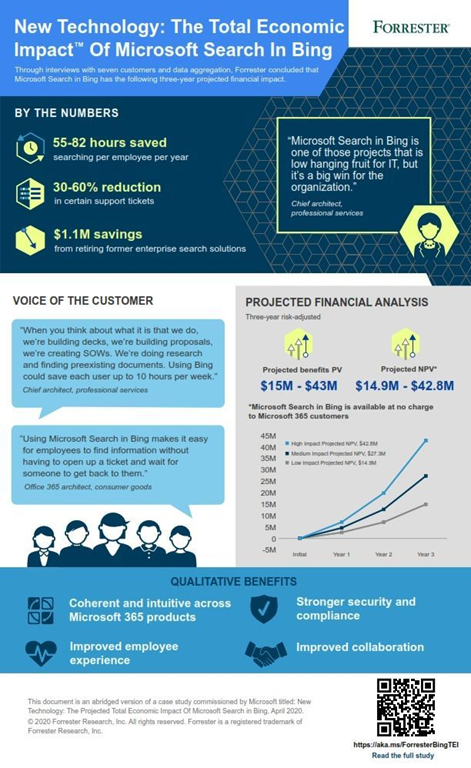
imageRecently, Microsoft commissioned Forrester Research to help quantify the benefits companies saw when they actively used and promoted Microsoft Search in Bing.

To do so, Forrester spoke with IT Pros at seven different organizations about how they functioned before and after implementing Microsoft Search in Bing.

Based on those findings, Forrester calculated the benefits to organizations over a three-year period, finding companies could:

  • Save between $13-$40M in lost productivity
  • Reduce certain support tickets 30-60%
  • Save up to an additional $1.1M in combined time and money by retiring existing search solutions
  • Full Forrester Total Economic Impact report

Surprised? It’s real. Employees are struggling to manage all the content and information required of them without the right tools. Too often this leads to unnecessary time spent searching, too many clicks to find what they need, or a frustrated employee who gives up and reaches out to the help desk for support. Forrester found that companies actively using Microsoft search in Bing could save each employee 55-82 hours per year otherwise spent searching!

Download the report here:

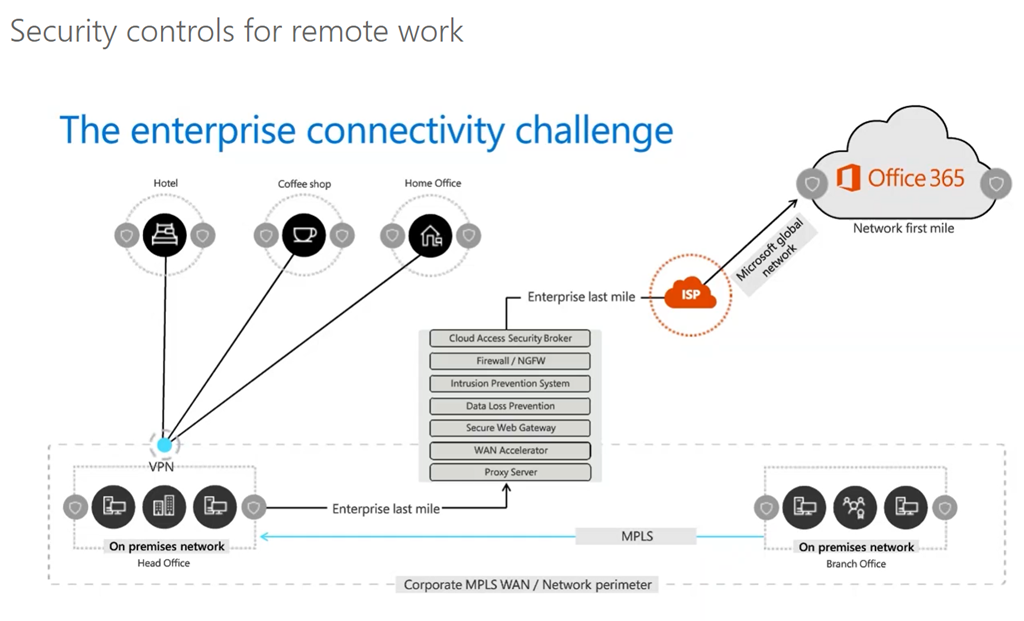
imageIn trying to enable the modern working from home scenario, the challenge for organizations arises in working with or around their legacy network architecture. As more customers and users move to the cloud, the network’s ability to scale becomes limited. Microsoft’s Chief Security Advisor, Sean Sweeney and Senior Program Manager, Paul Collinge, address the architecture’s design problems and focus on three steps for adapting an organization’s network for heavy remote usage during these unprecedented times while leveraging the capabilities already present in Microsoft 365.

  1. Identify paths to optimize for Office 365
  2. Implement a VPN split tunnel
  3. Take a different approach to security controls

With taking these steps to adapt to a changing security environment, organizations can take advantage of control benefits such as preventing unauthorized access, controlling authorized user access, data loss prevention, and IDS/IPS, DDoS protection. Your organization can effectively elevate security and performance while also protecting your employees at home.

imageThe new “Developer’s Guide to Azure” eBook published from Microsoft, written by Build5Nines’ own Chris Pietschmann, is your guide to getting started with Microsoft Azure development.

This book is a great jumpstart to your journey as an Azure Developer or Azure Architect working to create websites, databases, Internet of Things (IoT) solutions, and so much more!

The books chapters include topics such as:

  1. Getting started with Azure
  2. Connecting your application with data
  3. Securing your application
  4. Adding intelligence to your application
  5. Connecting your business with IoT and gaining insights
  6. Deploying your services and reducing costs
  7. Share your code, track work, and ship software
  8. Microsoft Azure in action
  9. Summary and resources

Whether you’re just starting out with Microsoft Azure, working on a cool side project, or are a professional developer, developing with Microsoft Azure services and tools enables you to adopt the latest cloud technologies. This is true regardless of your preferred programming language (C#, Java, Javascript, Python, PowerShell, and more!) and development stack, and even including open source technologies!

Posted by: kurtsh | September 3, 2020

RELEASE: Microsoft Lists in Microsoft Teams for GCC tenants

imageToday, we are proud to announce the general availability of the Lists app in Teams for all our commercial and GCC customers.

As you might already know, Microsoft Lists, which we announced at Build 2020 is a Microsoft 365 app that helps you track information and organize your work. Lists are simple, smart, and flexible, so you can stay on top of what matters most to your team. Track patients, loans, issues, assets, routines, contacts, inventory and more using customizable views and smart rules and alerts to keep everyone in sync. With ready-made templates, you can quickly create lists from directly within Teams and access them on the Teams mobile app by accessing the Lists tab you added as a channel.

This feature is enabled in GCC by default. The Lists app in Teams includes 3 new industry-specific templates – Patients, Loans and Incidents which can be used by Government agencies. Find out more details in our main announcement post here.

Read the announcement here:

Posted by: kurtsh | September 1, 2020

RELEASE: Azure AD My Sign-Ins

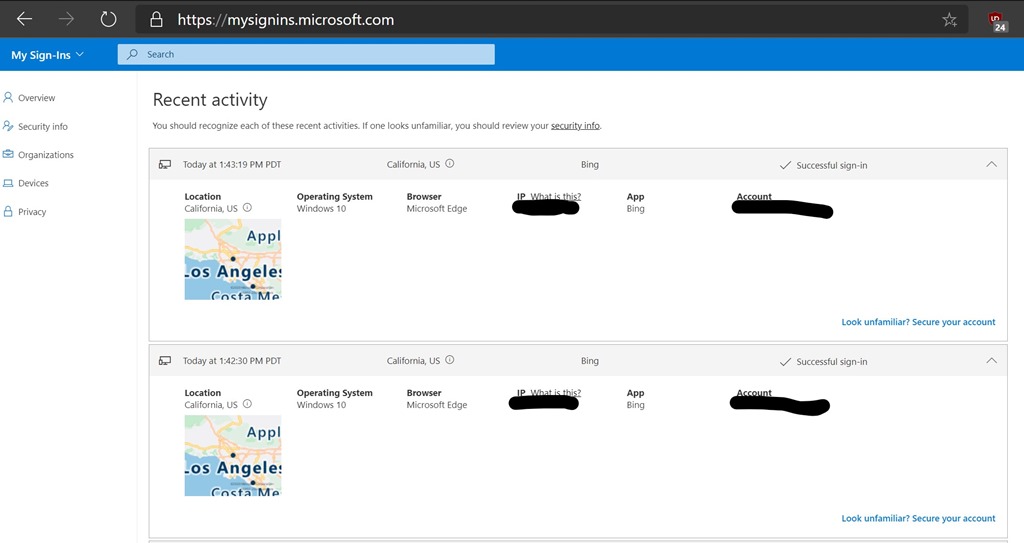
Annotation 2020-09-01 135525We’re excited to announce the General Availability of Azure AD My Sign-Ins—a new feature that allows enterprise users to review their sign-in history to check for any unusual activity. As we discussed in the Public Preview blog post, the My Sign-Ins page empowers users to see:

  • If anyone is trying to guess their password.
  • If an attacker successfully signed in to their account from a strange location.
  • What apps the attacker accessed.

If you’re an Azure AD user, access your “My Sign Ins” here:

There’s a similar feature also available for consumer logins using Microsoft Accounts:

Read more here:

Posted by: kurtsh | September 1, 2020

RELEASE: Azure Firewall Manager

image


Azure Firewall Manager is now generally available.

Azure Firewall Manager is a security management service that provides central security policy and route management for cloud-based security perimeters.  It includes Azure Firewall Policy, Azure Firewall in a Virtual WAN Hub (Secure Virtual Hub), and Hub Virtual Network. In addition, we are introducing several new capabilities to Firewall Manager and Firewall Policy to align with the standalone Azure Firewall configuration capabilities.

Key features in this release include:

  • Threat intelligence-based filtering allow list in Firewall Policy is now generally available.
  • Multiple public IP addresses support for Azure Firewall in Secure Virtual Hub is now generally available.
  • Forced tunneling support for Hub Virtual Network is now generally available.
  • Configuring secure virtual hubs with Azure Firewall for east-west traffic (private) and a third-party security as a service (SECaaS) partner of your choice for north-south traffic (internet bound).
  • Integration of third-party SECaaS partners are now generally available in all Azure public cloud regions.
  • Zscaler integration will be generally available on July 3, 2020. Check Point is a supported SECaaS partner and will be in preview on July 3, 2020. iboss integration will be generally available on July 31, 2020.
  • Support for domain name system (DNS) proxy, custom DNS, and fully-qualified domain name (FQDN) filtering in network rules using Firewall Policy are now in preview.

Read more here:

« Newer Posts - Older Posts »

Categories