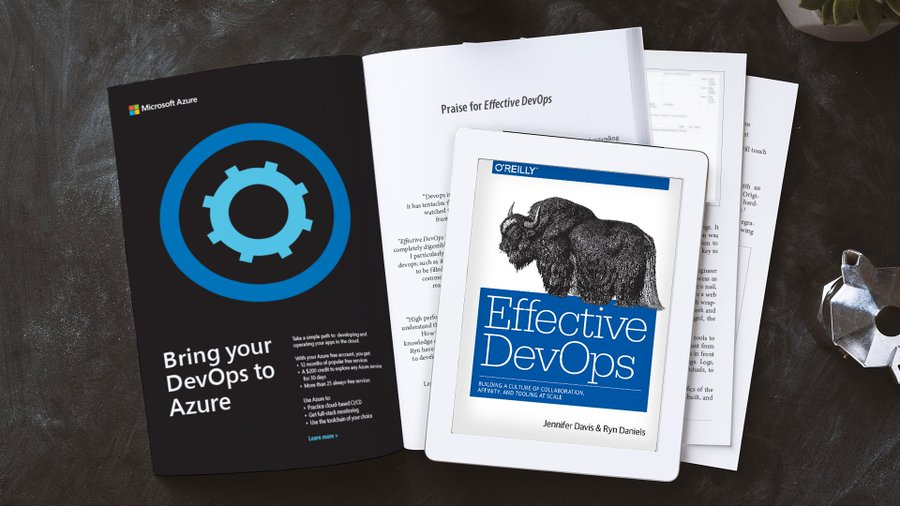
imageHow have successful organizations navigated their #DevOps journeys? Find these stories and more in Effective DevOps from O’Reilly.

DevOps enables organizations to deliver software faster and more reliably. But to get the desired results, it’s important to know that there’s more to building an effective DevOps practice than learning new methodologies and technologies. Culture is the key to a successful DevOps transformation.

Download Effective DevOps from O’Reilly to find out how to build a strong and sustainable DevOps culture within your organization.

Read the e-book to learn:

  • The foundations and central four pillars of effective DevOps.
  • Tips for fostering collaboration, strong interpersonal relationships, and affinity between teams. 
  • How to select tools and workflows that support and strengthen your organization’s unique DevOps culture.
  • How to troubleshoot common problems and misunderstandings.
  • How successful organizations have handled their DevOps journeys.

Download now:

Posted by: kurtsh | November 26, 2020

TRAINING: Power Platform Beginner’s Course (Udacity)

imageIf you don’t know how to code but want to easily build apps that solve business problems, there’s now a powerful and effective solution to help you create your own. No longer will you need to get swamped with technical details or use developer resources to create amazing apps. Now, you can use low-code solutions, like Microsoft Power Platform. The best part? Udacity is offering a free, beginner-level course to show you how.

What is Microsoft Power Platform?

Microsoft Power Platform is an app development, data analysis, automation and AI solution from Microsoft that empowers people in the tech industry who aren’t engineers — citizen developers at any level of the organization. It is a no-code platform which means that users don’t need any programming experience to use the tool.

Microsoft Power Platform has four main components:

  • Power Apps –  Low-code, extendable apps for web, iOS, and Android that can be built with a drag-and-drop interface.
  • Power BI – Self-service analytics brought together in simple dashboards and reports, perfect for driving business insights
  • Power Automate – Codeless workflow automation that integrates hundreds of apps in a matter of minutes
  • AI Builder – Incorporate AI into your app using pre-built models or training your own.

Microsoft Power Platform opens up a world of possibilities, and learning how to use it is easy.

Instructors
  • Dona Sarkar, Dev Manager, Power Platform & Fusion Devs Advocacy, Microsoft
  • Greg Hurlman, Power Platform Traditional Dev Advocate Lead, Microsoft
  • Gomolemo Mohapi, Power Platform Student Dev Advocate Lead, Microsoft
  • Joe Camp, Power Platform Career Switchers Advocate Lead, Microsoft

Enroll in the course here:

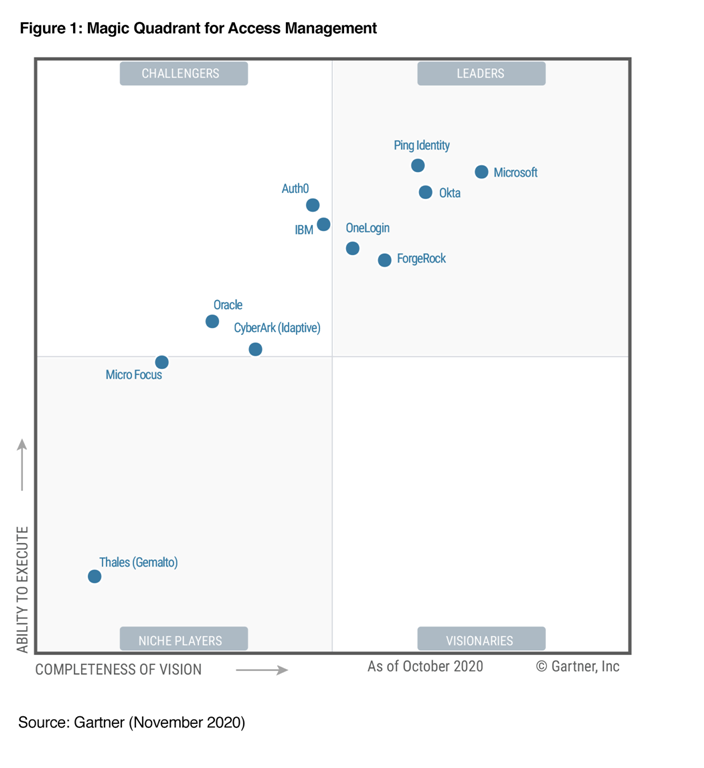
imageMicrosoft is doing very well when it comes for Azure Active Directory, according to Gartner.

From Alex Simons, Corporate VP for Identity Program Management:

I’m proud to announce that for the fourth year in a row, Microsoft Azure Active Directory (Azure AD) has been recognized as a “Leader” in Gartner Magic Quadrant for Access Management, Worldwide.

    image

    To read the entire post and to download the Gartner Group Magic Quadrant report, free of charge, visit:

DOWNLOAD: Microsoft Azure Active Directory again a “Leader” in Gartner Magic Quadrant for Access Management
https://www.microsoft.com/security/blog/2020/11/24/microsoft-azure-active-directory-again-a-leader-in-gartner-magic-quadrant-for-access-management/

imageLearn how Azure Sentinel can consume security telemetry data directly from a 3rd Party SIEM like Splunk.

Why do we want to share this scenario? For some scenarios it makes sense to use data from 3rd Party SIEMs for correlation with available data sources in Azure Sentinel, also Sentinel can be used as single pane of glass to centralize all incidents (generated by different SIEM solutions) and finally you will probably have to deliver the side-by-side for a while until your security team will be more comfortable working within the new SIEM (Azure Sentinel).

Read the full blog post here:

Limageearn how to set up a secure, remote desktop experience from anywhere using Windows Virtual Desktop. Plan, deploy, and optimize your virtual desktop environment to deliver Windows 10 desktops on any device—and reduce infrastructure costs.

Read the Packt Quickstart Guide to Windows Virtual Desktop to:

  • Plan for a successful deployment with technical configurations and steps to get started.
  • Explore the unique benefits of Windows Virtual Desktop, including advanced security and compliance features that help keep your apps and data secure.
  • Get troubleshooting tips and best practices.

Download the eBook for free here!

Posted by: kurtsh | November 25, 2020

INFO: Security & Compliance for Microsoft 365 Government

imageAt Ignite 2020 this year, we specifically delivered sessions for security and compliance professionals and anyone that is looking to learn more about how Microsoft 365 Government can help in protect and navigate the modern digital world. The below sessions are posted in the Microsoft Tech Community Video Hub.

Posted by: kurtsh | November 25, 2020

INFO: Advanced eDiscovery for Microsoft 365 Government

imageToday, more than ever, government organizations are facing increasing challenges associated with remote delivery of public services. We have added enhanced regulatory, legal, and forensic investigation capabilities in the government clouds to help address these challenges.

We are excited to announce Advanced eDiscovery capabilities in Microsoft 365 Government
Advanced eDiscovery provides a broad set of intelligent capabilities to help customers reduce large volumes of data to a relevant set. For example, an automatically generated query helps filter only for unique content by identifying near duplicates, which can help dramatically reduce data.

You can learn more about this and other Advanced eDiscovery capabilities in this demo at:

Posted by: kurtsh | November 25, 2020

OFFER: Microsoft Complete Protection Plans

imageIt’s that time of the year… and folks are busy buying Surface devices & Xbox consoles as gifts… usually on sale at various places.

One of the best purchases I ever make is the extended warranty from Microsoft for their hardware.  Cracked displays from accidental drops, overheating, sticking/dysfunctional keys, hardware-based blue screens, spilt coffee on the keyboards… they’re all by this warranty.

IMPORTANT: YOU HAVE ONLY 45 DAYS AFTER PURCHASE OF THE DEVICE TO PURCHASE AN EXTENDED WARRANTY FROM MICROSOFT.

The warranties are quite “liberal” in my experience.  The terms and conditions are documented in the link below however it’s pretty simple:  If you buy a device from Microsoft, you really should get the extended warranty to protect against any damage you might have and for the peace of mind.

WHERE TO PURCHASE AN EXTENDED WARRANTY FOR SURFACE OR XBOX

The easiest way to get an extended warranty from Microsoft for any Surface or XBox that you’ve purchased in the last 45 days is through the Microsoft Store app on the device.

Here’s links to the warranties – or you can simply open the Microsoft Store (or Xbox Store) on your purchased device.  These links must be opened on the purchased device, for the purchase of a warranty.

XBOX

SURFACE GO

SURFACE PRO

SURFACE LAPTOP

SURFACE BOOK

SURFACE STUDIO

Posted by: kurtsh | November 25, 2020

BETA: Microsoft Tunnel for Intune (Public Preview)

imageThe Microsoft Tunnel Gateway solution allows Microsoft Intune-enrolled iOS and Android devices to access on-premises apps and resources. Tunnel is fully integrated with the Microsoft 365 cloud and takes advantage of single sign-on capabilities using Azure Active Directory (AAD) authentication from the client to Tunnel Gateway.

Conditional Access policies, which are integrated into the Tunnel, provide an additional layer of security for your network. By applying these policies, you can restrict network access to just users who are enrolled, compliant, and meet your defined user identity risk requirements. We consider Conditional Access integration with Tunnel to be a key part of your Zero Trust security journey.

Every organization’s network infrastructure is different. Tunnel Gateway installation is flexible to meet your unique network requirements. It can be installed on-premises, in your DMZ, or in the cloud.

For more on this new preview, read the full announcement here:

This article explains how the tunnel works, including prerequisites to use it, and its architecture.

imageMicrosoft Teams now provides FREE 24-hr long, 300-person audio/video conference calls for anyone – including folks w/out Microsoft Accounts – who can attend via web browser or via the Teams app on PC/Mac/iOS/Android.

The following features are now available in preview in the Teams desktop and web apps, with more features coming soon:

  • Start a personal chat or create a group chat with up to 250 people.
  • Seamlessly sync your existing chats from your phone to your computer and carry-on conversations on the device of your choice.
  • Talk all day for free with friends and family via video or audio calls.3
  • Share video meeting invites with anyone, even if they don’t have Teams, and see up to 49 of your friends and loved ones in one frame in Gallery view or Together mode.
  • Upload and share photos and videos from your computer in any personal or group chat.

To start using personal features in Teams on your computer, follow these steps:

  • If you are new to Teams, download the Teams desktop app and sign in with a personal Microsoft account or create a new one to get started.
  • If you currently use the Teams desktop app at work, click on your profile picture on the top-right corner and select ‘Add personal account’. Upon successful login, Teams will launch a new window containing your personal chats and groups so it’s easy to switch between your work and personal accounts.
    • Note: We are slowly rolling out the option to add a personal account to existing commercial users. So, if you don’t see this option to add your personal account, you may have to wait until your app is updated or for your IT admin to enable it within your organization.
  • If you want to use the personal features in Teams in your web browser, go to this link and sign in or create a new personal Microsoft account to get started.

(While you can use the Teams desktop and web apps to chat with or call friends and family, we are working on bringing all the other personal features available in the Teams mobile app to desktop and web soon.)

Check out the details of this new offer for you and your family, club, or organization:

« Newer Posts - Older Posts »

Categories