imageWith many businesses transitioning to permanent remote work, a hybrid approach, or returning to the office, organizational efforts around protecting business-critical information is crucial.

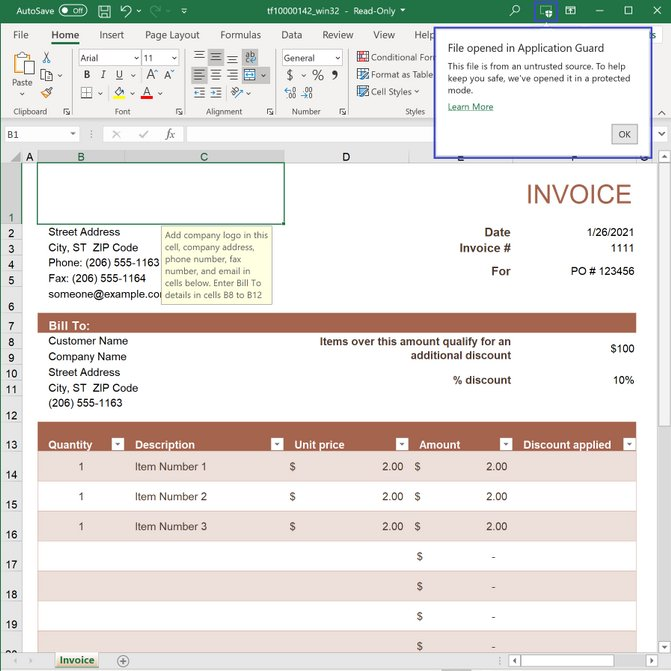
Files from the internet and other potentially unsafe locations can contain viruses, worms, or other kinds of malware that can harm computers and data. To help protect your users against zero-day exploits and other advanced attacks no matter where your users work from, Office 365 opens files from potentially unsafe locations in Application Guard. To help enable you to deliver secure productivity regardless of the model your business chooses, we are pleased to announce that Application Guard for Office* is now generally available.

Application Guard will be off by default. Administrators will need to enable the feature and set the correct policy for users in their organization. To learn more about Application Guard, review the Installation Guide and check out the User Guide on the Office Support website. 

Continue the conversation and join us in the Microsoft 365 Tech Community. Whether you have product questions or just want to stay informed with the latest updates on new releases, tools, and blogs, Microsoft 365 Tech Community is your go-to resource to stay connected!

Application Guard is available to participating organizations that have Microsoft 365 E5 or Microsoft 365 E5 Security licenses.

Posted by: kurtsh | February 12, 2021

NEWS: Introducing Microsoft Viva

Watch now as CEO Satya Nadella introduces Microsoft Viva: Empowering every employee for the new digital age.

imageToday we’re introducing Microsoft Viva, the first employee experience platform built for the digital era.

Microsoft Viva brings together communications, knowledge, learning, resources and insights into an integrated experience that empowers people and teams to be their best, from anywhere.

Powered by the full breadth and depth of Microsoft 365, it is experienced through Microsoft Teams and other Microsoft 365 apps that people use every day.

Visit here:

imageTake a Zero Trust approach to secure your cloud and hybrid networks

Most organizations are facing challenges with the transition to remote work, acceleration of digital transformation, and rise in security threats.

A Zero Trust approach can help secure your network and protect against cyber security attacks. Azure network security is a secure platform with advanced cloud native networking, that can protect web applications and workloads sophisticated attacks.

Join us for this digital event and learn to:

  • Protect and accelerate websites, apps, and content with the new Azure Front Door.
  • Secure cloud perimeters and protect virtual networks with Azure Firewall and Azure Firewall Manager.
  • Utilize Azure Web Application Firewall to protect from web vulnerabilities and bots.

Date/Time:
Thursday, February 18th, 2021 10:00 AM–11:00 AM Pacific Time

Registration:
https://info.microsoft.com/ww-landing-Network-Security-2021.html

imageCapture your notes and action items for every meeting using the “Meeting Capture” Power App!

Also, export & pin “Meeting Capture” to the Microsoft Teams App Bar!

imageMicrosoft has made available a “Power Platform Center of Excellence (CoE) Starter Kit” that provides an organization the ability deliver a framework for:

  • Collaboration/sharing
  • Standards
  • Consistency
  • Governance

…around the usage of Power Platform services like Power Apps, Power BI, Power Automate, and Power Virtual Agents.  (The Power Platform Center of Excellence Starter Kit is downloadable from here:
https://docs.microsoft.com/en-us/power-platform/guidance/coe/starter-kit)

Power Platform Center of Excellence (CoE) Starter Kit Training
To learn how to implement the Center of Excellence Starter Kit, please review the following videos:

Posted by: kurtsh | February 9, 2021

INFO: Notes on deploying Microsoft Defender Antivirus

imageMicrosoft Defender Antivirus (formerly called “Windows Defender Antivirus”) is a tremendously powerful anti-malware, threat protection solution for Windows 10 workstations.  It is built into all versions of Windows 10 – Home, Professional, Enterprise – and provides the strongest antivirus protection that Microsoft offers.  (Microsoft internally relies on Microsoft Defender Antivirus for it’s Enterprise workstation malware protection – and the broader “Microsoft Defender for Endpoint” solution for it’s full  endpoint detect & response technology)

I was recently asked how to migrate from a 3rd party solution to Microsoft Defender Antivirus, so I thought I’d share what I gathered:

  1. MIGRATION PROJECT PLAN
    We provide this guide for migrating from 3rd party AV solutions to our “Premium” Endpoint Detect & Response solution, “Microsoft Defender for Endpoint”, which is a superset of Microsoft Defender Antivirus and other endpoint protection technologies.  It may be of use to you as the general steps are all there.  (There are also explicit instructions available for switching from McAfee & Symantec)
    1. Make the switch from a non-Microsoft endpoint solution to Microsoft Defender for Endpoint (Generic plan)
      https://docs.microsoft.com/en-us/windows/security/threat-protection/microsoft-defender-atp/switch-to-microsoft-defender-migration
  2. APPLICATION EXCLUSIONS
    Establishing application exclusions are documented in the link below:
    1. Configure and validate exclusions for Microsoft Defender Antivirus scans
      https://docs.microsoft.com/en-us/windows/security/threat-protection/microsoft-defender-antivirus/configure-exclusions-microsoft-defender-antivirus
    2. Configure and validate exclusions based on file extension and folder location
      Configure and validate exclusions based on extension, name, or location – Windows security | Microsoft Docs
    3. Configure Microsoft Defender Antivirus exclusions on Windows Server
      https://docs.microsoft.com/en-us/windows/security/threat-protection/microsoft-defender-antivirus/configure-server-exclusions-microsoft-defender-antivirus
  3. “OTHER ELEMENTS” OF MICROSOFT DEFENDER ANTIVIRUS TO CONSIDER
    There is more to Microsoft Defender Antivirus than just malware filtering.  If you are interested in configuring & tuning “Cloud-delivered Protection”, for example, this is covered in this article, “Configure Microsoft Defender Antivirus features”.
    https://docs.microsoft.com/en-us/windows/security/threat-protection/microsoft-defender-antivirus/configure-microsoft-defender-antivirus-features
  4. EVALUATION ENVIRONMENT FOR MICROSOFT DEFENDER ANTIVIRUS
    You can also follow the document, “Evaluate Microsoft Defender Antivirus”.  We provide a demo environment online through VMs in Microsoft’s Azure cloud to experiment with if you’re interested.  See the link below.
    https://docs.microsoft.com/en-us/windows/security/threat-protection/microsoft-defender-antivirus/evaluate-microsoft-defender-antivirus

DEPLOYMENT & MANAGEMENT

The following links are all the documentation you need to deploy and manage Microsoft Defender Antivirus:

(Side note: There is a rather exhaustive book available on Amazon that you might be interested in that goes over Microsoft Defender Antivirus management using SCCM.  This is called “System Center Endpoint Protection” and is really just SCCM used with a series of management templates to control Microsoft Defender Antivirus:

QUESTIONS & FAQs?

imageI’ve linked to a document called “Windows Defender Frequently Asked Questions” to review.  (“Windows Defender” is the previous name for “Microsoft Defender Antivirus”)  And adhoc questions can be addressed (no SLA) at the Community site:

The following document also provides guidance on evaluating Microsoft Defender Antivirus for those looking for it:

Posted by: kurtsh | February 9, 2021

INFO: Azure EA Administration Resources

imageCongratulations!  So you’ve setup an Enterprise Agreement-based Enrollment for Azure! (i.e. You established a contract that enables your organization to use Azure Commercial or Azure Government & bill your usage through Microsoft via a reseller.)

What’s next?  Well, you’ll want to set up your agreement on the https://ea.azure.com and start understanding how to delegate roles, setup subscriptions, and administer your enrollment for your organization.

Here’s resources for training, documentation, and support for your next steps in being an Azure EA Enrollment Administrator:

VIDEO TRAINING:

  • EA Portal Onboarding Session (37min)
    Overview of the EA Portal walking through roles, and managing those roles, managing enrollment policies and settings, Seeing usage and costs
    https://www.youtube.com/watch?v=OiZ1GdBpo-I

DOCUMENTATION:

SUPPORT:
If you have any questions related to

    • Agreements/ Orders
    • Billing & Invoicing
    • Enrollment administration
    • Portal Access
    • Reporting & Service Usage
    • etc.

Submit a support request at the following portal.  Be prepared to submit your Azure Enrollment number which you will receive once the agreement is completed:

Posted by: kurtsh | February 3, 2021

EVENT: Microsoft Ignite – Digital – March 2-4, 2021

imageRegister for this digital experience to learn new skills, connect with peers, and explore the latest technology. Check out the schedule and start planning your experience.

Dates:
March 2–4, 2021

Registration:
https://myignite.microsoft.com/

imageAnyone that’s ever been responsible for cost controls & billing for Azure knows that it’s not light work and a whole lot clicking.

Well, check out what’s new with Azure Cost Management and Billing – there’s a lot of time-saving features that have been introduced that is sure to delight Azure financial admins.

Updates include:

  • a new cost view for resource groups
  • the ability to change billing scopes
  • other time-saving tools

Review the updates here:

Posted by: kurtsh | February 3, 2021

NEWS: 99.99% uptime for Azure Active Directory

imageOn April 1, 2021, Azure Active Directory will update our public service level agreement (SLA) to promise 99.99% uptime for Azure AD user authentication for all licensed Azure AD Premium customers, an improvement over our previous 99.9% SLA. This change is the result of a significant and ongoing program of investment in continually raising the bar for resilience of the Azure AD services.

Because our identity services are vital to keep customer businesses running, resilience and security are and always will be our top priority. In the last year, we’ve seen a surge in demand as organizations moved workforces online and schools enabled study from home—in fact, some national education systems moved entire student populations online with Azure AD. Azure AD is now serving more than 400 million Monthly Active Users (MAU) and processing tens of billions of authentications per day. We treat every one of those authentication requests as a mission critical operation.

In conversations with our customers, we learned that the most critical promise of our service is ensuring that every user can sign into the apps and services they need without interruption. To deliver on this promise, we are updating the definition of Azure AD SLA availability to cover user authentication and federation (and removing administrative features). This focus on critical user authentication scenarios aligns our engineering investments with the vital functions that must stay healthy for customers to run their businesses.

« Newer Posts - Older Posts »

Categories