imageMicrosoft State and Local Government leaders Mandy Ledford and Carol Workman, respective GMs of the East and West regions, preview the Showcase. This unique digital experience demonstrates the creative ways agencies are engaging citizens, empowering employees, optimizing operations and reinventing services. It’s easy to explore demonstrations, interviews and more in our five focus areas:

  1. 21st century workforce
  2. A safer, more secure nation
  3. Connected governments and communities
  4. Reimagined health and human services
  5. Smart infrastructure
  6. Modernizing citizen services for the digital age
  7. Building trust in the online environment
  8. Using AI to understand community needs
  9. Accelerating state government remote work
  10. Moving city government forward
  11. Learning anytime., anywhere
  12. Transforming workforce strategies with data-driven insights
  13. Mapping the coronavirus in real-time
  14. Reducing costs with proactive maintenance models
  15. Working to feed the world
  16. Connecting rural America to new opportunities
  17. Improving legal case management
  18. Connecting through remote learning
  19. Preparing students for the future
  20. Sustaining North America’s largest transportation network
  21. Enhancing public safety
  22. Modernizing unemployment administration
  23. Using AI for accessible inclusive hiring
  24. Keeping the community informed
  25. Enhancing fleet operations
  26. Seeing underground infrastructure in 3D
  27. Automating emergency response
  28. Engaging the public

Be sure to download the Showcase guides to plan your visit and quickly identify key solutions. Thank you for joining us; we look forward to collaborating to deliver results, drive modernization and enhance government services.

imageExplore how data can be used during crises to make informed decisions that will affect the lives of people in your communities in this #GovAfterShock session hosted by @LivNeal

Microsoft Industry Digital Forum
Using data to inform policy making in times of crisis

The COVID-19 crisis has demonstrated the importance of data in making decisions which affect the lives of people and communities around the world.

This session will explore perspectives on how data can be used to drive informed decision making, particularly in times of crisis, and will bring perspectives from gGovernment, the private sector, IGOs and NGOs – all of whom have vital roles in ensuring government can operate at pace and cooperate with each other to meet the needs of the community and further enable societies.
Within the discussion participants will have the opportunity to explore the role that skills have to play in success, enabling remote government access, empowering cross agency collaboration and how approaches to privacy and security can build trust.

  • Host: Olivia Neal, Dir Digital Transformation, Worldwide Public Sector, Microsoft
  • Moderator: Audrey Plonk, Head of Digital Economy Policy Division, OECD Panelist:
  • Robert Opp, Chief Digital Offices, UNDP
  • Bertrand Monthubert, Regional Councilor Data & AI strategy, Region of Occitanie
  • Chris Calabrese, Sr Dir Privacy and Data Policy, Microsoft

This event is in partnership with Government After Shock.

  • You are also asked to register for Government After Shock and attend the panel discussion Data Governance for a Digitally-Enabled State. Hear Dr Julia Glidden, Corporate Vice President, Worldwide Public Sector, Microsoft and government leaders discuss what needs to be done to realize the potential of a full data-driven public sector.

Register for the webcast here:

Posted by: kurtsh | February 18, 2021

DOWNLOAD: The Total Economic Impact™ of Power Automate

imageDiscover how companies are using #PowerAutomate to:

  • Save 26,660 worker hours per year
  • Achieve three-year 199% ROI
  • Reduce time-to-market up to 33%

Discover how 57 companies in industries as diverse as financial services, power generation, and field services streamlined business processes, reduced costs, and improved security with Power Automate.

Read this commissioned study conducted by Forrester Consulting to understand the potential benefits, costs, and risks associated with an investment in Power Automate and learn how:

  • Three ways of using Power Automate saved companies 26,660 worker-hours per year.
  • An intelligent automation solution that unites digital process automation (DPA), robotic process automation (RPA), and AI in a single SaaS offering in the cloud delivered a three-year return on investment of 199 percent.
  • Automating low-value activities frees IT teams to work on other projects that deliver greater value to the organization.
  • Surveyed companies reduced time-to-market by as much as 33 percent.

Read the study:

Posted by: kurtsh | February 18, 2021

INFO: Develop & Test on Azure

There are a number of solutions architectures available using Azure that have been published for your convenience.

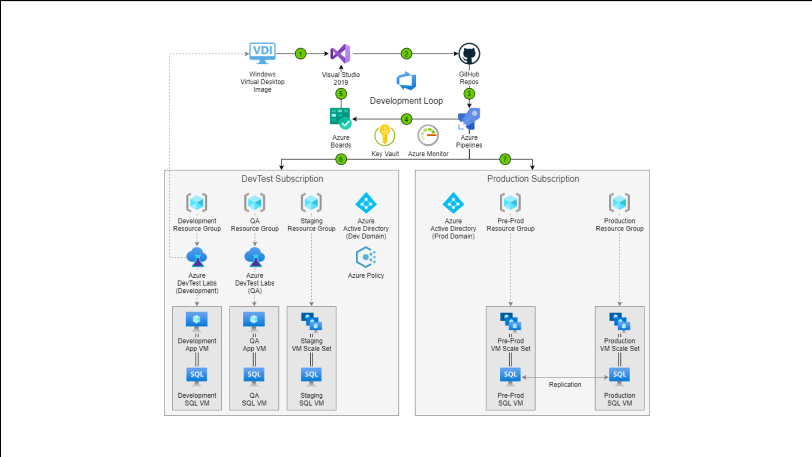
One of the best paths to efficiency & cost-saving is the architecture for Development & Testing in Azure.

imageDevelop and test on Azure

Provision fast, lean, and secure dev/test environments while saving substantially with the Azure Dev/Test offer

Optimize your development and test environments on Azure
Empower your team to quickly provision dev/test and pre-production environments to deliver quality products, applications, and services. Use purpose-built, managed developer services like Azure DevTest Labs, GitHub Codespaces, and Windows Virtual Desktop to easily manage and optimize dev/test environments, tenants, and subscriptions, without sacrificing governance, cost controls, or security.

  • Securely code from anywhere:
    Use Windows Virtual Desktop to securely remote into development environments. If you don’t need direct access to remote resources, use GitHub Codespaces to create cloud-hosted developer environments from any hosted Git repository. Connect to these environments directly from Visual Studio Code, which provides an experience that looks and feels local.
  • Create dev/test environments in seconds:
    Use a rich set of managed developer services to provision fast and compliant dev/test environments that are tailored to your unique needs. Quickly provision and manage team-specific environments across your organization by using Azure DevTest Labs reusable cstom templates to reproduce test environments. Simplify the management experience of Windows virtual machines (VMs) and deploy and scale your dev/test environments with ease using Windows Virtual Desktop.
  • Minimize waste and maximize control:
    Use Azure DevTest Labs to centrally manage your dev/test environments with full control of VMs, and custom template configurations to reproduce high fidelity environments.

    Set lab policies to automatically shut down and start up virtual machines, and use the lab cost trend feature to estimate your spending and set thresholds. Use Azure Cost Management for increased visibility into project costs, while utilizing quotas and policies to ensure that costs stay on target.

  • Stretch your budget with low dev/test rates:
    The Azure Dev/Test offer provides discounted rates for your ongoing development and testing, with no Microsoft software charges for Azure Virtual Machines and special dev/test pricing for other services. Save even more with reservations for one-year or three-year commitments on VMs and Azure SQL Database.

    Visual Studio subscribers also receive free monthly credits that can be used to explore and try Azure services.

More more on this, view the solution architectures here:

Posted by: kurtsh | February 18, 2021

DOWNLOAD: “Optimize Remote Dev Team Productivity”

Find out how to empower your distributed dev team with the right tools, skills, and culture for remote development.

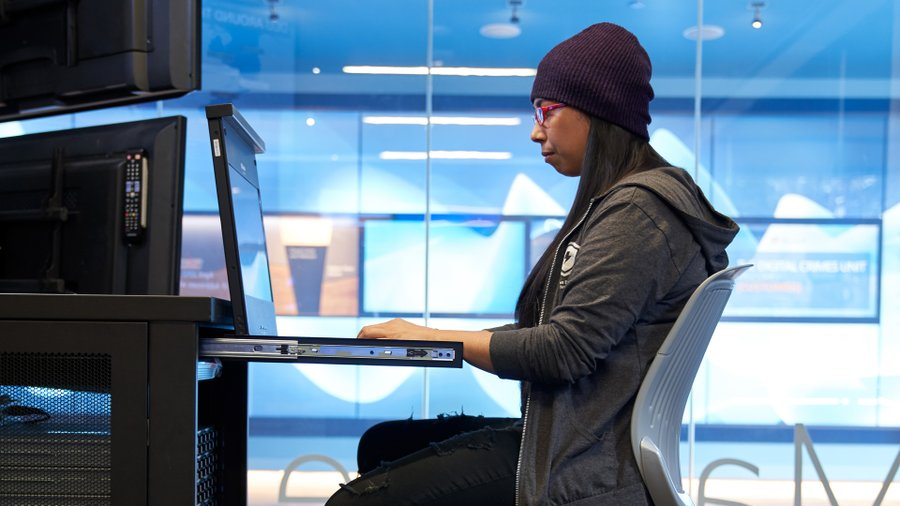
imageDevelopment team leaders are increasingly managing fully distributed teams as organizations embrace remote work. This presents new challenges and opportunities to maximize a teams’ potential by enabling them to code, collaborate, and ship efficiently and securely from any location.

Download 7 Tips to Optimize Remote Developer Team Productivity to find out how to empower your distributed development team with the right tools, skills, and culture for remote development. Get guidance and practical examples to learn how to:

  • Build and maintain a strong team culture in an online environment. 
  • Provide your developers with processes and tools to streamline remote coding while enhancing team collaboration. 
  • Apply automation principles and track application health across the entire development lifecycle in a remote, distributed organization.

Download the ebook here:

Learn how you can use Azure Networking services to improve the foundation and performance of your infrastructure workloads. Check out the webinar!

imageWatch this webinar to learn how you can use the Azure Networking services to improve the foundation and performance of your infrastructure workloads.

You will learn how to:

  • Build a secure virtual network infrastructure in cloud.
  • Connect your on-premises and branch locations the cloud using hybrid connectivity.
  • Enable remote workers to access internal resources.
  • Deliver and secure applications to a global user base.
  • Enable edge computing platforms and applications.

Register here:

Also available:

Posted by: kurtsh | February 17, 2021

EVENTS: Ask Microsoft Anything

Microsoft has been putting on several “Ask Me Anything” events.  Even if you miss it, the archive of questions and answers are at the URLs from the original AMA.

image

This Tuesday we’re hosting an Office Scripts AMA! Join us at 9 am PT on August 16th for an hour of live Q&A. Check it out:
2/10/21 – Announcing an Azure Cognitive Services – Speech AMA! – Microsoft Tech Community

image

Get ready for an Azure Cognitive Services – Speech AMA on Wednesday, February 10 on 9AM PT!
2/10/21 – Announcing an Azure Cognitive Services – Speech AMA! – Microsoft Tech Community

image

Join a Microsoft Lists AMA next week, Feb. 11, 9:00-10:00 AM PT! Experts from the Lists team will be available to respond to your questions and feedback posted in the Microsoft 365 AMA discussion space on the MST Community.
Announcing a Microsoft Lists AMA on February 11, 9 AM PT! – Microsoft Tech Community

image

Join this AMA about the Community Mentors App, on Tuesday, Feb. 9, 9-10 AM PT. Experts will be on hand to respond to your questions and feedback.
Community Mentors App Ask Me Anything (AMA) – February 9, 9:00-10:00 AM PT – Microsoft Tech Community

Posted by: kurtsh | February 17, 2021

INFO: FastTrack for Microsoft 365 security

imageFastTrack remote deployment guidance for eligible customers with 150 or more licenses is now newly available for:

…to help protect against threats.

Posted by: kurtsh | February 17, 2021

TRAINING: Microsoft 365 Training Hub

imageThe Microsoft 365 Training hub provides training on over 25 different products & services in Microsoft 365.  It’s an incredible resource for IT organizations looking to get their end users up and running – as well as train up their own staff. 

For end users alone, there are:

  • Basic Video Training
  • Downloadable Training Templates
  • Quick Starts
  • Tips & Tricks

Also, the hub includes:

  • Office for the Web Training
  • Cheat sheets
  • Infographics
  • Admin & IT Professional Training
  • Modern Workplace training

Interested?  Check out the Training hub here:

Posted by: kurtsh | February 16, 2021

TRAINING: Windows Virtual Desktop Certification (AZ-140)

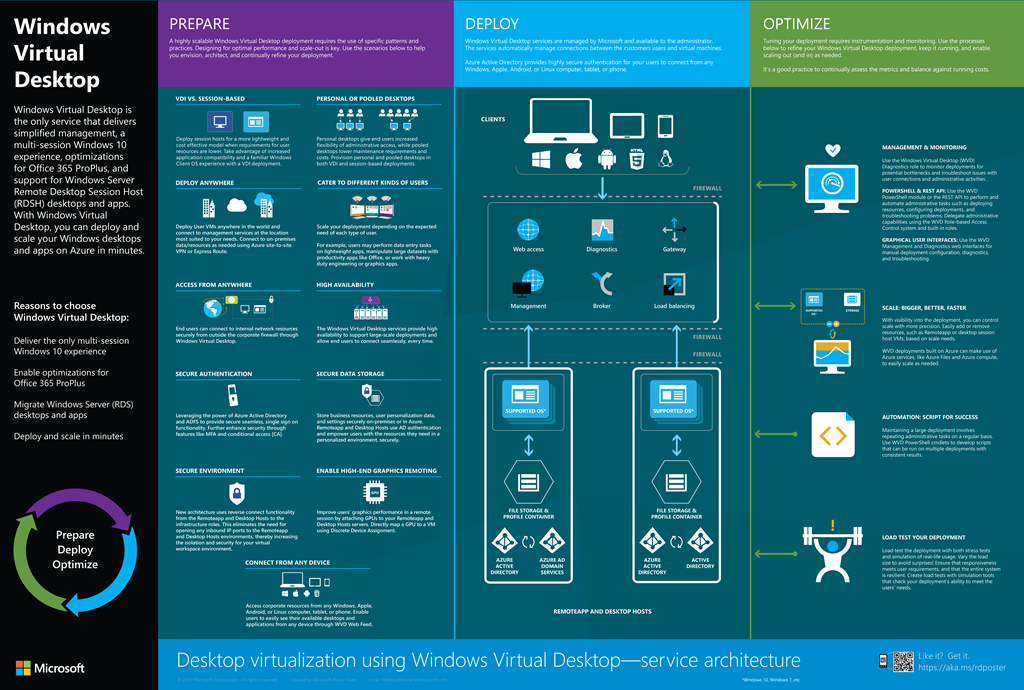
wvd-poster-downloadNew Microsoft certification is coming! Microsoft Certified: Windows Virtual Desktop Specialty, Exam: AZ-140.

  • Plan a Windows Virtual Desktop architecture (10-15%)
  • Implement a Windows Virtual Desktop infrastructure (25-30%)
  • Manage access and security (10-15%)
  • Manage user environments and apps (20-25%)
  • Monitor and maintain a Windows Virtual Desktop infrastructure (20-25%)

Download exam skills outline

« Newer Posts - Older Posts »

Categories