Join us on February 25 to learn how to protect your critical data and apps with the latest innovations from #Azure Storage. Register today:

imageJoin this webinar to discover how to protect your business-critical data and applications with Azure Storage. Azure Storage provides comprehensive data protection capabilities for simple, scalable, and cost-effective backup and disaster recovery.

You’ll learn how to:

  • Protect your critical data from failures and data loss.
  • Ensure quick and cost-effective business continuity across regions and zones.
  • Apply best practices through product demos and customer examples.

Register for this event here:

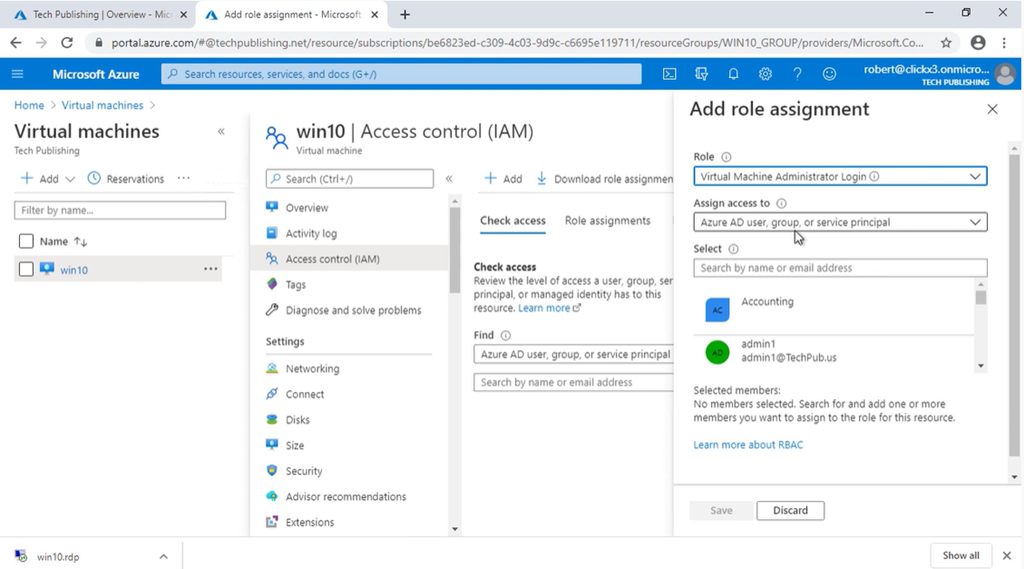
This is what is necessary to setup an Azure VM for authentication and remote desktoping through an Azure Active Directory.  This is a lot more than I think we’d all like and I’m looking to see how this will be improving in the future.

————————-

imageProfessor Robert McMillen shows you how to log in with Remote Desktop to an Azure Virtual Machine using Azure Active Directory.

Here is some of the support information needed to complete these steps from the video:

net localgroup "remote desktop users" /add "AzureAD\you@yourname.com"

dsregcmd /status

RDP File Changes:

enablecredsspsupport:i:0

authentication level:i:2

imageOur Microsoft Defender for Endpoint AMA happened on February 17, from 8:00-9:00 AM PT. Our product team was on hand to answer questions about our threat and vulnerability management capabilities. See the past questions and answers here::

Details:
Microsoft Defender for Endpoint AMA – threat and vulnerability management   
Place: https://aka.ms/ama/DefenderforEndpoint

Posted by: kurtsh | February 21, 2021

VIDEO: “Insider Risk Management” – 7-part Series

imageDon’t let insider threats go undetected. Learn how to uncover, investigate, and act on malicious activities in your organization.

Watch our 7-part Insider Risk Management Series:

  • Episode 1: Identify and take action on critical insider threats
    Insider threats and risks are a major issue for all companies and can easily go undetected until it is too late. Leveraging AI to find what humans may have missed can provide you with a game-changing advantage. Come learn how new features in Insider Risk Management can give you broad visibility into potential insider risks and quickly take action with integrated investigative workflows.
  • Episode 2: Creating and customizing built-in ML policies to quickly identify insider risks
    See how easy it is to configure a policy to detect insider risks within your organization. We offer pre-configured templates for risks ranging from IP Theft by Disgruntled Employees to Security Violations to Data Leaks. Policies can be utilized as is or customized to your organization’s needs.
  • Episode 3: Utilizing integrated workflows to collaboratively remediate insider risks
    Come learn about the end-to-end integrated workflows that ensure the right people across security, HR, legal, and compliance are involved to quickly investigate and take action once a risk has been identified.  In addition to integrations with Advanced eDiscovery, we now have the ability to push tickets to Service Now and send alerts to the Office 365 Management Activity API which can then be consumed by SIEM systems such as Azure Sentinel.
  • Episode 4: Leveraging an integrated end-to-end approach to identify and remediate insider risks
  • Episode 5: Fulfill regulatory compliance requirements with Communication Compliance​
  • Episode 6: Better with Microsoft Teams. Learn more about our latest native Teams integrated features!
  • Episode 7: Learn how to reduce communication risks within your organization

Watch the series here:

Posted by: kurtsh | February 21, 2021

DOWNLOAD: Azure SQL Resource Kit

imageWith so many different factors to keep in mind, choosing the best database for your SQL Server migration can be daunting. Download the Azure SQL Resource Kit for resources and information to help you get started with your migration to Azure SQL. You’ll learn how to choose the database service that fits your needs, utilize your existing on-premises SQL Server skills, and plan your successful deployment.

Explore the resource kit to:

  • Understand how Azure SQL works and start your SQL Server migration with a free copy of the Azure SQL Revealed e-book.
  • See real-world examples of how organizations deployed Azure SQL and are taking advantage of its wide range of features and functionality for data management solutions.
  • Learn how to lower your total cost of ownership while improving operational efficiency.
  • Choose the right database service, run your migration, and take advantage of the extensive free training resources available to you.

Get it here:

imageRegister for this digital event to reimagine your project management with Microsoft Project, Dynamics 365 Project Operations, and Microsoft Planner.

Complete your projects-big and small-on time with project management solutions built to meet your needs. Register now to learn how Microsoft Project, Dynamics 365 Project Operations, and Microsoft Planner work individually and together to supercharge your productivity.

Join us for this digital event to:

  • Discover new features and best practices during the keynote and 6+ hours of additional on-demand demos and product walkthroughs.

  • Connect with Microsoft experts, technology partners, and peers to expand your network.

  • Get tailored guidance and questions answered from the engineering teams behind these products.

Details below:

Posted by: kurtsh | February 19, 2021

INFO: Azure Architecture Center

imageWe recently launched an updated Azure Architecture Center:

  • Azure Architecture Center
    Architecture diagrams, reference architectures, example scenarios, and solutions for common workloads on Azure
    https://aka.ms/all-architectures

Find examples like these:

  • Extend an on-premises network using ExpressRoute
  • Hub-spoke network topology in Azure
  • Consumer health portal on Azure
  • Azure AD identity and access management for AWS
  • Azure security solutions for AWS
  • Baseline architecture for an Azure Kubernetes Service (AKS) cluster

Over 370+ architectural designs for implementing solutions within Azure with a consistent experience, and now much easier to filter and discover the right architecture for your organization!

Posted by: kurtsh | February 19, 2021

INFO: Reply All Storm Protection in Exchange Online

Recently, there’s a been a few folks on Twitter talking about the Reply All storms that their organizations have suffered and the political consequences of those that participate – including their leadership.

We haven’t had a ReplyAll storm at Microsoft for a lonnnnng time.  Why?

Because there’s a Reply All Storm Protection feature in Exchange Online.

When a reply all mail storm happens in your organization, it can disrupt business continuity and in some cases even throttle the rest of your organization’s email for a period of time. At Microsoft Ignite 2019 we announced the Reply All Storm Protection feature to help reduce the impact that reply all storms can have on large organizations. This feature has completed our rollout, and is now available to all Office 365 tenants worldwide (except GCC-High… it’s coming).

Initially the Reply All Storm Protection feature will mostly benefit large organizations who have large distribution lists. When the feature detects a likely reply all storm taking place on a large DL it will block subsequent attempts to reply all to the thread and will return an NDR to the sender. The reply all block will remain in place for several hours.

Initially the Reply All Storm Protection feature will use the following conditions to detect a reply all storm:

  • 10 reply all-s to over 5000 recipients within 60 minutes

It will then block subsequent replies to the thread for 4 hours.
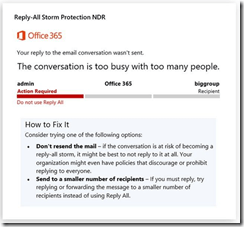
imageThe reply all storm NDR will look something like this:

Over time, as we gather usage telemetry and customer feedback, we expect to tweak, fine-tune, and enhance the Reply All Storm Protection feature to make it even more valuable to a broader range of Office 365 customers.

We’d love to hear your feedback on this feature. We are considering possible future enhancements to improve our reply all storm detection accuracy, add admin customizable thresholds and block duration, as well as producing reply all storm reports and notifications.

We’re already seeing the first version of the feature successfully reduce the impact of reply all storms within Microsoft (humans still behave like humans no matter which company they work for 😉 and believe it will also benefit many other organizations as well.

<taken from the Exchange Team blog>

imageDid you miss the Windows Virtual Desktop digital event? It’s not too late to get the latest insider tips, demos, and product updates. Watch on demand:

Take a technical deep dive into how to deploy and scale virtual desktops and apps with Windows Virtual Desktop. Whether you’re already running virtual desktops or just getting started, you’ll learn new ways to optimize your virtualization projects—directly from the Microsoft product team.

Register for this free digital event to:

  • Get expert guidance on how to quickly and securely move your virtual desktops and apps to Azure.
  • Learn best practices to monitor, automatically scale, and easily manage apps and images in your virtual desktop environment.
  • Find out how to virtualize GPUs, multimedia, and high-performance computing workloads.
  • Hear the latest product news and get details on upcoming features.
  • See demos of virtualization tools and techniques.

Delivered in partnership with Intel.

Register here:

Posted by: kurtsh | February 19, 2021

INFO: Monitoring application sign-in health for resilience

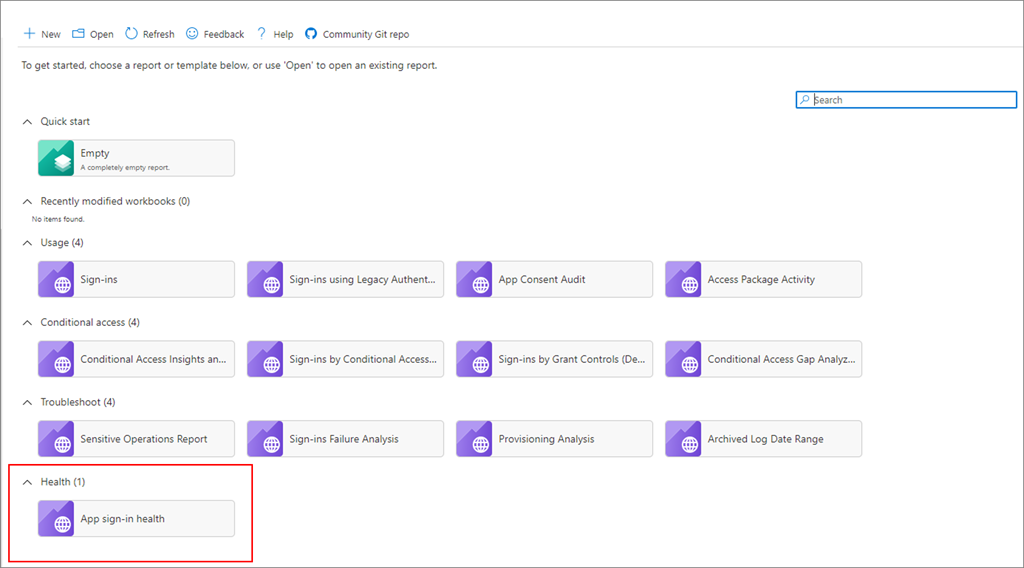
imageAn Azure AD workbook to monitor authentication requests for your applications!

To increase infrastructure resilience, set up monitoring of application sign-in health for your critical applications so that you receive an alert if an impacting incident occurs. To assist you in this effort, you can configure alerts based on the sign-in health workbook.

This workbook enables administrators to monitor authentication requests for applications in your tenant. It provides these key capabilities:

  • Configure the workbook to monitor all or individual apps with near real-time data.

  • Configure alerts to notify you when authentication patterns change so that you can investigate and take action.

  • Compare trends over a period, for example week over week, which is the workbook’s default setting.

Read more here:

« Newer Posts - Older Posts »

Categories