Posted by: kurtsh | September 11, 2021

WHITEPAPER: Azure Defenses for Ransomware Attack

Today we are releasing an eBook that lays out key Azure native capabilities and defenses for ransomware attacks and guidance on how to proactively leverage these to protect your assets on Azure cloud.

imageRansomware and extortion are a high profit, low-cost business which has a debilitating impact on targeted organizations, national security, economic security, and public health and safety. What started as simple single-PC ransomware has grown to include a variety of extortion techniques directed at all types of corporate networks and cloud platforms.

To ensure customers running on Azure are protected against ransomware attacks, Microsoft has invested heavily on the security of our cloud platforms and has provided you the security controls you need to protect your Azure cloud workloads.

By leveraging Azure native ransomware protections and implementing the best practices recommended in this eBook, you are taking measures that ensures your organization is optimally positioned to prevent, protect and detect potential ransomware attacks on your Azure assets. 

This eBook lays out key Azure native capabilities and defenses for ransomware attacks and guidance on how to proactively leverage these to protect your assets on Azure cloud.

Download the eBook here:

Posted by: kurtsh | September 11, 2021

INFO: Windows 11 Optimization & Performance Improvements

imageA lot has been said about Windows 11’s noticeable performance improvements over Windows 10 on the same hardware… and a lot has been said about security & hardware requirements of Windows 11 over Windows 10.

This blog goes over the performance improvements made in Windows 11 and how they are made, including a quick 11min video that was done by Microsoft Mechanics Jeremy Chapman with Microsoft VP, Steve Dispensa.

02:09 — Prioritizing apps and processes

04:22 — Resume from sleep

05:42 — Reduced disk footprint

06:25 — Windows 11 hardware requirements

07:28 — Application compatibility & servicing model

08:38 — Update process for admins

10:16 — MEM policies

11:38 — Wrap up

Read the blog post here:

Task publishing to frontline workers, along with a few other features, has just been released for users of Microsoft Planner for GCC!

imageWe’ve extended Microsoft Planner functionality in Microsoft Teams for GCC customers, with GCC High and DoD availability coming soon. These added features for organizing and assigning tasks include:

  • A new List view for quickly seeing and sorting more tasks. It also supports bulk editing so you can change the details of several tasks, like progress, priority, and due date, all at once. The List view is available for Planner in Teams alongside the traditional Board, Charts, and Schedule views from Planner for the web.
  • A left navigation pane that organizes your tasks by Important (based on priority), Planned (based on due date), and Assigned to me (tasks that others assign to you). That same pane also shows all your Teams and channels that contain a Planner plan to help you quickly navigate to the right team effort.
  • Native integration with Teams notifications (i.e., messages, channels, and email) for certain task updates, like when you’re assigned a task or when a task is completed.
  • Task publishing to frontline workers. With this feature, leadership can create tasks centrally at the corporate level and publish those tasks to targeted frontline locations like stores, clinics, or factories. Frontline workers at those locations see a simple list of their task assignments through Teams, while corporate has full visibility into task progress across all locations.

Read the announcement here:

Posted by: kurtsh | September 10, 2021

EVENT: “Microsoft Event” – September 22nd, 2021

imageHere we go again. One guess what we’re announcing. Smile

“Join us to see what’s next.”

Posted by: kurtsh | September 10, 2021

NEWS: Microsoft acquiring Aussie video startup Clipchamp

Microsoft is acquiring Clipchamp which provides in-browser video editing.

imageClipchamp, which has been likened to Canva, provides easy-to-use in-browser video editing tools for users.  The company aims to combine the simplicity of a web app with the full computing power of a PC with graphics processing unit (GPU) acceleration.

Microsoft says the acquisition will boost its Microsoft 365 offering and provide users with tools fit for the current environment.

Read more here:

This is for SQL Server 2012 licensees that don’t have Software Assurance:

  • SQL Server 2012 is going out of support soon – meaning it won’t get security updates, unless Extended Security Updates are obtained (usually a separate, annual subscription)
  • By moving to Azure Dedicated Hosts in Microsoft’s cloud, your SQL Server 2012 will receive Extended Security Updates (ESUs) at no cost

Here’s the recently announced details on how customers can migrate their SQL Server 2012 installations to Azure Dedicated Hosts to get ESUs at no additional cost while in Azure:

imageMigrating your on-premises infrastructure and architecture to the cloud may seem like a daunting task, especially if you don’t have Software Assurance for your on-premises licenses. While this may seem difficult and challenging, there is a pain-free way to bring your existing on-premises licenses to the cloud through Azure Dedicated Host. Not only does Azure Dedicated Host provide you with your own private cloud on Azure, but it also allows you control over host maintenance and lets you continue using your existing licenses, and offers continued support for applications that would not otherwise be supported on other clouds. For example, when you run your Dedicated Host on Azure you can take advantage of free SQL Server 2008 or SQL Server 2012 Extended Security Updates, only in Azure.

The following blog post will take you on a deep dive into moving SQL Server licenses to Azure Dedicated Host, its infrastructure benefits, and why it is the easiest way to bring your existing on-prem licenses to the cloud.

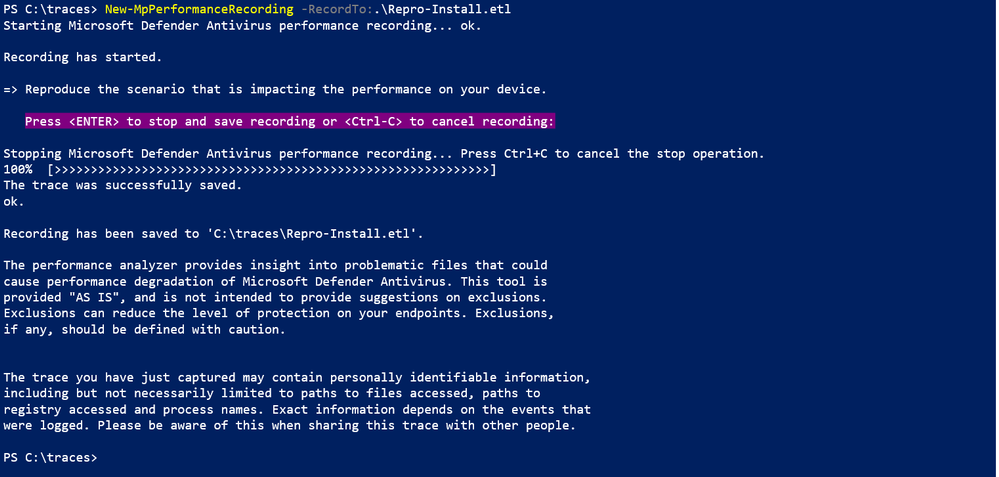
This is the tool we just released for Microsoft Defender for Endpoint/Antivirus.

Posted by: kurtsh | September 9, 2021

INFO: What counts as a “Teams Meeting”?

Microsoft customers that have an interest in monitoring their overall Teams Meetings usage for contractual reasons may be interested in knowing how Teams Meetings are measured per tenant:

The components that count towards the Teams Meetings metric are:

  1. Number of distinct users that participate in at least one scheduled meeting or group call* or Calling 1:1 Or VOIP or Phone System (PSTN) or Walkie Talkie call in the last 28 days.
  2. Excludes guest users/direct dial-in users.
  3. Includes Teams free and trial seats.
  4. Excludes calendar actions like scheduling/accepting.
  5. Calling MAU includes 1:1 Ad-hoc calls (joined by 2 participants) or Voice IP (VOIP) or Phone System PSTN users
  6. Walkie Talkie calls are joined by users into Walkie Talkie Channel

* Group calls are calls joined by three or more participants.

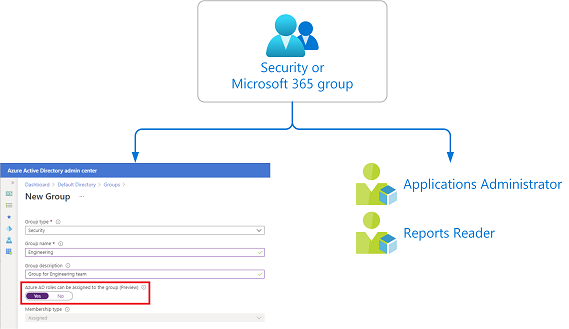
Assigning Azure AD roles to cloud groups is generally available now. isAssignableToRole attribute on group object is in Graph v1.0 and latest version of AzureAD PowerShell.

imageAzure Active Directory (Azure AD) lets you target Azure AD groups for role assignments. Assigning roles to groups can simplify the management of role assignments in Azure AD with minimal effort from your Global Administrators and Privileged Role Administrators.

Why assign roles to groups?

Consider the example where the Contoso company has hired people across geographies to manage and reset passwords for employees in its Azure AD organization. Instead of asking a Privileged Role Administrator or Global Administrator to assign the Helpdesk Administrator role to each person individually, they can create a Contoso_Helpdesk_Administrators group and assign the role to the group. When people join the group, they are assigned the role indirectly. Your existing governance workflow can then take care of the approval process and auditing of the group’s membership to ensure that only legitimate users are members of the group and are thus assigned the Helpdesk Administrator role.

..

Read how to implement this here:

Posted by: kurtsh | September 8, 2021

INFO: Azure Security Podcast

imageThe Azure Security Podcast is a twice-monthly podcast dedicated to Security, Privacy, Compliance, Governance and Reliability on the Microsoft Cloud Platform. Hosted by Microsoft security experts Michael Howard, Sarah Young, Gladys Rodriguez and Mark Simos.

Here’s some of the subjects from the last 35 episodes:

  • AZURE DEFENDER FOR SQL – THREAT PROTECTION

  • STUDY GUIDE FOR SC-200: MICROSOFT SECURITY OPERATIONS ANALYST

  • ZERO TRUST

  • AZURE SENTINEL SOC PROCESS FRAMEWORK

  • AUTOMATING SECURITY

  • MICROSOFT THREAT INTELLIGENCE CENTER – MSTIC

  • AZURE DATA EXPLORER

  • AZURE PURVIEW

  • APPLIED DATA SCIENCE, AI AND MACHINE LEARNING IN SECURITY

  • AZURE BASTION

  • AZURE SECURITY QUESTIONS

  • SECURITY NEWS DUMP FROM IGNITE

  • NETWORK SECURITY

  • AZURE RED TEAM

« Newer Posts - Older Posts »

Categories