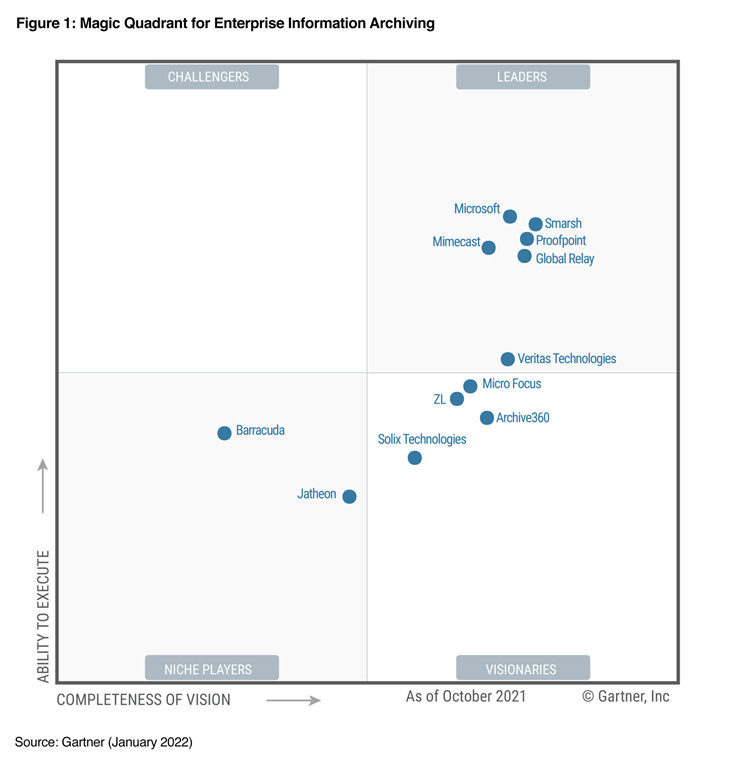
imageWe are excited to share this great news with you – Microsoft is named as a Leader in the 2022 Gartner Enterprise Information Archiving (EIA) Magic Quadrant.

This is the fourth consecutive year that Microsoft has been recognized as a leader in this critical space. This recognition reinforces our ability to offer best-in-class and innovative information governance, data connectors/archiving, eDiscovery, communication compliance, and other compliance solutions.

Read the announcement here & download the report at this link:

imageLearn about the cost savings and business benefits that companies experienced by using Azure Virtual Desktop—previously called Windows Virtual Desktop—for their virtual desktop infrastructure (VDI). This 2021 Forrester Consulting study commissioned by Microsoft and Intel provides a detailed analysis of the return on investment and other outcomes experienced by real customers.

The analysis shows that potential benefits include:

  • A three-year 210 percent return on investment and payback on the initial investment in as little as three months.
  • Reduced IT costs for maintenance, deployment, and management by 59 percent.
  • Reduced VDI licensing and infrastructure costs by up to 34 percent.
  • Increased productivity by up to 22 person-hours through improved security response, connectivity, and user onboarding.

Download the report here:

imageGet more value from your existing VMware investments by modernizing your virtual desktop infrastructure (VDI) with Azure Virtual Desktop—formerly called Windows Virtual Desktop. Learn to simplify delivery of your VMware-hosted virtual desktops and apps by using VMware Horizon Cloud Service on Microsoft Azure.

Download this guide to find out how to:

  • Deliver highly secure remote work solutions to your organization from virtually anywhere, with a familiar Windows 10 experience. 
  • Plan for implementation with prerequisites and steps to use Horizon Cloud on Azure.
  • Apply best practices to quickly deploy, test, and scale your app and desktop virtualization on Azure. 
  • Optimize your environment after deployment with tools like Azure Advisor and VMware App Volumes.

Download the eBook here:

imageSimplify infrastructure management, improve security, and reduce costs by migrating your Remote Desktop Services environment to Azure Virtual Desktop. Explore the benefits of moving your virtual desktop infrastructure (VDI) to the cloud and learn how to migrate in seven steps. 

You’ll learn how to:

  • Spend less time maintaining your infrastructure by using a VDI managed service.
  • Take advantage of integrated end-to-end security for users, apps, and data. 
  • Optimize costs by using your existing licenses and paying only for what you use. 
  • Migrate to Azure Virtual Desktop with step-by-step guidance.

Download the eBook here:

imageThis document is intended for administrators who may be deploying Virtual Desktop Infrastructure (VDI) systems and describes hardening steps specific to that workflow as well as general guidance that can be applied to any Azure deployment.

Independent Security Evaluators (ISE) reviewed VDI  architectures using the Microsoft Azure cloud computing environment to establish an Azure-specific hardening guide for the media and entertainment (M&E) industry.

imageLearn how to set up secure, remote work experiences in minutes from anywhere using Azure Virtual Desktop. Plan, deploy and optimise your virtual desktop infrastructure (VDI) to deliver Windows 10 desktops on any device—and reduce infrastructure costs. 

Read the latest edition of Quickstart Guide to Azure Virtual Desktop to:

  • Plan for a successful deployment with updated features and guidance, including technical configurations and steps to get started.
  • Set up and optimise your virtual desktops in the Azure portal with just a few clicks. 
  • Explore the unique benefits of Azure Virtual Desktop, including cost-saving pricing options and advanced security and compliance features.
  • Get best practices, recommendations and troubleshooting tips.

Download the eBook here:

image“Although many employees are ready to return to the workplace, more than 70 percent say they want flexible remote work options to continue. 1 So how can you help them collaborate and stay productive without compromising security or increasing complexity for IT?

As you define your hybrid work strategy, consider a Cloud PC solution with Windows 365 or a virtual desktop solution optimized for flexibility with Azure Virtual Desktop (formerly Windows Virtual Desktop). Pairing one of these simple, flexible options with Surface devices will connect your people to the data and information they need while keeping your organization secure.

Whether you choose Windows 365 or Azure Virtual Desktop, you can provide your full-time employees, part-time employees, contractors, and interns with a highly flexible, simple, secure, and familiar experience using the Windows operating system on Microsoft Surface. The right approach and technology can help your organization embrace the hybrid era today to grow and innovate for tomorrow.

To learn more, see the following ebook:

imageGet more value from your existing Citrix investments by modernizing your virtual desktop infrastructure (VDI) with Azure Virtual Desktop—previously called Windows Virtual Desktop. Use this guide to learn about migrating your Citrix on-premises virtual desktop and app environment to Citrix Virtual Apps and Desktops for Azure.

Find out how to:

  • Plan a successful move with migration prerequisites and insights for using Citrix and Azure Virtual Desktop solutions together. 
  • Unify management and support more users across your hybrid environment by quickly deploying and scaling virtual desktops.
  • Deliver secure, productive remote work experiences virtually anywhere using Azure Virtual Desktop and Citrix Virtual Apps and Desktops for Azure. 
  • Optimize your VDI with best practices and familiar tools like Windows 10 Enterprise multisession, integrated security features, and Citrix App Layering.

Download the book here:

imageLearn how to strengthen business resilience by developing a disaster recovery strategy for your Azure Virtual Desktops—formerly called Windows Virtual Desktop—in Azure Virtual Desktop Handbook: Disaster Recovery. With this free handbook, you’ll:

Get step-by-step guidance to create a disaster recovery strategy for your Azure Virtual Desktop environment to keep users connected during an outage.

  • Learn how to enable business continuity with tools like Azure Site Recovery, FSlogix, Azure NetApp Files, and Cloud Cache.
  • Find recommendations for testing and optimizing your disaster recovery implementation.

Download the eBook here:

Posted by: kurtsh | January 20, 2022

INFO: 25 Windows Policies you shouldn’t set

Ever heard of policy bloat?  Yeah, I know.  We don’t have time to worry about that… but as with all policies, in Windows there are policy settings that no longer work or have been phased out for other policies. We’ve documented 25 that you should review.

imageWe have listened to your feedback and learned a lot about which experiences work and which don’t. We have also worked to evolve and simplify the controls needed to support these improved experiences, and identify which older policies have become irrelevant or replaced with a better option. As a result, the Windows update policy set contains policies that no longer have any impact; that don’t work as described on devices running Windows 10, version 20H2 or later; or that work but not as well as the policies that were added to accomplish a similar experience in a much better way.

Read about them here:

« Newer Posts - Older Posts »

Categories