Posted by: kurtsh | September 16, 2022

INFO: Cloud-based Development Environments from Microsoft

Here’s 4 solutions we provide that address the needs of Windows users & Developers that want configurable, remotely-accessible Windows 10/11 workstations hosted in the cloud.

  1. Azure Virtual Desktop
    https://azure.microsoft.com/en-us/services/virtual-desktop/
    imageMicrosoft’s Enterprise cloud-hosted VDI offering.  A fully IT-managed Virtual Desktop Infrastructure platform with complete configurability for OS, software & hardware. Optionally available for integration with 3rd party tools including Citrix XenDesktop, VMware Horizon, and other historically on-prem 3rd party VDI solutions.  Costs are determined based on monthly usage & configuration.  The original Microsoft hosted desktop offering and the one with the greatest maturity & largest ecosystem.
  2. Microsoft Windows 365
    https://www.microsoft.com/en-us/windows-365
    imageProvides a Windows 10/11 virtual machine and persists the user’s personalized apps, content, and settings—from the Microsoft cloud to any device.  Uniquely available in “t-shirt sizes” providing a flat monthly price for each subscribed VM, ranging from $31-$66/month depending on configuration – with the caveat that there is very little flexibility in hardware configuration beyond what initial VM option is chosen.  With different options available for small & medium businesses vs Enterprise-class customers, Windows 365 provides a turnkey solution for individuals and organizations looking for a balance between predictable costs as well as VM-level flexibility.
  3. Microsoft Dev Box – Virtual Machines for Developers
    https://azure.microsoft.com/en-us/blog/announcing-microsoft-dev-box-preview/
    imageService that provides hosted Windows hardware & software tailored to development work. Enables quick provisioning of standard tools & platform software for developers in a hosted environment.  Leverages Windows 365 as the backend.  Full hosted Windows VM – full control over the hosted environment to install applications like SQL Server.  Can be managed using Intune/Endpoint Manager.  Works with any IDE and any source control system that runs on Windows.  Can be managed using Intune, Endpoint Manager or the Azure portal.
    (Video overview of Dev Box is available here: https://www.youtube.com/watch?v=kyeuSpR74W4_
  4. Github Codespaces
    https://code.visualstudio.com/docs/remote/codespaces
    imageGitHub Codespaces provides cloud-powered development environments for any activity – whether it’s a long-term project, or a short-term task like reviewing a pull request. You can work with these environments from Visual Studio Code or in a browser-based editor but Visual Studio’s IDE is not yet available.  As a fully managed environment created in the cloud, Codespaces does not enable modifications to the operating environment like Dev Box does but also absolved the developer of the complexity of an unmanaged environment.
    (Video overview of Github Codespaces is available here: https://www.youtube.com/watch?v=j5VQ8OlwbqI)
    Note: Visual Studio Online was renamed to Visual Studio Codespaces then subsequently merged into Github Codespaces.

Wanna take Azure classes from Microsoft’s own Deployment Engineering team?  Get ready to register for “Learn Live: FastTrack for Azure”.

imageLearn along with expert Azure engineers as they walkthrough hands-on exercises, share demos, and answer your questions to connect the dots and accelerate your Azure solution implementation. This interactive and on-demand series will cover a variety of Azure solution areas as directly requested by customers. Our engineers are eager to help you gain skills and apply them on your learning and deployment journey, including answering your questions.

Join us for this live learning experience where you will be guided by subject matter experts through the Learn modules below in real time along with developers around the globe. Earn badges, prepare for certifications and Learn Live with a great community! See you there 🙂

The following classes are scheduled & registration is first come, first served – and NO, I can’t get you in if it’s booked full, so register now!

For descriptions of each class, visit:

Posted by: kurtsh | September 10, 2022

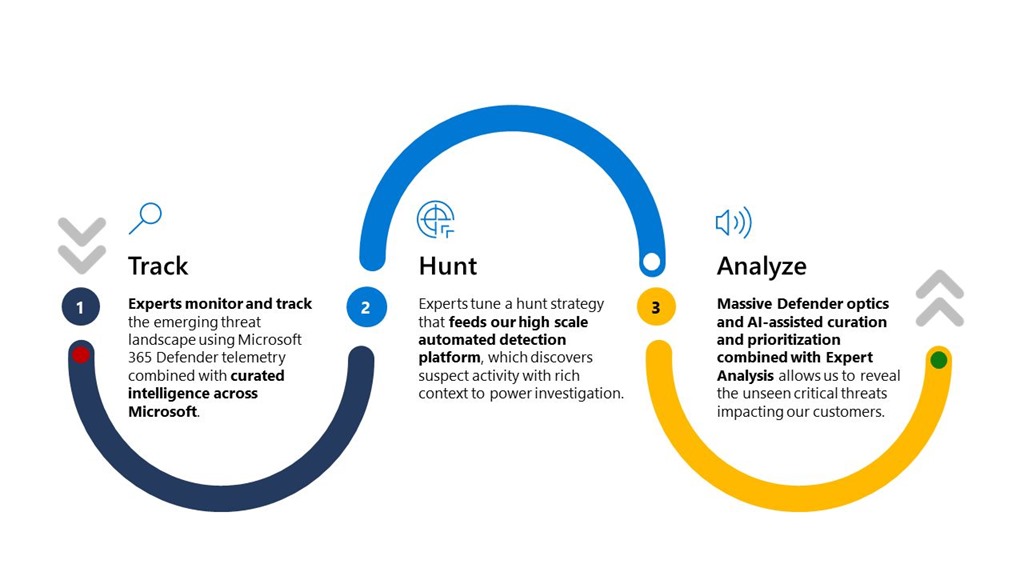
RELEASE: Microsoft Defender Experts for Hunting

ThreatHuntingMicrosoft Defender Experts for Hunting hits general availability to support organizations and their cybersecurity employees with proactive threat hunting.

Defender Experts for Hunting was created for customers who have a robust security operations center but want Microsoft to help them proactively hunt threats using Microsoft Defender data. Defender Experts for Hunting is a proactive threat hunting service that goes beyond the endpoint to hunt across endpoints, Microsoft Office 365, cloud applications, and identity.

Capabilities include:

  • Threat hunting and analysis—Defender Experts look deeper to expose advanced threats and identify the scope and impact of malicious activity associated with human adversaries or hands-on-keyboard attacks.
  • Defender Experts Notifications—Notifications show up as incidents in Microsoft 365 Defender, helping to improve your security operations’ incident response with specific information about the scope and method of entry.
  • Experts on Demand—Click the “Ask Defender Experts” button in the Microsoft 365 Defender portal to get expert advice about threats your organization is facing. You can ask for help on a specific incident, nation-state actor, or attack vector.
  • Hunter-trained AI—Defender Experts share their learning back into the automated tools they use to improve threat discovery and prioritization.
  • Reports—An interactive report summarizing what we hunted and what we found.

Want to opt in out find out more? check the below.

EnergySavingThe Xbox One in standby mode uses 10-15.7 watts — the most of all next-generation consoles… and it’s always consuming that power 24/7. 

Enable "Energy Saving" mode to drop power usage to .4-.5 watts & save money on your electrical bill.

Read more below on how to do this &what the power consumption is for each Xbox console type:

Posted by: kurtsh | September 9, 2022

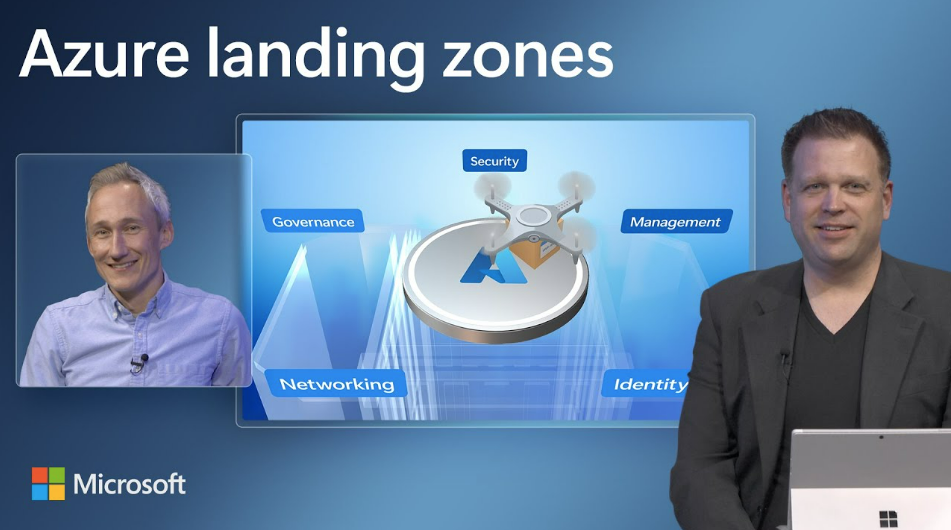
TRAINING: Azure Landing Zones

imageNeed a short 11min video on what an “Azure Landing Zone” is and why it should be the 1st thing you do as an Azure Administrator of a new Azure subscription?

00:00 Introduction of Azure Landing Zone updates
00:49 Driving events that push you to consider the Cloud
01:42 Updates to the architecture
02:24 Modular approach that’s scalable and repeatable
03:40 Root Management Group – organize subscriptions for services
04:30 On ramps for various starting points
05:43 Land Zone Review
7:50 Build with Landing Zone Accelerator
11:08 How to get started

Watch the full video with references here:

imageAre you ready for Microsoft Ignite, our tech conference for IT Pros & more?

Registration is now open! Learn from Microsoft leaders, product experts & partners, connect with your peers, level up your skillset & explore the latest technological innovations.

imageIgnite has digital & in-person attendance options! Digital (video streaming) is free as always but in-person attendance is in Seattle for $1895. There are also International in-person options as well available for free, although many are booked full already.

See you there!

Dates:
Oct 12-14, 2022

Registration:
https://ignite.microsoft.com/en-US/home

imagePermissions Management is a cloud infrastructure entitlement management (CIEM) solution that provides comprehensive visibility and control over all permissions for any identity and any resource across all major clouds – Microsoft Azure, AWS, Google Cloud Platform – and identity providers.

It provides a unified platform where you can assess, manage, govern, and protect permissions and identities consistently.

Join us for an discussion of Entra Permissions Management and meet the product group!

imageI’ve been with Microsoft for a long time and I’ve got the crow’s feet, the lousy complexion, the grey hair, etc. to prove it.

Turns out there’s 3 features in the Teams Client that improve one’s personal appearance on meetings or video calls that may or may not be enabled on your Windows PC that I discovered to be very useful:

  • Soft focus
    This is my favorite feature & something commonly available on phone filters & Snapchat: It softens the focus on your face, eliminating wrinkles, blemishes, pimples, etc.
  • Adjust Brightness
    Stop worrying about your lighting! Auto-brightness adjust will change the brightness of your appearance depending on the light around you to ensure you’re always visible.
  • Mirror My Video
    By default, your appearance is broadcast as a flat image meaning that written words appear backwards.  (ex: Text on your shirt, pages held up to your camera, etc.) By mirroring your video, any text viewed by meeting participants is seen correctly.

A community announcement was made about these “personal appearance” features here:

Posted by: kurtsh | September 4, 2022

VIDEO: Overview of Microsoft Compliance Core

imageThis is a 1-hour session split into the core segments of compliance around the 4 pillars of Info protect/governance + Insider Risk + eDiscovery + Compliance management.

(From the documentation at Microsoft Purview compliance portal – Microsoft Purview (compliance))

  • Intro – Know your data – 0:20
  • Compliance Manager – 4:28
  • Data Classification – where is my data? – 9:06
  • Content Explorer – 11:06
  • Activity Explorer – 13:01
  • Sensitive Info Types – 15:00
  • Trainable Classifiers – 15:22
  • Information Governance – retention labels auto label – 17:43
  • Records Management – file plan – 21:05
  • Regulatory Records – 21:51
  • DLP overview – 25:48
  • DLP configuration – 30:45
  • DLP Alerts – case management – 33:58
  • MCAS demo – session proxy – 35:23
  • EMail DLP with MIP labels – 37:08
  • MCAS – BOX connected apps demo – 40:03
  • Endpoint DLP demo – triggers – 41:16
  • Insider Risk Managment – overview – 45:07
  • Insider Risk – user activity review portal – 47:04
  • eDiscovery and Audit Overview – 51:52
  • eDiscovery Case Management Demo – 55:10
  • eDiscovery Threaded Teams Conversations – 56:00
  • eDiscovery – Redaction – 56:22
  • Data Connectors – archive of 3rd party data – 57:13
  • Architecture Plan, API’s, 3rd party data and Power Automate – 58:15

To watch the video, visit:

To download the slides, go to:

imageExact Data Match (EDM) is a critical component of Data Loss Prevention – a security approach designed to protect business information and other sensitive data from being exposed.

Instead of identifying the data that needs to be protected through pattern matching, EDM monitors the actual data that needs to be protected.

Speakers:

  • Matt Soseman: Senior Security Architect at Microsoft
  • Douglas Baker: Senior Cybersecurity Architect at Patriot Consulting

Watch the video here:

Register and watch the full webinar here:

« Newer Posts - Older Posts »

Categories