image Currently the following courses are available to Technet Plus Subscribers:

Course 6690: Exploring the Fundamentals of Network Infrastructure in Windows Server 2008
This 2-hour online course is a part of the eLearning Collection 6420: Fundamentals of a Windows Server 2008 Network Infrastructure and Application Platform. It provides you with an overview of network infrastructure in Windows Server 2008. Topics covered in the course include:

  • A conceptual introduction to the physical network infrastructure
  • Introduction to the organization of logical networks
  • Introduction to Active Directory
  • Introduction to server roles and features

Course 6694: Fundamentals of Administering Windows Server 2008
This 2-hour online course is a part of the eLearning Collection 6420: Fundamentals of a Windows Server 2008 Network Infrastructure and Application Platform. It provides you with the knowledge and skills required to administer Windows Server 2008. Topics covered in the course include:

  • Introduction to administrative tools in Windows Server 2008
  • Introduction to performance monitoring tools in Windows Server 2008
  • Procedures to perform server administration

Course 6698: Fundamentals of Implementing Network Load Balancing and Virtualization
This 2-hour online course is a part of the eLearning Collection 6420: Fundamentals of a Windows Server 2008 Network Infrastructure and Application Platform. It provides you with the knowledge and skills required to implement network load balancing and virtualization in Windows Server 2008. Topics covered in the course include:

  • Various methods to implement server scalability and availability
  • Implementation of Windows network load balancing
  • Introduction to server virtualization
  • Implementation of server virtualization
  • The courses above are all part of a Microsoft E-Learning course collection designed to help you build your knowledge to design, deploy & secure your environment.

Individuals with Microsoft Technet Plus Subscriptions may access these courses at:
http://technet.microsoft.com/subscriptions/manage

Digg This

Posted by: kurtsh | December 20, 2008

RELEASE: SQL Server 2005 Service Pack 3 releases!

image Service Pack 3 for Microsoft SQL Server 2005 is now available. SQL Server 2005 service packs are cumulative, and this service pack upgrades all service levels of SQL Server 2005 to SP3. You can use these packages to upgrade any of the following SQL Server 2005 editions:

  • Enterprise
  • Enterprise Evaluation
  • Developer
  • Standard
  • Workgroup

Microsoft SQL Server Service pack 3 (SP3) can be downloaded at :
http://www.microsoft.com/downloads/details.aspx?FamilyID=ae7387c3-348c-4faa-8ae5-949fdfbe59c4&displaylang=en

List of the bugs that are fixed in SQL Server 2005 Service Pack 3
http://support.microsoft.com/?kbid=955706

Note: To upgrade SQL Server 2005 Express Edition, obtain the SP3 version of Express Edition or Express Edition with Advanced Services.
For a list of new features and improvements that are included in SQL Server 2005 SP3, review the What’s New document.

Support lifecycle for SQL Server 2005 :
http://support.microsoft.com/lifecycle/?p1=2855

Digg This

<blatently ripped from the DPM blog>image
Storage Solutions is very excited to announce the release of Service Pack 1 for DPM 2007.

Service Pack 1 for Microsoft System Center Data Protection Manager (DPM) 2007 provides continuous data protection for Windows application and file servers using seamlessly integrated disk and tape media and includes the following expanded capabilities:

  • Protection of Hyper-V™ virtualization platforms, including both Windows Server 2008 Hyper-V and the Microsoft Hyper-V Server, has been added to the existing set of protected workloads, building on the virtualization protection originally delivered for Virtual Server 2005.
  • Enhanced SQL Server 2008 protection, including the addition of new protection capabilities for mirrored databases, support for parallel backups of databases within a single instance, and the ability to move data from SQL Server 2005 to SQL Server 2008 for migration scenarios.
  • Microsoft Office SharePoint Server 2007 and Windows SharePoint Services 3.0 receive index protection, significant catalog optimization, and support for mirrored content databases.
  • Added protection for Exchange Server 2007 Standby Cluster Replication (SCR), enabling a complete disaster recovery solution that leverages SCR failover alongside DPM point-in-time restores.

In addition to enhancing the protection of each of the core Microsoft application workloads, additional capabilities have also been introduced with the release of DPM 2007 SP1, such as:

  • Local Data Source Protection enabling the DPM 2007 SP1 server to act as a branch office server offering self-protecting File Services and Virtualization hosting within one platform.
  • Cross-Forest Protection allowing large enterprise customers with multiple Active Directory® forests to now have even more flexibility in their DPM deployments.
  • Provision for a Client DPML answers customer demand for a more cost-effective way to protect Windows XP and Windows Vista clients using the same DPM 2007 infrastructure that protects their servers
  • Disaster Recovery capabilities within DPM 2007 SP1 now include the ability to leverage a third-party vaulting partner via the cloud (SaaS)

All of this new functionality builds on the features released in the DPM 2007 ‘Rollup Update’ in June 2008, which provided protection of Windows Server 2008, including Windows Server 2008, Windows Server 2008 core, Windows Server 2008 System State and BitLocker™ support – as well as new tape media capabilities around tape sharing and media library sharing. 

Between ‘Rollup Update’ and Service Pack 1, most of the core features of DPM 2007 have seen incremental capabilities or workload advancements which promises to keep Data Protection Manager on a trajectory toward improving how Microsoft customers protect and recover their Windows application and file servers with the Microsoft backup and recovery solution.

Digg This

<stolen from the IAG product team blog –
http://blogs.technet.com/edgeaccessblog/archive/2008/12/19/intelligent-application-gateway-2007-service-pack-2-is-now-available.aspx… I made an edit though.  See the items in GREEN.>

We are happy to announce the availability of IAG SP2.

Marking a significant milestone for our product, Service Pack 2 brings with it a variety of enhancements that improve overall IAG scalability, interoperability, and functionality.

Alongside these benefits, IAG SP2 has the ability to run as a virtual machine on Hyper-V, achieving low TCO, deployment flexibility, and a simplified solution for disaster recovery. For the first time ever, customers are able to download a fully functional, trial version of the IAG that can be used in their production environment without ordering an evaluation hardware.

IAG product team wish you and your family happy holidays
(we are sure that you will use all this free time to install and evaluate SP2!)

IAG Team celebrates SP2 release

Digg This

There are active threats floating around out there on web sites right now.  It’s so important that we’ve released this patch out-of-band, i.e. we didn’t wait until the next “patch Tuesday”.

Please strongly consider deploying this patch to your users.  Seriously.  No joke.

Microsoft Security Bulletin MS08-078 – Critical
Security Update for Internet Explorer (960714)

This security update resolves a publicly disclosed vulnerability. The vulnerability could allow remote code execution if a user views a specially crafted Web page using Internet Explorer. Users whose accounts are configured to have fewer user rights on the system could be less impacted than users who operate with administrative user rights.

This security update is rated Critical for Internet Explorer 5.01, Internet Explorer 6, Internet Explorer 6 Service Pack 1, and Internet Explorer 7. For information about Internet Explorer 8 Beta 2, please see the section, Frequently Asked Questions (FAQ) Related to This Security Update. For more information, see the subsection, Affected and Non-Affected Software, in this section.

The security update addresses the vulnerability by modifying the way Internet Explorer validates data binding parameters and handles the error resulting in the exploitable condition. For more information about the vulnerability, see the Frequently Asked Questions (FAQ) subsection under the next section, Vulnerability Information.

This security update also addresses the vulnerability first described in Microsoft Security Advisory 961051.

Recommendation. Microsoft recommends that customers apply the update immediately.

http://www.microsoft.com/technet/security/bulletin/ms08-078.mspx

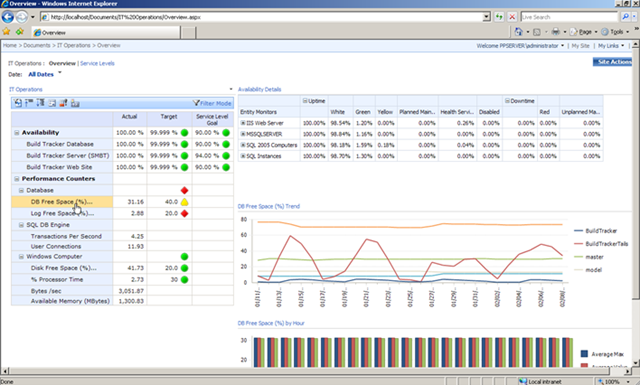
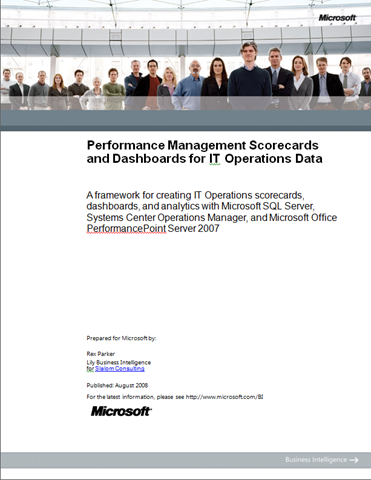
We’ve posted a whitepaper & FREE solution accelerator designed to help IT Pro’s build a complete performance management solution for monitoring the health of their IT infrastructure.  IT professionals can now go beyond canned operational reports with interactive performance dashboards, comprehensive scorecards, and powerful analytics – all built on Microsoft platform components including Microsoft® SQL Server®, Systems Center, Microsoft Office SharePoint® Server 2007, and Microsoft Office PerformancePoint® Server 2007.

image

The solution consists of a detailed whitepaper as well as preconfigured SQL Server Integration Services packages, cubes, and PerformancePoint dashboards to extract data from Systems Center and deliver it through PerformancePoint Server.  

imageAgain, we are offering this content as a free download to help customers maximize the value of the data they are currently collecting through Systems Center, and in the process showcasing the value of our products in a manor that’s relevant to the IT Pro audience.

 DOWNLOADS:

Find the solution posted on the BI and PPS external websites.

Digg This

image We released a new site to beta test that allows people to test their Exchange Server 2003/2007 environment for remote connectivity.

  • Microsoft Exchange ActiveSync Test
    This test will simulate the steps a mobile device uses to connect to an Exchange Server using Exchange ActiveSync.

  • Microsoft Exchange ActiveSync AutoDiscover Test
    This test will walk through the steps a Windows Mobile 6.1 device (or another AirSync licensed device) uses to connect to the AutoDiscover Service

  • Microsoft Office Outlook 2007 AutoDiscover Connectivity Test
    This test will walk through the steps Microsoft Office Outlook 2007 uses to connect to AutoDiscover

  • Microsoft Office Outlook 2003 RPC/HTTP Connectivity Test
    This test will walk through the steps Microsoft Office Outlook 2003 uses to connect via RPC/HTTP

  • Inbound SMTP Email Test
    This test will walk through the steps an Internet e-mail server uses to send inbound SMTP email to your domain

LINK:
https://www.testexchangeconnectivity.com/

Digg This

<Credit goes to my friend Jerry for pointing this out>
image For those of you looking for stocking stuffers this Christmas/Holiday/Winter Solstice, Gamefly is selling used Xbox 360 games.

Here are some examples:

$10 and below: 

  • Timeshift = $9.99
  • Conan = $9.99
  • MLB2K8 = $9.99
  • NBA2K8  = $9.99
  • Quake Wars: Enemy Territory = $9.99

$20 and below:

  • Unreal Tournament 3 = $14.99
  • Devil May Cry 4 = $12.99
  • Guitar Hero: Aerosmith = $19.99
  • Army of TWO = $19.99
  • Rainbow Six: Vegas = $16.99
  • Ironman = $14.99
  • Tiger Woods PGA Tour 08 = $12.99

$30 and below:

  • Grand Theft Auto 4 = $29.99
  • Soul Caliber 4 = $29.99
  • Lego Indiana Jones = $29.99
  • Guitar Hero 3: Legends of Rock = $27.99

And so on and so forth…

LINK:
http://www.gamefly.com/products/search.asp?pf=1070&s=1&cat=10&

Digg This

Posted by: kurtsh | December 17, 2008

DOWNLOAD: Free Tools for Windows-based Twitter users

It dawned on me that if I’m going to post something on Facebook, I should probably do it for the other service that I’ve been trying out – Twitter – because it has an equal number of cool software applications for it as well.

image

Chirpr – Windows Vista Gadget for Twitter
The Chirpr gadget for Twitter is a really reliable and easy to use gadget for posting updates to Twitter.  It’s easy to type in your posts and it counts the number of characters you’ve used in a new post to ensure that you don’t go over 140.  It also shows you the history of posts that you have on your Twitter page. 

What I like about it is that it’s always available in my Vista Sidebar so regardless of what application I’m in, I can quickly crank out a post if I’m in the mood.  And it’s free!

LINK: http://www.codeplex.com/chirpr


image

Outtwit – Outlook PlugIn for Twitter
Outlook now has it’s own free plug in to allow you to post updates to Twitter directly from Outlook. 

I used to have to go to my Windows Vista sidebar to post to Twitter but now I don’t even have to do that if I’m in Outlook.  There’s a bar in the interface now that allows you to make posts and receive replies directly into an Outlook folder.

LINK: http://www.techhit.com/OutTwit/quickstart.html


image ceTwit – a Twitter client for Windows Mobile
Interested in posting and tracking Twitter feeds using a client other than the SMS text facilities of Pocket Inbox?  This is a good way to do it.  I’ve only recently started using this but it’s a helluva client for posting Twits as well as tracking Twitter feeds from others.  The interesting thing about ceTwit is that it supports Ping.FM which allows simultaneous cross posting against Twitter, Plurk, Facebook, Jaiku, etc. in a single post.

LINK: http://www.kosertech.com/blog/?page_id=5

(Now because I haven’t been using it very long, I can’t give a full on recommendation behind it but not to worry – there are numerous OTHER Windows Mobile Twitter clients out there for you to use:
http://theregoesdave.com/2008/04/01/7-twitter-clients-for-mobile-phones/)

Digg This

Posted by: kurtsh | December 17, 2008

DOWNLOAD: Free Tools for Windows Facebook users

I gotta admit, I’m more fascinated with all the nifty tools that Facebook users have at their disposal… more so than the actual Facebook service itself.  It’s such a good marriage between Software + Services. 

Here are 3 Facebook tools that I use today that I think are absolutely cool… not to mention free:

image FBLook
If you are an Outlook user, you probably have it open all the time. Now you can update your Facebook status, see your friend statuses and see the number of new requests without having to open the browser or any other applications. FBLook seamlessly integrates Facebook into Outlook.

LINK: http://www.techhit.com/FBLook/


image FaceBook Gadget for Windows Vista
Receive Facebook messages, requests, invites, and pokes to your desktop. This cleanly designed gadget also allows you to edit your status and provides quick links to Facebook. Bugs were fixed in version 1.5.

LINK:  http://gallery.live.com/LiveItemDetail.aspx?li=95cec600-3f59-4c27-aa27-c63b09279d3e


image Skybook for Windows Mobile
SkyBook is a free Facebook client for Windows Mobile devices (Pocket PC and Smartphones). With SkyBook you stay in touch with Facebook friends all the time.

Features:

  • Sleek, graphic-rich user interface
  • Set your status while on-the-go
  • View friends’ status and detailed information
  • View friends’ friends and send friendship requests
  • Get notified of events like wall post, message,
    poke, and friend request
  • View your pokes, wall, inbox, and friend requests,
    all in full text
  • Poke friends, send message to friends, and post
    on friends’ wall
  • Access you and your friends’ photo albums
  • Ability to view, zoom in/out, and pan full-sized
    photos, and play slideshow
  • Upload photos from built-in camera or file folder
  • Import friends’ profile photos to Outlook Contacts
    (photo Call ID)
  • and more…

LINK:  http://www.magnifoca.com

Digg This

« Newer Posts - Older Posts »

Categories