image
Project 2007 Hands-On Training with UMT Consulting
on February 3rd, 2009 in Los Angeles

Join us for this one-day hands-on training which will highlight Microsoft Project best practices. This event will cover several useful tips for improving your productivity with Microsoft Project including:

  • How to Reduce project schedule maintenance time by:
    • Defining calendars
    • Setting project options
    • Defining resources
    • Defining the project summary task
  • Constraint Types – What are they and how to use them:
    • Properly setting constraint types
    • Deadlines vs Constraints
    • Improving CPM analysis by accurately identifying dependencies
  • Best Practices
    • Views: selecting views and splits
    • Filtering and grouping
    • Auto indent/hiding the view bar
    • % Complete vs % Work complete (Actual Duration/Duration or Actual Work/Work)
    • Methods for analyzing over allocations
  • And more!

Location:  Microsoft – Los Angeles
333 S Grand Ave
Suite 3300
Los Angeles CA 90071

Date:  February 3, 2009

Time:  9:00am – 12:30pm

Cost:  *Free!*

Course Highlights

  • Hands-on training
  • Tips on improving your project schedule
  • Learn how to use constraints in Microsoft Project
  • Hear about best practices from the instructor and your peers

Who Should Attend: This course is for Project Managers, Project Coordinators, or Project Task Owners who would benefit from learning how to better utilize Microsoft Project.

Prerequisites: To gain the most from this event, attendees should have a working knowledge of basic Project Management practices and terminology. Attendees should also have some experience working in Microsoft Project.

Registration: If you’re a customer of mine and you’re interested in registering, please contact me for details.  Note: This special, no charge training event will fill quickly and space is limited, so be sure to register as soon as possible to reserve your seat.

Sincerely,
UMT Consulting Group

Digg This

image
 Learn Time Saving Tips and Tricks for Project 2007

The Microsoft Project instructor will share best practices and give you advice for getting the most out of using Microsoft Project 2007. The presenter will cover time saving techniques on topics such as:

  • Taking advantage of the new features in Project 2007
  • Creating an effective Work Breakdown Structure
  • Improving communication with customized views
  • Resource planning and tracking
  • And more!

Learn How to Improve Collaboration with Project 2007 and SharePoint Integration

By combining Microsoft Office Project 2007 with Microsoft Office SharePoint Server 2007, project managers and anyone else responsible for managing a team, can effectively schedule work, assign tasks, and communicate team responsibilities. Microsoft partner, EPM Live, will show how you can take advantage of these two familiar and widely used Microsoft Office applications as a powerful Enterprise Project and Work Management solution to improve your organization’s project collaboration.

We look forward to welcoming you to Microsoft Irvine!

—————-

Earn 3.5 PDUs for Attending!  Attend and you can win cool prizes like:

  • Project Professional 2007
  • Gift certificate to a local restaurant

————–

Date/Time:  March 19, 2009

  • 8:00am – 8:30 Check in/Breakfast
  • 8:30 – 10:00am Project 2007 Tips and Tricks
  • 10:00am – 10:15  Q&A
  • 10:15 – 10:30am  Break
  • 10:30 – 12:00pm  Improving Project Collaboration with Project 2007 and SharePoint Integration

Location:  Microsoft Irvine
3 Park Plaza
16th Floor
Irvine, CA 92614

Registration:
If you are a customer of mine, contact me and I will get you registration details.  Registration is restricted to Enterprise Managed customers.

Digg This

image Free copy of automatic network mapping plug-in for Microsoft Visio 2007 for all Visio 2007 customers. Plug-in retails for $499, but is free until March 31, 2009.

LANsurveyor Express for Microsoft® Visio® is a powerful Visio 2007 plug-in that makes it easy to get comprehensive network maps in just minutes! Accessible via the Visio toolbar,

LANsurveyor Express automatically discovers your network and produces topology maps in Visio format. Plus, LANsurveyor Express uses Visio SmartShapes® to represent your network devices and populates each node’s custom properties with the node’s IP address, network name, and fully-qualified domain name

DOWNLOAD:  LANsurveyor Express (6.98MB)
http://www.solarwinds.com/register/registrationform.aspx?Program=583&c=70150000000E50d&CMP=LEC-PT-MS-LSE-VTB-Q408

(as taken from the Microsoft Incentives site)

Digg This

image Announcement:
Microsoft is announcing an update to its Microsoft Business Intelligence roadmap. Microsoft’s strategy is to deliver BI to everyone in the organization through the broadly adopted tools of Microsoft Office SharePoint Server and Microsoft Office Excel, and built on the scalable Microsoft SQL Server BI platform.

Based on customer feedback, we are moving the scorecard, dashboard, and analytic functionality from Microsoft Office PerformancePoint Server into Office SharePoint Server Enterprise, making these capabilities available throughout the organization at a lower TCO.

In mid 2009, we will release PerformancePoint Server 2007 “service pack 3” which will include updates to the current product’s planning module. Thereafter, customers should not expect further investment in standalone versions of PerformancePoint Server. However, ongoing support of our planning customers is a high priority. These changes enable customers to deploy a complete BI solution with existing investments in SharePoint Server, SQL Server, and Excel, the most widely used analysis and planning tool in market today.

Q&A:

  1. What will happen to PerformancePoint Server?
    PerformancePoint Server 2007 will no longer be a standalone item on the Microsoft price list as of April 1, 2009. For organizations interested in PerformancePoint Server, it can be obtained by purchasing SharePoint Server 2007 Enterprise CAL with Software Assurance. In the future, the monitoring and analytics capabilities will be included in the next release of SharePoint Server and will be available to SharePoint Enterprise CAL customers. Customers with rights to PerformancePoint Server SP3 will be able to download it mid 2009 (please contact your account manager for details). Performance management is a critical component of business intelligence and Microsoft will continue marketing and R&D investment in this area in future product releases.
  2. What about from now until SharePoint ‘v-next’?
    How will I obtain the current PerformancePoint monitoring and analytics functionality for broad BI deployment?
    From the date of this announcement, PerformancePoint Server will be a license entitlement for SharePoint Server 2007 E-CAL customers with Software Assurance only. The technical requirement to use PerformancePoint planning will continue to be SQL Server Enterprise Edition. Customers will be able to use BI throughout their entire organizations simply by deploying SQL Server, SharePoint Server, and Excel.
  3. What about support for existing PerformancePoint Server planning customers?
    Customer care is our primary focus during this transition. We will keep our commitments to deliver improved planning capabilities in PerformancePoint Server 2007 SP3 in mid 2009 that addresses many of the features and functionality required by our customers to leverage in their planning projects. We will continue to support all PerformancePoint customers per our existing support policy. For further details on this policy visit: http://support.microsoft.com/lifecycle/?p1=12922.
  4. What about legacy products such as ProClarity and Business Scorecard Manager?
    ProClarity Analytics Server is part of PerformancePoint Server 2007. ProClarity Desktop Pro is a separate product and is not connected with PerformancePoint licenses, with or without SA. Business Scorecard Manager (BSM) is a downgrade right of PerformancePoint Server 2007. The core ProClarity capabilities that made that product successful will migrate to SharePoint and Excel over the coming releases. As for Business Scorecard Manager and ProClarity Desktop Pro, we don’t anticipate any further customer demand for this.
  5. Will customers still be able to purchase PerformancePoint Server if they require more licenses for an existing deployment?
    No, not as a standalone product. If customers require additional PerformancePoint Server 2007 CALs, they should purchase SharePoint Server 2007 E-CALs with Software Assurance to be entitled to PerformancePoint Server 2007 CALs.
  6. If I have additional questions, who do I contact?
    If you have additional questions, please first work with your Microsoft account team. If you have additional questions following that, you can contact PerformancePoint Server Roadmap Announce team pps_an@microsoft.com.
Digg This

image The compliance team would like to invite you to a Live Meeting where you can share your ideas on compliance. If this interests you please read on.

‘Reduce the cost and effort of configuring and validating Microsoft products to address customer IT GRC requirements.’ – Project Tribeca Team

Does your IT team struggle to cope with the ever-changing demands of domestic and international governance, risk, and compliance (GRC) requirements? Microsoft is working to provide product configuration guidance to help IT professionals achieve compliance with hundreds of GRC authority documents, including SOX, PCI, HIPAA, GLBA, and EUDPD.

Join the Microsoft Project Tribeca team in weekly discussions to help shape content, GRC authority document alignment, and technology configuration guidance that directly affects your organization.

Topics

  • GRC Authority Document Scope: U.S., European Union (EU), International
  • GRC Control Objectives, Activities, and Tests

Open Questions

  • What GRC authority documents affect your organization?
  • How does your IT department manage change/configuration for GRC requirements?
  • How does your IT department associate required change and configuration management with GRC objectives?
  • What types of GRC guidance and tools do you expect or desire from Microsoft?
  • Has your organization used the IT Compliance Management Guide?

Meeting Dates

Attend any single or multiple Connect meetings.

In addition, three lucky qualified attendee will Win a copies of Windows Vista Business Edition!!!!

  • 1/28/09 8 AM PT – What GRC Authority Documents impact your organization?
  • 2/04/09 8 AM PT – How does your IT department manage change/configuration for GRC requirements.

Please join us by signing up for the IT governance and Compliance program in Microsoft Connect. Click here to join the program.

After you have joined the program, bookmark the following link to return to the program site and get the latest information about upcoming events:

(Taken from http://blogs.technet.com/regcomp/archive/2009/01/21/opportunity-to-participate-in-a-live-meeting.aspx)

Digg This

image The beta 3 release of Forefront Security for Office Communications Server (FSOCS) is now publicly available for download.  FSOCS provides fast and effective protection against malware and out-of-policy content in IM conversations and attachments for Office Communications Server 2007 (OCS) environments. This new release includes:

  • Support for OCS 2007 R2
  • Support for OCS 2007 Enterprise Edition server roles
  • Integration with OCS 2007 Access Edge role to add protection from external public IM threats

Like other Forefront server security products, FSOCS uses multiple engine scanning to provide superior detection of latest threats over single engine solutions. The FSOCS Beta 3 is shipping with 5 antimalware engines from Microsoft & industry-leading security partners. The Beta 3 will include engines from Microsoft, CA, Kaspersky, Norman and VirusBuster.

DOWNLOAD:
http://technet.microsoft.com/en-us/evalcenter/cc509001.aspx

Digg This

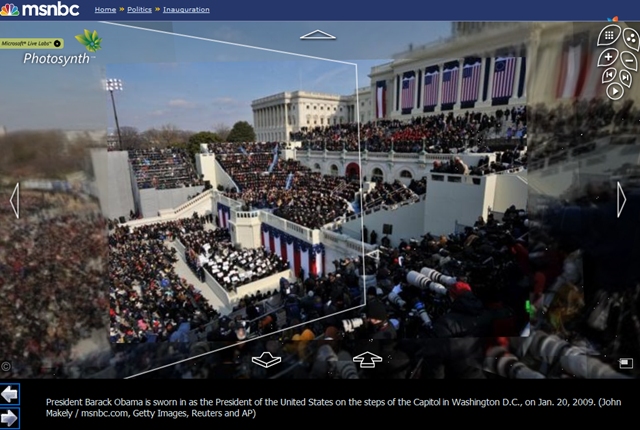
image WOW – this is so cool.
http://www.msnbc.msn.com/id/28661923

Photosynth enables people to take multiple photographs and in 3 dimensions lay those photographs out with depth.  One can not only see a panorama shot of a scene but also a deeper, closer shot of that same environment, depending of course on what photos have been taken.

Navigating Photosynth couldn’t be easier too.  It’s just point and click to the area you want to zoom in on.

We did a similar thing with CNN.  I’ve just never seen such good photography on a public site like this before.  Makes sense since it’s Getty, Reuters, and AP’s photos I suppose.  Professionals!  Gotta love ‘em.

Digg This

On January 7, to go along with Steve Ballmer’s announcement of Microsoft’s Mobile Search deal with Verizon at CES2009, we launched the latest and greatest version of Live Search for Windows Mobile.  So what’s new, you ask?

LOCALIZATION
Now available in France and Italy.

clip_image001

clip_image002

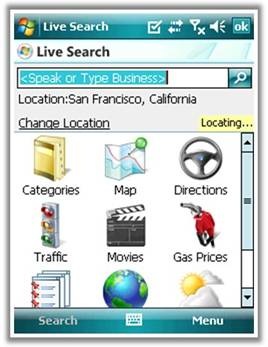
“LOCATE ME”
Quickly get your approximate location using nearest cell tower of your provider.

clip_image003

clip_image004

­­­­­­(p.s.  For Verizon Wireless customers, there’s a little more coming in the way of our “Locate Me” functionality based on our newly announced partnership.  Stay tuned.)

AUTOSUGGEST
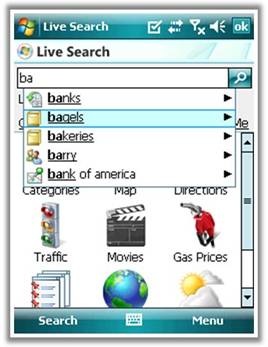
Search suggestions including recent searches, address book contacts, business categories, popular businesses, and popular web searches.

clip_image005

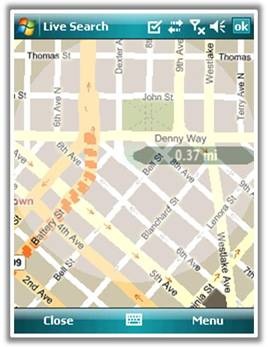
BIRD’S EYE IMAGERY
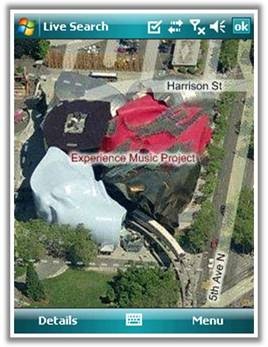
View landmarks from a 45 degree view just as you do on the desktop. 

clip_image007

And a few items more that don’t come with pretty screenshots…

  • IMPROVED SEARCHING
    Support for combined “what/where” queries, e.g. “pizza redmond wa” and ability to sort results by distance or by relevance.
  • BUSINESSES AS LOCATIONS
    Improved ability to get directions to a business and set a business as your current location.
  • BETTER SPEECH EXPERIENCE
    Higher accuracy and reduction in clicks when speech recognition confidence is high.

DOWNLOAD:
http://wls.live.com from your Windows Mobile phone.

Digg This

clip_image002Please find below a list of EPM 2007 webcasts in the coming months as well as on-demand webcasts (recorded in the past 4 months) . These webcasts are primarily targeted at IT Professionals and will present in details key aspects to consider when you evaluate, plan, deploy, and operate Project Server 2007.

On February 12th, Larry Duff will present the recently released Solution Connector for Microsoft Office Project Portfolio Server 2007 on MSDN Code Gallery to the developer community.

You need to register to each webcast by clicking their respective link (all free of charge); then you get emailed a link to sign on and participate in the web cast on its date and time.

Each webcast is recorded for later viewing (on-demand) which should be through the same registration URL.

For a listing of all EPM webcasts check the following link: http://www.microsoft.com/events/series/epm.aspx

Webcast Title

Abstract

Date

Microsoft Office Project Server 2007 – Server Administration

This webcast covers Microsoft Office Project Server 2007 Server Administration best practices. We discuss SharePoint’s Central Administration, Shared Service Provider Administration and Project Web Access Administration.  This webcast is part of a webcast series targeted at IT professionals.  In the series, we present in detail key aspects to consider when you evaluate, plan, deploy, and operate Project Server 2007.

Monday, January 19, 2009

1:00 PM Pacific Time

Project Server and Project Portfolio Server Advanced Customization

Attend this webcast to discover two of the latest solution starters produced for Microsoft Office Project Server 2007 and Office Project Portfolio Server 2007, the Solution Connector and the Project Server audit framework. The Solution Connector is a Microsoft ASP.NET Web service and Microsoft .NET class library, which provides a set of methods for programmatically creating, updating, or deleting projects and their attributes in Project Portfolio Server 2007. The Solution Connector was created to support both the Microsoft Enterprise Project Management (EPM) Capital Planning and Investment Control for Federal Government (CPIC) and Innovation Process Management (IPM) solutions. In these solutions, projects and ideas are captured in Microsoft Office SharePoint Server and at a specific point in the workflow the information is pushed to Project Portfolio Server 2007 (utilizing the new Solution Connector Web-service) for analysis. The Project Server audit framework solution gives you the ability to audit specific Project Server events within a framework. Join us to learn more.

Thursday, February 12, 2009

8:00 AM Pacific Time

Microsoft Office Project Server 2007 – Maintenance and Monitoring

This webcast covers Microsoft Office Project Server 2007 Maintenance and Monitoring best practices. This session will cover maintenance plans that should be put in place as well as performance counters that should be monitored.  We also discuss how to deploy software updates for both Project Server and Project Professional 2007. This webcast is part of a webcast series targeted at IT professionals. In the series, we present in detail key aspects to consider when you evaluate, plan, deploy, and operate Project Server 2007.

Wednesday, February 25, 2009

11:00 AM Pacific Time

Microsoft Office Project Server 2007 – Deployment into a SharePoint Server Intranet Farm

This webcast covers Microsoft Office Project Server 2007 Deployment best practices into a SharePoint Server intranet farm (out of the box Project Server 2007 is deployed on top of Windows SharePoint Services V3). We discuss SharePoint Server deployment pre-requisites, deployment scenarios and best practices. This webcast is part of a webcast series targeted at IT professionals. In the series, we present in detail key aspects to consider when you evaluate, plan, deploy, and operate Project Server 2007.

Wednesday, March 18, 2009

11:00 AM Pacific Time

Microsoft Office Project Server 2007 – Disaster Recovery

This webcast covers Microsoft Office Project Server 2007 Server Disaster Recovery options and best practices. We discuss how to recover from a catastrophic failure on your SharePoint/Project Server far;, this includes what are the options to recover from a loss of any component of your SharePoint/Project Server farm: SQL server, Application Server, Disk etc … We present farm and database restore options.  This webcast is part of a webcast series targeted at IT professionals. In the series, we present in detail key aspects to consider when you evaluate, plan, deploy, and operate Project Server 2007.

Wednesday, April  8, 2009

11:00 AM Pacific Time

Microsoft Office Project Server 2007 – Virtualization

This webcast covers Microsoft Office Project Server 2007 Server Virtualization best practices using Windows Server 2008’s Hyper-V. We discuss deployment best practices with respect to virtualization, including optimum architecture configuration (which component should be deployed on a  virtual environment and which ones should be deployed on a physical environment), and how to architect a high availability virtual farm.  This webcast is part of a webcast series targeted at IT professionals. In the series, we present in detail key aspects to consider when you evaluate, plan, deploy, and operate Project Server 2007.

Wednesday, April 29, 2009

11:00 AM Pacific Time

On-Demand Webcasts

———————–

Key Resources

Enterprise Project Management

Project Desktop

IT Professionals

Developers

Digg This

clip_image001
Tips and Tricks for the 2007 Microsoft Office System
Get the most out of Office 2007! You’re invited to attend a Live Meeting. Learn about timesaving features to help you in your day-to-day work. Suitable for beginner or intermediate users. Everyone will learn something!

The Ribbon
The Microsoft Office Fluent user interface, called ‘the Ribbon’ will help you find the features you need to complete tasks quickly and easily. This presentation will demonstrate useful tips and tricks for Outlook, Word, Excel and PowerPoint and help you get familiar with the Ribbon.

Save time
The time you take to attend this session can help save you time later. Past participants reported saving from 15 to over 30 minutes a day after attending a Tips and Tricks session. That adds up! Led by an expert Microsoft presenter, the session is not only informative, but entertaining.

Ask questions
Take advantage of our expert – join the live version of this meeting to ask your burning questions!

Tips & Tricks for the 2007 – Microsoft Office System
Schedule 2009 – All sessions are Office 100 Level

Please use your computer for the audio portion of the presentation for best results.

First Time Users:
To save time before the meeting, check your system to make sure it is ready to use Microsoft Office Live Meeting.

« Newer Posts - Older Posts »

Categories