image
Desktop Optimization: Achieving Both Flexibility and Control

Microsoft and Pontis Research are pleased to invite you to a Desktop Optimization seminar where you will be joined by a group of your peers to discuss Microsoft’s approach to solving some of the unique challenges faced by IT organizations.

Desktop optimization means that an organization has attained the right balance in its desktop infrastructure—empowering employees with the flexibility they need to be productive, while providing IT the needed level of control, manageability, and security. Desktop optimization creates significant organizational benefits. Employees can be more productive with access to applications and data on demand—virtually wherever, whenever they need them. Desktop deployment, management, and support are dramatically simplified through virtualization, automation, and centralized administration.

Ultimately, desktop optimization is about providing an infrastructure that helps organizations control costs, improve systems availability, and enable greater business agility.

AGENDA:

  • Registration and Meal Service
  • Vision of the Optimized Desktop
  • Review of the Desktop Optimization Pack
  • Application Virtualization
  • Diagnostics and Recovery Toolset
  • Asset Inventory Service
  • Advanced Group Policy Management
  • Desktop Error Monitoring
  • Wrap up

Make an impact, gather and exchange effective ideas from others and network with your peers. We hope you will join this informational and educational forum to discuss the topics most relevant to you today!

WHO SHOULD ATTEND:

  • IT Executives who wants to learn how new capabilities can facilitate business efficiency
  • IT Leaders who are interested in hearing more about Microsoft’s vision application virtualization and other Desktop Optimization Tools

Register Now!  Choose one of the following sessions:

March 10, 2009
11:30 AM – 1:30 PM PST
Microsoft San Diego
9255 Towne Centre Dr., Suite 400
San Diego, CA 92121
Phone: (858) 909-3800
(Lunch included)
CLICK HERE to register

March 12, 2009
8:30 AM – 10:30 AM PST
Microsoft Irvine
3 Park Plaza
Suite 1600
Irvine, CA 92614
Phone: (949) 263-3000
(Breakfast included)
CLICK HERE to register

Digg This

Posted by: kurtsh | January 19, 2009

INFO: Sharepoint Resources from Start-to-Finish

A coworker compiled some information and listed some sites below which provides essential information for customers rolling out SharePoint across the organization.

Training and Adoption:

Compliance and Governance:

Utilities and Add-ons:

Technical White papers:

Books:

The following goods are worth reading – some are more reference-like, others are more on the tutorial side:

Digg This

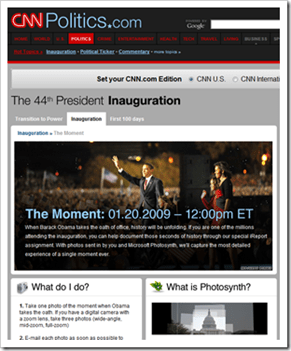
image_thumb3 We at Microsoft will be partnering with CNN over the next few days to Photosynth “The Moment” of next week’s Inauguration. 

The below link provides some initial details on CNN.com.  Expect to see more information broadcasted on CNN’s special programs like “Anderson 360” and “The Situation Room” over the next few days prior and post the Inauguration.

“When Barack Obama takes the oath of office, history will be unfolding. If you are one of the millions attending the inauguration, you can help document those seconds of history through our special iReport assignment. With photos sent in by you and Microsoft Photosynth, we’ll capture the most detailed experience of a single moment ever.”

For more on “The Moment” Photosynth:

For more information on Microsoft Photosynth, visit:

Digg This

image photoSuru is a tool that leverages the Windows Presentation Foundation to provide a rich experience for photo viewing and sharing.

It comes with a starter kit for individuals interested in learning how to develop applications that take advantage of the Windows Presentation Foundation.

Installation

1. Install Microsoft .NET Framework 3.5 SP1

2. Install photoSuru.

Build Your Own
Check out the starter kit source code, documentation and how-to content at WindowsClient.net.

Digg This

Posted by: kurtsh | January 16, 2009

NEWS: “We Are Expanding, Not Killing, the Zune”

Paul Thurrott write on his WindowsITPro column:

After a series of vague statements last week by Microsoft officials at the Consumer Electronics Show (CES), the software giant found itself at the center of yet another controversy: It was allegedly killing its Zune hardware devices, conceding defeat to the iPod, and moving the Zune software to other devices, like smart phones and the Xbox.

It’s not true, Microsoft says. Yes, the company has plans to expand the Zune platform from the PC, Web, and Zune devices to other portable devices, including smart phones, and to the Xbox 360. But it is not exiting the Zune hardware business, contrary to rumors.

"We are going to be in the hardware business going forward," Microsoft Zune marketing director Adam Sohn said.

More at http://windowsitpro.com/windowspaulthurrott/article/articleid/101214/microsoft-we-are-expanding-not-killing-the-zune.html

There’s a comment on Paul’s article at the bottom about "not wanting the wireless capability".  I really have to disagree with this and I think this is one of the single most short-sighted comments I’ve read in a long time.  The WiFi function in the Zune is absolutely CRITICAL to Zune’s success and just because you don’t use it today doesn’t mean that it doesn’t mean big things ithe future.  Here’s a few scenarios that the Wifi component could be extremely exciting in – but we just don’t have the software developed yet for it:

  • Wireless sharing with Xbox 360s that are hooked up to sound systems
  • Wireless file transfer to laptop PCs on Wifi networks
  • Wireless broadcasting from one device to 4 other Zunes or laptop users (like a DJ)

And my favorite:  Imagine if DRM was no longer used.  All of a sudden, the DRM encryption used for music sharing from device to device would no longer be necessary.  Oh wait a minute:  Apple just declared that they were going to end the usage of DRM on the iTunes Music Store.  Hmmm…

Lots of opportunity for the Zune here… and all because of the Wifi adapter that it has.

Digg This
Posted by: kurtsh | January 16, 2009

NEWS: “Obama switching to Windows phone?”

<taken from link below>image

Barack Obama is a serious BlackBerry addict, quoted as proclaiming "they’re going to [have to] pry it out of my hands." Now, it appears the President-elect might switch to a Windows-powered phone, in order to continue his email habit securely.

In an entertaining article posted earlier this week, CNET reporter Declan McCullagh notes that Obama has proclaimed the BlackBerry his favorite gadget. The President-elect reportedly relied on it to bypass aides during the Presidential campaign, and used it to check his e-mail during his daughter’s football games. But, as The New York Times and other sources have reported, the President-elect will probably have to give up his tech toy when he takes the oath of office next week.

BlackBerry maker Research In Motion claims that e-mail messages flowing from and to its devices are encrypted and would be practically impossible to intercept. But, McCullagh reports, this isn’t good enough for the NSA (National Security Agency) which — though it has refused to comment officially — apparently wants to take Obama’s BlackBerry away.

According to McCullagh, a new, better way to give the "emailer-in-chief" the electronic fix he craves could be General Dymanics Corporation’s Sectera Edge, pictured at the top of our story and below. This Windows-based phone has previously been said to meet Federal standards for both classified phone calls and secure network access. The Sectera Edge meets NSA requirements for Top Secret voice information, and provides access to the SIPRNet (secret Internet procotol router network), according to General Dynamics.

Read more:  http://www.windowsfordevices.com/news/NS7086169660.html based on CNet article.

Posted by: kurtsh | January 15, 2009

BETA: Windows 7 Beta

clip_image001IT’S HERE!

Download Windows 7 Beta TODAY!
http://www.microsoft.com/windows7

Over the past few years, you’ve asked us to make some changes to Windows. We listened closely. Now it’s time to share an early look at how we’ve used your feedback. Windows 7 is faster, more reliable, and makes it easier to do what you want. Want to try the Beta? Come back the afternoon of January 9. And remember—this is just a preview. There’s more to come.

Windows 7 for the Enterprise
Windows 7 is next version of the Windows client operating system and is on track to be available approximately 3 years after the release of Windows Vista. Windows 7 builds on the modern foundation of Windows Vista, and companies that deploy Windows Vista first will find that Windows 7 is highly compatible with their hardware, software, and tools.

The investments in Windows 7 are shaped by the evolving needs of end users and IT professionals in the enterprise. As user needs have changed, the demands on IT professionals have increased. Today, IT professionals must provide more capability and greater flexibility for users while continuing to minimize cost and security risks.

Here’s a preview of the key investments in Windows 7 to help enterprise customers address the evolving needs of their end users and IT professionals:

  • Make users productive anywhere
    Windows 7 enables users to complete their job no matter where they are-at home, in a branch office, or on the road-without reducing productivity.
  • Enhance security and control
    Windows 7 builds on the security foundation of Windows Vista, and delivers increased flexibility in helping secure computers and data.
  • Streamline PC management
    Whether IT professionals manage and deploy desktops, laptops, or virtual environments, Windows 7 makes the job easier while enabling them to leverage the same tools and skills they use with Windows Vista.

Windows 7 Beta Download
The beta version of Windows 7, Microsoft’s next-generation PC operating system, can be downloaded today by MSDN, TechBeta and TechNet customers. Consumers who want to test-drive the beta will be able to download it beginning Jan. 9 at http://www.microsoft.com/windows7.

News and Resources

Digg This

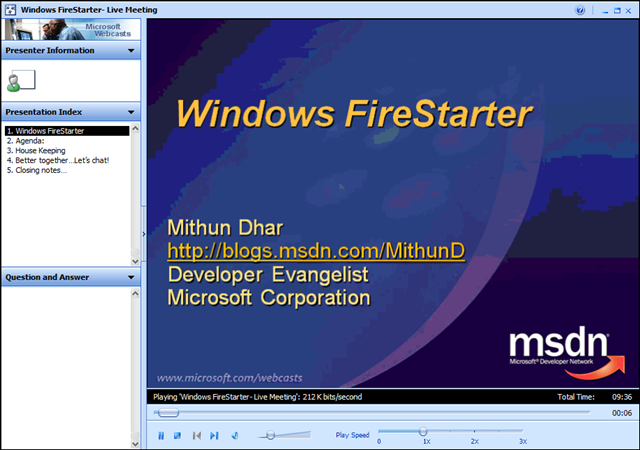
image Did you miss the Windows FireStarter online event? 

If so, you can still see recordings of the archived presentations.  I’ve copied the links to them below.

—————————

Windows FireStarter is coming to a PC near you. We’re broadcasting another FireStarter event live from Redmond! Register to watch and learn all that you ever wanted to know about Windows. Topics covered: Why Vista?, The Case of the Unexplained, Building Differentiated UI Apps using Composite WPF, Best Practices for Developing for Windows; Windows Security Bitlocker, Windows 7 and Windows Server 2008 R2.

This month features Windows Internals Expert, Diagnostics & Recovery Toolset creator & book author, Mark Russinovich.

All the sessions in this event are presented to you by some Excellent Microsoft Speakers who are Subject Matter Experts.

———————–

When: December 12th 2008 8:30 AM- 5:00 PM PACIFIC

The Live Meeting Space won’t be active till 8:00 AM on December 12th

Computer Audio
To use computer audio, you need speakers and microphone, or a headset. Questions can be asked via the Q&A panel in Live Meeting.

First Time Users:
To save time before the meeting, check your system to make sure it is ready to use Microsoft Office Live Meeting.

Agenda:


Session Name

Speaker

8:15 – 8:30

Kick off

Mithun Dhar

8:30 – 9:30

Keynote/Why Vista!

Chris Henley

9:30 – 10:45

The Case of the Unexplained

Mark Russinovich

10:45 – 11:00

Break


11:00 – 12:15

Building Differentiated UI Applications Using Composite WPF

Glenn BlockBob Brumfield & David Hill

12:15 – 1:00

Lunch


1:00 – 2:00

Best Practices for Developing for Windows for Windows Standard User

Crispin Cowan

2:00 – 3:00

Windows Security and Bitlocker

Byron Hynes

3:00 – 3:15

Break


3:15 – 4:00

(Windows 7 + Windows Server 2008 R2) Teaser Session

Byron Hynes

4:00 – 5:00

Windows for everyone!

 
Digg This

Posted by: kurtsh | January 15, 2009

BETA: Microsoft Tag – Using camera-readable barcodes

image

Okay – this is cool. “Mobile Tagging” rules.

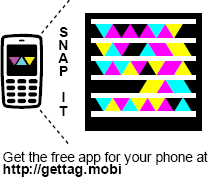
Microsoft has released both a new highly reliable & resilient computer-readable graphical code called “Tags” that are designed for rapid recognition and interpretation to enable people to post graphical objects on web sites, business cards, corporate literature, etc. and enable the average cell phone to:

  1. READ/INTERPRET A TAG
    It will enable the camera on the cell phone to capture the graphic through a viewfinder that is shown on the phone’s screen and interpret it into an Internet URL.
  2. VISIT/SAVE/EMAIL THE URL
    Once interpreted, the URL is then fed into the phone’s Internet browser for immediate resolution.  The URL can also be automatically emailed or stored for future reference. 

The camera pattern recognition technology is actually pluggable meaning that if other vendors wish they can provide modules that the camera can interpret.  For example, if Symbol, the owners of 2-D barcode technology want to provide modules to make it easy to read 2-D bar codes using consumer cameras, it should be possible using the “Tag Reader” software, available.

PHONE SOFTWARE
image The “Tag Reader” software itself is 300k-600k and is available for various platforms including:

  • Windows Mobile
  • Apple iPhone
  • Blackberry
  • Symbian S60
  • J2ME-based phone

All downloads are available simply by visiting the following URL on your phone:
http://gettag.mobi

You can also send the download to your phone over SMS by visiting:
http://www.microsoft.com/tag/content/download/

USES
image There are many conceivable uses for this mobile tagging technology.  A tag can provide end users with information through the URL they are given such as:

  • Restaurant directions
  • Magazine ads
  • Movie trailers
  • Business card information
  • Bus schedules
  • Real estate listings
  • Intro videos

Additionally, the graphical code format is usable on non-paper formats:

  • video displays
  • TV advertisements
  • electronic billboards
  • web sites (the tag above in this post is actually a tag for http://kurtsh.spaces.live.com)

Of course, this technology works beautifully on paper as well in magazines, books, newspapers, and other forms of literature.

image GETTING USAGE INFORMATION
A really interesting concept that’s come of this is that part of the model is providing analytics on the number of people that have used the mobile tag you’ve published.  Every time someone uses that mobile tag, it is noted on the http://tag.microsoft.com central site, providing you with reports of how well visited your site is.

CREATING YOUR OWN TAGS
Creating your own tags is easy.  Simply register your Windows Live ID by going to:

http://tag.microsoft.com/

…and start creating your own tags.  Tags a published using the Adobe Acrobat reader.  You may resize the graphic to whatever view you see fit and then take a snapshot from there.

FREE!
Oh – did we mention it’s free?  The software, the infrastructure, everything?

Visit the following URL for more information:

http://www.microsoft.com/tag/

Digg This

image
Microsoft invites you to an exclusive workshop:

You are invited to attend a 1-day technical introduction designed to deliver practical, hands-on information about managing your infrastructure with Microsoft’s System Center Operations Manager 2007. This workshop will be led by a Microsoft Management Technical Specialist covering the following topics:

  • Introduction to System Center Operations Manager 2007
  • Common Monitoring Scenarios
  • Monitoring more than Microsoft
  • Introduction to System Center Configuration Manager
  • Hands on Labs

Register now and take advantage of the following learning opportunities:

  • Proactively manage business critical IT services, including distributed applications, the supporting infrastructure and hardware, and end-user service delivery.
  • Reduce the complexities of managing your IT environment by providing a monitoring solution that is designed with ease of use in mind.
  • Provide a highly reliable infrastructure by leveraging Windows Server and SQL 2005 clustering for high availability and through agents that automatically failover to a secondary management server if connectivity to the primary server is lost.
  • Include management packs with prescriptive knowledge developed by the application and OS development teams at Microsoft and verified in production deployments to improve monitoring, troubleshooting, and problem resolution for more than 50 Microsoft applications and Windows Server components.

Dates/Times:

  • Thursday February 26, 2009
    Microsoft Irvine Office
    3 Park Plaza., Suite 1800
    Irvine, CA 92614
    949.263.3025
  • Tuesday March 24, 2009
    Microsoft Los Angeles Office
    333 South Grand Ave, Suite 3300
    Los Angeles, CA 90071
    213.806.7300

Time:
9:00 AM – 4:30 PM
Registration begins at 8:30 AM
(Breakfast, lunch and parking included)

Audience:
This hands-on lab is for IT Professionals in job roles like infrastructure specialists, network administrators, directory administrators, management specialists, storage and data administrators and client support. This technical hands-on workshop is limited to 28 attendees.

Registration:
Please contact me if you are a customer of mine interested in attending.  Attendance requires registration and is invitation only.

Digg This

« Newer Posts - Older Posts »

Categories