Posted by: kurtsh | March 31, 2009

EVENT: First Look Session: Windows 7

image Join Microsoft’s Client Technology Specialist and Pontis Research for a First Look Session and answer questions on compatibility and deployment. We will discuss how Windows 7 will help make users productive anywhere, enhance security and control, and streamline PC management.

Windows 7 for the Enterprise
Windows 7 is next version of the Windows client operating system and is on track to be available approximately 3 years after the release of Windows Vista. Windows 7 builds on the modern foundation of Windows Vista, and companies that deploy Windows Vista first will find that Windows 7 is highly compatible with their hardware, software, and tools.

This session will showcase some of the key investments in Windows 7 to help enterprise customers address the evolving needs of their end users and IT professionals:

  • Make users productive anywhere
    Windows 7 enables users to complete their job no matter where they are-at home, in a branch office, or on the road-without reducing productivity.
  • Enhance security and control
    Windows 7 builds on the security foundation of Windows Vista, and delivers increased flexibility in helping secure computers and data.
  • Streamline PC management
    Whether IT professionals manage and deploy desktops, laptops, or virtual environments, Windows 7 makes the job easier while enabling them to leverage the same tools and skills they use with Windows Vista.

Location:
Microsoft – Irvine
3 Park Place
Suite 1600 Irvine California 92614

Register:
This is a corporate event only.  If you are an Enterprise customer of mine, please contact me for details on how to register.

Digg This

image For those of you who were available to see Lynn Langit’s presentation on SQL Server 2008 for Developers, here is a link to the Powerpoint presentation.http://cid-00da410c7f7e038d.skydrive.live.com/embedrowdetail.aspx/ProductMaterial/SQLServer2008/GOOD|_tech|_days09|_sweden|_SQLDEV.pptx

I am trying to get the recording for those that are interested.  Let me know if you want to have access to the LiveMeeting.

Digg This

(Once again, I find myself making an exception to my general rule of not pointing to external blogs.)

image A fellow named “Paul” runs a blog called “Slick IT” which has a post on there that is just spectacular.  Heck – I wish I wrote it.

He makes a ton of great points and points to a very important blog post on the IEBlog site.

Yeah… I’m just going to leave it at that.

Posted by: kurtsh | March 26, 2009

VIDEO: I love this advertisement so much.

Posted by: kurtsh | March 26, 2009

RELEASE: Microsoft Commerce Server 2009 announced

image Building on years of experience and proven performance, Commerce Server 2009 is a comprehensive e-commerce foundation for business-to-consumer and business-to-business scenarios.

If you have been running earlier versions of Commerce Server, read on to learn more about the many new, exciting, out-of-the-box capabilities in Commerce Server 2009.

  • Get your site up and running quickly with reduced time to market
    New Default Site and easy skinning features help get you into production fast, allowing you to focus on selling merchandise.

  • Benefit from centralized, cross-channel management
    Whether your customers shop using a computer, a mobile phone, a gaming system, or other channels, Commerce Server 2009 introduces full, multi-channel support, allowing you to centrally manage your cross-channel strategy.

  • Integration with Microsoft Office SharePoint Server 2007
    With more than 30 new Web parts and controls available, and integration with Windows Live Services, including Microsoft Virtual Earth, Commerce Server 2009 allows you to choose a range of new features and functions. The modular design allows you to quickly add or remove functionality without impacting the entire site.

  • Take advantage of role-specific functionality
    Commerce Server 2009 integrates with Office SharePoint Server 2007 through Commerce Services—a benefit for merchandisers and marketers. It also provides improved design templates and commerce Web parts and tools for site designers, while offering a new Commerce Foundation for developers and IT professionals.

  • Engage and interact with customers using enhanced Web 2.0 community features
    Use the contemporary, out-of-the-box Web site with built-in product reviews and ratings to interact with customers. Leverage the community functionality in Office SharePoint Server 2007 to further engage your customers through forums, blogs, and wikis.

  • Personalize your e-commerce experience
    With easy, standards-based design, extensibility, and integration capabilities, Commerce Server 2009 provides the flexibility to create e-commerce solutions that best suit your business needs.

  • Enhanced analytics
    Microsoft SQL Server Reporting Services, the reporting engine in Commerce Server, enables the creation, management, and delivery of both traditional, paper-oriented reports and interactive, Web-based reports displayed through Office SharePoint Server 2007. 

  • High availability and performance
    Support for Windows Server 2008 and 64-bit gives access to higher performance servers and helps you support large, complex catalogs.

  • Easy customization
    The new Commerce Foundation adds more out-of-the-box functionality and presents a new, unified working and extensibility model to allow for quicker customization and integration.

  • End-to-end connectivity
    Microsoft BizTalk Server Adapters help solve the issues of communication with other line-of-business applications and trading partners, allowing for bidirectional synchronization and orchestration of order, catalog, inventory, and profile objects.

  • Deeper ties with your legacy systems
    The new Commerce Foundation unifies the calling surface so you can easily add third-party, best-of-breed features, such as payment providers, fraud detection, address verification, tax services, and other services, into the unified calling model.

COMMERCE BLOG:
http://blogs.msdn.com/commerce/archive/2009/03/18/general-availability-announcement-of-microsoft-commerce-server-2009-at-mix09.aspx

LINK:  http://www.microsoft.com/commerceserver/en/us/overview.aspx

Digg This

image <taken from Technet>

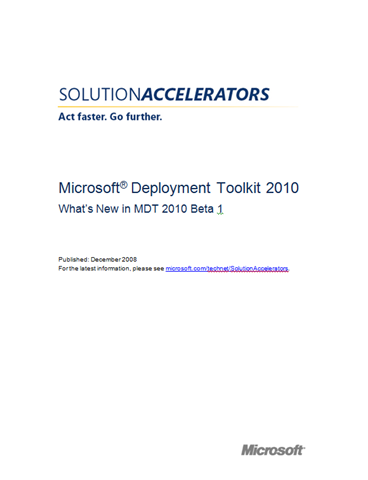
There’s been a lot of press about how there isn’t a an upgrade path from Windows XP to Windows 7.  In this video, Jeremy walked me through using the latest beta of the Microsoft Deployment Toolkit, specificallly the User State Migration Tool, to transfer the user settings and files from a Windowx XP installation to a new install of Windows 7 on the same PC.

One of the really cool features in this new version is hardlink migration.  In the past, if you wanted to back up all of a users files and settings, those had to be transferred to a different drive, and the new OS install would wipe the machine, complete the new install, and then you’d transfer the files back.  With hardlink migration, all the files stay in place on the machine, and the Win7 install just updates file locations with hardlinks.  This means the install and settings transfer happens much faster, because the files aren’t transferred at all, just the paths to them are updated.  It’s really cool, and means you can have a fresh install of Win7, with all your XP files and settings, completed in as few as 30 minutes.

WHAT’S NEW (in Microsoft Deployment Toolkit 2010 beta):
The new features in MDT 2010 Beta 1 are supported only for Lite Touch Installation (LTI)–based deployments and are not supported for Zero Touch Installation (ZTI)–based deployments using Microsoft System Center Configuration Manager 2007.

The MDT 2010 Beta 1 release includes the following new features:

  • Support for Windows 7 Beta. Deploy Windows 7 Beta by using MDT 2010 Beta 1.
  • Support for Windows Server 2008 R2 Beta. Deploy Windows Server 2008 R2 Beta by using MDT 2010 Beta 1.
  • Support for Windows Automated Installation Kit (Windows AIK) version 2.0. Deployment of Windows 7 Beta and Windows Server 2008 R2 Beta by using MDT 2010 Beta 1 requires the use of Windows AIK version 2.0.
  • Support for Windows User State Migration Toolkit (USMT) version 4.0. USMT 4.0 is required to support Windows 7 Beta deployments. Specifically, the following new features of USMT 4.0 are supported in LTI-based deployments:
  • Support for USMT 4.0 hardlink migration. USMT 4.0 includes a new method of saving user state called hardlink migration. Hardlink migration creates a snapshot of current user data files before reinstallation, which keeps data in the same location on the disk while upgrading the system and rebuilds the links after Windows 7 Beta is installed. Hardlink migration dramatically reduces the time required to migrate user state, because the data is never moved, which is faster than copying the user data to another disk.
  • Support for USMT 4.0 shadow copy. USMT 4.0 supports the ability to archive files that are in use by using the shadow copy feature in Windows 7 Beta and Windows Server 2008 R2 Beta.
  • Support for the Deployment Image Servicing and Management (DISM) tool. The new DISM tool (Dism.exe) allows for servicing offline images, mounting and unmounting Windows Imaging format (WIM) files, and customizing Windows Preinstallation Environment (Windows PE) boot images. The DISM tool replaces many of the tools in previous versions of the Windows AIK, including Package Manager (Pkgmgr.exe), the International Settings Configuration Tool (Intlcfg.exe), and the Windows PE command-line tool (PEimg.exe).
  • Support for Windows PE version 3.0. Windows PE 3.0 is included as a part of the Windows AIK version 2.0 and is required to deploy Windows 7 Beta and Windows Server 2008 R2 Beta by using MDT 2010 Beta 1.
  • Support for the Boot Configuration Data (BCD) management tool. MDT 2010 Beta 1 uses the new BCDEdit command-line tool to manage BCD files. MDT 2008 Update 1 used the BitLocker™ Drive Preparation Tool (BdeHdCfg.exe) to manage boot configuration.
  • Support for Windows 7 Beta default disk partition configuration. In MDT 2010 Beta 1, the disk partition configuration for Windows 7 Beta will be similar to the Windows BitLocker Drive Encryption disk configuration, where the operating system is installed on Disk 0, Partition 2, and the system partition is on Disk 0, Partition 1.

LINKS:

Digg This

image

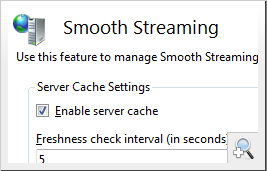
Smooth Streaming, an IIS Media Services extension, now available in beta, enables adaptive streaming of media to Silverlight clients over HTTP. Smooth Streaming provides a high-quality viewing experience that scales massively on content distribution networks making true HD media experiences (720p+) a reality.

Smooth Streaming is the productization of technology first used by Microsoft to deliver on-demand video of the 2008 Summer Olympics for NBCOlympics.com. Smooth Streaming dynamically detects current network and local PC conditions, and seamlessly switches the video quality of a media file that a Silverlight player receives. Consumers with high-bandwidth connections and newer hardware can experience HD quality streaming, and others with lower bandwidth speeds or older hardware receive an appropriate stream for their conditions, allowing the audience to enjoy an uninterrupted streaming experience with the highest quality possible.

With a few mouse clicks in Expression Encoder 2 Service Pack 1, you can encode several quality levels of a specific piece of content; each media quality level is encoded as its own complete file. Choose one of Expression Encoder’s Silverlight 2 templates and publish all of the media content and the Silverlight player directly to a Smooth Streaming-enabled IIS 7.0 server. Once IIS receives a request for media, it will create virtual chunks from each video file and deliver the best content possible to the end user.

Smooth Streaming provides media companies with a better way to make true HD (720p+) on the Web a reality. It offers code-free deployment and simplified content management for content creators and content delivery networks. For end users, the improved video viewing experience will bring the reliability and quality of television to their favorite video Web sites.

SmoothHD.com To see Smooth Streaming in action, check out SmoothHD.com, a prototype site for Akamai AdaptiveEdge Streaming for Microsoft Silverlight. Download the Smooth Streaming beta and check back soon for our upcoming Smooth Streaming white paper.

DOWNLOAD:
http://www.iis.net/extensions/SmoothStreaming

Digg This

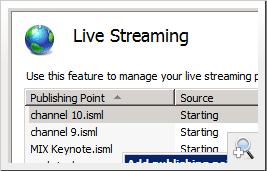
image Live Smooth Streaming, an IIS Media Services beta extension, enables adaptive streaming of live events to Silverlight clients. Using HTTP to deliver live events takes advantage of the scale of existing HTTP networks and keeps content close to the end user and makes true HD (720p+) a realistic option for live Web broadcasts. The additional advantage of using HTTP-based delivery for live events is that the existing HTTP infrastructure also drastically increases live event availability.

For the most popular live Web broadcasts, CDNs and content providers have to worry about how much capacity they can dedicate on their much more resource constrained streaming network. By using HTTP, they can take advantage of all the resources of their network and do not have to worry about maxing out network capacity and shutting out users from live events.

Extend Engagement Times
Live Smooth Streaming offers consumers the best possible media viewing experience. Today, content owners largely target video quality for the lowest common denominator of their audience, even though many of their viewers have high-quality, high-speed connections. For example, video bit rates of 300 Kbps will play back consistently well across a variety of last-mile connection speeds, but higher quality 1.5 Mbps rate video may not play back well on a connection constrained to receive 500 kbps.

Smooth Streaming dynamically adapts stream quality based on a users momentary connection speed – so consumers with high bandwidth connections can experience near HD or true HD quality (720p+) streaming (e.g., from 1.5Mbps to 3Mbps and beyond). Others with lower bandwidth speeds receive the highest possible bit rate based on their current connection speed and CPU conditions.

Live Video. Your Way.
Live Smooth Streaming enables Silverlight players to support typical PVR (personal video recorder)-style interaction. Join events in progress and quickly seek to the beginning to catch up. Rewind the highlights and enjoy the Silverlight experience in your own way.

NBCOlympics.com

To see Smooth Streaming in action, check out SmoothHD.com, a prototype site for Akamai AdaptiveEdge Streaming for Microsoft Silverlight.

DOWNLOAD:
http://www.iis.net/extensions/LiveSmoothStreaming

Digg This

The PHP on Windows Training Kit includes a comprehensive set of technical content including demos and hands-on labs to help you understand how to build PHP applications using Windows, IIS 7 and SQL Server 2008. The 38.3MB March RC1 release includes the following:

  • PHP & SQL Server Demos
  • Integrating SQL Server Geo-Spatial with PHP
  • SQL Server Reporting Services and PHP PHP & SQL Server Hands On Labs
  • Introduction to Using SQL Server with PHP
  • Using Full Text Search over Office Documents in PHP PHP on Windows Hands On Labs
  • IIS Access Control Features for PHP
  • Using IIS 7.0 Media Features in a PHP Application
  • Troubleshooting PHP
  • Migrating PHP Applications to IIS 7.0

Requires:

  • Windows Vista or Higher
  • .NET Framework 3.5 SP1
  • Windows Powershell
  • Microsoft SQL Server 2008 Express with Advanced Services
  • SQL Server 2008 AdventureWorks Sample Database
  • PHP 5.2.8 for Windows (non thread safe) or higher
  • SQL Server Driver for PHP v1.0
  • Microsoft Filter Pack 1.0
  • Adobe PDF IFilter
  • Microsoft SQL Server Business Intelligence Development Studio
  • Microsoft SQL Server 2008 Reporting Services Samples
  • Microsoft SQL Server 2008 Reporting Services Report Builder 2.0
Digg This

image The following are Briefs/Documentation for proper licensing of Windows Operating Systems in Virtual Environments.  In other words, if you are doing either of the following:

  • Virtualizing Windows Server operating systems and running them in production
  • Virtualizing & hosting Windows client operating systems (2000/XP/Vista/7/etc.) and running them in virtual machines, either in VDI or in instances on a desktop

…you should probably review these documents from our Volume Licensing site.  Licensing Windows when in virtual machines has some very important differences in comparison to licensing Windows on physical machines.  http://www.microsoft.com/licensing/resources/volbrief.mspx 

DOWNLOADS:

Digg This

« Newer Posts - Older Posts »

Categories