Today, Microsoft announced the release of Microsoft Enterprise Desktop Virtualization 1.0 (MED-V) and the companion guide for MED-V – Infrastructure Planning and Design Guide for MED-V.

IPD-MED-V-architecture What is MED-V?

MED-V released today is part of the Microsoft Desktop Optimization Pack (MDOP) offering that is available to Microsoft’s Software Assurance customers. It provides deployment and management of virtual Windows desktops to enable key enterprise scenarios. In addition, MED-V helps enterprises upgrade to the latest version of Windows even when some applications are not yet compatible. This virtualization technology builds on top of the Microsoft Virtual PC to run two operating systems on one device, adding virtual image delivery, policy-based provisioning and centralized management.

To get started with planning for an infrastructure that takes advantage of the MED-V desktop virtualization technology, we have also released the free Infrastructure Planning and Design (IPD) Guide for Microsoft Enterprise Desktop Virtualization (MED-V) – a new addition to the family of free tools and guides called Virtualization Solution Accelerators from Microsoft.

What is IPD Guide for MED-V?

The IPD Guide for MED-V outlines the critical infrastructure design elements that are crucial to a successful implementation of MED-V. The reader is guided through the four-step process of designing components, layout, and connectivity in a logical, sequential order. Identification of the MED-V server instances needed is presented in simple, easy-to-follow steps, helping the reader to deliver managed virtual machines to end users. Following the steps in this guide will result in a design that is sized, configured, and appropriately placed to deliver the stated business benefits, while also considering the performance, capacity, and fault tolerance of the system.

The Infrastructure Planning and Design Guide streamlines the planning process by:

  • Defining the technical decision flow through the planning process.
  • Listing the decisions to be made and the commonly available options and considerations.
  • Relating the decisions and options to the business in terms of cost, complexity, and other characteristics.
  • Framing decisions in terms of additional questions to the business to ensure a comprehensive alignment with the appropriate business landscape.

Key Features of the IPD Guide for MED-V:

  • Enables the reader to quickly select the end users, locations, and virtual machines (VMs) that will be included in the project scope to meet the business requirements.
  • Assists the reader in determining how many MED-V server instances will be required in order to deliver managed virtual machines to end users.
  • Steps through MED-V infrastructure design in a logical, sequential order.

Act now!

[taken from MAP blog]

Digg This

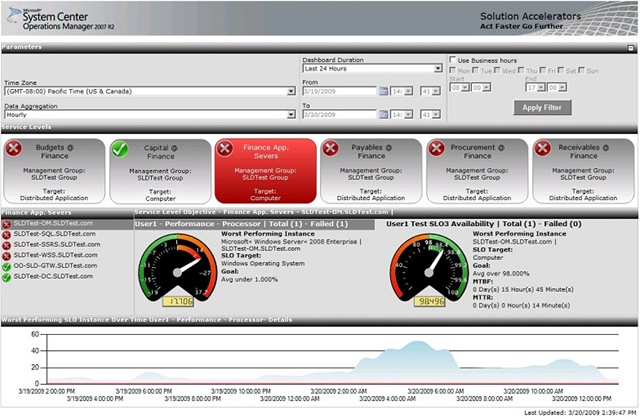
SLD-Dashboard-JPG65pct This free Solution Accelerator collects and monitors operational measurements for your line of business (LOB) applications. Its graphical dashboard makes it easy to keep tabs on service availability and performance, letting you:

  • Spot trends in service availability and performance
  • Head off problems before they occur
  • Reduce costs by streamlining IT operations

This new version of the Service Level Dashboard uses System Center Operations Manager as the engine, and Windows SharePoint Services 3.0 as its presentation platform to track and report service levels on a near real-time basis. The Dashboard now tracks additional metrics for service level compliance, including mean time to repair (MTTR), mean time between failures (MTBF), and application service level trends.  Its SharePoint-based authentication lets you create individual Dashboards by department, so you can easily track service levels for different groups in the organization.

Try it Now!

  • Join the Service Level Dashboard 2.0 Beta on Microsoft Connect as part of the System Center Operations Manager Beta Program (you’ll need your Microsoft Live ID). 
  • Already using SCOM 2007 R2 Release Candidate 1? Click here to start
  • NOTE: You can access the beta on Microsoft Connect, where you will first need to fill out a nomination survey. Once you’ve completed the survey, you will see the Operations Manager beta connections page, which provides links and instructions for downloading.

[taken from the MAP blog]

Digg This

Posted by: kurtsh | April 6, 2009

DOWNLOAD: Astraware Sudoku for Windows Mobile

LIMITED TIME OFFER: 
We’ve swung a deal with Astraware to make their Sudoku product available for free for all Windows Mobile users using Smartphone or Pocket PC form factors.

—————

image Astraware Sudoku lets you enjoy Sudoku on your Windows Mobile phone. Pick your puzzles from six levels of difficulty or download “Puzzles of the Day” over the air and then compare times with other players from around the world.

Astraware Sudoku offers a wide range of help for beginning players, from smart hints to manual or automatic pencil marks to a hold-and-highlight feature. You can create your own puzzles—which means an unlimited number of puzzles! You can even enter puzzles you’ve seen in books or newspapers, and then use the built-in puzzle-solver to help solve them.

DOWNLOAD:
http://www.microsoft.com/windowsmobile/en-us/downloads/sudoku.mspx

Posted by: kurtsh | April 5, 2009

3RD PARTY: REDFLY Mobile Viewer beta released

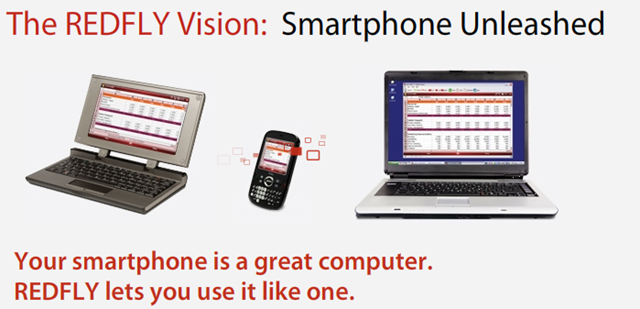
image_thumb[1]This week at the CTIA show in Las Vegas, Celio Corp expanded the REDFLY product line adding a software option for smartphone users – the REDFLY Mobile Viewer software for Windows XP and Vista. The REDFLY Mobile Viewer combined with two existing REDFLY Mobile Companion hardware models give smartphone users a variety of ways to get real work done on a smartphone.

The REDFLY Mobile Viewer lets you conveniently use your favorite Windows Mobile applications at full size on your PC and experience many of the award-winning REDFLY Mobile Companion benefits when your smartphone is connected to your PC.

What can you do with the REDFLY Mobile Viewer? Text message friends and family throughout the day. Keep your work and personal lives separate while multitasking on one device. Go from 8 viewable cells to 50 while using Excel Mobile right on your phone. See more of any smartphone application at resolutions up to 1024×768 pixels – all using the full-size keyboard and mouse you already enjoy on your PC to control your phone.

Visit www.celiocorp.com to find out more about the REDFLY Mobile Viewer and download a FREE beta version of the software.

Which REDFLY product is right for you? See a comparison of products and features.

DOWNLOAD:  http://www.celiocorp.com/install/#viewer

Digg This

Posted by: kurtsh | April 5, 2009

DOWNLOAD: REDFLY Driver Update News

image Celio Corp released a major phone driver and REDFLY firmware update.

The new phone driver and REDFLY firmware combination increases communication speeds over USB and Bluetooth while providing more stability and adding support for more third-party applications such as Opera 9.5.

As part of the software update, 18 new Windows Mobile phones were added to the list of REDFLY supported phone bringing the total to 54.

This software update is recommended for all REDFLY users. Visit http://www.celiocorp.com/install to download the updates and view installation instructions.

DOWNLOAD:  http://www.celiocorp.com/install

Digg This

Posted by: kurtsh | April 3, 2009

DOWNLOAD: Hyper-V Security Guide now available!

image Elevate virtual environment security with the Hyper-V Security Guide!

The Hyper-V Security Guide is designed to provide your customers with guidance, instructions, and recommendations to help them further elevate the security of virtualized Windows Server® environments and address their business-critical needs.

Here’s your chance to help your customers efficiently manage the security of their virtualized environments. Get all the details about the guide by visiting the Hyper-V Security Guide page on TechNet.

The Hyper-V Security Guide provides the following information to address security concerns about server virtualization:

  • Hardening the Hyper-V role. Prescriptive guidance for hardening the Hyper-V role, including several best practices for installing and configuring Hyper-V with a focus on security. These best practices include measures for reducing the attack surface of Hyper-V as well as recommendations for properly configuring secure virtual networks and storage devices.
  • Delegating virtual machine management. Prescriptive guidance to help IT professionals safely and securely delegate administrative access to virtual machine resources using tools such as System Center Virtual Machine Manager.
  • Protecting virtual machines. Prescriptive guidance for securing virtual machine resources, including best practices and detailed steps for protecting virtual machines by using a combination of file system permissions, encryption, and auditing.

This Solution Accelerator provides the following important benefits:

  • Secure deployment. The recommendations in this guide will help securely deploy applications on the Microsoft virtualization platform with confidence.
  • Comprehensive. This guide was written to address key security concerns around server virtualization.
  • Thoroughly tested. All security recommendations have been fully tested in Microsoft labs.
  • Free. The Hyper-V Security Guide is free on the Microsoft Download Center.

DOWNLOAD:
http://go.microsoft.com/fwlink/?LinkId=140067

Digg This

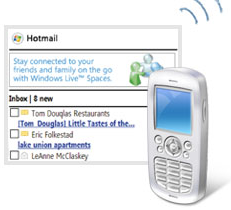
image Windows Live for Windows Mobile v10.6.0046.0800 is now ‘live’ at http://wl.windowsmobile.com.  This version includes Messenger.  This update to our public release is solid and much improved over what is being used today.

DOWNLOAD:
http://wl.windowsmobile.com

Release Notes:
http://mobile.microsoft.com/live/En-US/mobile/release.mspx?wt.dl=1&sid=bb541ca1629268867560bcc1b2162c859f3d7561

FAQ:
http://mobile.microsoft.com/live/En-US/mobile/faq.mspx?wt.dl=1&sid=bb541ca1629268867560bcc1b2162c859f3d7561

Digg This

image Microsoft Office SharePoint Designer is now a freely downloadable product.  Today, the Sharepoint Team Blog made the announcement on their blog.

DOWNLOAD: 
http://office.microsoft.com/en-us/sharepointdesigner/HA103607611033.aspx (143MB-296MB)

SHAREPOINT PRODUCT TEAM BLOG:
http://blogs.msdn.com/sharepoint/archive/2009/04/02/sharepoint-designer-available-as-a-free-download.aspx

This has a number of ramifications:

  1. Customers can now make relatively advanced design changes to Sharepoint sites regardless of whether they are Sharepoint Server based on Windows Sharepoint Services based.
  2. Relatively complex workflows can be created without any cost to businesses providing human workflow to reduce error and quicken business process.
  3. End users can make customizations to pages which could potentially result in support calls if they have the “Designer” right, which Site Owners do by default.


This blog entry from the SharePoint Designer team does a good job of laying out the options available for locking down the use of SharePoint Designer on an environment if that is something to be concerned about in your organization.

Locking Down Sharepoint Designer
http://blogs.msdn.com/sharepointdesigner/archive/2008/11/25/locking-down-sharepoint-designer.aspx

To view the rights a group has on a site:

  1. Browse the site
  2. Site Actions menu | Site Settings
  3. Under Users and Permissions, click People and Groups
  4. In the Left Navigation, Click Site Permissions
  5. You will get a list of groups and any users that have explicit permissions.  Clicking the name will get you the specific permissions the group has.
Digg This

microsoft-webinar-april-200.gif

When: April 14th, 2009
(8:30 am Pacific · 10:30 am Central · 11:30 am Eastern)
Duration: 60 minutes

register_today_orange.jpg
(http://cts.vresp.com/c/?ProdianceCorporation/86b4e979c7/25e115a7d7/761ebbc418)


In the wake of the economic crisis and subsequent $700 billion federal bailout, regulators and government officials are calling for more transparency in our financial system. In a recent speech in Washington D.C., Federal Reserve Chairman Ben Bernanke specifically highlighted the need to mitigate risk, prevent fraud and increase transparency within derivatives trading – an environment that is fraught with complex and critical spreadsheets and other end-user computing (EUC) applications.

Join Microsoft and Prodiance for this exclusive online event to learn about the key risk and compliance issues for critical spreadsheets and EUCs, and how the latest technology and best practices can help organizations effectively mitigate operational risk while improving oversight and transparency.

The agenda will include:

  • An overview of spreadsheet and EUC challenges in today’s business environment
  • The impact of spreadsheet errors and fraud on the current economic crisis
  • Expectations and regulatory mandates for spreadsheets and EUCs 
  • Steps to controlling key spreadsheets and EUCs
  • Best practices for leveraging technology to increase transparency and sustain spreadsheet control and compliance
  • A live demonstration of Prodiance and Microsoft software capabilities
  • Interactive polls and Q&A

Who should attend: CFOs, Controllers, CIOs, COOs, CEOs, IT Security, Auditors, Risk and Compliance Executives.

register_today_orange.jpg
(http://cts.vresp.com/c/?ProdianceCorporation/86b4e979c7/25e115a7d7/761ebbc418)

For additional questions concerning this event, please contact us at +1.925.543.0054 or at contact@prodiance.com.


©2009 Prodiance Corporation. All rights Reserved.

Digg This

image Cloud computing has huge implications for both developers and business people. This is your chance to get in on the ground floor and be part of the community that helps pioneer this exciting new area. Find out more and register today.

REGISTER:
https://www.clicktoattend.com/invitation.aspx?code=137135

DATE/TIME:
Tuesday, April 21, 2009, 5:05 PM – 7:00 PM
Welcome Time:5:00:00 PM Pacific Time

LOCATION:
Neudesic Offices
3420 Ocean Park Blvd Suite 3055
Santa Monica, CA 90405

Digg This

« Newer Posts - Older Posts »

Categories