image Microsoft Exchange 2007 Deployment Workshop – Hands-on Lab

In most organizations today, email plays a key role in the day to day operations of the business. However, security and compliance, along with efficiency and access, are top concerns for IT professionals as they implement and deploy solutions.
Join us for this one-day hands-on lab to learn how to deploy and manage Microsoft Exchange Server 2007. This complimentary training will show how the benefits and new technology can help support and address real problems through these three pillars:

  • Built-in Protection: Exchange Server 2007 offers built-in protective technologies to keep your business moving, reduce spam and viruses, enable confidential communications, and help your company to be compliant.
  • Anywhere Access: With Exchange Server 2007, employees get anywhere access to their e-mail, voice mail, calendars, and contacts from a variety of clients and devices.
  • Operational Efficiency: Exchange Server 2007 enables new levels of operational efficiency through capabilities that optimize hardware and networking investments and features that help make administrators more productive.

What is a hands-on-lab?
This isn’t your typical IT class. This hands-on lab is for experienced IT Pros who want to "try it out." You’ll spend most of the day getting hands-on practice and experience with the new product features and scenarios in your own lab environment with very little instructor presentation.

Dates:

  • April 21, 2009 Irvine, CA (Microsoft Office)
    (8:30 a.m. – 4:30 p.m.)
  • April 30, 2009 Los Angeles, CA (Microsoft Office)
    (8:30 a.m. – 4:30 p.m.)

Who Should Attend:
This course is for system administrators and engineers who work with the installation, configuration, and maintenance of a variety of server types and have two to three years of experience managing enterprise-level Microsoft Exchange Server environments.

Prerequisites:
To get the most from this course, you need to have two to three years experience with the technologies included in Microsoft Exchange environments.

Registration:
Please contact me for details on how to register if you are a customer of mine.

Workshop Agenda

Modules

Lab Objectives

Module 1: Installing and Managing Microsoft Exchange Server 2007

Lab: Installing Microsoft Exchange Server 2007; Time estimated: 60 minutes
After completing this lab, you will be able to:

  • Verify prerequisites for a new installation.
  • Install the Hub Transport Server and Mailbox Server roles on a single server.
  • Verify a successful installation.
  • Use the built-in Exchange Server Best Practices Analyzer (ExBPA) to verify whether the new installation complies with recommended best practices.
  • Use the command line to perform an Exchange Server 2007 server role installation.

Lab: Transitioning from Exchange Server 2003 to Exchange Server 2007; Time estimated: 90 minutes
After completing this lab, you will be able to:

  • Install the ExMap tool and run it to gather technical details of your current Microsoft® Exchange environment.
  • Prepare the Active Directory® environment and install Microsoft® Exchange Server 2007 SP1.
  • Migrate mailboxes and folders from Exchange Server 2003.
  • Remove Exchange Server 2003 from the Exchange Server 2007 organization.

Lab: Managing and administering Exchange Server 2007; Time estimated: 40 minutes
After completing this lab, you will be able to:

  • Use the Microsoft® Exchange Management Shell to balance mailboxes across multiple mailbox databases.
  • Use the Exchange Server 2007 Toolbox, including the Best Practices Analyzer (ExBPA) and the Performance Troubleshooter (ExPA).
  • Understand the AutoDiscover feature of Exchange Server 2007 with Microsoft Office Outlook® 2007

Module 2: Compliance and Retention with Exchange Server 2007

Lab: Exchange Server 2007 Compliance & Retention; Time estimated: 60 minutes
After completing this lab, you will be able to:

  • Create a new Messaging Records Management folder.
  • Create Messaging Records Management content settings by using the Microsoft® Exchange Management Console.
  • Create a Messaging Records Management mailbox policy and link it to the Managed Custom folder.
  • Assign a Messaging Records Management mailbox policy to a user’s Inbox.
  • Enforce compliance by creating an ethical wall using Hub Transport Rules.
  • Create a message classification.
  • Create a Hub Transport Rule to act upon the message classification.
  • Work with message classifications in Microsoft Outlook Web Access

Module 3: Operational Efficiency

Lab: Using Exchange Server 2007 Cluster Continuous Replication; Time estimated: 60 minutes
After completing this lab, you will be able to:

  • Install Microsoft® Windows Server™ 2003 cluster services to support Exchange Server 2007 Cluster Continuous Replication (CCR).
  • Configure a Majority Node Set (MNS) quorum with file share witness.
  • Install and configure the Exchange Server 2007 active and passive nodes in the cluster.

Lab: Using Exchange Server 2007 Standby Continuous Replication; Time estimated: 60 minutes
After completing this lab, you will be able to:

  • Install and configure Exchange Server 2007 Standby Continuous Replication.
  • Simulate a database loss
  • Activate the Standby Continuous Replication copy

Module 4: Unified Messaging

Lab: Configuring the Unified Messaging Server; Time estimated: 60 minutes
After completing this lab, you will be able to:

  • Configure the Microsoft® Exchange Server 2007 Unified Messaging environment to receive incoming calls and apply dialing restrictions.
Digg This

image The latest Microsoft Security Intelligence Report (SIR) was released on April 8, 2009. Volume 6 of the SIR provides an in-depth report on:

  • Software vulnerabilities (both in Microsoft software and in third-party software).
  • Software exploits.
  • Security and privacy breaches.
  • Malicious and potentially unwanted software trends.
  • E-mail, spam, and phishing trends.

image Volume 6 focuses on July – December of 2008. Here are some of the findings in the latest SIR, with guidance on how help combat threats and stay secure.

For more details and a video summary of the Security Intelligence Report (v6), visit:

http://www.microsoft.com/security/portal/sir.aspx
Vinny and Tim show – SIR Volume 6


DOWNLOAD:
http://www.microsoft.com/downloads/details.aspx?FamilyID=aa6e0660-dc24-4930-affd-e33572ccb91f&displaylang=en

Digg This

Posted by: kurtsh | April 14, 2009

DOWNLOAD: SQL Server 2008 Service Pack 1 now available

clip_image001Service Pack 1 for SQL Server 2008 is now available for download here and is primarily a roll-up of previous cumulative updates, quick fix engineering updates and minor fixes made in response to requests reported through the SQL Server community.

While there are no new features in this service pack, customers running SQL Server 2008 should download and install SP1 to take advantage of the fixes which increase supportability and stability of SQL Server 2008. With this service pack, Microsoft has made investments to ease deployment and make management of service packs more efficient. Key improvements in SP1 include Slipstream, Service Pack Uninstall and Report Builder 2.0 click-once deployment.

  1. Slipstream allows administrators to install SQL Server 2008 and Service Pack 1 in a single instance. This decreases the total time for an installation, including a fewer number of reboots thereby increasing productivity and deployment availability.
  2. Service Pack Uninstall allows administrators to uninstall the service pack separately from the database release.  This feature also improves DBA productivity, reduces the cost of deployment and improves overall supportability
  3. Report Builder 2.0 Click Once improves the existing SQL Server end-user report authoring application by easing deployment to business users

DOWNLOAD:
http://www.microsoft.com/downloads/details.aspx?displaylang=en&FamilyID=66ab3dbb-bf3e-4f46-9559-ccc6a4f9dc19

Digg This

Wow.  A friend pointed me to this site earlier today:

CBS College Sports:  UCLA Athletics
http://all-access.cbssports.com/player.html?code=ucla&media=112623

image

Okay.  So what’s the big deal?  Well, the site is a little more than it seems.

First of all, the site provides daily access to video content – primarily interviews and news bits regarding college sports from football, to basketball, to volleyball, to golf, etc.  There are a lot of free videos available that people can view.  They can also access LIVE events such as radio broadcasts of games in real time.

image

FEATURING MICROSOFT SILVERLIGHT
But the really interesting thing is the site is not HTML driven.  Instead, it’s driven by Microsoft Silverlight, which is the reason the site is so visually appealing and smooth. 

More importantly, the video stream is a Windows Media video/audio clip (.ASF in this case) that appears to be delivered over HTTP from an IIS Media Server or a Windows Media Server.

In any case, check it out.  It’s a really good experience with great video quality and an elegant UI.

http://all-access.cbssports.com/player.html?code=ucla

(And for those of you rooting for the “other team”, you might want to check this out)

Digg This

image Hmm.  Missed this one.

In case it hasn’t been apparent, in the same way that Windows Server is Microsoft’s operating system platform to applications that need basic platform services such as file I/O, network services, performance throttling, event logging, remote management, scriptability, security principles, etc…

Internet Information Server 7.0 (an installable service for Windows Server 2008) is Microsoft’s Internet services platform for web-based applications that need basic web services such as FTP, Media streaming, Application isolation, HTTP-based application communication, resource management, etc.

FTP SERVICE 7.5 RELEASES
FTP Services 7.5, unlike past versions of FTP in Windows Server 2003 and previous revisions is an optional plug-in service that leverages the IIS 7.0 web platform for managability, administration, configuration, security, etc.

Imagine if someone wrote an FTP services completely independently for security and performance, over a hardened web platform.  That appears to be what we did with the 7.5. 

CHANGES

  • XML CONFIG FILES – The biggest change is departure of the old IIS 6.0 configuration metabase database – replaced by an XML file-based system making configuration backup and management simpler and segregate-able.
  • FTP OVER SSL – FTP has historically always happened in the clear meaning data transferred was never encrypted.  Additionally, password transmission by default has been in the clear.  The introduction of FTP over SSL provide secure FTP transmission while taking advantage of the performance benefits of FTP over HTTP.
  • UTF8 & IPv6 SUPPORT – Although IPv6 has not taken off yet, FTP 7.5 is ready for it if and when your company adapts it for a larger address space.
  • ADAPTIVE BANDWIDTH – Bandwidth throttling on a dynamic or static basis is possible for the FTP service without impacting other web services.

DOWNLOAD:
x64:
http://www.microsoft.com/downloads/details.aspx?displaylang=en&FamilyID=ffb7c167-279e-48d3-8169-dea85784c4d1.
x86: http://www.microsoft.com/downloads/details.aspx?displaylang=en&FamilyID=b7f5b652-8c5c-447a-88b8-8cfc5c13f571.

Digg This

image VDI Expert Series Webcast:
Microsoft and Citrix – Exploring VDI’s Myths, Limitations and Benefits

If you’re considering Desktop Virtualization or Virtual Desktop Infrastructure (VDI), join Microsoft® and Citrix® to discover how to minimize the cost of a VDI implementation with the most comprehensive solution.  

Hear about:

  • Top 5 VDI Myths
  • XenDesktop Technical Differentiators & Testing Metrics
  • Minimizing the cost associated with a VDI implementation
  • Enhanced security
  • Increased business agility

Date/Time:

  • Thursday, April 9, 2009
    10:00AM-11:00AM PST

REGISTER: 

Digg This

clip_image002

Supporting Better Business Decisions
with Business Intelligence and SQL Server Analysis Services

Join us for a free 2-day, invitation only training seminar to help you use technologies you probably already own to do more with business intelligence.

In this uncertain financial climate BI is no longer a luxury afforded by larger organizations – it is now considered an essential part of the IT portfolio. While driving better decision-making throughout your organization may be key to success, simply providing volumes of data or reports is usually not enough.  There is a solution and you may likely already own the technology. SQL Server Analysis Services is designed to translate data into business models that facilitate insightful decision making. 

Date/Time:
Mon, May 11 – Tues, May 12
8:30 – 5:00 pm

Location:
Microsoft Office – Irvine
3 Park Plaza
Suite 1600
Irvine, California 92614

This seminar is densely packed with real world examples and numerous practical demonstrations.  By the end of the two days, attendees can reasonably expect to be both inspired and empowered to implement robust analytic solutions.

Who should attend

  • Any IT professional with an interest in learning more about BI, data analysis and data mining
  • Business professionals interested to understand and evaluate Microsoft’s BI strategy and platforms.
  • Apart from a general understanding of relational database technologies, there is no requirement to have any background or experience with OLAP or data mining technologies.

Day One         
09:00    09:30    30    Defining Business Intelligence
09:30    10:00    30    Introducing Dimensional Modelling Techniques
10:00    10:15    15    Introduction to OLAP
10:15    10:30    15    ** MORNING BREAK **
10:30    12:00    90    Designing and Developing Dimensions and Cubes
12:00    13:00    60    ** LUNCH BREAK
13:00    14:00    60    Enriching the UDM Design with Calculations, KPIs, Actions, Perspectives and Translations
14:00    14:45    45    Optimizing, Managing, Securing and Scaling the UDM
14:45    15:00    15    ** AFTERNOON BREAK **
15:00    16:00    60    Querying and Consuming the UDM
16:00    16:30    30    Next Generation OLAP from Microsoft
16:30    17:00    30    Q and A

Day Two         
09:00    09:30    30    Introduction to Data Mining
09:30    10:15    45    Introducing the SQL Server Data Mining Algorithms
10:15    10:30    15    ** MORNING BREAK **
10:30    12:00    90    Introducing the SQL Server Data Mining Algorithms (Continued)
12:00    13:00    60    ** LUNCH BREAK
13:00    14:00    60    Querying and Visualizing Data Mining Results
14:00    14:45    45    Integrating Data Mining with SQL Server
14:45    15:00    15    ** AFTERNOON BREAK **
15:00    16:15    75    Embedding Data Mining Results into Applications
16:15    16:30    15    Next Generation Data Mining from Microsoft
16:30    17:00    30    Q and A

Registration:
If you’re a customer of mine, please contact me for details on how to register.  This will be an extremely packed class so only invited Enterprise guests will be allowed to participate.

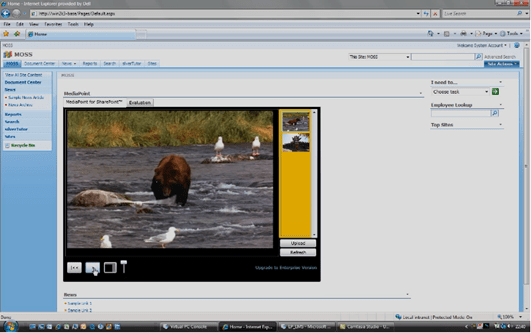
For those looking for a nice free plug in for Sharepoint Server 2007 or Windows Sharepoint Services that will allow people to interactively view and browse media like videos and audio clips, Point8020’s MediaPoint is available using Silverlight that allows you to instantly expand your Sharepoint site’s capabilities.

image For more information, visit Point8020’s web site:

LINK:  http://www.point8020.com/services.aspx#MediaPoint

Digg This


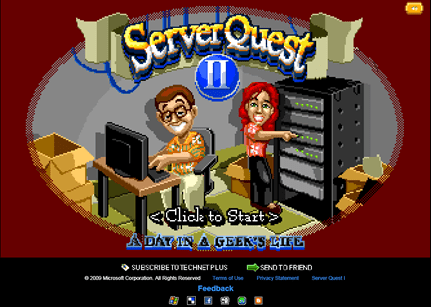
ServerQuest is back!

ServerQuest II:  A Day In a Geek’s Life
http://www.microsoft.com/click/serverquest

If you played the original ServerQuest and liked it, you’re sure to enjoy ServerQuest II, now in Silverlight!

If you remember the ol’ Sierra Online games of old, I’m sure you’ll recognize the style of ServerQuest.  And for those of you that have older backgrounds in computers and games will remember games like Snake, the Mattel Intellivision, and binary jokes.

Also if you work as an IT Professional on a daily basis and know the more “typical” problems that IT staff folks have to deal with, you’ll have a deep appreciation for some of the scenarios in which you’re posed challenges… through email in Outlook, of all places!

image

BUT I DON’T LIKE PIXELATED GRAPHICS!
For those who are too young to remember, ServerQuest was specifically designed to bring back memories of classic adventure games of the past.  But if you don’t like ServerQuest II’s ‘look & feel’ – fear not:  Let’s see if you can do better!  Microsoft Silverlight is running a contest called ServerQuest Contest:

ServerQuest Contest
http://www.serverquestcontest.com/

Contestants can submit their own Silverlight game and through online voting you can win $5000 and have your game featured within ServerQuest II itself!  For example:  Take a look at this one:

Are Your Certifiable?
http://www.microsoft.com/click/areyoucertifiable/

Digg This

image We are excited to announce our new version of Microsoft Desktop Optimization Pack (MDOP), available for purchase to Software Assurance customers. 

MDOP 2009 includes:

Alongside these updated releases, MDOP 2009 also includes the other standard MDOP tools:

The updates are available to 14.4 million MDOP customers.

MED-V provides deployment and management of virtual Windows desktops to enable key enterprise scenarios.    MED-V 1.0 helps enterprises upgrade to the latest version of Windows even when some applications are not yet compatible.   MED-V builds on top of Microsoft Virtual PC to run two operating systems on one device, adding virtual image delivery, policy-based provisioning and centralized management.

A recent brief by Enterprise Management Associates (EMA) emphasized some of the customer benefits of using MED-V:  "We found that MED-V really solved our application compatibility problems. It allowed us to deploy the applications that we were having difficulty with, where third party vendors were not providing a supported version. Where we used to have hundreds of images, we were able to move to one [Windows] Vista image, and use MED-V to deploy [legacy] applications on top of that," said IT Deployment Manger at Belfast Health and Social Care Trust, an organization of 22,000 staff members.

"We are really happy with MED-V. We can virtualize the applications that are made only for XP, and they work fine, with all the functionality intact," said a large European telecommunications company with almost 80,000 employees.

App-V 4.5 CU1 is now available as part of MDOP 2009.  App-V 4.5 CU1 adds support for Windows 7 beta, so customers can move ahead with application testing in preparation for enterprise deployments. It also contains a few improvements such as instant access or removal of applications assigned to end users.  When Windows 7 releases, we are committed to supporting the final product within 90 days of general availability. 

AIS 1.5 update, now available to all MDOP end users through Windows Update, enhances the license reconciliation feature and the task scheduler. It now provides a detailed report for each application (e.g. whether license type is retail or volume license) to simplify license inventory tasks and to improve licensing compliance. The inventory scan scheduling has been improved to ensure data is collected even from devices that are turned off regularly.

MDOP 2009 is available for MDOP subscribers at Microsoft Volume Licensing Site (MVLS).

DOWNLOAD:
https://www.microsoft.com/licensing/servicecenter/Catalog/Product.aspx?d=/wEPBQIxNwUDNzA1

[taken from the MDOP blog]

Digg This

« Newer Posts - Older Posts »

Categories