Balesio, the makers of one of my favorite utilities, “PPTminimizer”, released a new version of their product.

AN imageODE TO “PPT MINIMIZER 4.0”
One of my favorite tools in my arsenal of utilities is Balesio PPTminimizer.  It allows you to compress Office Powerpoint files (2007 and prior) by reducing the size and fidelity of graphics objects embedded within the document.

The premise behind this is that graphics objects are generally much larger than they need to be once they are embedded within the Powerpoint and sized to fit the slide.  A graphics object that’s 1024×768 and is 1.1MB in size might be resized to 160×120 in a slide but it remains 1.1MB within the file.

PPTminimizer resizes the 1.1MB graphics object so that it might take only 100k but still look the same on the slide.

PPTminimizer was always very flexible.  It allowed people to:

  • Compress graphics at different compression levels (for example, high compression is great for sending people “drafts” of Powerpoints over email, whereas “standard” is better for archival once the document is completed.
  • Automatically compress PPTs (or at least ask you if you want to) every time you send an email in Outlook with a PPT attached to it.
  • Right-mouse click any Powerpoint file and compress it.  (It makes a 2nd copy of the file and appends the word, “Optimized” to the file name)

At the end of the day, you were always able to send Powerpoints over email without filling someone’s mailbox.  Compression ratios are usually around 50%-95%… i.e. a 10MB Powerpoint drops down to as little as <1MB in size.

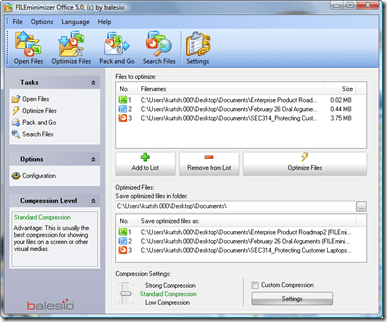
imageENTER FILE MINIMIZER OFFICE 5.0
Well, they finally went and extended that PPT functionality to .DOC and .XLS files.  Files that are part of the rest of the Office family of products can now have embedded objects shrunk just like PPTs.

In addition to shrinking graphics files down to sizes that are more appropriate for the fidelity that is necessary within the document, FILEminimizer also “flattens” OLE objects.  If you have an Excel table embedded within a Word .DOC, FILEminimizer can convert the Excel table into a graphics object, greatly reducing the size of the object.

And like PPTminimizer, it will intercept every message you mail with Outlook that contains an Office attachment in it… but now it will compress every .DOC, .XLS, and .PPT (or .DOCX, .XLSX, or PPTX) you have attached to the mail and batch process these documents all at once.

At $45, this is a very worthwhile investment if you send and receive Office documents over the mail or store many documents on server shares.

Digg This

Posted by: kurtsh | April 21, 2009

INFO: Office 2007 Service Pack 2 coming April 28th

image Besides announcing a release date of April 28th, the Office Sustained Engineering folks published a write up that described the new general fixes in Service Pack 2.

—————–

We’ll start with updates that pertain to multiple products, highlight fixes to the individual desktop applications, and then discuss fixes to the server products.

Changes that impact desktop applications

  • Service Pack 2 adds the ability to open, edit and save documents in version 1.1 of the OpenDocument Format for Word, Excel, and PowerPoint. These applications now let users save, open, and edit files as OpenDocument Text (*.odt), OpenDocument Spreadsheet (*.ods), and OpenDocument Presentations (*.odp).
  • The 2007 Microsoft Office Service Pack 2 is the first service pack to support uninstall of client updates through the Microsoft Service Pack Uninstall Tool for the 2007 Microsoft Office Suite as well as via Windows Installer command line. The Service Pack Uninstall Tool will be available as a separate download.
  • The Microsoft Save As PDF or XPS add-in has been built into Office applications in SP2. Users no longer have to download and install the add-in separately.
  • When many graphic objects are present performance has been improved.
  • In many scenarios, expect increased print fidelity of graphical objects.
  • Improved interoperability using standard DrawingML markup to describe the visual properties of the SmartArt graphic. 

The 2007 Office Suite SP2 has been tested and is supported for Internet Explorer 8. Windows Vista SP2, Windows Server 2008 SP2, Windows 7 and Windows Server R2 will all be supported upon their release.

Access

  • The ability to export reports to Excel has been added.
  • Fixes for issues with the import data wizards, report printing and previewing, macros, Excel integration, and date filters.
    Updates to Access Developer Extensions are now included in SP2.

Excel

  • The charting mechanism has improved robustness and targeted performance improvements.
  • A chart object model has been added to Word and PowerPoint.
  • Improved printing of graphical content, especially on PCL printers.

Groove

  • Improved form tools.
  • Synchronization reliability has been improved.

InfoPath

  • Increased compatibility between InfoPath forms and other Microsoft products, such as Groove and Outlook.

OneNote

  • SharePoint synchronization has been improved which helps reduce the load on SharePoint servers and produce fewer errors.

Outlook

  • Performance in startup, shutdown, view rendering, and folder switch has been improved.
  • Calendar updates, search, and RSS are more reliable.
  • The object model has been improved.

PowerPoint

  • Resaving of files is faster. Several printer-specific problems have been fixed.
  • The Microsoft Office Excel Chart Object Model has been more fully integrated.

Project

  • The scheduling engine, Active Cache, and Gantt charts all have improvements.
  • There is additional reliability with earlier versions of the .mpp format.

Publisher

  • Fixes have been made in the following areas: print preview, compatibility with Internet Explorer 8, e-mail on Windows Vista, and saving to the Content library. 

Visio

  • Improved compatibility with other Microsoft products in several key scenarios, such as inserting Visio drawings as linked objects in PowerPoint or Word, exporting reports to Excel, and saving drawings as Web pages for browsing in Internet Explorer 8.

Word

  • Fidelity of PDF and XPS output has been enhanced compared to the output created through the use of the download. 
  • Better integration of the Microsoft Office Excel Chart Object Model.

Changes that impact the server products

Windows SharePoint Services 3.0 SP2 and Microsoft Office SharePoint Server SP2 include fixes and enhancements designed to improve performance, availability, and stability in your server farms. SP2 provides the groundwork for future major releases of SharePoint Products and Technologies.

  • An STSADM command line that scans your server farm to establish whether it is ready for upgrade to the next version of SharePoint and provides feedback and best practice recommendations on your current environment.
  • SP2 offers support for a broader range of Web browsers.
  • Substantial improvements to Forms-based authentication.

Windows Server 2008 SP2 and Windows Server R2 will be supported on their release.

Enterprise Content Management (ECM)

  • The performance and stability of content deployment and variations feature has been improved.
  • A new tool has been added to the STSADM command-line utility that enables a SharePoint administrator to scan sites that use the variations feature for errors.

Excel Services

  • SP2 makes it easier to configure Excel Web Access Web Parts on new sites.
  • Several rendering, calculation, and security issues have been resolved.
  • Some display issues have been addressed.
  • Improved compatibility with Mozilla Firefox browsers.

Groove Server

  • Improved  synchronization reliability.
  • Groove Server 2007 Manager will install and run with SQL 2008.
  • Groove’s LDAP connectivity and auto-activation functionality have been improved.
  • Error reporting in the Groove Relay Server has improved significantly.
  • Groove Relay Server has improved robustness.

Forms Server

  • Memory requirements and the page load times for large browser-rendered forms have been reduced.
  • Browser rendering of various controls, such as the ‘cannot be blank’ asterisk and the rich text field has been improved.

Project Server

  • Better memory management in the queue service.
  • Performance to certain database table indexes is improved.
  • Resource plans, build team, cost resources, and the server scheduling engine have improved.

Search Server

  • Improvements to the reliability and stability of very large corpus crawls.
  • Backup-restore has been improved.
  • A new command has been introduced to the stsadm.exe tool that lets a SharePoint Administrator to tune the Query processor multiplier parameter.
  • Improved accuracy in searches involving numbers.

http://blogs.technet.com/office_sustained_engineering/archive/2009/04/16/service-pack-2-for-the-2007-microsoft-office-system-due-to-ship-april-28th.aspx

Digg This

image Check this deal out for $138:

  1. Xbox 360 Pro (Refurbished)
  2. 20GB Hard Drive
  3. 1 Wireless Controller
  4. 1 Xbox Live Headset
  5. 1 Ethernet cable
  6. Component HD cable
  7. HDMI port
  8. FREE Shipping

…and it comes with the “Red-ring-of-death” resistance “Falcon” chipset design.  In case you don’t know what that is, the Falcon chipset has:

  • Cooler, less power consuming CPU (65nm instead of 90nm from the original “Xenon” Xbox 360 design)
  • Cooler, less power consuming GPU (80nm instead of 90nm from the original “Xenon” Xbox 360 design)
  • Cooler, less power consuming RAM (80nm eDRAM instead of 90nm from the original “Xenon” Xbox 360 design)
  • Improved, larger, heat sinks and cooling ducts
  • Power utilization of 175W (instead of 205W from the original “Xenon” Xbox 360 design)

The only “better” units you’ll find are the “Jasper” chipsets that are shipping (since Sept 2008) in the NEW Xbox 360 Pro with 60GB hard drives.  These of course are sold new at $299 and nowhere near the price of $138.

The trick is that this unit is normally $149 on eBay, but with Live Cashback on eBay with 8% Live Cashback available on it if you BuyItNow using PayPal.  (Search for “Xbox 360 HDMI 20GB” from http://search.live.com/cashback and click on the eBay sponsored site on the right that says “get 8% off eBay BuyItNow purchases”)

Here’s a direct link to the eBay store selling the units:

Digg This

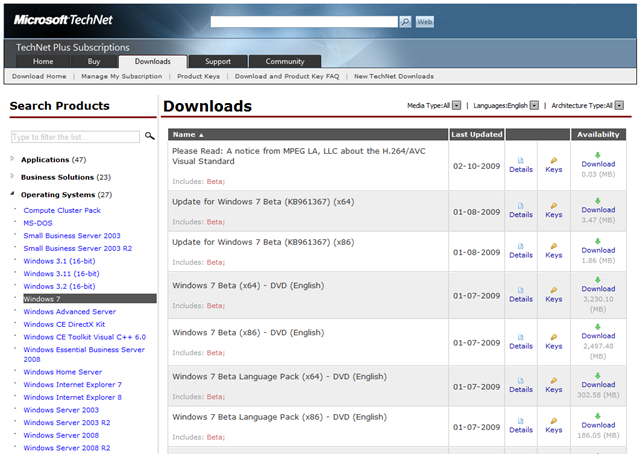
In case it wasn’t clear, based on the confusion created by some folks in the media, Windows 7’s Release Candidate is not available on either MSDN or Technet Plus yet.

(BTW:  All it would have taken to check one’s sources, would be to find one of the millions of Technet Plus or MSDN subscribers to see whether or not the RC had posted.  As you can see below, it hasn’t.  The only posted as a of Friday was the public Beta.)

image

Digg This

image For customers researching or currently operating SharePoint Server 2007, we have collated these links to highlight some of the online content available which you might find useful. If there is anything in particular you’d like to hear about, please let me know.

MOSS 2007 White papers on Microsoft.com

  • Deploying and Supporting Enterprise Search with SharePoint Server 2007
    This white paper covers the topics of how Microsoft IT implemented enterprise search within the company’s intranet using SharePoint Server 2007.
  • Good, better, best: Office and SharePoint Products and Technologies
    This white paper describes how different versions of Microsoft Office programs work together with the 2003 and 2007 versions of SharePoint Products and Technologies. The focus of this paper is on the integration features of the Office 2003 Editions versions the 2007 Office Suites with the 2007 SharePoint Products and Technologies.
  • Information architecture in Office SharePoint Server
    This paper is intended to represent the process that a medium to large organization might undergo when deploying Microsoft Office SharePoint Server 2007 in a practical scenario. Included are typical approach, implementation, and governance techniques that might occur when planning, customizing, and deploying an Office SharePoint Server 2007 installation

Technical guidance from TechNet

TechNet Webcasts

TechNet Virtual Labs

Customer Case Studies

Website Portals

Digg This

image SQL Server 2008 Service Pack 1 (SP1) is now available at the following URL :

DOWNLOAD:
http://www.microsoft.com/downloads/details.aspx?displaylang=en&FamilyID=66ab3dbb-bf3e-4f46-9559-ccc6a4f9dc19

You can use these packages to upgrade any SQL Server 2008 edition.

SQL Server 2008 SP1 is primarily a roll-up of previous cumulative updates, quick fix engineering updates and minor fixes made in response to requests reported through the SQL Server community. While there are no new features in this service pack, customers running SQL Server 2008 should download and install SP1 to take advantage of the fixes which increase supportability and stability of SQL Server 2008.

With this service pack, Microsoft has made investments to ease deployment and make management of service packs more efficient. Key improvements in SP1 include Slipstream, Service Pack Uninstall and Report Builder 2.0 click-once deployment.

  • Slipstream allows administrators to install SQL Server 2008 and Service Pack 1 in a single instance. This decreases the total time for an installation, including a fewer number of reboots thereby increasing productivity and deployment availability.
  • Service Pack Uninstall allows administrators to uninstall the service pack separately from the database release.  This feature also improves DBA productivity, reduces the cost of deployment and improves overall supportability
  • Report Builder 2.0 Click Once improves the existing SQL Server end-user report authoring application by easing deployment to business users

For more information about SQL Server 2008 Service Pack 1, please review the Release Notes : http://go.microsoft.com/fwlink/?LinkId=147331

BLOG REVIEW:
http://blogs.technet.com/dataplatforminsider/archive/2009/04/07/service-pack-1-for-sql-server-2008-available-today.aspx

Digg This

Posted by: kurtsh | April 15, 2009

RELEASE: Expression Media 2 Service Pack 2 released

image What is Expression Media 2?

Expression Media 2 is software that allows you to catalog, then organize, annotate, share, present, publish and protect your work.  It handles over a hundred file types that include not only still image files but also video, music, graphics, fonts, Excel sheets and more!  This can help you keep control of all the pieces of a project or job. 

The great thing about Expression Media for me is that it allows me to go back into my library of digital photos and find photos of a time or place very quickly.  I can find a date range or I can type in a place name that I know I added to my files.  It takes out the pain of sorting through images from various trips to the same location when you know you want the image from the time you were there in 2005. 

Another nice thing is it is available to use on both PC and Mac and the experience is the same. 

More about Expression Media 2 here:
http://www.microsoft.com/prophoto/expressionmedia2/default.aspx

What’s new in Service Pack 2?

A full list of fixes is available in the Microsoft Knowledge Base article here.
http://support.microsoft.com/kb/962902

A couple things that were fixed which are worth highlighting are:

  • Importing a number of large images is very slow
  • Original file paths are used instead of new file paths when copying items to a new catalog.
  • Moving hierarchical keywords may incorrectly apply flat keywords to images
  • HTML gallery links show question marks when viewed in Mozilla Firefox browsers

Service Pack 2 for Expression Media is available for download here:

If you are using Expression Media make sure to have SP1 installed first before installing SP2.  Enjoy!

Digg This

image Microsoft Exchange Server 2010 helps you achieve new levels of reliability and performance by delivering features that help to simplify your administration, protect your communications, and delight your users by meeting their demands for greater business mobility.

MORE INFO: 
http://technet.microsoft.com/en-us/exchange/2010/default.aspx

DOWNLOAD:
http://www.microsoft.com/downloads/details.aspx?displaylang=en&FamilyID=1898ed2c-2f88-48ac-824e-d3d20fad77d7#Overview

—————-

What’s New in Exchange Server 2010 Beta?

New Rights-Protected E-Mail Functionality with Active Directory RMS

  • Transport rules to apply AD RMS protection to messages based on conditions
  • Persistent protection of attachments in rights-protected messages
  • Support for AD RMS templates
  • An Internet confidential AD RMS template for protection over the Internet
  • AD RMS protection for Unified Messaging voice mail messages

New Transport and Routing Functionality

  • Cross-premises mail routing  – An organization can choose to outsource some of their mailboxes to a hosted solution while maintaining their on-premises deployment. Exchange 2010 allows routing of messages between the on-premises and hosted mailboxes.
  • Enhanced disclaimers – Exchange 2010 lets you add disclaimers that can include hyperlinks, images, and HTML-formatted text. You can also insert Active Directory attributes that are substituted for the sender’s attributes when a disclaimer rule is triggered.
  • Transport rules integration with AD RMS – Exchange 2010 gives you the ability to create rules that require AD RMS protection based on keywords or patterns.
  • Moderated Transport – Exchange 2010 provides an approval workflow for sending messages to recipients. When you configure a recipient for moderation, all messages sent to that recipient must go through an approval process.
  • Shadow redundancy – Messages that are submitted to an Exchange 2010 Hub Transport server are stored in the transport database until the next hop reports successful delivery of the message. If the next hop doesn’t report successful delivery and it fails, the message is resubmitted for delivery.
  • Transport dumpster truncation based on log copy status – When messages that are in the dumpster are replicated to all mailbox databases, they’re removed from the dumpster.
  • Latency SLA management – Exchange 2010 Transport lets you measure service levels delivered relative to your service level agreement (SLA) goals. Exchange 2010 gives you the ability to measure latencies for each hop, as well as end-to-end latency.
  • Transport database improvements – Performance improvements in the Transport database result in reduced database I/O per second (IOPS) per message, which increases message throughput.

New Permissions Functionality

In Exchange 2010, Role Based Access Control (RBAC) has replaced the permissions model that was used in Exchange 2007. RBAC lets you define extremely broad or extremely precise roles and assignments based on the roles of your administrators and users, and the tasks they perform. Access to the cmdlets and parameters required to perform a task is granted by assigning the related RBAC management role to a user or universal security group. If you want to grant an administrator or user the ability to perform tasks in Exchange 2010, you must either add the administrator or user to a universal security group that already has been assigned a specific RBAC role, or you must assign the role directly to the administrator or user.

New High Availability Functionality

Exchange 2010 combines the key availability and resilience features of cluster continuous replication (CCR) and standby continuous replication (SCR) into a single high availability solution that handles both on-site data replication and off-site data replication. Mailbox servers can be defined as part of a Database Availability Group to provide automatic recovery at the individual mailbox database level instead of at the server level. Each mailbox database can have up to 16 copies.

The following features in Exchange 2007 and Exchange 2007 Service Pack 1 (SP1) no longer exist in Exchange 2010:

  • Local continuous replication (LCR)
  • Single copy clusters (SCC)

New Messaging Policy and Compliance Features

  • Exchange 2010 compliance features make retention independent of users’ mailbox management and filing habits, and these features ensure retention policies are applied continuously
  • interface for applying retention policies
  • Auto tagging for retention policies
  • Mailbox search features for cross-mailbox search with Advanced Query Syntax (AQS) support
  • New transport rules predicates and actions

New Outlook Web Access Features

  • Favorites in the Navigation Pane
  • Search folders
  • Message filtering
  • The ability to set categories in the message list
  • Options in the Web management interface for Outlook Web Access
  • A side-by-side view for calendars
  • Multi-client language support
  • The ability to attach messages to messages
  • Expanded right-click capabilities
  • Integration with Office Communicator, including presence, chat, and a contact list
  • Conversation view
  • The ability to send and receive text (SMS) messages from Outlook Web Access
  • Outlook Web Access mailbox policies

New Unified Messaging Features

  • Personal auto attendants (call answering rules)
  • Additional language support including in Outlook Voice Access and Voice Mail Preview
  • Enhancements to name lookup from caller ID
  • Voice Mail Preview
  • Messaging Waiting Indicator
  • Missed call and voice mail notifications using text messaging (SMS)
  • Protected Voice Mail
  • Built-in Unified Messaging administrative roles

Web Management Interface

  • Text messaging (SMS) integration
  • Voice messaging integration
  • Mailbox Search
  • Distribution list creation and management
  • Moderation and approval for distribution list submission

New Exchange Core Store Functionality

  • Storage groups are deprecated
  • Mailbox databases are no longer connected to the server object
  • Extensible Storage Engine (ESE) has many improvements for high availability, performance, and database mobility
  • The Store schema has been flattened

New Administration Functionality in the Exchange Management Console

The core EMC refers to new functionality that affects how you use the Exchange Management Console that includes:

  • Customer Experience Improvement Program (CEIP)
  • Organizational Health
  • Community and Resources
  • Command logging
  • Property dialog command exposure

New Administration Functionality in the Exchange Management Shell

  • Remote administration – With the new Shell, you can connect to remote Exchange 2010 servers across the network with only Windows PowerShell V2 CTP3 and Windows Remote Management 2.0 CTP installed.
  • Administrator audit logging – Actions that result in the modification of Exchange organization configuration and other object properties in the Exchange Management Console, the Web management interface, and the Shell can now be logged for later review.

FAQ
Digg This

image Event Overview
Miss MIX or want a refresher? Join us for MSDN Events Unleashed: The Best of MIX!

What’s New in Silverlight 3?
Are you interested in building business-focused Rich Internet Applications (RIAs)?  Would you like to take advantage of 3D in the browser, but assume it is too hard?  Have you wanted to take a Silverlight application offline?  Then this session is for you.  We will explore and illustrate the new features of Silverlight 3, including the following:

  • Support for perspective 3D
  • Offline Support
  • .NET RIA Services which simplifies the traditional n-tier application pattern by bringing together the ASP.NET and Silverlight platforms

Building Web Applications with Windows Azure
This session will begin with a brief overview of Azure and discuss some of the announcements made at MIX.  We will then illustrate through demo how to build a Windows Azure application from the ground up.  We will illustrate how to consume Azure Table Storage, how to host services, web pages and Silverlight components, as well as how to deploy your solution to the cloud.

MVC 1.0 vs ASP.Net Webforms
Have you heard about the new ASP.NET MVC  framework from Microsoft and wondered what it was all about? Are you curious whether this replaces ASP.Net WebForms?  Well in this session you will learn how to use the model-view-controller (MVC) pattern to take advantage of your favorite .NET Framework language for writing business logic in a way that is de-coupled from the views of the data.  In addition, we will talk about the pros and cons of both MVC and Web Forms, how to determine the best choice for a specific project, various techniques and patterns used to build MVC applications vs. Web Forms applications, and the implications for using each approach.

Logistics:

Los Angeles:

  • Date:
    May 20, 2009 2:00 PM – 5:00 PM
  • Location:
    Microsoft – Los Angeles
    333 S. Grand Ave.
    Suite #3300 (33rd Floor) Los Angeles California 90071

Irvine:

  • Date:
    May 28, 2009 2:00 PM – 5:00 PM
  • Location:
    Microsoft – Orange County 
    3 Park Plaza, Suite 1800
    Irvine California 92614

San Diego:

  • Date:
    June 02, 2009 2:00 PM-5:00 PM
  • Location:
    Microsoft San Diego Office – MPR
    9255 Towne Center Drive, 4th Floor
    San Diego California 92121

Registration:
Please contact me for details on how to register if you’re a customer of mine.

Digg This

image Microsoft Visual Studio Team System Big Event
Thursday, April 30, 2009 8:30 AM – Thursday, April 30, 2009 5:00 PM Pacific Time (US & Canada)
Welcome Time: 8:00 AM

Location:
Microsoft Corporation
3 Park Plaza
Suite 1600 Irvine California 92614
United States clip_image001


Event Overview
How do you take an idea from conception to completion? How can you truly do more with less?
Please join us for this unique, invitation-only event to discover how both product and processes help your organization succeed in today’s environment. We will explore how Team System assists teams across the board to be successful in today’s tough times. This “break through” event will not only provide you with best practices around development and testing, but will demonstrate key capabilities of both Visual Studio Team System 2008 and the upcoming 2010 release. It’s a day that promises to have something for everyone!

SESSIONS

  • Test Driven Development: Improving .NET Application Performance & Scalability
    This session will demonstrate how to leverage Test Driven Development in Team System. We’ll highlight both writing unit tests up front as well as creating test stubs for existing code.
  • "It Works on My Machine!" Closing the Loop Between Development & Testing
    In this session, we will examine the traditional barriers between the developer and tester; and how Team System can help remove those walls.
  • Treating Databases as First-Class Citizens in Development
    Team System Database Edition elevates database development to the same level as code development. See how Database Edition enables database change management, automation, comparison, and deployment.
  • Architecture without Big Design Up Front
    Microsoft Visual Studio Team System 2010 Architecture Edition, introduces new UML designers, use cases, activity diagrams, sequence diagrams that can visualize existing code, layering to enforce dependency rules, and physical designers to visualize, analyze, and refactor your software. See how VSTS extends UML logical views into physical views of your code. Learn how to create relationships from these views to work items and project metrics, how to extend these designers, and how to programmatically transform models into patterns for other domains and disciplines.
  • Development Best Practices & How Microsoft Helps
    Sometimes development teams get too bogged down with the details. Take a deep breath, step back, and re-acquaint yourself with a review of current development best practice trends, including continuous integration, automation, and requirements analysis; and see how Microsoft tools map to those practices.
  • "Bang for Your Buck" Getting the Most out of Team Foundation Server
    Today’s IT budgets are forcing teams to do as much as they can with as little as possible. Why not leverage Team Foundation Server to its full potential? In this session we’ll highlight some capabilities of TFS that you may or may not already know about to help you maximize productivity.

Register:
Please contact me for information on how to register if you’re a customer of mine.

Digg This

« Newer Posts - Older Posts »

Categories