image

Having a strategy on ensuring proper cost management of your Azure cloud instance should be top priority for cloud-enabled organizations.

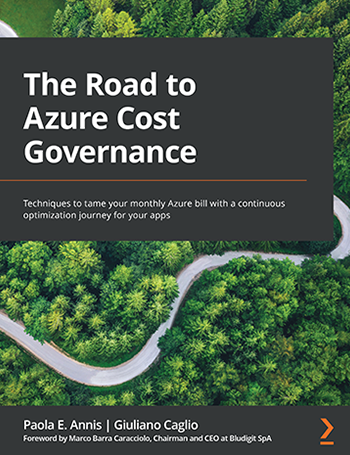
This is a blog post & a FREE eBook that we’ve made available that goes over Azure Cost Governance top to bottom, including how billing works, cost optimization, setting guardrails and thresholds for your usage, etc.

Make sure you’re spending your budget on Azure wisely & optimally by driving toward “cloud efficiency” with Cost Governance.

What is cloud efficiency?

It is the capacity to utilize cloud resources in the best possible way, and at the lowest possible cost while, at the same time, minimizing the waste of resources, and thus of energy and carbon emissions. It’s a combination of cost—how you handle and govern your cloud infrastructure, carbon—how you can keep carbon emissions at a minimum, and energy—how the application uses electricity, and how you can optimize these three areas to make the cheapest, more modern, efficient, and sustainable application. In this post, we will explore why you should immediately start your cloud cost management and governance process.

Cloud cost optimization is essential for companies as it directly impacts their bottom line and OPEX expenses. The cost of cloud computing can quickly add up, especially for businesses with a high volume of data or high traffic, and mission-critical applications.

Cloud cost optimization is what makes workloads more efficient, but what are its benefits?

  • Understanding, measuring, optimizing, and tracking your cloud costs. Having full control of your monthly bill should be your primary goal.
  • Reduce carbon emissions. Cloud computing consumes a significant amount of energy, and the increased usage of cloud resources has resulted in a substantial increase in carbon emissions. Cloud providers are taking steps to reduce their carbon footprint, but businesses can also play a significant role in reducing carbon emissions by optimizing their cloud resources.
  • Improve the performance of applications. This can significantly impact user experience, as slow or unresponsive applications can lead to frustrated customers and lost revenue. By optimizing cloud resources, companies can ensure that their applications run smoothly, improving customer satisfaction, and decreasing cloud spend.
  • Saving on your application’s cost in a systematic way can give you a budget for additional features, refactoring, and innovation.

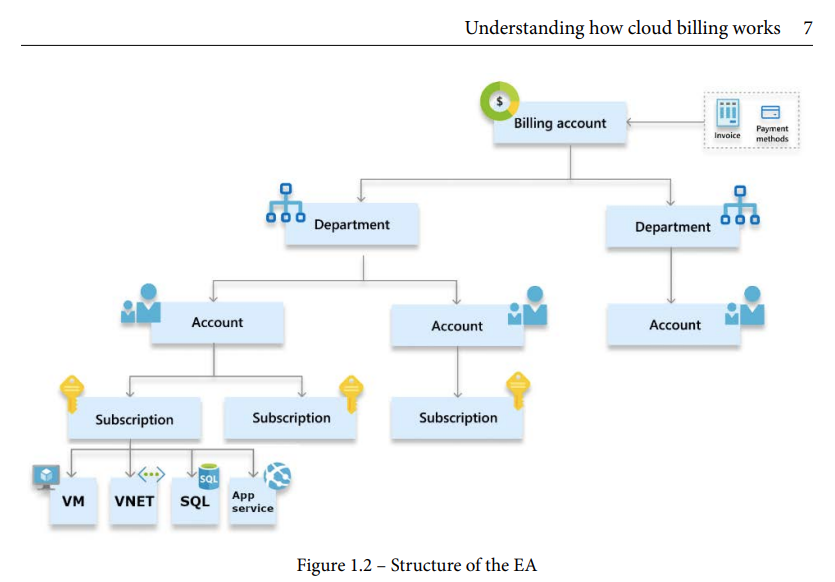
This article below goes over the different ways Azure users can optimize their costs.  The eBook reviews how billing works specifically for customers with EAs as well as other contacting scenarios.  For example:

image

Read about the 4 main cloud cost optimization strategies here:

Download the FREE eBook on Azure Cost Governance here:

Posted by: kurtsh | June 2, 2023

DOWNLOAD: Azure Savings Dashboard (.PBIX)

imageWanna keep management appraised of how much money you’re saving the organization through proper cost optimization techniques?

This Power BI .PBIT dashboard for customers to import into Power BI that shows how much money they’re saving on Azure optimization techniques like Azure Reservations, Azure Savings Plan, or Azure Consumption Commitment discount.

For more information, visit:

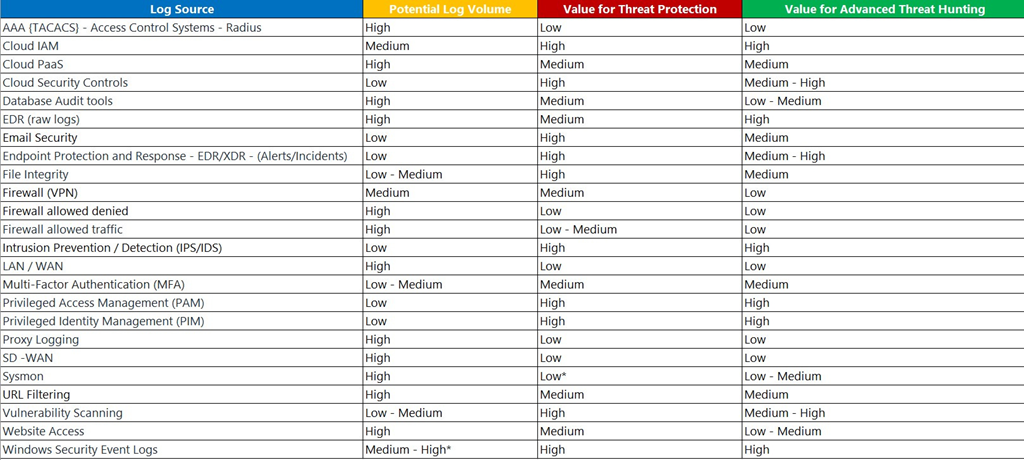
imageOne of my favorite Microsoft Security Global Black Belts, Andrea Fisher, wrote a great post explaining what should be ingested into Microsoft Sentinel & why.

She’s got a table and some advice on the post below. Andrea has done 70+ Microsoft Sentinel engagements & you should probably heed her advice. Smile 

clip_image002What is Microsoft Defender for Endpoint?

  • Microsoft Defender for Endpoint is an enterprise endpoint security platform designed to help enterprise networks prevent, detect, investigate, and respond to advanced threats.
  • Defender for Endpoint uses the following combination of technology built into Windows 10 and Microsoft’s robust cloud service:
    • Endpoint behavioral sensors
    • Cloud security analytics
    • Threat intelligence
    • Core Defender Vulnerability Management
    • Attack surface reduction
    • Next-generation protection
    • Endpoint detection and response
    • Automated investigation and remediation
    • Microsoft Secure Score for Devices
    • Microsoft Threat Experts
    • Centralized configuration and administration, APIs

More details: 
https://learn.microsoft.com/en-us/microsoft-365/security/defender-endpoint/microsoft-defender-endpoint?view=o365-worldwide

Is there a solution for non-Microsoft platforms?

  • Microsoft Defender for Endpoint on macOS
  • Microsoft Defender for Endpoint on Linux
  • Microsoft Defender for Endpoint on Android
  • Microsoft Defender for Endpoint on iOS

More details: Microsoft Defender for Endpoint on other platforms: 
https://learn.microsoft.com/en-us/microsoft-365/security/defender-endpoint/non-windows?view=o365-worldwide
Microsoft 365 Defender

With Microsoft 365 Defender, Defender for Endpoint, and various Microsoft security solutions, form a unified pre- and post-breach enterprise defense suite that natively integrates across endpoint, identity, email, and applications to detect, prevent, investigate, and automatically respond to sophisticated attacks.

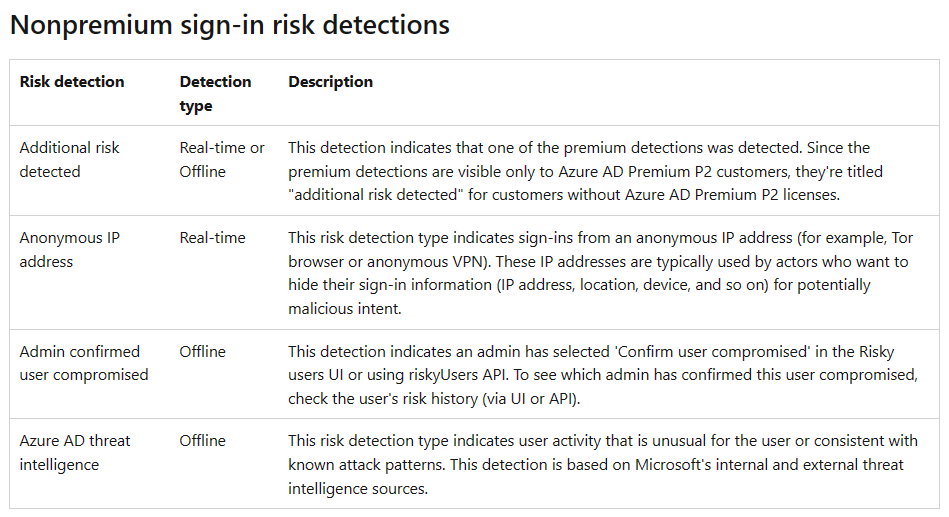
Did you know? Azure AD Identity Protection has risk detections for both premium licensed users and non-premium licensed users?

imageAzure AD Identity Protection identifies and reports suspicious actions related to user accounts in the directory, which contribute to the overall user risk score in the Risky Users report. The feature enables organizations to quickly see and respond to these suspicious actions.

The detection of risk can be classified into two levels, User and Sign-in, and can be calculated in Real-time or Offline mode. While certain risk types are exclusive to Azure AD Premium P2 customers, others are accessible to Free and Azure AD Premium P1 customers.

imageSign-in risk refers to the likelihood that an authentication request is unauthorized by the identity owner. Suspicious activity may be identified for a user that is not associated with a specific malicious sign-in, but rather the user as a whole.

You can review which risk detections are for the Free, Azure AD Premium P1 and Azure AD Premium P2 licensed users here:

imageMicrosoft is a 1st class platform leader in IaaS platform native Security, with Microsoft Defender cloud security solutions for virtually all IaaS workloads such as:

  • Comprehensive Cloud Security Posture Management & Cloud Infrastructure Entitlement Management
  • World class DDOS protection, Malware detection for blob storage, VMs, containers, etc.

Other lower-tier cloud providers do not have most of the same native IaaS security solutions to protect assets in their cloud and generally rely on customers purchasing separately licensed, 3rd party security solutions & their positions on the Forrester Wave highlights this lack of attention to this critical area.

DOWNLOAD THE REPORT
To download the Forrester Wave report on “Infrastructure-as-a-service Platform Native Security” (licensed for distribution):

clip_image002We’ve published a request form for the Early Access Program for “Microsoft 365 Copilot”:

In March, we introduced the world to Microsoft 365 Copilot – your copilot for work. We’re excited to share the next step in our journey as we bring Copilot to more customers and introduce new capabilities. We’re also releasing new data and insights from our 2023 Work Trend Index on how work is changing in the era of AI.

Microsoft 365 Copilot Early Access Program
Since March, we’ve been testing Copilot with 20 enterprise customers, learning alongside companies like Chevron, Goodyear, General Motors and Dow. Their overwhelming feedback is that Copilot has the potential to revolutionize work. They point to how it is a game changer for meetings and is beginning to transform the way they create. And, they’ve identified areas where we can do more to help people adapt to this new way of working, like the need for more conversational, multi-turn interactions. As we bring Copilot to more customers, we’ll continue to rely on this kind of feedback to refine Copilot and help guide users as they adapt to this new way of working.

In addition to Microsoft 365 Copilot features previously announced, including Copilot for Word, Copilot for Excel, Copilot for PowerPoint, and others, we’re also announcing the following NEW capabilities:

Introducing new Microsoft 365 Copilot capabilities
When we introduced Copilot in March, we unveiled capabilities across the Microsoft 365 suite of apps that millions use every day to get work done. We’re not stopping there – we’re continuing to add new Copilot capabilities to bring AI to every part of the suite, enabling employees and organizations to unleash creativity, unlock productivity and uplevel skills.

· Copilot in Whiteboard will make Microsoft Teams meetings and brainstorms more creative and effective. Using natural language, you can ask Copilot to generate ideas, organize ideas into themes, create designs that bring ideas to life and summarize whiteboard content.

· By integrating DALL-E, OpenAI’s image generator, into PowerPoint, users will be able to ask Copilot to create custom images to support their content.

· Copilot in Outlook will offer coaching tips and suggestions on clarity, sentiment and tone to help users write more effective emails and communicate more confidently.

· Copilot in OneNote will use prompts to draft plans, generate ideas, create lists and organize information to help customers find what they need easily.

· Copilot in Loop helps your team stay in sync by quickly summarizing all the content on your Loop page to keep everyone aligned and able to collaborate effectively.

· Copilot in Viva Learning will use a natural language chat interface to help users create a personalized learning journey including designing upskilling paths, discovering relevant learning resources and scheduling time for assigned trainings.

Read more about how to request access here:

clip_image009

A few more announcements regarding integration support for the new Windows Local Administrator Password Solution (WLAPS):

SENTINEL

One of Microsoft’s MVPs documented steps on how to create Data Collection Rules (DCRs) for Microsoft Sentinel that will collect LAPS events from your environment.

imageINTUNE

We’ve also announced Microsoft Intune support for the ability to manage and support Windows LAPS, bringing Microsoft’s admin password management solution to the cloud.

Posted by: kurtsh | May 7, 2023

BETA: Windows 365 Frontline

Does your organization have:

  • field workers
  • call centers
  • factory floor workers

…or folks that other work in “rotation schedules”? 

Wouldn’t it be cool if you could provide Cloud PC access for any 3 employees per license – like shift-workers & 3rd party contractors?

imageWindows 365 Frontline is a version of Windows 365 that helps organizations save costs by providing a single license to provision three Cloud PC virtual machines. For each Windows 365 Frontline license that you buy, you can provision three different Cloud PCs that can’t be used concurrently. Instead, each user receives a unique Cloud PC that they can use when the other two users on the same license aren’t signed into their Cloud PCs.

Windows 365 Frontline is designed specifically for workers who share computing resources and don’t require 24/7 dedicated Cloud PCs. This system better supports organizations that are more elastic and distributed working across various devices. Frontline Cloud PCs can be helpful for users who are:

  • On a rotation schedule.
  • Working across time zones and regions.
  • Part-time workers.
  • Contingent staff.

The maximum number of active Windows 365 Frontline Cloud PCs in your organization is equal to the number of Windows 365 Frontline licenses that you’ve purchased. For example, if you purchase 10 licenses, 30 Cloud PCs will be provisioned. Ten of those Cloud PCs can be active at a given time. The licenses are managed automatically based on active sessions. When a user ends their session, the license is released for another user to start using their Cloud PC.

Windows 365 Frontline is in public preview.

Read more about Windows 365 Frontline here:

Are you supporting Windows 10 or 11 desktops?

Wouldn’t it be great to receive an email when a significant known issue in Windows comes up?  There’s a new way to get those notices proactively!

imageToday, we’re announcing the availability of a much-requested feature for IT administrators planning and deploying Windows feature and quality updates—email alerts! Starting today, you can get notified about Windows known issues documented in the Windows release health section of the Microsoft 365 admin center. This enables you to easily and quickly learn about issues related to Windows updates and make informed decisions about rolling out an update across your environment.

When you sign up, you’ll receive emails about new issues for the versions of the Windows operating system you support, as well as updates to known issues such as:

  • Changes in issue status
  • New workarounds
  • Issue resolution

This new feature is available to IT admins with a Windows or Microsoft 365 tenant, a subscription that provides access to Windows release health in the Microsoft 365 admin center[1], and an eligible admin role.

Read about how to sign up for these alerts here:

« Newer Posts - Older Posts »

Categories