Posted by: kurtsh | August 24, 2009

WHITEPAPER: Microsoft Security Update Guide, July 2009

imageHmm.  This was something that slipped by me.  Looks like in July 2009, we published an extremely comprehensive 102 page guide to how IT professionals should consume Microsoft’s security patch information, recommended processes, communications, and tools.

Basically, it’s a book on how to keep it all straight.  Here’s how they describe it:

“This Guide was designed to help IT professionals better understand and use Microsoft security release information, processes, communications, and tools. Our goal is to help IT professionals manage organizational risk and develop a repeatable, effective deployment mechanism for security updates.

In this Guide, you will find a convenient glossary of terms, an overview of the Microsoft Security Bulletin process, and a stage-by-stage review of Microsoft Security Updates.

The Guide is organized according to the following stages of the security update process:

  • Stage 1, Receive Microsoft Security Release Communications
  • Stage 2, Evaluate Risk
  • Stage 3, Evaluate Mitigation
  • Stage 4, Standard or Urgent Update Deployment Timeline
  • Stage 5, Monitor Systems
  • Ongoing Stage, Watch.

Each section outlines the purpose and objective for that stage, as well as the expected target outcomes upon that stage’s completion.”

DOWNLOAD: The Microsoft Security Update Guide (2.8MB)
http://www.microsoft.com/downloads/details.aspx?FamilyID=c3d986d0-ecc3-4ce0-9c25-048ec5b52a4f&displaylang=en

Digg This

One company that I’ve never talked about is a small company called Adisasta.  They make a couple surprisingly well-written clients for Windows Mobile that don’t get a lot of press but certainly demonstrate the power of Windows Mobile as a phone/connected platform.

wmTorrent – Mobile Torrent Client
WinMobile Torrent is an advanced yet easy-to-use BitTorrent client for Windows Mobile. It allows you to create, leech and/or seed torrent files from within the Application. It supports multiple and simultaneous download of torrents with numerous functions to manage, control downloads and peers in a user-friendly interface.

image

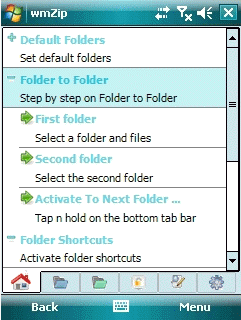
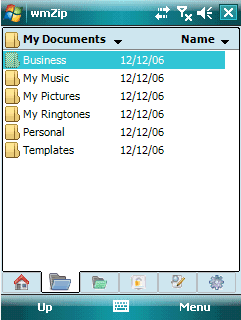
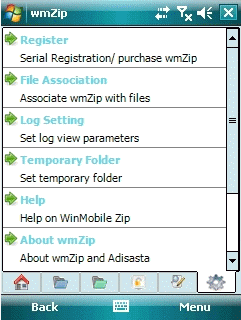
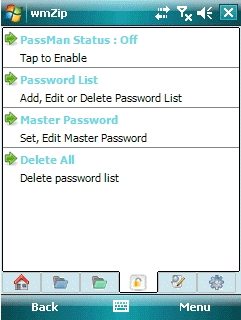
wmZip – Mobile ZIP compression client with AES 256-bit support
WinMobile Zip v.3 is a comprehensive archiving tool with built-in supports for viewing and extracting of a wide range of archiving formats, in addition to advanced zip archiving with state-of-the-art AES. The new release has built-in supports for viewing and extracting of ISO, CAB, ARJ, LZH, Z, DEB, CPIO, TAR, RAR, BZIP2, CHM, RPM and SIS archive format.

NOTE:  This is the exact same encryption used by NikoMak’s WinZip client 9.x-12.x.  This is particularly useful if you replicate encrypted ZIP files between your desktop and mobile device using Live Mesh.

 image image image

image image image


wmFusion – Mobile RSS Reader + Torrent Client
WinMobile Fusion is a solid application with skinned multi-tab user interface. It is extremely easy to navigate and utilize. A single tap to change font size, single tap to toggle full screen and one hand navigational capability to read news from item to item, to navigate from feed to feed or group to group. Tap-and-hold dynamic context menus are available in almost all views. It also has many in-built functions that makes it easy to add, edit, manage or subscribe news feed/rss sites of any known formats. RSS, RDF or ATOM are all supported. WinMobile Fusion is also a torrent client, with support for torrent downloading from enclosures or links within the items of the feed. This operation can easily be accomplished with a single tap of your stylus.

image image

Digg This

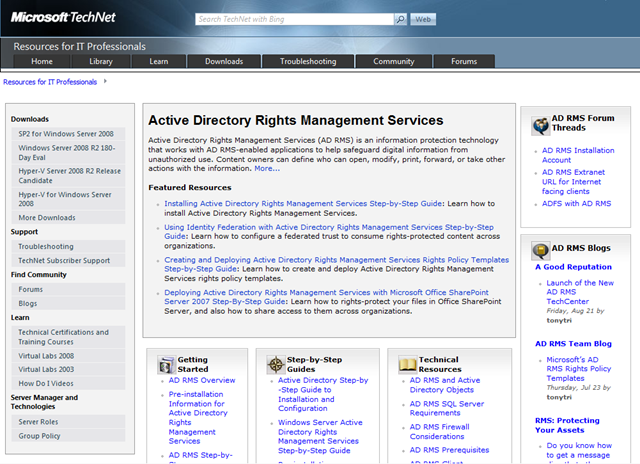
imageIf you’ve been keeping your thumb on the pulse of Rights Management Services, which by the way is one of my two FAVORITE pet products here at Microsoft, (The other being Windows Media) you know that Rights Management’s resources have been sort of scattered all over the place.

NO LONGER!

Introducing the Active Directory Rights Management Services TechCenter
Finally, a one-stop shop for all things related to Rights Management!  Just look at some of the resources pointed to directly from this page:

Also pointers to:

  • Rights Management Services online discussion forum
  • Rights Management Services support blog
  • Rights Management Services product team blog
  • Rights Management Downloads
  • Rights Management Troubleshooting
  • Rights Management Virtual Labs
  • Rights Management Technical Resources like
    • Firewall Considerations
    • Client Requirements
    • Server Requirements
    • Federation Considerations
    • Database Prerequisites

This is a FANTASTIC resource for folks planning on deploying & supporting Active Directory Rights Management Services!

LINK:  ADRMS TechCenter
http://technet.microsoft.com/en-us/dd448611.aspx

Digg This

image This past week, we announced the new LifeCam Cinema, a device that has been specifically designed to provide consumers with a choice for recording HD 720p videos. The new cam can be easily connected to any computer system and comes with a couple of features that are designed to improve the quality of the videos for home PC users.

The LifeCam Cinema is the first to deliver support for true 720p video recording, featuring built-in technologies that allow it to record at 30fps. Unlike the majority of consumer webcams available on the market, LifeCam Cinema is designed to provide users with support for high-definition resolutions of 1280 by 720 pixels. With the increasing popularity of video websites such as YouTube and Hulu, the new LifeCam Cinema fits the requirements of those users who like to record themselves and post the videos over the aforementioned websites.

Features:

  • True HD 720p Video Sensor
  • Widescreen (16:9) Resolution
  • Auto Focus
  • Up to 30 Frames Per Second
  • ClearFrame Technology for Smooth and Clear Video
  • Digital Noise-Canceling Microphone
  • Glass Element Lens
  • 5 MP Stills (interpolated)
  • Universal Flexible Base
  • Aluminum Body
  • OCS 2007 R2 Certified
  • XP-Win7 Operating Systems (no Mac folks – sorry)
  • Available in Enterprise  Multipacks
  • $79.95 MSRP (Oct Availability)

Designed to connect to the user’s computer system via a USB 2.0 interface, the LifeCam Cinema has also been featured with ClearFrame technology, which will enable the webcam to deliver smoother, more detailed videos.

The product is compatible with Office Communications Server 2008 R2, Windows Live Messenger, Windows Live Movie Maker and Windows Live Photo gallery. Behind the microphone, the camera also sports an integrated Windows Live Call button, which will more easily allow users to make Internet phone calls.

The camera is compatible with Windows 7/Windows Vista/Windows XP and is expected to become available on September 9, for about US$79.99.

ANNOUNCEMENT:
http://www.microsoft.com/presspass/press/2009/aug09/08-20cinemapr.mspx

PRODUCT SITE:
http://www.microsoft.com/hardware/digitalcommunication/ProductDetails.aspx?pid=008

Digg This

(I’m blatently copying the content from one of our Technet newsletters here but I just got finished watching this thing and it’s pretty darned good.)

image “Find out what is changing with product activation in Windows 7 versus previous versions of the operating system in this short new video on TechNet Edge titled Volume Activation Changes in Windows 7. Also, for upcoming Windows 7 volume activation guidance, visit the Widows Volume Activation page.”

Here’s some of my notes from the video:

Existing Windows Vista Customers will need to:

  1. Install Windows 7 patch on existing KMS servers running on Windows Vista, Windows Server 2003, and Windows Server 2008:
    Update for Windows Server 2003 (KB968915)
    Update for Windows Server 2003 x64 Edition (KB968915)
  2. Get Windows 7 KMS keys from the licensing portal (http://www.microsoft.com/licensing)
  3. Install and activate the keys on existing KMS host

Single KMS server will be able to activate Windows 7, Windows Server 2008 R2, Windows Vista and Windows Server 2008.  In the future, it will activate Microsoft Office 2010.

In Windows 7, the activation threshold of 25 machines can be a combination of physical and virtual machines.

MAK key behaves like a retail key, activating each individual computer via:

  1. Internet or phone
  2. VAMT tool by proxy (For use if your client machines do NOT have Internet access – common in secured environments, government installations, etc.)
  3. Note:  Volume Activation Management Tool 2.0 is part of the Windows Automated Installation Tookit


VOLUME ACTIVATION PLANNING GUIDE:
http://technet.microsoft.com/en-us/library/dd878528.aspx

VOLUME ACTIVATION CALL CENTER: (US)
888-352-7140

ONLINE RESOURCES:
http://www.technet.com/volumeactivation

This is a great resource for Desktop IT Professionals.  Did you ever ask yourself:

“What are the exact feature differences between Windows 7 Editions like Starter, Home Basic, Home Premium, Professional, Enterprise & Ultimate?”

imagePaul Thurrott created a really MASSIVE & CURRENT chart with what I surmise is every different feature difference between each edition.  In order to respect his work, I’m only snapshotting parts of this charts he’s created but trust me:  This is well worth your while to check out.

Like Paul says:  “It’s sad that Microsoft doesn’t do this on their own.  But then again, this keeps me employed.”  Here’s short cuts to each chart category on Paul’s site:

Digg This

image

Send an email to mmsnotfy at microsoft dot com to sign up for notification when discounted early-bird registration opens up.   Don’t think I need to say anything more, do it?

LINK:
http://mms-2010.com/

Digg This

Posted by: kurtsh | August 20, 2009

RELEASE: Windows Live Essentials “Wave 3” updated

image Looks like we announced the launch of completely updated versions of the Windows Live products:

  • Messenger: 14.0.8089.726 (previous build was 14.0.8064.206)
  • Mail: 14.0.8089.0726 (previous build was 14.0.8064.206)
  • Photo Gallery: 14.0.8081.709 (previous build was 14.0.8064.206)
  • Movie Maker: 14.0.8091.0730 (previous build was 14.0.8064 beta)
  • Writer: 14.0.8089.726 (previous build was 14.0.8064.206)
  • Toolbar: 14.00.8064.0206 (previous build was 14.0.8064.206)
  • Family Safety: 14.0.8093.0805 (previous build was 14.0.8064.0206)

     —————

Ars Technica has a nice write up about the release:  http://bit.ly/PyM6v

Digg This

image Back on July 13th, there was a massive announcement made at the Microsoft Worldwide Partner Conference detailing the upcoming suite of Microsoft’s security technologies.

The biggest of these was the Forefront Protection Suite (formerly Forefront Security Suite).  FPS is an umbrella that covers 6 different products that are purchaseable either as a suite or ala carte/individually:

  • Forefront Endpoint Protection 2010 (formerly Forefront Client Security)
    This is a comprehensive anti-malware solution for both clients & servers that provides the industry’s best antivirus/antispyware, local firewall management, network access protection integration, detailed enterprise reporting, and rootkit/malicious software removal.
  • Forefront Protection 2010 for Exchange Server (formerly Forefront Security for Exchange)
    Forefront Protection 2010 for Sharepoint (formerly Forefront Security for Sharepoint)
    This provides a unique multilayered malware protection engine as well as an antispam solution that enables administrators to simultaneously leverage up to 5 of 9 antivirus engines from such security vendors as Kaspersky, Sophos, Norman, CA, Authentium, & AhnLabs in addition to Microsoft’s own MSAV engine for filtering/protection Exchange email.
  • Forefront Online Security for Exchange Server
    This is the hosted security solution that filters inbound/outbound email of malware & spam before it ever touches a customer’s infrastructure, enabling dramatic reductions in messaging traffic (since 95% of all email received is spam) and providing a strong layer of anti-malware security that it automatically maintained without any labor by the subscriber.  It leverages the hosted technologies from our best of breed acquisition of Frontbridge.
  • Forefront Protection Manager (formerly Forefront Server Security Management Console)
    The first Microsoft security management console to provide an end-to-end view of all aspects of protection available to a customer from the Internet gateway to the antivirus solutions on servers to the malware protection on clients and both report & manage all of them from a single pane of glass.
  • Forefront Threat Management Gateway Web Security Service ** (formerly Internet Security & Acceleration Server)
    Microsoft’s dramatic next version of Internet Security & Acceleration Server features powerful Threat Management technologies to ensure not just to keep the bad guys out, but to also anaylze what’s legitimately coming in.  Or at least what it looks like.

** Forefront TMG must be licensed on a per-processor basis however it falls under the umbrella of FPS because of Forefront Protection Manager’s capabilities of monitoring and managing it as part of the end-to-end Forefront security management process.

Additionally 3 other technologies/products were announced

  • Forefront Identity Manager 2010 (formerly Identity Lifecycle Manager v2.0)
  • Forefront Unified Access Gateway 2010 (formerly Intelligent Access Gateway)
  • Active Directory Federation Services 2.0 (formerly codenamed “Geneva”)

DETAILS:
http://blogs.technet.com/forefront/archive/2009/07/13/business-ready-security-news-at-wpc.aspx

Digg This

Posted by: kurtsh | August 20, 2009

WEBCAST: Windows Firestarter, September 18th, 2009

image Windows FireStarter
Friday, September 18, 2009
8:00 am – 5:00 pm

Description:
(Note: This is a live broadcast of an in-person event happening in Redmond, WA)

Windows 7 and Windows 2008 R2 introduce fantastic new technologies to streamline your business, enhance security and save you money. Today’s Windows Firestarter event will introduce you to these features and then dive deep into how they work. See how DirectAccess provides the remote user with virtually the same experience they would have if they were in the office. Learn how Group Policy and PowerShell can simplify the administration of your network, regardless of how large or small it is. Experience a simpler yet more rich Web surfing experience with new Internet Explorer 8 features. See new BitLocker, AppLocker and User Account Control Features that are designed to protect your data no matter where it is. We will also dive into how easy it is to deploy Windows 7 the way you want it deployed – your image, your way – even if you are migrating from Windows XP. Join us for this demo heavy session on all of this and more at Windows Firestarter!

To Register:
Please contact me for details on how to register if you are a customer of mine. 

Digg This

« Newer Posts - Older Posts »

Categories