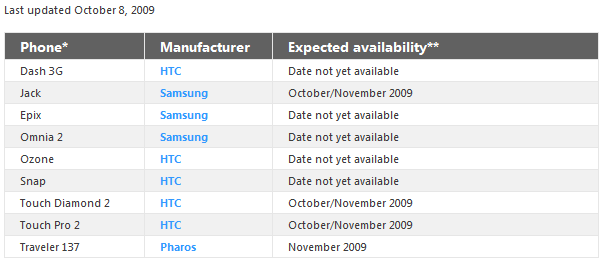
image Have you heard about some exciting new features in Windows Mobile 6.5 that you’d like to try (like enhanced web browsing and improved messaging)? Have you wondered if you can update your older Windows Mobile phone to Windows Mobile 6.5? The answer depends on the model of your phone and conditions put in place by your mobile operator (also known as your carrier).

The one really important thing is that in order to upgrade to 6.5, you must have at LEAST a Windows Mobile 6.1-based phone.  5.0 and 6.0 based phones are not getting upgrades.

There’s links to all of this but for a quick peek at what phones are documented as upgradable:

image

For more information:
http://www.microsoft.com/windowsmobile/en-us/meet/wm65-upgrade.mspx

Digg This

image Microsoft Forefront Protection 2010 for Exchange Server was released to manufacturing yesterday!  Availability of the released product will be on November 9th.

We believe we’ve shipped a high quality product with great improvements over the previous release, including:

  • Premium antispam protection, with 99% detection rate, less than 1 in 250,000 false positives, and backscatter filtering
  • New user interface with dashboard view of detection statistics and health monitoring
  • Antispyware scanning provided by the Microsoft Antimalware Engine
  • Integrated provisioning and management of Forefront Online Protection for Exchange (FOPE) for hybrid, on-premise/hosted protection
  • Support for Exchange 2010, Windows PowerShell, and Hyper-V
  • Standardized installation using MSI installer

For more information on Microsoft Forefront Protection 2010 for Exchange Server requirements and a download of the prior Release Candidate, visit:

Digg This

Posted by: kurtsh | October 9, 2009

TRAINING: Microsoft Windows Server 2008 R2 Hands On Labs

If you’re a customer of mine that would like to attend the following briefing, please contact me and I’ll provide you with date and registration details.  This is NOT A PUBLIC EVENT.

 Microsoft Windows Server 2008 R2 Hands On Labs 
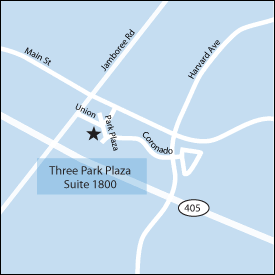
imageYou are invited to attend an exclusive event that will provide you with hands on experience with Windows Server 2008 R2 across a variety of common workloads. This event will take place at the Microsoft Technology Center in Irvine, CA. This is a one day session and will begin at 9AM.

Windows Server 2008 R2 Session Description

This overview event will give students a hands-on introduction to Windows Server 2008 R2, with built-in web and virtualization technologies, which enable you to increase the reliability and flexibility of your server infrastructure. New virtualization tools, web resources, and security enhancements help you save time, reduce costs, and provide a platform for a dynamic and optimized datacenter. Powerful new capabilities like hosting ASP.NET application on Server Core, Live Migration of Virtual Machines, and Publishing Centralized Desktops provide cost saving solutions that ensure you have a flexible, manageable server infrastructure on which to build your business.

By attending this course you will become familiar with new capabilities across the four investment pillars – Web, Virtualization, Security and Management.
clip_image001Microsoft Technology Center

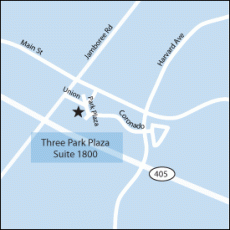
Microsoft Technology Centers (MTCs) provide everything you need—an outstanding environment, industry leaders, and technology experts—to envision, architect, and demonstrate a secure, customized solution based on Microsoft and partner technologies. This session will be held at the Irvine, CA MTC.

Direction can be found at: http://www.microsoft.com/mtc/locations/Irvine.mspx

Digg This

Posted by: kurtsh | October 9, 2009

DOWNLOAD: Disk2VHD v1.0

We’re excited to announce a new Sysinternals tool, Disk2vhd, that simplifies the migration of physical systems into virtual machines (p2v).

Just run Disk2vhd on the system you want to migrate and specify the volumes for which you want data included, and Disk2vhd creates a consistent point-in-time volume snapshot followed by an export of the selected volumes into one or more VHDs that you can add to a new or existing Hyper-V or Virtual PC virtual machine.

DOWNLOAD:  Disk2VHD v1.0
http://technet.microsoft.com/en-us/sysinternals/ee656415.aspx

Digg This

image

Nuff said?
http://ptech.allthingsd.com/20091007/a-windows-to-help-you-forget/

Some quotes:

  • “Windows 7 introduces real advances in organizing your programs and files, arranging your taskbar and desktop, and quickly viewing and launching the page or document you want, when you want it. It also has cool built-in touch-screen features.”
  • “It removes a lot of clutter. And it mostly banishes Vista’s main flaws—sluggishness; incompatibility with third-party software and hardware; heavy hardware requirements; and constant, annoying security warnings.”
  • “In recent years, I, like many other reviewers, have argued that Apple’s Mac OS X operating system is much better than Windows. That’s no longer true.”
  • “Windows 7 beats the Mac OS in some areas, such as better previews and navigation right from the taskbar, easier organization of open windows on the desktop and touch-screen capabilities. So Apple will have to scramble now that the gift of a flawed Vista has been replaced with a reliable, elegant version of Windows.”
  • “Windows 7 is a very good, versatile operating system that should help Microsoft bury the memory of Vista and make PC users happy.”
Digg This

image Customers using Office Communications Server 2007 R2 that have Standard client access licenses (CALs) on Software Assurance may now connect their Office Communicator users with AOL Messenger users over the Internet at no charge.

This means that Office Communicator users using Office Communicator Server 2007 R2 that have Std CALs w/ SA may now connect with the following at no additional cost:

  • Communicator to Communicator
  • Communicator to Web Communicator
  • Communicator to MSN or Windows Live Messenger
  • Communicator to AOL Instant Messenger
  • Communicator to GoogleTalk
  • Communicator to Cisco’s Jabber

(Connectivity to Yahoo Messenger continues to be possible through an annual subscription, per Yahoo)

This continues to demonstrate that Office Communications Server allows companies to empower their users to connect and do business with the richest set of real time communications systems over the Internet while still ensuring communications traffic is MANAGEABLE, LOGGED, and REPORTABLE for security, audit & compliance needs.

For more information on this announcement:
http://www.microsoft.com/presspass/features/2009/oct09/10-01ucinterop.mspx

Digg This

Posted by: kurtsh | October 5, 2009

BETA: System Center Service Manager Beta 2

image The Service Manager team is very pleased to announce that Beta-2 for Service Manager 2010 is now available for download from connect. Details and links are below.

Download
To download, simply go to the Service Manager site on Connect www.connect.microsoft.com. Once you have successfully signed in, click the Downloads link, click Service Manager Beta-2 and then select all of the following files on the download details page:

  • SMCDImage_amd64.exe
  • SMCDImage_x86.exe (32 bit console)
  • InstallOMMPs.exe
  • AuthoringTool.exe (authoring console)
  • SM_B2_Public.zip

Click download to begin the download process. Once the files have successfully downloaded, please be sure to read the release notes before installing the product as they contain some important information about the release

You can also use the public forums for feedback and support, link below
http://forums.microsoft.com/TechNet/ShowForum.aspx?ForumID=2066&SiteID=17

Please read the “Preparing for Service Manager Deployment” section of the Installation and Configuration Guide for step-by-step guidance on how to install and configure the product.

What’s new in Beta 2?

  • Problem management
  • End user self-service portal
  • IT analyst portal
  • Inbound email to incident workflow
  • New reports
  • Full extensible data warehouse
  • Authoring console for customizing forms and creating custom workflows (without writing code!)
  • Operations Manager integration – alert to incident scenario and service/service component inventory sync
  • Self-service software provisioning
  • significant improvements in performance and scalability

[taken from the System Center Service Manager blog & from SCSM forum]

Digg This

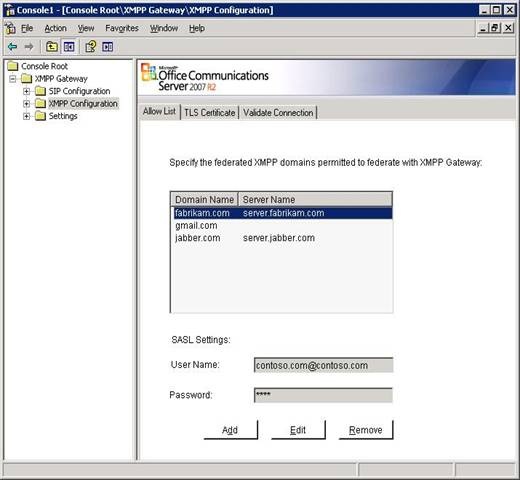
clip_image002The Office Communications Server 2007 R2 XMPP Gateway (eXtensible Messaging and Presence Protocol) enables IM and presence communication between Office Communications Server 2007 R2 and select XMPP-based IM and presence providers, including  Google Talk and Jabber. Once the gateway is deployed in an Office Communications Server environment, users hosted on Office Communications Server can do the following:

  • Add or delete users on an XMPP environment as contacts
  • Communicate with users on XMPP environment through one-on-one IM conversations.

This enables corporate deployments of OCS2007R2 to extend their communications reach beyond the boundaries of even MSN, Yahoo, or AOL which already exists today, while also logging IM communications between individuals (for either security or regulatory/audit purposes) and maintaining centralized control over who has what communications access to the Internet.

This continues Office Communications Server’s & Office Communicator’s tradition of being the most interoperable real-time corporate communications infrastructure for enterprises.

Digg This

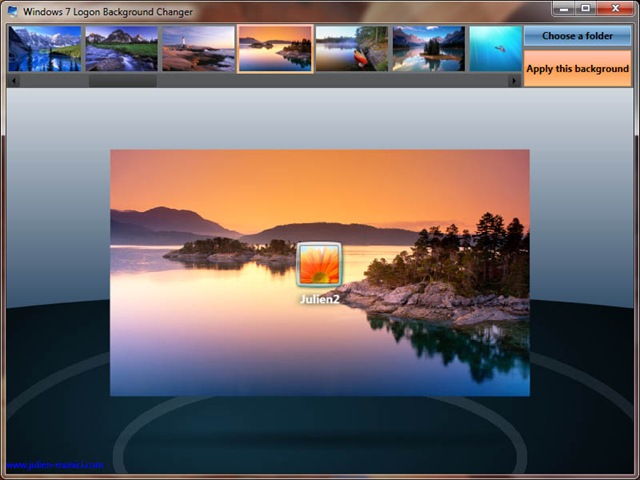
win7bgThis is a neat tool that seems to have to be rebuilt every 3 years since we never seem to build it directly into the Control Panel.

IT’S FREE?!?
Julien Mancini wrote a nice little free tool that will enable you to change the background graphic of the initial login screen as well as the locked-workstation screen of your Windows 7 installation.

SIMILAR TO STARDOCK
It basically does the same thing as Stardock’s LogonStudio Vista, (which incidentally still works under Windows 7)except it’s simpler since it doesn’t involve the whole concept of themes and such.  It just allows you to point at a graphic, and apply it to the login screen – that’s it.  (If you don’t know what I’m talking about with regard to LogonStudio & themes, just skip this paragraph – it’s not important)

Here’s some interesting details:

  • Works on both 32-bit & 64-bit Windows 7
  • Written in Windows Presentation Foundation!  For the uneducated, this equates to really cool animations, 3D motion, and transitions.
  • Makes no modifications to any system files whatsoever.

DOWNLOAD:  Windows 7 Logon Background Changer
http://www.julien-manici.com/windows_7_logon_background_changer/

Digg This

imageForefront Identity Manager 2010 (FIM), formerly known as Identity Lifecycle Manager "2" delivers an integrated identity management solution with powerful self-service capabilities for Office end-users, rich administrative tools and enhanced automation for IT professionals and .NET and WS-* based extensibility for developers. 

FIM 2010 provides organizations with unique workflow driven solutions to manage user accounts, passwords, groups and distribution lists as well as certificate-based credentials such as smart cards, using identity-based policies that can span across Windows and heterogeneous environments. And when you download the latest beta software, you’re automatically registered to access valuable resources assembled in one convenient location.

There are 3 areas of focus with FIM 2010:

Empowering People:

  • With FIM 2010 end-users can easily perform self-service tasks such as group and distribution list management with self-help tools integrated into a SharePoint-based console as well as directly in Microsoft Office Outlook.
  • FIM 2010 provides IT professionals with the tools they need to manage identities through a SharePoint-based policy and workflow management console.
  • Developers have access to extensibility features through extensive public APIs.

Delivering agility and efficiency:

  • FIM 2010 integrates enterprises’ heterogeneous infrastructure, including directories, databases, and line of business applications.
  • FIM 2010 enables management of heterogeneous strong authentication systems, such as third-party certificate authorities.

Increasing security and compliance:

  • FIM 2010 provides management features that enable system auditing and compliance. By integrating the tools IT uses to manage identities, credentials, and resources, FIM 2010 helps organizations integrate policies across the organization and secure the enterprise.
  • Integrated management tools allow organizations to better enjoy the security benefits of strong authentication.

——————

Digg This

« Newer Posts - Older Posts »

Categories