Posted by: kurtsh | November 25, 2009

BETA: Silverlight 4 Beta Availability for Developers

image

Silverlight 4 Beta Information

Earlier this week at PDC09 in Los Angeles we unveiled a Beta version Silverlight 4. This latest version delivers hundreds of features and controls that, when combined with the continued innovation in Microsoft’s world-class tools for designers and developers — Microsoft Visual Studio and Microsoft Expression Blend – present the leading edge in rapid, powerful application development. With printing support, rich reporting and charting, and integration with back-end systems and server products including Microsoft SharePoint, Silverlight is ready for business.

What’s New in Silverlight 4 Beta?

Silverlight 4 delivers a full suite of powerful capabilities to business application developers, bringing the best-of-breed .NET platform to browser-based experiences. Silverlight provides an ideal platform for developing and deploying modern business applications for both customer facing and staff-facing applications.

To learn more about beta release here are some good resource:

Additionally the Day#2 keynote announcement of Silverligh4 beta release from PDC09 is available on demand at:

————

[taken from Raj’s blog]

Posted by: kurtsh | November 25, 2009

NEWS: Bing Cashback is back for the holidays!

clip_image001
As you head into Thanksgiving weekend and start your holiday shopping, be sure to check out Bing cashback for great deals on gifts for everyone on your list.

With Bing cashback, you’ll earn a percentage of the product price as cash back. We’ve been adding new merchants to the program in anticipation of the holidays (including the likes of Endless, Macy’s and Dick’s Sporting Goods), bringing us to more than 1,000 stores where you can search, shop and save.

And, in the spirit of gift-giving, Bing cashback is offering extra cash back on purchases from select stores. Starting the day after Thanksgiving through 12/2, get up to 35% cashback from places like:

  • eBay (10% cashback)
  • AT&T (35%)
  • Dell (20%)
  • Best Buy (10%)
  • Sephora (20%)
  • Gap (10%)
  • Footlocker (25%)
  • …and more

Start shopping now by checking out our top gift ideas and don’t forget to come back on 11/27 to learn about our special holiday deals. These deals are available to all, so feel free to spread the cheer with friends and family.

Posted by: kurtsh | November 25, 2009

RELEASE: Windows Azure Services Training Kit

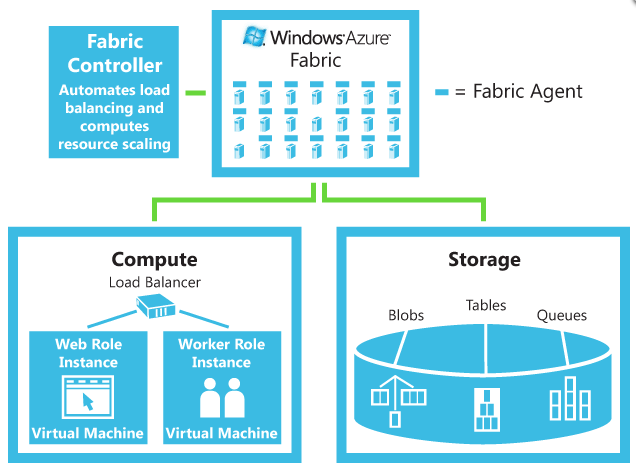
image The Azure Services Training Kit includes a comprehensive set of technical content including hands-on labs, presentations, and demos that are designed to help you learn how to use the Windows Azure platform including: Windows Azure, SQL Azure and .NET Services. The November release includes new and updated labs in addition to information about Microsoft Codename “Dallas”.

This training kit contains the following content:

  • Presentations Presentations will be updated after PDC 2009 with all of the latest and greatest decks.
  • Demos Demos will be updated after PDC 2009 with all of the latest and greatest demos.
  • imageHands On Labs
    • Introduction to Windows Azure
    • Exploring Windows Azure Storage
    • Deploying and Monitoring Applications in Windows Azure
    • Windows Azure: Worker Role Communication
    • Federated Authentication in a Windows Azure Web Role Application
    • Building ASP.NET Web Form Applications with Windows Azure
    • Introduction to SQL Azure
    • Migrating Databases to SQL Azure
    • SQL Azure: Tips and Tricks
    • Intro to Dallas
    • Introduction to the .NET Service Bus
    • Introduction to the .NET Access Control Service
    • Service Remoting with Service Bus
    • Eventing with the Service Bus

Samples and Tools

  • PhluffyFotos

Supported Operating Systems:

  • Windows Server 2008; Windows Vista; Windows Vista Service Pack 1
  • .NET Framework 3.5 SP1
  • Visual Studio 2008 SP1
  • Windows Powershell

Instructions:
After downloading the training kit, run the self-extracting executable to extract all of the training kit files to your local machine. After the content is extracted, the starting page for the training kit will be displayed in your default browser. You can then browse through the individual hands-on labs, demos, and presentations.

Please Note: Many of these labs require Windows Azure platform developer accounts. To request an invitation code that can be used to register, please visit: http://www.azure.com

DOWNLOAD:  Windows Azure Platform Training Kit (193MB)
http://www.microsoft.com/downloads/details.aspx?FamilyID=413E88F8-5966-4A83-B309-53B7B77EDF78&displaylang=en

LINK:  Windows Azure Web Site
http://www.microsoft.com/windowsazure/windowsazure/

image This year at PDC we announced the release of the Office 2010 Beta to the public as part of our Wave 14 launch.  This release was created based on your feedback, plus a year’s worth of validation and testing and the results are amazing!  Office 2010 offers an exceptional productivity experience across the PC, phone and browser.  The beta offers tons of new features such as Office Backstage View, Ribbon user interface across all applications,  photo and video editing in PowerPoint, fast new data comparison tools in Excel, improved mail/calendar management in Outlook and much more!  For your convenience I’ve put together a list of the Wave 14 line up along with a few highlights for each product, a list of extras and demos.  Please take a moment to experience what is undoubtedly our best release ever!

Wave 14 Lineup

Office Professional Plus 2010 Beta

  • Take control of your e-mail and calendar with conversation management tools, mail tips, calendar preview and more in Outlook 2010.
  • Track changes to shared notebooks in OneNote 2010.
  • Discover more features with the Backstage View and the Office ribbon, now featured in ALL Office applications.
  • Add the “wow” factor to your presentations by easily editing and compressing videos and photos in PowerPoint 2010, then showing the world with Broadcast Slide Show.
  • Make fast, effective comparisons of data using Excel 2010’s new conditional formatting, including sparklines, and find the pivot table information you need more easily with slicers.

SharePoint Server Enterprise 2010 Beta

  • Sites – Provides a portal for collaboration over the internet, extranet and internet sites
  • Search – Find content, information and people using this best of breed search technology
  • Communities – Allows group collaboration so that you team can share knowledge, ideas  by connecting with others.
  • Insights – Enables users to access and interact with information across unstructured and structured data sources.
  • Content – Allows users to participate  in a governed, compliant content management lifecycle
  • Composites -empowers users to rapidly respond to business needs by creating their own no-code solutions on-premises or in the cloud, through a rich set of building blocks, tools, and self-service capabilities.

Microsoft FAST Search Server 2010 for SharePoint Beta

  • Provides powerful high-end search delivered through SharePoint
  • Includes all the search features and integration capabilities of SharePoint Server 2010, plus a more engaging and conversational search experience
  • Use of context to provide specific search experiences for different needs (such as departments or geographies)
  • Offers advanced content processing capabilities that create metadata and add structure to unstructured content, and deep platform flexibility, scalability, and extensibility

Microsoft Visio 2010 Beta

  • Data-driven visualization tools and templates
  • Powerful process-management features
  • Advanced sharing capabilities through the Web
  • Pulls real-time data from multiple sources, including Microsoft Excel 2010 and Microsoft SQL Server
  • Manage processes with sub processes and rules and logic validation
  • Create SharePoint workflows and export them for execution and real-time monitoring

Forefront Threat Management Gateway 2010 Release Candidate

Forefront Protection 2010 for Exchange Server

  • Provides fast and effective protection against malware and spam by including multiple scanning engines from industry-leading security partners.

Forefront Online Protection for Exchange 9.3

  • Forefront Online Protection for Exchange consists of layered technologies to actively help protect businesses’ inbound and outbound e-mail from spam, viruses, phishing scams, and e-mail policy violations.

Extras:

Office Web Apps

  • Designed for business customers, available through SharePoint Server, allows //my and //sharepoint sites to host browser-based Web Apps accessible from virtually anywhere. (Office Web Apps for consumers is still in Technical Preview.)

Outlook Social Connector

  • This new feature brings communications history and social networking feeds into the Outlook experience.

Office Mobile 2010

  • Offers mobile versions of Word, Excel, PowerPoint, OneNote and SharePoint Workspace Mobile 2010 and is available on the Windows Mobile marketplace for Windows Mobile 6.5 phones. (Mobile 6.5 download information)

Wave 14 Demos

Wave 14 is a comprehensive solution that provides a rich and robust platform for the enterprise and web.  This release ensures that your organization can collaborate more effectively by optimizing resources in a way that drives business process improvements.  Now is the opportunity to see Office 2010 for yourself!  You’ll need to register for the beta first and then will be able to download Office Professional Plus 2010 Beta.

Posted by: kurtsh | November 22, 2009

OFFER: Save 10% On Xbox 360 Consoles @ Microsoft Store!

Get 10% Off Everything at the Microsoft Store!

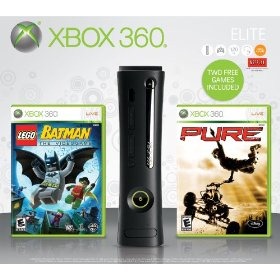
The Official Microsoft Store is offering a 10% discount on all items including games, Xbox 360 consoles, Window 7, etc.  2 Xbox 360 Console deals are still in stock:

  • Xbox 360 Elite holiday bundle w/ 2 games for $269.99 (Save $30)
  • Xbox 360 Modern Warfare 2 Limited Edition Console – $359.99 (Save $40)

Offer valid 11/16/2009-11/25/2009.clip_image003

Steps:

clip_image002    clip_image001

Posted by: kurtsh | November 20, 2009

BETA: Microsoft Live Labs “Pivot”

image“Here at Live Labs we’re all about experiments, and Pivot is our most ambitious to date. Pivot makes it easier to interact with massive amounts of data in ways that are powerful, informative, and fun. We tried to step back and design an interaction model that accommodates the complexity and scale of information rather than the traditional structure of the Web.

Pivot is currently available by invitation only to a small technical audience to help us explore future scenarios. To learn more about Pivot and our vision for this project, check out this video, share it, embed it, and blog/tweet/post your thoughts about it.

Why We Think This Is Exciting

When we use the Web today we treat the most fundamental scenarios as separate activities. Search takes us from many things to one, browsing moves us from one thing to another, and recommendations expose affinities that enable us to explore related topics. Can we do better by combining these scenarios into a more unified experience?

image Pivot focuses on this intersection, enabling us to learn key lessons while attempting to broadly apply this philosophy to the Web. We hope that Pivot will inspire and fuel transformative experiences across the Web.

At the heart of Pivot are "Collections." They combine large groups of similar items on the Internet, so we can begin viewing the relationships between individual pieces of information in a new way. By visualizing hidden patterns, Pivot enables users to discover new insights while interacting with thousands of things at once.

For those with access to our limited preview, this site includes a wealth of developer details to create Collections. We hope you will join our technical discussion to share your work and interact directly with the Pivot team. If you don’t have an invitation, please leave your email address and we will notify you if we expand our private preview in the future.

imageAlso known as, you get what you pay for.

The wily statistical researchers at SquareTrade, the folks that insure/warranty products predominantly from eBay but also independently have found through their monster database of numbers that people that buy cheap laptops… usually end up with malfunctions up to 20% more often than folks that purchase higher end laptops.

In fact, Premium laptops have the lowest malfunction rate where as Netbooks get returned due to malfunction the most.  Surprised?

Additionally, SquareTrade broke down who’s laptops are most reliable versus who’s… well… have malfunctions more than the others.  The message is clear:  Smaller outfits tend to have fewer returns.

And there were some interesting discoveries along the way.

——————————————-

image Manufacturers: Vast Differences in Reliability

  • When excluding accidental damage and examining hardware malfunctions by manufacturer, Asus and Toshiba come out on top.
  • Apple and Dell both fall in the middle with approximately an 18 percent failure rate; while industry leader HP has the highest failure rate.
  • Over one in four HP laptops in the study experienced a hardware malfunction during the first three years of ownership.

Other highlights of the study include:

  • Asus and Toshiba were the most reliable manufacturers, with fewer than 16 percent having a hardware malfunction over three years.
  • Netbooks are projected to have a 20 percent higher failure rate from hardware malfunctions than more expensive laptop computers.
  • Manufacturers proved to be a more reliable determinant of reliability than the type of laptop and should be a greater factor in making a purchase decision.


DOWNLOAD:  SquareTrade Research:  “Nearly 1 in 3 Laptops fail over 3 years”
http://www.squaretrade.com/pages/laptop-reliability-1109/?ccode=bs_war_buyerblog


[taken from the SquareTrade blog]

Posted by: kurtsh | November 19, 2009

INFO: List of Applications that use new Windows 7 Features

image I hate Scott Hanselman.  Alright.  Maybe I don’t hate him.  But I secretly seeth because his blog is so much better than mine. Sob.

Like this recent post.  I write posts that go deep on certain topics based on my own personal experience on that one topic. 

Scott on the other hand writes posts that are exhaustive in nature because of his breadth of experience and knowledge.

How the heck does one ‘list’ all the apps that leverage Windows 7’s inherent Aero Taskbar features?  Man – that’s just insane.

POST:  List of Applications that use new Windows 7 Features
http://www.hanselman.com/blog/LightItUpListOfApplicationsThatUseNewWindows7Features.aspx

Posted by: kurtsh | November 19, 2009

NEWS: Windows Server 2008 R2 Haiku… for fun & prizes!

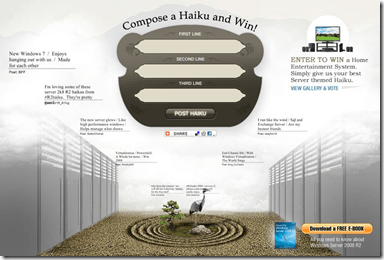
imageFor all geek poets,

A Windows Server haiku

Means prizes click here

—————————-

There’s no way to really explain this other than to just have you go to it and see for yourself.

The idea is to have folks generate some creative haikus… flex that IT brain, so to speak, around what Windows Server 2008 R2 delivers.

And by the way, there’s even a nice plug for our free Microsoft Press book, “Introducing Microsoft Windows Server 2008 R2”


LINK:  Windows Server 2008 R2 Haiku Contest
https://www.r2haiku.com/

Powershell2 Windows Management Framework, which includes Windows PowerShell 2.0, WinRM 2.0, and BITS 4.0, was officially released.

By providing a consistent management interface across the various flavors of Windows, we are making our platform that much more attractive to deploy. IT Professionals can now easily manage their Windows XP, Windows Server 2003, Windows Vista, Windows Server 2008, Windows 7, and Windows Server 2008 R2 machines through PowerShell remoting – that’s a huge win!

The big component for myself is obviously Windows PowerShell 2.0.  Here’s a quick description of PS2.0 as described in the Support entry:

Windows PowerShell is a command-line shell and scripting language that is designed for system administration and Automation. Built on the Microsoft .NET Framework, Windows PowerShell enables IT professionals and developers to control and automate the administration of Windows and applications.
New features that are introduced in Windows PowerShell 2.0 include the following:

  • Remoting
    Windows PowerShell 2.0 lets you run commands on one or more remote computers from a single computer that is running Windows PowerShell. PowerShell remoting allows for multiple ways of connecting. These ways include interactive (1:1), fan-out (1:many), and fan-in (many:1 by using the IIS hosting model).
  • Integrated Scripting Environment
    PowerShell Integrated Scripting Environment (ISE) enables you to run interactive commands and edit and debug scripts in a graphical environment. The main features include color-coded syntax, selective execution, graphical debugging, Unicode support, and context-sensitive help.
  • Modules
    Modules allow for script developers and administrators to partition and organize their Windows PowerShell code in self-contained, reusable units. Code from a module executes in its own self-contained context and does not affect the state outside the module.
  • Advanced functions
    Advanced functions are functions that have the same capabilities and behavior as cmdlets. However, they are written completely in the Windows PowerShell language, instead of compiled C#.
  • Background jobs
    Windows PowerShell 2.0 allows for running a command or expression asynchronously and "in the background" without interacting with the console.
  • Eventing
    This feature adds support to the Windows PowerShell engine infrastructure for listening, forwarding, and acting on management and system events.
  • Script internationalization
    This new feature enables Windows PowerShell scripts to display messages in the spoken language that is specified by the UI culture setting on the user’s computer.
  • Script debugging
    New debugging features were added to Windows PowerShell that let you set breakpoints on lines, columns, variables, and commands, and that let you specify the action that occurs when the breakpoint is hit.
  • New cmdlets
    Windows PowerShell 2.0 introduces over 100 built-in cmdlets. These cmdlets, excluding other tasks, enables you to do computer-related, event log, and performance counter management tasks.

You can download the packages here:
http://go.microsoft.com/fwlink/?LinkID=151321

« Newer Posts - Older Posts »

Categories