First Look Office 2010 [taken from the Microsoft Press blog]

Greetings! For a limited time you can download this free e-book without stepping through any registration. First Look: Microsoft Office 2010, by Katherine Murray, offers 14 chapters of early content, organized like so:

Part I, “Envision the Possibilities,” introduces you to the changes in Office 2010 and shows you how you can make the most of the new features to fit the way you work today. Chapter 1, “Welcome to Office 2010,” gives you a play-by-play introduction to new features; Chapter 2, “Express Yourself Effectively and Efficiently,” details the great feature enhancements and visual effects throughout the applications; and Chapter 3, “Work Anywhere with Office 2010,” explores the flexibility factor by presenting a set of scenarios that enable users to complete their work no matter where their path takes them.

Part II, “Hit the Ground Running,” focuses on each of the Office 2010 applications in turn, spotlighting the key new features and showing how they relate to the whole. These chapters provide a how-to guide for many of the top features you’re likely to use right off the bat, and they offer inspiring ideas on how to get the most from your favorite applications.

Part III, “Next Steps with Office 2010,” zooms up to the big picture and provides examples to help you think through interoperability. How often do you use the various Office applications together? Customer research shows that people often don’t realize how well the applications work together as a complete system—which means they might be laboring over items they could easily incorporate from somewhere else. This part of the book provides examples for integrating the applications and explores Office 2010 security and training opportunities, as well.

You can download the e-book here. It’s about 10.5 MB.
BLOG:  http://blogs.msdn.com/microsoft_press/archive/2009/12/09/free-e-book-first-look-microsoft-office-2010.aspx

Posted by: kurtsh | December 10, 2009

RELEASE: Offline Virtual Machine Servicing Tool v2.1

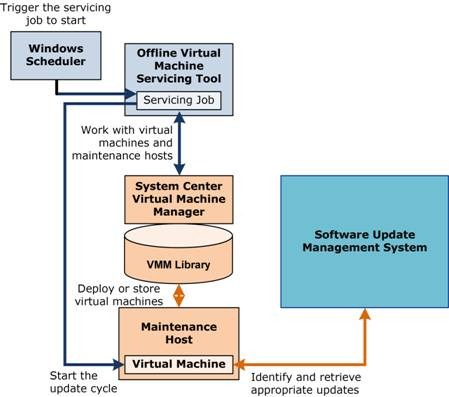
OVMST We just released a new version of our tool, “Offline Virtual Machine Servicing Tool – version 2.1”.  Like all Solution Accelerators, OVMST 2.1 is available at no cost, and is fully supported by Microsoft.

You have told us that one of the toughest challenges you face in managing your virtualized environment is servicing your offline virtual machines without opening the door to attackers. Because offline virtual machines are often not kept up with the latest security patches, the moment these machines are brought back online to be serviced, they instantly become vulnerable to penetration. 

The Offline Virtual Machine Servicing Tool 2.1 has free, tested guidance and automated tools to help you keep your virtualized machines updated, without introducing vulnerabilities into your IT infrastructure.    The tool combines the Windows Workflow programming model with the Windows PowerShell™ interface to automatically bring groups of virtual machines online, service them with the latest security updates, and return them to an offline state. 

Release 2.1 of OVMST is a direct response to requests by customers: to support the R2 wave.  the Offline Virtual Machine now supports the following products:

  • Hyper-V-R2
  • VMM 2008 R2
  • SCCM 2007 SP2
  • WSUS 3.0 SP2
  • OVMST 2.1 also supports updates to Windows® 7 and Windows Server® 2008 R2 virtual machines.  

MORE INFO:  To learn more about the Offline Virtual Machine Servicing Tool 2.1 
http://technet.microsoft.com/en-us/library/cc501231.aspx

DOWNLOAD: Offline Virtual Machine Servicing Tool 2.1 
http://www.microsoft.com/downloads/details.aspx?FamilyId=8408ECF5-7AFE-47EC-A697-EB433027DF73&displaylang=en

[taken from the Gamerscore blog]

image On December 15, Games for Windows – LIVE will evolve beyond LIVE gaming and include a portal for accessing and downloading your favorite LIVE-enabled titles…courtesy of Games on Demand. Games on Demand for Windows lets you easily purchase and download great titles from the Games for Windows – LIVE library right from your computer, and re-install your games whenever you want, wherever you want. Games for Windows – LIVE now gives you the flexibility to access and play your games where and when you want, all straight from your PC.

“With Games on Demand, we didn’t just want to create a cut-and-paste version of existing digital distribution services,” said Mike Ybarra, general manager of LIVE Engagement Services. “We challenged ourselves to deliver an integrated platform that takes full advantage of the unique capabilities offered by the LIVE service. Our goal has always been to create a seamless online gaming experience for the Windows community, and Games on Demand is a great step toward that end.”

The launch lineup will include recent hits like:

  • “Resident Evil 5” (Capcom)
  • “Red Faction: Guerrilla” (THQ)
  • “Battlestations: Pacific” (Square Enix)

…as well as new exclusive LIVE-enabled versions of popular digital games such as “World of Goo” and “Osmos” distributed by Microsoft Game Studios. All games can be purchased either by credit card or with Microsoft Points. Games on Demand for Windows will be available in markets that currently have the Games for Windows – LIVE service. Microsoft is also offering an updated LIVE-enabled version of “Tinker,” formerly an exclusive Windows Vista Ultimate Extra, as a completely free download from the Games for Windows – LIVE client.

“Connected digital experiences are defining the continued growth of Windows as a gaming platform,” said Chuck Osieja, creative director of Games for Windows – LIVE. “Today marks Microsoft’s return to delivering Windows games built on unique LIVE experiences.”

Games for Windows – LIVE delivers a truly connected experience for PC gamers, letting you enjoy a common Gamertag, Gamerscore and unified friends list that carries across both supported PC games and the Xbox 360 console. The service also offers single and multiplayer Achievements, voice chat, text messaging and TruSkill online matchmaking.

Posted by: kurtsh | December 10, 2009

BETA: Outlook Hotmail Connector 14.0 for Outlook 2010 Beta

image [taken from the Outlook blog]

We’re happy to announce the Beta release of Microsoft Outlook Hotmail Connector 14.0 (previously called Outlook Connector) in parallel with the Outlook 2010 Beta.

Why use the Outlook Hotmail Connector?
If you have been using Outlook Connector 12.1, you already know you can manage your Windows Live Hotmail e-mail, calendar, and contacts from within Outlook.

Outlook Hotmail Connector 14.0 Beta is compatible with Outlook 2003 and 2007, and will replace Outlook Connector 12.1 upon release and provides an improved authentication and synchronization experience.

Better with Outlook 2010
With Outlook Hotmail Connector 14.0 and Outlook 2010, you gain these additional benefits:

  • Junk filter settings Your Safe Sender List/Blocked sender list/Safe Recipient lists are synchronized between Outlook and Hotmail.
  • Integrated Send/Receive Send/receive works like your other Outlook accounts.
  • Integrated connection status Your Hotmail account status appears in the Outlook status bar.
  • Rule support for secondary accounts Rules work with the Hotmail account in Outlook even if it’s not your primary account.

Install the Outlook Hotmail Connector 14.0 Beta today
If you have installed the Outlook 2010 Beta and have a Hotmail account in your profile, you are prompted to upgrade to the Outlook Hotmail Connector 14.0 Beta (see my previous blog post on the subject for details on how to connect an Hotmail account to Outlook 2010).

To download the Outlook Hotmail Connector 14.0 Beta manually, go to the Microsoft Download Center.

On behalf of the entire Outlook Hotmail Connector team, thanks for trying Outlook 2010 and the Outlook Hotmail Connector 14 Beta.

image Digital marketing is one of the fastest growing areas of advertising today. However, to keep pace with digital’s huge influence on consumers’ media habits, advertisers must do more than simply extend their offline campaigns into the digital marketing space. Digital is driving new terms of engagement between brands and consumers and reshaping media consumption across both old and new channels. Research shows that the most important and influential consumers continue engaging with digital media even when watching TV. To be truly effective, a brand’s integrated marketing strategy must incorporate digital marketing from the start.

Sound complicated? It doesn’t have to be. Our new Understanding Digital guide has been developed to make it easier than ever to plan the role of digital marketing in your campaign, and ensure that you are making full use of the unique range of touchpoints that digital provides.

DOWNLOAD: Marketer’s Guide to Digital Advertising – “Understanding Digital”
http://advertising.microsoft.com/europe/ForPublishers/default.aspx?pageid=2471

image Today we are pleased to announce that a public beta of Office Environment Assessment Tool, a beta of Office Code Compatibility Inspector and a draft of the Assessment and Remediation Guide are now available for download at the new Office 2010 Application Compatibility resource page on MSDN. These tools and documentation are made available to you as per our announcement of the Office 2010 Application Compatibility program at SPC09 in October.

Please use the links below to navigate and get the tools and the documentation. We encourage you to send us your feedback, comments and suggestions by either using Office 2010 Application Compatibility Forum on TechNet or by just sending a direct mail to ofappcpt@microsoft.com.

Tools and Guidance

Send us feedback on the Code Compatibility Inspector and OEAT via e-mail

[Taken from the Gray Knowlton’s blog]

imageDuring our most recent Architect’s Council meeting in Orange County, we reviewed a large part of Microsoft Cloud Computing solution including overviews of:

  • Windows Azure Platform & An Overview of the Microsoft Cloud
  • Service Oriented Architecture & Cloud Computing
  • Architecting Solutions Leveraging the Cloud
  • Making Sesne of the Expanding Range of Data Storage Solutions
  • Best Practices with Data Interaction Frameworks

The content from the last Microsoft Architect’s Council event has been posted on:

Also there’s the following content to get you up to speed with Microsoft’s Cloud technologies:

“What is Azure?” whiteboard videos

image In these three short screen casts, IT Pro Evangelist Matt Hester shows how you can help customers install the Service Level Dashboard 2.0 for System Center Opera­tions Manager 2007 R2 to keep mission-critical, line of business applications up and running.  The dashboard automatically displays application or system availability and performance in near-real time. 

Using the dashboard, customers can easily keep track of availability and performance trends, and head off problems before they occur.  The dashboard also lets customers easily create role-specific dashboards to support differ­ent departments, like HR, Finance, or Operations. 

If you don’t have the Service Level Dashboard downloaded already, grab it from this link:

clip_image001
…For Today, Tomorrow and Beyond.
http://www.flexibilitysecurityandcontrol.com

Cloud computing is becoming an increasingly popular approach to driving down costs while making the business more nimble. With Microsoft cloud computing, you can:

  • Increase productivity and satisfaction by providing seamless experiences across the PC, Web, and phone and from the data center to the cloud
  • Remain confident that your data and services will be protected and available as you reap the efficiency, cost, and environmental benefits of the cloud
  • Choose whether your applications will run locally, in the cloud, or a combination of the two based on your business needs

Interested in the potential of cloud computing for your business? We invite you to join us for a series of webcasts to learn how our approach enables enterprise-class services, consistent connected experiences, and the power of choice.

WHEN

TOPICS


Dec 9, 2009
12:00-1:00pm EST

Why Microsoft has the Best Cloud Computing Story
“Cloud” is a much-used IT industry term that means different things to different people. Does it mean Web-based applications? Web-hosted services? Centralized server farms and data centers? Platforms for developing and running scalable applications? Join this webcast to learn about Microsoft in the Cloud.

clip_image001

Dec 14, 2009
12:00-1:00pm EST

The Business Value of Online Services
Microsoft cloud services is a new model for business computing. It offers greater financial flexibility in how to fund IT resources. Join this webcast to learn how cloud computing with Microsoft can lower cost of ownership.

clip_image001[1]

Jan 11, 2010
12:00-1:00pm EST

Microsoft Online Services: The Better Choice
Microsoft’s cloud services is about the power of choice—a hybrid model of on-premises and off-premises resources that enable organizations to move what they want to the cloud—as much or as little as they want. Join this webcast to learn more about the three principles of Microsoft’s cloud computing strategy and the concept of “three screens and a cloud.”

clip_image001[2]

Unifying the Workplace: Connecting Deskless Workers to Critical Information – An Industry Perspective:
Do you have a large number of “deskless” workers in your organization who use computers very infrequently if at all? Is your organization forced to share critical benefits and company information with them mainly through expensive printing of hardcopies, intra-company mailings, posting on bulletin boards, shared kiosks/PCs or direct mailings?

Join one of the webcasts below to learn more about how organizations within your industry are using Cloud Services to connect the deskless worker to critical information.

Jan 18, 2010
12:00-1:00pm EST

Connecting the Deskless Worker for the Manufacturing Industry

clip_image001[8]

Jan 25, 2010
12:00-1:00pm EST

Connecting the Deskless Worker for the Retail Industry

clip_image001[9]

Feb 1, 2010
2:00-3:00pm EST

Connecting the Deskless Worker for the Healthcare Industry

clip_image001[10]


If you are eager for information in advance of the webcasts and the in-person conferences, we invite you to visit the following websites:

Or, check out the following materials:

image Everyone has this problem.  They go to work, log into their corporate network, and they use a corporate printer.  Then they go home, they log into their home network, and they and they have to change their default printer to a home printer.

Windows 7 makes this process AUTOMATIC through a new feature called “Location Aware Printing”.  Depending on what network you’re on, it’s easily configurable to have your default printer change.

  1. Click START –> CONTROL PANEL –> DEVICES & PRINTERS
  2. Select a Printer already listed.  The Menu will list an item called “Manage default printers”.
  3. Click “Manage default printers”

Here’s the weird part:  This is automatically configured by printers.  When you log into a network and configure a default printer, that printer is automatically bound to that network as your default.  When you log into another network and configure yet another default printer there, it will remain the default printer only as long as you’re connected to that network.

So a lot of people probably had no idea that this feature was there.  It just made their lives easier because the “right printer” was always configured no matter where they went.  They probably didn’t even notice that they didn’t have to constantly reconfigure their default printer where ever they went.

And shouldn’t all improvements be that way?

« Newer Posts - Older Posts »

Categories