All bias aside, this is the first toolbar I’ve installed and left on my browser in a long time.  I can’t say the same for the Windows Live Toolbar or the MSN Toolbar.

imageBing Bar is a little different from most browser toolbars in that it provides a couple of really nice facilities over a brand new Silverlight driven user interface developed by Microsoft’s User Experience Research team.

Besides the obvious Bing search field, which provides intelligent filtering and both result & image previews, the Bing Bar adds a couple nifty things;

  • Stocks Dropdown & Ticker – This is one of my favorite features.  It displays a ticker of watchable stocks and when click on, shows a 6 mo history of the stock along with the company report.
  • Email Update – Hotmail or MSN email users see when new mail comes in as the Mail button glows, and clicking on it produces a wide drop down that displays all recent emails.  One can reply directly from the interface or start their own email.
  • News & Weather Dropdowns – Single click views of today’s weather with the current weather displayed directly on the toolbar… or hot news stories sorted into one of 7 searchable categories.
  • Autofill Manager – Manage the automatic entry of personal information from an encrypted store on your computer.  Personal address, email, phone number, etc.  all can be autopopulated into online forms if you choose using the autofill manager.
  • Safety Center – A single location to manage all things Internet safety related including pop up blocking, phishing, and safe site designation.

Additionally, the buttons are dynamic:  As new features are made available, they’re dynamically loaded up at run time so in the future you can anticipate seeing a lot more on the Bing Bar. 

It’s a lot slicker than it probably sounds.  Give it a try!

Posted by: kurtsh | December 3, 2009

BETA: Bing Maps Silverlight Beta goes live!

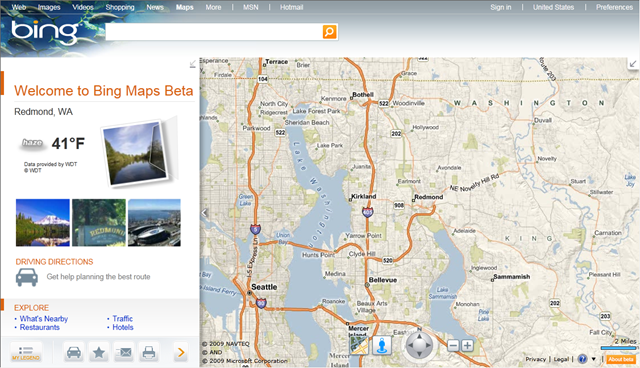
image The latest Bing Maps Silverlight Beta has gone live!  You can access it via:

…or just go to www.bingmaps.com and click on the new BETA Link.

We will keep the current AJAX control live on the consumer site, but look for the Beta to gain much momentum as it offers many new exciting features and content.

We have added some exciting new content/features.  Here is a quick brief look at a few of the highlights.

  • Enhanced Birds-Eye:  Limitations on viewing large groups of bird’s eye imagery have been eliminated through the Silverlight control.  3D required a proprietary plug-in and did not previously work on Macs.  We have taken the hundreds of 3D cities and merged that with fully mosaiced/seamless Birds-eye to provide an exclusive oblique view of the world.  As per before you can see it from all four directions.
  • Streetside imagery:  Initially the coverage is limited to 35 cities but based on a press release you may have seen we just entered into another partnership agreement with a large yet to announced company where we are driving, loading and updating 1.5M linear miles of US & European streets. 
  • Maps Apps:  Check out the Maps Apps section by clicking on the arrow located to the right of ‘My Legend’ button.  We now have the tools enabling the creation of a highly Brand-able local search.  We are welcoming partners of ours to build their own custom applications which are hosted and visible to all Bing visitors.
  • Improved Photosynth Integration:  Photosynth has now been better integrated into the experience.  Check out our Photosynth search application in the Maps Apps above.
  • Much easier development:  All of the above and much more are now available to develop against.  Check out our new Interactive SDK.  If you do not already have an account, sign up for an account: http://www.microsoft.com/maps/developers/

If you are interested in learning more:


LINK:  Bing Maps Silverlight Beta
http://www.bing.com/maps/explore/

image Remember how Symantec was the first Antivirus company to the podium to declare Microsoft’s Free Security Essentials antivirus/antimalware product “insufficient”, declaring 3rd party testing wrong, even going so far as to fabricate their own head-to-head test to try to prove their point?  (In case you forgot, here’s a few samples of their previous rants here, here, here, and here.)

Well, it turns out that AV-Comparatives – one of a couple generally recognized authorities on independent malware testing ran yet ANOTHER test on Microsoft’s free “Security Essentials” package in comparison to even Symantec’s newest antivirus solution – several months after MSE’s initial release.  The results?

“Believe it or not, but the recently introduced, free security solution from Microsoft manages to hold its own against fully-fledged, paid security suites from heavyweight players on the security market, at least when it comes down to generic detection and heuristic techniques. In fact, Microsoft Security Essentials 1.0, formerly codenamed Morro,  fared better than the products from security companies that were fast to downplay the relevance of a free basic solution from the Redmond company. According to AV-Comparatives, Microsoft Security Essentials 1.0 outperformed no less than 10 rival products for heuristics detection.

AV-Comparatives compared a total of 16 products from various security companies, including AVIRA AntiVir Premium 9.0.0.446, G DATA Antivirus 20.0.4.9, Kaspersky AntiVirus 9.0.0.463, ESET NOD32 Antivirus 4.0.437.0, F-Secure Antivirus 10.00.246, Microsoft Security Essentials 1.0 beta, Avast Professional Edition 4.8.1348, BitDefender Antivirus 13.0.13.254, eScan AntiVirus 10.0.997.491, AVG Antivirus 8.5.406, Trustport Antivirus 2.8.0.3017, McAfee VirusScan Plus 13.11.102, Symantec Norton Antivirus 17.0.0.136, Sophos Antivirus 7.6.10, Norman Antivirus & AntiSpyware 7.10.02, and Kingsoft Antivirus 2009.08.05.16.”

Read more at: 

————–

Y’know, when even Slashdot agrees that Microsoft Security Essentials is a good product, you know it’s antivirus engine should be considered by people looking for protection.  Note that Forefront Client Security, Microsoft’s enterprise solution, leverages this same anti-malware engine.

Posted by: kurtsh | November 30, 2009

HOWTO: Remove a Printer Driver package from Windows 7

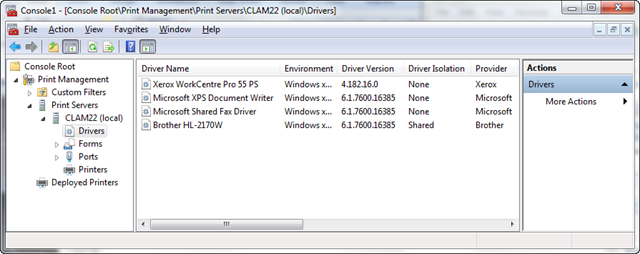
image I ain’t even gonna pretend I knew how to do this.  This annoys me that it was this difficult for me to figure out.  I had to BING the damned thing in order to get it done.

The problem I had was that when you uninstall a printer, you don’t actually uninstall the driver/driver package associated with that printer.  If you go ahead and reinstall the printer all over again, (like a network printer) it’ll just use what you’ve got installed on your system and you’re hosed.

SO WHAT TO DO IF YOU HAVE A CORRUPTED PRINTER DRIVER/PACKAGE
Basically, in order to remove a corrupted Printer Driver from Windows 7, you have to do the following:

  1. Run MMC from START—> RUN.
  2. Click File –> Add Remove Snap In
  3. Select Print Management
  4. Click the “Add Local server” button
  5. Click “Drivers” in the Print Management –> Print Servers –> YOURMACHINE (local) hierarchy
  6. Right click the Printer Driver/Package you want removed.

[Props go to eHow for showing me this little routine.]

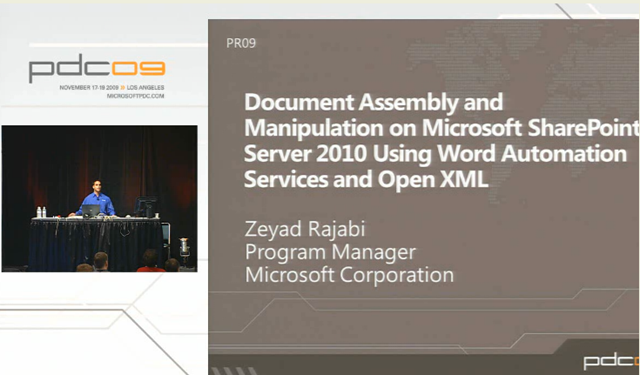
image Our Sharepoint Technology Specialist, David Gorgone, collected some additional information about the aforementioned “Word Automation Services”. 

Word Automation Services, if you recall, is a service that runs on Windows Server 2008 R2 in tandem with Sharepoint Server 2010 that is designed to populate template Word documents with content for specific fields like name, address, etc.  It then outputs the document in a format like Adobe Acrobat/PDF.

Here’s what David had to say:

There is a bunch of new information released and publically available on Word Automation Services. 

To get started, I would check out this presentation (Video and PowerPoint slides) from the PDC on Word automation:

There is a streaming video of the presentation, a link to the slides, and his code.  He actually shows code to convert a DOCX to PDF.  This blog also has some good general information on Word automation and using the Open XML SDK.

On MSDN, we have released a whole section on Word Automation Services.  This includes articles, getting started, sample code, and details the object model:

And finally, the beta of SharePoint 2010 is now available for download here:

Posted by: kurtsh | November 25, 2009

WEBCAST: Catch 22 – eDiscover & Spreadsheets, Dec 1st

clip_image001

Session Overview
A significant amount of today’s corporate data is stored in end-user computing (EUC) applications including spreadsheets and PC databases. These applications are used in many mission-critical business processes – financial reporting, closing the books, revenue recognition, journal entries, equity and commodity trading, insurance and actuarial processes, scientific analysis, and more. Despite their power, speed and flexibility, EUCs often lack the proper safeguards and controls needed to prevent gross accounting errors, avoid poor decisions, prevent fraud, and protect against non-compliance with corporate and regulatory mandates. Furthermore, organizations often fail to properly inventory and account for them in preparing for litigation and legal discovery.

Join Prodiance and Microsoft GRC expert Jeff Jinnett for this exciting online event to learn about the key issues surrounding spreadsheet and EUC risk, and how to leverage the latest technology and best practices to establish a sustainable eDiscovery Reference Model (EDRM) to efficiently mitigate spreadsheet and EUC risk, improve compliance, and drive business process efficiency.

The agenda will cover:

  • The latest industry trends, business drivers and regulatory mandates affecting spreadsheet and EUC risk 
  • Best practices and auditor guidance for automating internal controls over mission critical EUCs
  • The legal impacts of uncontrolled EUCs and requirements for establishing an effective EDRM model
  • A live software demonstration of the Prodiance Enterprise Spreadsheet Manager system
  • A review of the business case and ROI

———-

Date/Time:
Tuesday, December 1st, 2009
(8:30 am PST / 10:30 am CST / 11:30 am EST)

Registration:
http://www.prodiance.com/news/register2.asp?utm_campaign=Webinar%3A%20Catch%2022%20-%20eDiscovery%20%26%20Spreadsheet%20Control&utm_content=eric.perry@prodiance.com&utm_medium=Email&utm_source=VerticalResponse&utm_term=HTML%20Version%20-%20Image%20Link%202

———-

If you have any questions concerning this event, please call us at +1 (925) 416-9191 or send an email to events@prodiance.com.

clip_image001[6]ALTERNATIVE THINKING ABOUT BUSINESS SERVICES:
Microsoft Exchange Server 2010 – Information and insights for a smooth migration

Considering a move to Exchange 2010?
Don’t miss this information-packed webcast!

Find out how you can improve organizational productivity and data center efficiency by upgrading to Microsoft Exchange Server 2010. Regardless of your current platform—Exchange, Lotus Notes or another non-Microsoft platform—moving to Exchange 2010 streamlines administration, better protects your communications and meets users’ demands for greater business mobility. 

clip_image001Making the Move to Exchange 2010: The Inside Story offers invaluable insight into the technology changes and potential business impact of this exciting new release.

Join HP Services Vice President, Office of the CTO, Tony Redmond, a leading authority on Exchange; Microsoft Unified Communications Senior Product Manager Nicole Brown; and Distinguished Technologist in HP’s services organization Donald Livengood for this hour-long webcast to learn:

  • How to be sure moving to Exchange 2010 is right for you
  • The benefits—both business and technical—your organization can expect
  • Critical factors to consider in planning your move
  • The most effective deployment strategies
  • How to speed your time-to-results

Date/Time:
Tuesday, December 8
11:30 a.m. – 12:30 p.m. EST
Get the inside word on Exchange 2010’s new features and how you can take optimal advantage of them.

Registration:
Learn more and register
http://customer.hp.com/r?2.1.3KT.2ZX.%5flTUk.Dt0K6o..N.L1mm.2NKu.az1udWxsJm1vPTE%5fCccSGKT0

clip_image001Webcast Series: Unlock the Value of your Microsoft Software Assurance (SA) Benefits

Date: December 4, 2009

Times:


Session 1


9:00 AM-10:00 AM PST


Software Assurance Overview


Session 2


10:00 PM-11:00 AM PST


Customer Showcase – Q&A with an SA Benefit Administrator


Registration: Contact me if you’re a customer of mine for information on how to register. 

Register only ONCE to attend one or both sessions. You can come and go as you please.
During these uncertain times, organizations are looking for ways to find the training, resources, and services they need without having to pay more. Microsoft Enterprise Agreements (EAs) come with a rich array of Software Assurance (SA) Benefits that organizations can leverage to save money, increase productivity, and provide their workforce with training and other valuable programs such as Employee Purchase and Home Use.

Join this webcast to learn more about Software Assurance (SA) and how it can help your organization. SA Fridays, a series of webcasts held on the first Friday of each month, will cover the basics of SA, provide SA experts who can answer your questions about SA, as well as go deeper on some of the SA benefits available.

Who Should Attend:

  • IT Managers and/or Software Assurance (SA) Administrators
  • Human Resources/Training Managers and Directors
  • Anyone else who wants to learn more about SA Benefits

SESSION 1: Software Assurance (9:00-10:00 AM PST)
This session will cover the basics of SA benefits available; how to activate and consume the benefits to meet the planning, deployment, and training needs of your organization.

SESSION 2: Customer Showcase – how we leverage our SA Benefits  (10:00-11:00 AM PST)
Come listen to one of your peers discuss ways in which their company has strategically leveraged their SA Benefits to save them time and money as they architect/deploy/manage their Microsoft investments across their enterprise.

Don’t miss this opportunity to learn more about how to leverage Software Assurance (SA) Benefits from our SA experts without having to leave your office. Register today for SA Fridays!
SAVE THE DATE for future SA Fridays webcasts:

  • February 5, 2010

If you are interested in seeing any of our previous webcasts (Packaged Services, E-Learning, Training Vouchers and Home Use Program).  Those sessions were recorded and are available ON Demand, here.

Posted by: kurtsh | November 25, 2009

TRAINING: Microsoft SharePoint as a Development Platform

image Maximize Your SharePoint Investment:
Leverage It as a Development Platform!

We invite you to join us at this in-person event that will assist your agencies and organizations in further realizing the return on your existing SharePoint investment via Enterprise SharePoint Development. Enterprise Application Development on the SharePoint Platform enables a multitude of SharePoint benefits to be coupled with the power of the .NET platform. This combination allows the creation of flexible, integrated and secure line-of-business applications to be built in a fraction of the time of traditional development. So join us at a city near you as we explore Microsoft’s current and long term strategy for the Microsoft SharePoint Platform and supporting Development Tools. Seize this opportunity to immerse yourself in the exciting world of Enterprise SharePoint Development!

————————–

  • 8:30 AM–9:00 AM
    Registration
  • 9:00 AM–10:00 AM
    Keynote: Taking your SharePoint Investment to the Next Level with Visual Studio 2010

    This keynote session will provide an overview of the new platform capabilities in SharePoint 2010. You will also be among the first to see Visual Studio 2010’s tightly integrated experience for application developers building and deploying SharePoint solutions.
  • 10:00 AM–11:00 AM
    Realizing SharePoint as a Development Platform

    This session will focus on how SharePoint Products & Technologies can contribute to the acceleration of the solution development process by taking advantage of out-of-box capabilities in order to deliver composite business applications for your organization.
  • 11:00 AM–12:30 PM
    Unleashing the Power of SharePoint Apps with Visual Studio 2010

    This demo-oriented session will provide a deeper look at SharePoint Development concepts, techniques & best practices. 
  • 12:30 PM–1:30 PM
    Lunch
  • 1:30 PM–3:00 PM
    Managing the SharePoint Application Development Lifecycle

    The final session of the day will provide a look at strategies and best practices for Team based SharePoint development

Who Should Attend
Developers, Architects, Web Designers and technical managers and stakeholders who wish to gain a better understanding of the long term vision of SharePoint as a platform and the benefit of developing for SharePoint.

Attend for your chance to win* a 16GB Zune HD!
Please feel free to forward to a co-worker you think would benefit from attending this event.  If you prefer I not forward you these types of communications, just let me know. To learn how to manage your contact preferences for other parts of Microsoft, please read our Privacy Statement.

——————–

If you’re a customer of mine, let me know if you’re interested in attending and I will send date, location, and registration information to you.

Posted by: kurtsh | November 25, 2009

BETA: “Fishbowl” – a Facebook client for Windows 7

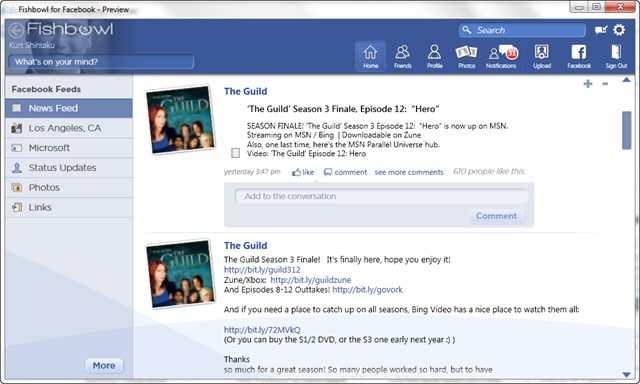
Looks like the folks at Microsoft Labs have come up with a fancy new Facebook client, optimized for Windows 7 users.

image

imageIt supports Aero Peek and is Touch ready for folks with touch Tablet PCs based on Windows 7.

INTEREST LEVEL
One feature that I find particularly useful is the slide bar for “interest” level.  It essentially allows one to view a Friend and say, “I am more interested in this Friend than most.”  This way you’re provided with more updates in the News Feed than others.  It’s a good throttle because there’s a lot of people that frankly, write too much about too little that I actually care about.

PHOTO BAR
Another feature that’s kinda cool is the Photo Bar which allows you to jump from Friend to Friend based on their photo.  It’s a nice highly rendered, highly accelerated-via-GPU function of the Fishbowl application that you simply can’t get using today’s technologies in AJAX and DHTML.

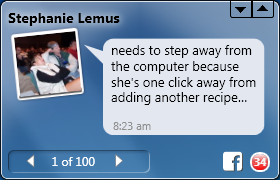
imageMINI WINDOW MODE
There’s also something called Mini Window Mode which allows you to keep your Fishbowl in a small window so that it’s imageunobtrusive but still keeps you up to date.  Seems like a Sidebar gadget/application to me but whatever.

All in all this is a very worthwhile app to grab.  Between this and Blu, the WPF powered Twitter app for Windows, I’d say there’s a very nice renaissance going on with Social Computing applications and next generation user interfaces.

« Newer Posts - Older Posts »

Categories