image

Microsoft Visual Studio 2010 is a landmark release of the premier development toolset for Windows, Web and Cloud development.

Join us for a comprehensive overview of Visual Studio 2010 and Team Foundation Server 2010.  Microsoft has made significant investments to and improvements of Modeling and Testing/QA tools in Visual Studio. Team Foundation Server is the Application Lifecycle Management (ALM) core of Team System and we’ll present enhancements in version control, reporting, project management and build management.  Spend a day with us to learn how to take software development to next level with Visual Studio 2010.

Agenda

  • 8:30 – 9:00 AM  Registration
  • 9:00 – 10:30 AM  Lap around Visual Studio 2010
    In this end-to-end demo, learn how the innovative features of Visual Studio 2010 and Team Foundation Server 2010 enable the production of modern applications with an unparalleled level of quality and collaboration.
  • 10:45 AM-12:00 PM  Agile Management with Team Foundation Server:
    Team Foundation Server2010 takes integrated Application Lifecycle Management to next level.  See how painless reporting, metrics and configuration & project management can enable you to build applications in a way that embraces change and promotes visibility and transparency.
  • 12:00 – 12:30 PM  Lunch
  • 12:30 – 1:45 PM  No more “No Repro
    How many times have you used or heard the line, “It works on my machine” or “I can’t recreate that bug”? During most software projects, countless hours are spent (wasted?) trying to communicate bugs – what happened, when, why, how – between testers and developers. Many bugs get swept away because they can’t be reproduced, only to be found the bugs really do exist – when the end users are running the system in production. In this session we’ll take a look at how Visual Studio 2010 will help eliminate this game of “no repro ping pong” and streamline communications between developers and QA.
  • 2:00 PM-3:15 PM  Architecture for Everyone
    Even before the ink is dry most software architecture documents are out of date. All it takes is that first line of code to be written. The team comes up with great designs. How can the design principles be enforced? How can you see what the architecture of the system really looks like, as it has been written, beyond just the high-level design? In this session, we’ll examine the architecture tools in Visual Studio 2010 that provide practical support for software architecture.

DATE/TIME:
Thursday, March 04, 2010 9:00 AM – Thursday, March 04, 2010 3:30 PM

LOCATION:
Microsoft Los Angeles Office MPR 1
333 S. Grand Ave. Suite #3300
Los Angeles California 90071
United States

REGISTRATION:
http://msevents.microsoft.com/CUI/EventDetail.aspx?EventID=1032439180&Culture=en-US
image Is your organization planning to deploy either Windows 7, Windows Server 2008 R2 or Microsoft Office in the near future? If so, are you aware of the deployment tools and resources available? Microsoft wants to help your organization maximize the business value out of your technology investment with deployment guidance and best practices.

Come join your local Team of Experts for a ‘Technology Deployment Day’. Attendees will learn how Microsoft Deployment can benefit your IT environment with integrated solutions from the desktop to the data center, management of physical and virtual IT environments, knowledge-driven management, and rapid time to value.

This half-day workshop will be full of product demonstrations to show you how to:

  • Discuss the Microsoft Deployment Toolkit methodology and tools
  • Understand the latest technologies for Windows OS Imaging (server and desktop)
  • Use System Center Configuration Manager to deploy Windows 7 and Windows Server 2008 R2 quickly and cost effectively
  • Create a Windows 7 image with Driver support in System Center Configuration Manager
  • Create a Windows Server 2008 R2 image
  • Image systems from network (bare metal deployment)
  • Create an Office App-V package and deployment

Date/Time/Location/Registration Details:
If you’re a customer of mine, please contact me for information about this event as it is an invite only opportunity for our Enterprise customers that requires registration.

image 

Join Microsoft and IDV Solutions at the downtown Los Angeles Microsoft offices Tuesday or the Irvine Microsoft Technology Center (MTC) Wednesday for a morning discussion on IDVs Visual Fusion, and Microsoft’s SharePoint and Bing Maps.
Learn how these three products combine to form an enterprise platform to flexibly and agilely develop business-focused applications that unite disparate data sources visually, in the context of location and time, for more informed, faster decision making.

Attention to business user experience and empowerment is a hallmark of solutions built on this platform, making rapid adoption and ongoing user satisfaction fundamental characteristics of these business applications.
The use of interactive data visualization combined with business intelligence will be demonstrated and applied to numerous real world scenarios. Current case studies from several organizations across a number of industries will be examined, as well as specific return on investment evidence.
Learn how your organization can benefit when these tools are applied to better understand and act on the key information driving your business.

All attendees are eligible for up to 60 hours of FREE services work from IDV Solutions, and one attendee will leave the event with a FREE Zune HD 32 GB Video MP3 Player.

Both events will conclude with lunch, and the Irvine event also includes a tour of the Irvine Microsoft Technology Center.

Los Angeles Details:
Date:  Tuesday, February 16th, 2010
Time: 9:30 AM to 1:00 PM PST
Location:  Los Angeles Microsoft office
333 South Grand Ave, Suite 3300
Los Angeles, CA 90071
(213) 806-7300
Locate on Bing Maps>
Attendee Benefits:

REGISTER TODAY!> LOS ANGELES

Irvine Details:
Date:  Wednesday, February 17th, 2010
Time: 9:30 AM to 1:00 PM PST
Location: Irvine Microsoft Technology Center (MTC)
3 Park Plaza, Suite 1600
Irvine, CA, 92614
(949) 263-3000
Locate on Bing Maps>
Attendee Benefits:

REGISTER TODAY!> IRVINE

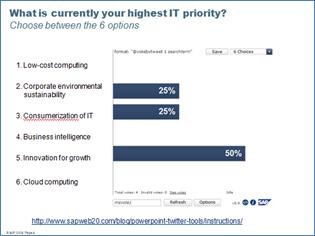
clip_image001Found this and thought I’d share it with a few of you guys that do presentations a lot.  These tools essentially embed within Powerpoint and can provide an interesting level of interactivity between attendees & the presenter by leveraging Twitter & the attendee’s phones. 

Kind of like a LiveMeeting, you can dynamically show on a Powerpoint slide:

  • What the worldwide Twitterati are saying about the topic you’re discussing, refreshed in real time
  • Live survey results simply by having an audience tweet to a specific keyword of your selection. 
  • Written audience feedback in real time with automated filtering to prevent idiots from swearing or saying profane things.

There are currently eight tools – you can easily cut and paste them into your own Powerpoint decks:

  • PowerPoint Twitter feedback slides
  • PowerPoint Twitter ticker bar
  • PowerPoint Twitter voting — bar charts and pie chart
  • PowerPoint Mood meter
  • PowerPoint Crowd meter
  • PowerPoint Zoom text
  • PowerPoint Twitter update bar
  • PowerPoint AutoTweet

clip_image001[4]

[Taken from http://blogs.msdn.com/dan_fay/archive/2009/12/15/free-powerpoint-twitter-tools-by-sap-web-2-0.aspx]

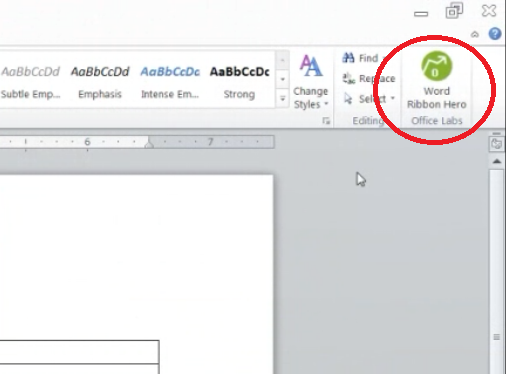
image Ribbon Hero is a game for Word, PowerPoint, and Excel 2007 and 2010, designed to help you boost your Office skills and knowledge. Play games (aka "challenges"), score points, and compete with your friends while improving your productivity with Office. 

As a concept test, this add-in is not supported, but is an opportunity for you to try out an idea we are working on and let us know what you think.  For additional challenges and the opportunity to earn more points, download Office 2010 Beta.

Apparently the press seems to agree that this is a pretty cool idea for training:

Requirements: Vista or Windows 7 (32/64 bit), Office 2007 or Office 2010 (32/64 bit)

Limitations: English only, Works with Word, Excel, and PowerPoint only, Does not support versions of Office earlier than Office 2007

Posted by: kurtsh | February 7, 2010

TOOL: Windows System State Analyzer

The Windows Performance team did a monster article about comparing system states across multiple servers to try to differentiate them and understand what could possibly be causing different results to the same tests.

—————

There often arises a need to figure out what may have changed on a system, either due to a specific issue or even to compare the difference between two systems. Today I would like to introduce you to the Windows System State Analyzer utility. Unless you are a developer or tester, you probably have never heard of this tool, as it is part of the Windows 2008 R2 Logo Software Certification and Windows 2008 R2 Logo Program Software Certification toolkits.

The basic functionality of the System State Analyzer tool is to allow you to compare two snapshots taken at different points in time. This allows you to compare the state of a machine both before and after an application install for instance. Today I will give you a run-through of what the tool looks like while doing a compare of a system both before and after installing a software package, in this case Virtual PC 2007. The initial UI will look something like this:

image

image Do you use the Windows Server Print Server role in your environment?  Are you using the either of the print server management packs for OpsMgr 2007?  Do you use the print management console?  If you answered yes to any of these questions then we would greatly appreciate your input to help form the future manageability plans for the print server role.  Head over to the OpsMgr public Connect site and fill out the "Print Server Management Survey".

Registration to the Connect program only requires a Windows Live ID.  The survey is anonymous and should take about 5 minutes to fill out the 11 questions.

Thank you in advance for your time and your feedback.

image Today we are announcing the opening of the Technology Adoption Program nominations for the next release of System Center Configuration Manager. 

The Technology Adoption Program is designed to provide a consistent experience for Microsoft customers to obtain real-world customer feedback on Microsoft pre-release products. 

There are many benefits for our TAP customers, to name a few:

  • Lead the market by adopting critical enabling technologies early
  • Influence and shape the final product by providing early and deep feedback
  • Connect with expertise to obtain a deep understanding of strategic emerging technologies

Building on over 14 years of systems management industry experience, Configuration Manager (formerly SMS) is the world leader in software distribution, OS deployment, HW/SW inventory and more.  Moving forward, there are both new capabilities as well as enhancements to existing product functionality that form the investments for engineering. 

Over the coming year the next release of Configuration Manager will move into a public beta.  Even at this early stage, we want to ensure that it is the highest quality release possible; the TAP program helps significantly in this effort. 

I would like to highlight for you briefly what the investment pillars for this next release are, and over the coming months we will continue to go deeper on these areas with different product folks through interviews, online chats and other forms of content.

The next release of Configuration Manager will focus on a few main areas:

  • Improving client management experiences through enhanced, integrated software distribution models.  The next release of Configuration Manager will provide a framework for the right application format to be delivered to the user based on who they are, the device they are using, and their connection.
  • Infrastructure improvements are also a main focus.  Optimizing site hierarchy, replication and content distribution on the backend.  For the managed client, improving client health and remediation capabilities will ensure that when a system is managed, it remains healthy and secure.  Part of this is also improving the Admin experience.  In the past we did this by reducing mouse clicks to get through an activity.  This is only part of the process.  Adding security models to enable role based administration, as well as improving the Admin console experience will ensure that Admins are more efficient everywhere.
  • In addition, other areas of focus include expanding device management scenarios, model based configuration management and improving patch management services; just a few of the places we are focused on development.

We hope to see a strong interest in this TAP program, and we want to ensure as many organizations are engaged as possible.  The team is limited in resource, and as a result, not every TAP nomination can be accepted.  Completion/Submission of the TAP nomination form is not a guarantee of acceptance.  All completed nominations are evaluated to ensure the right fit, priorities and alignment of goals are present. 

The TAP is not your only avenue to access the next release of ConfigMgr.  There are other ways you be able to experience the product before release, such as the public beta programs.  Stay tuned to this blog for further announcements.

[taken from http://blogs.technet.com/systemcenter/archive/2010/01/08/the-next-wave-of-client-management-begins-now.aspx]

Posted by: kurtsh | February 7, 2010

OFFER: System Center Influencers Program Membership

imageThe Influencer Program is a community program that will give influencers — user group leads, MVPs, popular bloggers, and others recognized as influential in the community around System Center — the technical training, content, people connections, and general guidance they need to enhance their credibility and impact in the community.

Key Member Benefits
  • Access to key content: Members get access to the latest technical training content to help them enhance their expertise. They can also submit content they’ve created to share with others in the community.
  • Meet experts and peers in the community: Members can stay connected with System Center-focused events, or let others know about their upcoming events. Members can register and find events, as well as request speakers for upcoming meetings.
  • Grow your influence: Members can learn about new opportunities to lead their communities on and offline, and find out about other opportunities to get more involved with Microsoft.

This invitation-only program is on Microsoft Connect, and offers links to several different tools to support influencer needs. The program is an open forum that welcomes feedback from participants to continue to make it more relevant and valuable.

imageWho’s Eligible

This program is intended for influencers of all kinds, or simply those who are looking for tools to become more influential in their own communities. The intention is not to supplant any existing influencer programs, such as the MVP program, but rather to complement and extend them, focusing specifically on the needs of the System Center (and soon: virtualization) community.

How to Join

If you are interested in joining this program, send the following to scnetsup@microsoft.com:

  1. Your name
  2. Your professional description
  3. Your Windows Live ID
  4. A photo of yourself
  5. How the Influencer Program will be of use to you and, most importantly, how you can help contribute to this community.

You can also email this alias with any questions about our tools, resources, or mission.

This past month, two major announcements were made that you might have missed:

The National Science Foundation is responsible for research in thousands of areas including food production for the 3rd world, robotics, 3D modeling for surgery, computer-based programming, cancer & disease detection, extraterrestrial communications, and other human endeavors.

By providing access to Microsoft cloud computing fabric, the NSF will be able to:

  • Take advantage of existing, pre-built research & development
  • Improve collaboration amongst researchers by providing a uniform place to share information
  • Increase performance and velocity of research through the sheer computation power of the cloud

Intuit, makers of financial software such as Quickbooks & TurboTax, have a base of independent developers that extend the capabilities & reach of their products but leveraging APIs built into their software.

In partnership with Microsoft, Intuit selected Windows Azure as their preferred cloud infrastructure for extending their software.   By providing the free Windows Azure software development kit (SDK) as part of the Intuit Partner Platform today at http://developer.intuit.com/azure, hundreds of thousands of application developers can now extend their financial services software & extensions via the web in a highly scalable, secure, and available infrastructure.

« Newer Posts - Older Posts »

Categories