clip_image001

Registration for MMS 2010 is now open!
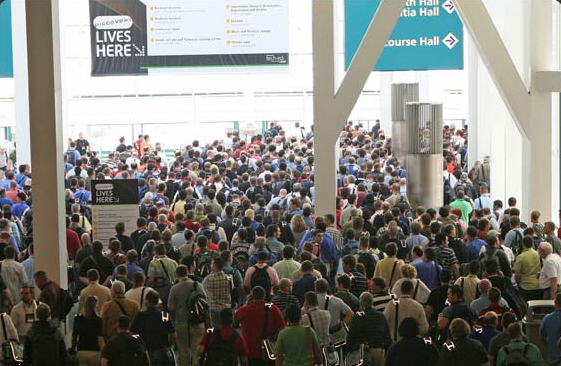
Microsoft Management Summit 2010,
April 19 – 23, Las Vegas, Nevada
http://www.mms-2010.com/public/registrationoverview.aspx

It’s time to start planning for the Microsoft Management Summit 2010 (MMS 2010) – the place to learn about the latest IT Management products, technologies and solutions from Microsoft and partners.

Registration is now open, and can be accessed from the event web site at www.mms-2010.com.  This site also provides an overview of the event, the overall schedule and information about available hotel accommodation.

Event Overview
This year’s event will be packed with information and news about new releases, product updates and added solutions for deploying and managing Windows 7, Windows Server 2008 R2 and a range of other platforms such as Unix, Linux and mobile devices.  In addition to exciting new versions of several existing System Center products the event will cover a variety of new solutions including those offering management of and from private and public Clouds.

As in past years, the event will also offer sessions on best practices – tips and tricks for managing existing and new environments – presented by attendees, IT Management Consultants and Microsoft field staff.  These topics provide an opportunity to learn from others in the community, enabling you to plan future deployments of Windows 7, Windows Server 2008 R2, applications and services with minimum cost and downtime.

With sessions by technical experts, opportunities to try out new products in the Labs as well as networking opportunities with leading Industry experts and peers, MMS 2010 remains the premiere technical event of the year for IT Management professionals.

Management Product Content
During MMS 2010, in addition to sessions covering existing products and solutions, there will be significant coverage of recent and upcoming management product releases including:

  • System Center Configuration Manager 2007 SP2, R2 and R3
  • System Center Configuration Manager v.Next
  • System Center Operations Manager 2007 R2
  • System Center Service Manager 2010
  • System Center Data Protection Manager 2010
  • System Center Essentials 2010
  • System Center Online Desktop Manager
  • System Center Virtual Machine Manager 2008 R2
  • Microsoft Application Virtualization (App-V) 4.5 SP1
  • Microsoft Enterprise Desktop Virtualization (Med-V) 1.0 SP1

MMS 2010 is the ideal opportunity to come listen to the product teams describe these new releases, to try out these new solutions in the lab and to discuss real-world deployment experiences with leading industry experts and fellow attendees with real-life experiences to share.

Event Theme
The theme of this year’s Microsoft Management Summit is Manage the Future, reflecting the upcoming changes we see in the world of IT as Virtualization and Cloud Computing fundamentally alter our concept of “IT Management”.  As these new initiatives alter the IT Landscape, IT Management will play an increasingly key role in reducing the apparent complexity while maximizing flexibility, availability and performance.

Sessions from Microsoft speakers and industry experts during MMS 2010 will cover how the current and near term wave of management solutions from Microsoft support:

  • Management of virtualized servers, services, desktops and applications
  • Management of desktops and datacenters from the Cloud
  • Management of the hosting services behind both public and private clouds
  • Integration between management products and technologies
  • Integration across platforms and vendor boundaries

Session Tracks

  • Client Management Technologies
  • Cloud Management
  • Community Topics
  • Microsoft IT
  • Operations Management
  • Security Management
  • Server Management Technologies
  • Solution Accelerators
  • Systems Management
  • Virtualization

Event Agenda
MMS 2010 will offer more deep technical Breakout Sessions than ever before, covering a range of IT Management topics and technologies. Daily “Speaker Q&A” sessions allow attendees to meet the presenters at the end of each day to discuss specific session content informally in a casual format. In addition, the event will provide over 8,000 Instructor-led Hands-On Lab places during the week and a “walk-in” Self-paced Lab area.  All of Microsoft’s Management solutions, together with those provided by Partners, will be on show at the MMS 2010 Expo where you’ll have the opportunity to review the solutions on offer and discuss your specific requirements with experts.

Visit the conference web site at www.mms-2010.com for more details of the overall agenda and registration information.

Content Survey
If you’d like to help in the content selection process for MMS 2010, we invite you to complete the MMS 2010 Content Survey. By taking a few minutes to tell us about your IT experience and expectations for the event, you’ll help ensure the topics and labs offered during MMS 2010 are relevant to you and your organization. The survey should take no more than 10 minutes to complete and when it closes on Dec 22nd two entries will be drawn from amongst the responses to win a Portable Media Player.

Registration
http://www.mms-2010.com/public/registrationoverview.aspx
This year the summit will be returning to The Venetian Hotel in Las Vegas, Nevada.  Two different registration options are available for attendees – you may either purchase your MMS 2010 registration and hotel accommodation separately, or as a package.

If you choose to register using the “Package” option, your registration fee includes accommodation for the nights of April 19th to 22nd at the Venetian Hotel. Alternatively you may choose to purchase accommodation separately from your registration, during the registration process or at a later date.  The MMS 2010 Event Team has negotiated a special rate at the Venetian Hotel, available only through the registration web site. Details of the accommodation on offer are provided on the Hotel Accommodation page.
Posted by: kurtsh | December 10, 2009

BETA: Office 2010 Beta Resource Kit

image The Microsoft Office 2010 Resource Kit provides information about new features and changes in deployment strategies for Office 2010. The documentation is intended for IT professionals who plan, implement, and maintain Office installations in their organizations. New and updated content will be published on a regular basis.

In the Office 2010 Resource Kit:

  • Product evaluation and getting started with Office 2010 Beta   
    Provides an overview of Office 2010, and includes information about the Setup architecture, 64-bit Office 2010, system requirements, getting started information, and product comparisons.
  • Planning the deployment of Office 2010 Beta  
    Provides information about assessing your current environment, planning for desktop configurations, security, and applications including Microsoft Access 2010, Microsoft Excel 2010, Microsoft Outlook 2010, and Microsoft Project 2010. It also provides planning information for migration and upgrading from previous versions of Office, as well as planning for virtualization and Terminal Services.
  • Configuration and deployment of Office 2010 Beta  
    Provides how-to information for specific deployment tasks, such as customizing the installation, and installing Office 2010 on users’ computers. It also provides information about the new licensing options for Office 2010, including instructions for configuring the infrastructure for volume licensing and activation.
  • Maintaining and updating Office 2010 Beta  
    Provides information about changing users’ configurations after installing Office 2010.
  • Security and protection for Office 2010 Beta  
    Provides information new security controls in Office 2010, which make it easier for IT professionals to build a robust defense against threats while maintaining information worker productivity.
  • Troubleshooting for Office 2010 Beta  
    Provides suggested solutions to issues you might encounter during a deployment of Office 2010.
  • Technical reference for Office 2010 Beta  
    Provides technical details related to Office 2010 Setup properties and command-line options, and describes the Office Customization Tool and Config.xml file.

LINK:  Office 2010 Resource Kit
http://technet.microsoft.com/en-us/library/cc303401(office.14).aspx

Other Resources:

TechEd2010 
TechEd 2010 is going back to New Orleans, LA!

Microsoft TechEd 2010 is Microsoft’s largest, most expansive technology conference for IT Professionals & Developers for the year. With over 13,000 people attending annually, it offers the greatest opportunity learn in-depth about virtually every topic of interest and how Microsoft’s technologies work in that space. For companies that leverage Microsoft products and solutions, it’s a veritable must-attend.

imageWhy attend Tech·Ed 2010?

Because you’ll return to your office with knowledge and expertise that only four days at Tech·Ed can offer. You can learn about today’s cutting edge trends, helping make life easier for you (and everyone else) at work. But the most important benefit just might be the networking: you can build personal connections with Microsoft experts and peers that will last far beyond Tech·Ed.

WEB SITE:  http://northamerica.msteched.com/?CR_CC=100280253&WT.srch=1&CR_SCC=100280253&WT.srch=1

—————–

Immerse Yourself

in hundreds of IT learning opportunities and ask your toughest questions to renowned technology experts, distinguished speakers, and community influencers.

Engage and Collaborate

with Microsoft innovators, third party experts, and thousands of your IT peers to find the technology resources necessary to help build state-of-the-art software solutions or to help plan, architect, deploy, manage and secure a connected IT infrastructure.

What’s New This Year

Send our convince your boss email. Then, download our convince your boss talking points, so you are prepared for any follow up conversations.

 imageimage

First Look Office 2010 [taken from the Microsoft Press blog]

Greetings! For a limited time you can download this free e-book without stepping through any registration. First Look: Microsoft Office 2010, by Katherine Murray, offers 14 chapters of early content, organized like so:

Part I, “Envision the Possibilities,” introduces you to the changes in Office 2010 and shows you how you can make the most of the new features to fit the way you work today. Chapter 1, “Welcome to Office 2010,” gives you a play-by-play introduction to new features; Chapter 2, “Express Yourself Effectively and Efficiently,” details the great feature enhancements and visual effects throughout the applications; and Chapter 3, “Work Anywhere with Office 2010,” explores the flexibility factor by presenting a set of scenarios that enable users to complete their work no matter where their path takes them.

Part II, “Hit the Ground Running,” focuses on each of the Office 2010 applications in turn, spotlighting the key new features and showing how they relate to the whole. These chapters provide a how-to guide for many of the top features you’re likely to use right off the bat, and they offer inspiring ideas on how to get the most from your favorite applications.

Part III, “Next Steps with Office 2010,” zooms up to the big picture and provides examples to help you think through interoperability. How often do you use the various Office applications together? Customer research shows that people often don’t realize how well the applications work together as a complete system—which means they might be laboring over items they could easily incorporate from somewhere else. This part of the book provides examples for integrating the applications and explores Office 2010 security and training opportunities, as well.

You can download the e-book here. It’s about 10.5 MB.

BLOG:  http://blogs.msdn.com/microsoft_press/archive/2009/12/09/free-e-book-first-look-microsoft-office-2010.aspx

Posted by: kurtsh | December 10, 2009

RELEASE: Offline Virtual Machine Servicing Tool v2.1

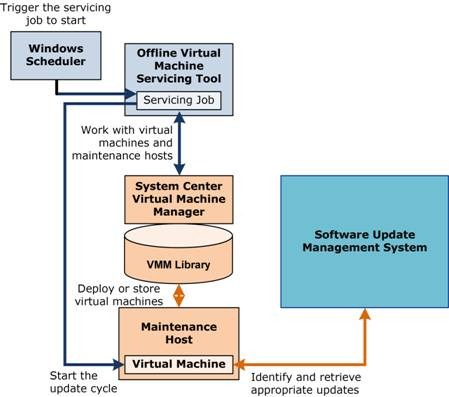
OVMST We just released a new version of our tool, “Offline Virtual Machine Servicing Tool – version 2.1”.  Like all Solution Accelerators, OVMST 2.1 is available at no cost, and is fully supported by Microsoft.

You have told us that one of the toughest challenges you face in managing your virtualized environment is servicing your offline virtual machines without opening the door to attackers. Because offline virtual machines are often not kept up with the latest security patches, the moment these machines are brought back online to be serviced, they instantly become vulnerable to penetration. 

The Offline Virtual Machine Servicing Tool 2.1 has free, tested guidance and automated tools to help you keep your virtualized machines updated, without introducing vulnerabilities into your IT infrastructure.    The tool combines the Windows Workflow programming model with the Windows PowerShell™ interface to automatically bring groups of virtual machines online, service them with the latest security updates, and return them to an offline state. 

Release 2.1 of OVMST is a direct response to requests by customers: to support the R2 wave.  the Offline Virtual Machine now supports the following products:

  • Hyper-V-R2
  • VMM 2008 R2
  • SCCM 2007 SP2
  • WSUS 3.0 SP2
  • OVMST 2.1 also supports updates to Windows® 7 and Windows Server® 2008 R2 virtual machines.  

MORE INFO:  To learn more about the Offline Virtual Machine Servicing Tool 2.1 
http://technet.microsoft.com/en-us/library/cc501231.aspx

DOWNLOAD: Offline Virtual Machine Servicing Tool 2.1 
http://www.microsoft.com/downloads/details.aspx?FamilyId=8408ECF5-7AFE-47EC-A697-EB433027DF73&displaylang=en

[taken from the Gamerscore blog]

image On December 15, Games for Windows – LIVE will evolve beyond LIVE gaming and include a portal for accessing and downloading your favorite LIVE-enabled titles…courtesy of Games on Demand. Games on Demand for Windows lets you easily purchase and download great titles from the Games for Windows – LIVE library right from your computer, and re-install your games whenever you want, wherever you want. Games for Windows – LIVE now gives you the flexibility to access and play your games where and when you want, all straight from your PC.

“With Games on Demand, we didn’t just want to create a cut-and-paste version of existing digital distribution services,” said Mike Ybarra, general manager of LIVE Engagement Services. “We challenged ourselves to deliver an integrated platform that takes full advantage of the unique capabilities offered by the LIVE service. Our goal has always been to create a seamless online gaming experience for the Windows community, and Games on Demand is a great step toward that end.”

The launch lineup will include recent hits like:

  • “Resident Evil 5” (Capcom)
  • “Red Faction: Guerrilla” (THQ)
  • “Battlestations: Pacific” (Square Enix)

…as well as new exclusive LIVE-enabled versions of popular digital games such as “World of Goo” and “Osmos” distributed by Microsoft Game Studios. All games can be purchased either by credit card or with Microsoft Points. Games on Demand for Windows will be available in markets that currently have the Games for Windows – LIVE service. Microsoft is also offering an updated LIVE-enabled version of “Tinker,” formerly an exclusive Windows Vista Ultimate Extra, as a completely free download from the Games for Windows – LIVE client.

“Connected digital experiences are defining the continued growth of Windows as a gaming platform,” said Chuck Osieja, creative director of Games for Windows – LIVE. “Today marks Microsoft’s return to delivering Windows games built on unique LIVE experiences.”

Games for Windows – LIVE delivers a truly connected experience for PC gamers, letting you enjoy a common Gamertag, Gamerscore and unified friends list that carries across both supported PC games and the Xbox 360 console. The service also offers single and multiplayer Achievements, voice chat, text messaging and TruSkill online matchmaking.

Posted by: kurtsh | December 10, 2009

BETA: Outlook Hotmail Connector 14.0 for Outlook 2010 Beta

image [taken from the Outlook blog]

We’re happy to announce the Beta release of Microsoft Outlook Hotmail Connector 14.0 (previously called Outlook Connector) in parallel with the Outlook 2010 Beta.

Why use the Outlook Hotmail Connector?
If you have been using Outlook Connector 12.1, you already know you can manage your Windows Live Hotmail e-mail, calendar, and contacts from within Outlook.

Outlook Hotmail Connector 14.0 Beta is compatible with Outlook 2003 and 2007, and will replace Outlook Connector 12.1 upon release and provides an improved authentication and synchronization experience.

Better with Outlook 2010
With Outlook Hotmail Connector 14.0 and Outlook 2010, you gain these additional benefits:

  • Junk filter settings Your Safe Sender List/Blocked sender list/Safe Recipient lists are synchronized between Outlook and Hotmail.
  • Integrated Send/Receive Send/receive works like your other Outlook accounts.
  • Integrated connection status Your Hotmail account status appears in the Outlook status bar.
  • Rule support for secondary accounts Rules work with the Hotmail account in Outlook even if it’s not your primary account.

Install the Outlook Hotmail Connector 14.0 Beta today
If you have installed the Outlook 2010 Beta and have a Hotmail account in your profile, you are prompted to upgrade to the Outlook Hotmail Connector 14.0 Beta (see my previous blog post on the subject for details on how to connect an Hotmail account to Outlook 2010).

To download the Outlook Hotmail Connector 14.0 Beta manually, go to the Microsoft Download Center.

On behalf of the entire Outlook Hotmail Connector team, thanks for trying Outlook 2010 and the Outlook Hotmail Connector 14 Beta.

image Digital marketing is one of the fastest growing areas of advertising today. However, to keep pace with digital’s huge influence on consumers’ media habits, advertisers must do more than simply extend their offline campaigns into the digital marketing space. Digital is driving new terms of engagement between brands and consumers and reshaping media consumption across both old and new channels. Research shows that the most important and influential consumers continue engaging with digital media even when watching TV. To be truly effective, a brand’s integrated marketing strategy must incorporate digital marketing from the start.

Sound complicated? It doesn’t have to be. Our new Understanding Digital guide has been developed to make it easier than ever to plan the role of digital marketing in your campaign, and ensure that you are making full use of the unique range of touchpoints that digital provides.

DOWNLOAD: Marketer’s Guide to Digital Advertising – “Understanding Digital”
http://advertising.microsoft.com/europe/ForPublishers/default.aspx?pageid=2471

image Today we are pleased to announce that a public beta of Office Environment Assessment Tool, a beta of Office Code Compatibility Inspector and a draft of the Assessment and Remediation Guide are now available for download at the new Office 2010 Application Compatibility resource page on MSDN. These tools and documentation are made available to you as per our announcement of the Office 2010 Application Compatibility program at SPC09 in October.

Please use the links below to navigate and get the tools and the documentation. We encourage you to send us your feedback, comments and suggestions by either using Office 2010 Application Compatibility Forum on TechNet or by just sending a direct mail to ofappcpt@microsoft.com.

Tools and Guidance

Send us feedback on the Code Compatibility Inspector and OEAT via e-mail

[Taken from the Gray Knowlton’s blog]

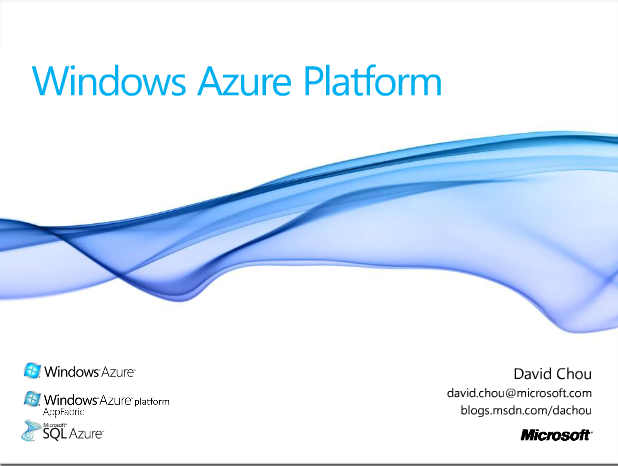
imageDuring our most recent Architect’s Council meeting in Orange County, we reviewed a large part of Microsoft Cloud Computing solution including overviews of:

  • Windows Azure Platform & An Overview of the Microsoft Cloud
  • Service Oriented Architecture & Cloud Computing
  • Architecting Solutions Leveraging the Cloud
  • Making Sesne of the Expanding Range of Data Storage Solutions
  • Best Practices with Data Interaction Frameworks

The content from the last Microsoft Architect’s Council event has been posted on:

Also there’s the following content to get you up to speed with Microsoft’s Cloud technologies:

“What is Azure?” whiteboard videos

« Newer Posts - Older Posts »

Categories