clip_image001

With the recent release of Windows Server 2008 R2, you won’t want to miss a chance to experience the very first, hands-on live R2 migration at our exclusive training opportunity!

HP Virtualization Workshop:  Windows Server 2008 R2 | Hyper-V | System Center
With today’s current difficult economic environment cost savings has become even more critical. Server virtualization can be a part of this cost savings if you understand how to best design and implement your server infrastructure. New virtualization tools, including System Center Virtual Machine Manager help you save time, reduce costs, and provide a platform for a dynamic and optimized datacenter.

clip_image001[6]Join us for this one day workshop and see what HP Virtualization Solutions can do for your organization*. Topics include:

  • Understanding Server Virtualization: Windows Server 2008 R2 Hyper-V with Lecture – Hands-on-Lab
  • Building High Availability Solution: Cluster Shared Volumes – Hyper-V Live Migration and Quick Migration with Lecture – Hands-on-Lab
  • Managing Virtual Environment: System Center Virtual Machine Manager 2008 R2 interoperable with System Center Operations Manager 2007 with Lecture – Hands-on-Lab
  • Best Practices for designing Hyper-V architecture with HP Solutions

Note: Customers who attend this workshop will have the opportunity to see Hyper-V running on Blade Servers with EVA Storage.

What is a workshop?
This isn’t your typical IT class. This workshop is for experienced IT Pros who want to “hands on learning”. You will spend most of the day getting hands-on practice and experience with the new product features and scenarios in a lab environment combined with presentations from HP technologists.

Who Should Attend:
This course is for system administrators and engineers who work with the installation, configuration, and maintenance of a variety of server types and have two to three years of experience managing an enterprise-level Microsoft Windows Server environment.

Prerequisites:
To get the most from this course, you will be experienced (two to three years experience) with the technologies included in Windows Server 2003 and Windows Server 2008.

RSVP:
Please contact me if you are a current customer of mine for details on date/time/location and registration information.

This special, no charge training event will fill quickly and space is limited, so be sure to register as soon as possible to reserve your seat.

clip_image001

I know I need to virtualize. Can I do it without spending a lot of money on VMware?

Virtualization can save your company a lot of money. So, naturally, it’s getting higher on your priority list. But Windows Server® 2008 R2 has Hyper-V™ built in, so there’s no need to purchase expensive virtualization software.

Windows Server 2008 R2 is the most advanced Windows Server operating system yet. Here’s our short list of reasons to upgrade:

  • Consume up to 18 percent less power. Windows Server 2008 R2 lets you lower the power states of processors, and even turn off individual cores when the server is at low utilization.
  • Reduce branch-office-network bandwidth up to 40 percent. BranchCache lets you cache huge, bandwidth-hogging files locally.
  • Help improve uptime and productivity. Live migration lets you move virtual machines among servers with no downtime, and clustering wizards help you set up a cluster in about three steps.
  • VMware can cost up to six times more than the Microsoft virtualization solution. Why pay that? Get virtualization built in. Try consolidation ratios of 10 to 1 or better.
  • Cut back on additional software costs. Besides the built-in hypervisor, Windows Server 2008 R2 includes DirectAccess, which lets you eliminate virtual private networks and manage remote computers as if they’re in the office.

Join us for Hands On Labs of:

  • Hyper-V Installation and Deployment
  • Failover Clustering & Live Migration
  • Virtual Machine Management using System Center Virtual Machine Manager
  • …and more…

LOCATION:

3 Park Plaza
Suite 1600
Irvine, CA 92614

DATE/TIME/LOCATION:
If you are a customer of mine and are interested in participating in the FREE training, please contact me and I will provide you with details.

clip_image002

Windows Server 2008 R2 is the most advanced Windows Server operating system yet. Here’s our short list of reasons to upgrade:

  • Consume up to 18 percent less power. Windows Server 2008 R2 lets you lower the power states of processors, and even turn off individual cores when the server is at low utilization.
  • Reduce branch-office-network bandwidth up to 40 percent. BranchCache lets you cache huge, bandwidth-hogging files locally.
  • Help improve uptime and productivity. Live migration lets you move virtual machines among servers with no downtime, and clustering wizards help you set up a cluster in about three steps.
  • Cut back on additional software costs. Besides the built-in hypervisor, Windows Server 2008 R2 includes DirectAccess, which lets you eliminate virtual private networks and manage remote computers as if they’re in the office.

This overview event will give students a hands-on introduction to Windows Server 2008 R2, with built-in web and virtualization technologies, which enable you to increase the reliability and flexibility of your server infrastructure. New virtualization tools, web resources, and security enhancements help you save time, reduce costs, and provide a platform for a dynamic and optimized datacenter. Powerful new capabilities like hosting ASP.NET application on Server Core, Live Migration of Virtual Machines, and Publishing Centralized Desktops provide cost saving solutions that ensure you have a flexible, manageable server infrastructure on which to build your business.

Join us for live Hands on Labs of:

  • Server Management with Powershell
  • IIS 7.5 and deploying ASP.NET on ServerCore
  • Active Directory Administration
  • High Availability on R2
  • BranchCache
  • DirectAccess
  • Remote Desktop Services

LOCATION:
333 South Grand Ave Suite 3300
Los Angeles, CA 90071

DATE/TIME/REGISTRATION:
If you’re interested in participating and you’re a customer of mine, please contact me and I’ll provide you with details.

We have had an unusual situation come up. 

Our partner organization has scheduled a series of paid training courses and they have openings available in one particular class we’ve giving.  It’s a 4-day course that goes for $1999 usually and we’re making them available to you if you’re a customer of mine and are interested in participating.

If you’re interested in the course below, are a current customer of mine, and want to participate this month, please contact me and I’ll see if I can get you registered.

—————–

image Upgrading Identity Lifecycle Manager 2007 to Forefront Identity Manager 2010 (4-day)

Prerequisites:
Experience with Microsoft® Forefront™ Identity Lifecycle Manager 2007 (ILM) or Microsoft® Identity Integration Server 2003 (MIIS), and a sound understanding of Active Directory®, Microsoft® Exchange Server, and Microsoft® SQL Server®.

Course description:
For students who are already acquainted with ILM 2007, this course will provide the additional knowledge and skills needed to plan for an Forefront Identity Manager 2010 (FIM) deployment. The course uses presentations, discussions, demonstrations, and many hands-on exercises.

image

Visio 2010 means business.
Get advanced diagramming tools that can help you save time and cash.

Join us for this upcoming webcast to learn more about how Visio 2010 can help you better manage processes and workflows in Microsoft SharePoint 2010.

Title: Enhance Process Management and Workflows with Visio 2010 in SharePoint 2010
Time: Tuesday, April 6, 2010, 11:00 AM – 12:00 PM Pacific Time

Overview: Attend this webcast to learn how Microsoft Visio 2010 can help you better manage processes and workflows in Microsoft SharePoint 2010. Escape the monotony of spreadsheets, and learn how you can visualize important process information in context. Discover how to enhance collaboration across your organization using Visio 2010 integration with SharePoint 2010 when publishing process diagrams and authoring and visualizing workflows.

Other topics we cover include: connecting Visio diagrams to data, publishing Visio diagrams to SharePoint, creating SharePoint workflows in Visio and round-tripping with SharePoint Designer, and visualizing workflow status with Visio. 

image This is actually quite old information however a number of you are only just now getting to upgrading to Configuration Manager 2007 R2 from SMS 2003.

What’s new in System Center Configuration Manager 2007 R2?

  • Application Virtualization Management. For more information about managing virtual applications created using the Microsoft Application Virtualization platform, see About Virtual Application Packages.
  • Forefront Client Security Integration. For more information, see About Forefront Client Security Integration with Configuration Manager 2007 R2.
  • SQL Reporting Services Reporting. Allows you to report on Configuration Manager activity using SQL Reporting Services.
  • Client Status Reporting. Provides a set of tools and Configuration Manager 2007 reports to assess the status of client computers, sometimes referred to as "client health." Clients that show a change in activity patterns might need administrative intervention.
  • Operating System Deployment Enhancements. The following enhancements are included in Configuration Manager 2007 R2:
    • Unknown computer support—In Configuration Manager 2007 R2, you can deploy operating systems to computers using a PXE service point without first adding the computer to the Configuration Manager database. For more information, see About Unknown Computer Support for Operating System Deployment.
    • Multicast deployment—Previously, all operating system deployments used unicast. Multicast can make more efficient use of network bandwidth when deploying large images to several computers at the same time. For more information, see About Multicast for Operating System Deployment.
    • Running command lines in task sequences with credentials other than the local system account.

References:

————-

What’s new in System Center Configuration Manager 2007 SP2?
While no new features have been added for the Microsoft System Center Configuration Manager 2007 SP2 release, some have changed very little since Configuration Manager 2007 SP1 and some have changed a lot.
http://technet.microsoft.com/en-us/library/ee344318.aspx

————-

What’s new in System Center Configuration Manager 2007 SP1?
Microsoft System Center Configuration Manager 2007 SP1 introduces out of band management. For more information, see Overview of Out of Band Management.

Configuration Manager 2007 SP1 also provides significant enhancements to the Asset Intelligence feature introduced in Systems Management Server (SMS) 2003 and included in Configuration Manager 2007. As well as the functionality provided by Asset Intelligence in Configuration Manager 2007, the following feature enhancements have been made to Asset Intelligence in Configuration Manager 2007 SP1:

  • New catalog and license management capabilities from within the Configuration Manager console.
  • Additional reports.
  • Compatibility with Microsoft SoftGrid applications.
  • Asset Intelligence catalog synchronization to child sites.
  • Ability to import both Microsoft and non-Microsoft software licensing data.

Using the Asset Intelligence feature in Configuration Manager 2007 SP1, the Asset Intelligence catalog can be dynamically updated by using the new Asset Intelligence synchronization point site system role. This site system can be used to request on-demand catalog synchronization with System Center Online or schedule automatic catalog synchronization. The Asset Intelligence synchronization point can also be used to upload uncategorized software titles to System Center Online for identification.

For more information, see Asset Intelligence in Configuration Manager.

The length of the evaluation period has changed in Configuration Manager 2007 SP1 to be more consistent with other Microsoft products. In Configuration Manager 2007, the evaluation period is 120 days. In Configuration Manager 2007 SP1, the evaluation period is 180 days.

The Application Compatibility Toolkit (ACT) Connector and the System Center Updates Publisher are no longer included with the Configuration Manager 2007 SP1 installation media.

Microsoft System Center Configuration Manager 2007 SP1 provides support for Windows Server 2008 as clients and site systems.

In Configuration Manager 2007 SP1, you can modify the registry to prevent the console from contacting the Internet to display the TechCenter page as the console home page. For more information, see How to Prevent the Home Page from Downloading the TechCenter Page on Microsoft.com.

In Configuration Manager 2007 SP1, a change was made to advertisements to run without being scheduled even if the logged on user is not an administrator. For more information, see "Internet-Based Clients Running Advertisements" in Example Package Access Scenarios.

————-

What’s new in Configuration Manager 2007?
Some aspects of Configuration Manager 2007 have changed very little since SMS 2003, while some have changed a lot. Also, several new features have been added and some features have been removed.

The following features are new to Configuration Manager 2007:

  • Desired configuration management
  • Network Access Protection for Configuration Manager
  • Wake On LAN

The following features were previously available only in Feature Packs but are now incorporated into the core product:

  • Mobile device management
  • Operating system deployment
  • Transfer site settings wizard
  • Manage site accounts tool (MSAC)
  • Asset Intelligence

The following features have changed significantly from SMS 2003:

  • Backup and recovery
  • Software updates

The following features have been improved but still function very much as they did in SMS 2003:

  • The administrator console
  • Collections
  • Software distribution
  • Software metering
  • Remote tools

The following features either have not changed or have minor changes:

  • Discovery
  • Inventory
  • Queries
  • Reporting

The basic site infrastructure has not changed. You still have primary sites and secondary sites, although the new feature for software distribution called the branch distribution point might remove the need to create some child sites in your hierarchy. Site-to-site communication is still configured using senders and addresses; however, in Configuration Manager 2007 senders can be installed only on primary or secondary site server systems. Several new server roles have been added to support new features. Configuration Manager 2007 now supports hosting the site database on a clustered SQL Server virtual instance as well as named instances of supported SQL Server installations.

In SMS 2003 you had two types of clients, but in Configuration Manager 2007 you have only one client type, which is similar to the SMS 2003 Advanced Client. Some of the client deployment methods have changed and some methods have been removed. A new method, software update point client installation, allows you to leverage your software update infrastructure to deploy Configuration Manager 2007 clients.

In SMS 2003 you had two security modes, but in Configuration Manager 2007 you have the equivalent of SMS 2003 advanced security. However, you now have two site modes: Configuration Manager 2007 native mode and Configuration Manager 2007 mixed mode. Although site modes are not at all related to the SMS 2003 security modes, they do involve the security of your Configuration Manager 2007 environment. Native mode is a requirement to support Internet-based client management, a new feature that allows you to manage clients that do not have a direct connection to your site.

In SMS 2003, the site server’s local subnet is automatically used as the site boundary for the site during setup. In Configuration Manager 2007, there is no default boundary created during setup, and you must manually create the boundary for a site when setup has completed. In SMS 2003, there are site boundaries and roaming boundaries, but in Configuration Manager 2007, there is only one type of boundary and it is equivalent to SMS 2003 roaming boundaries. Computers are assigned as clients to Configuration Manager 2007 sites according to the site boundaries you configure in the Configuration Manager console. Boundaries can now be defined by IP subnets, Active Directory site names, IPv6 Prefix, or IP ranges.

In SMS 2003, roaming boundaries were either local or remote roaming boundaries. When creating Configuration Manager 2007 boundaries, you instead decide whether the boundary will be used for either a slow or unreliable or a fast (LAN) network connection. During upgrade, any existing remote roaming boundaries will become slow boundaries and any local roaming boundaries will become fast (LAN) boundaries.

In SMS 2003, you could not upgrade from the evaluation version of the product to the full version. Configuration Manager 2007 now supports upgrading from the evaluation version. When upgrading an evaluation version, whether it is SMS 2003 or Configuration Manager 2007, an entire setup process must be completed using the new installation source files.

In SMS 2003, the client push installation method properties used when installing clients have the default site code set to Auto. In Configuration Manager 2007, the default site code used when installing clients using the client push installation method is set to the site code of the primary site.

In Configuration Manager 2007, state messages are sent by Configuration Manager 2007 clients using a new messaging system built into the product that allows clients to send "checkpoints" of important changes of state. State messages are not the same as status messages; whereas status messages provide information about component behavior and data flow, state messages provide a snapshot of the state of a process at a specific time.

Configuration Manager 2007 also includes support for fully qualified domain names (FQDNs) and IPv6.

References:

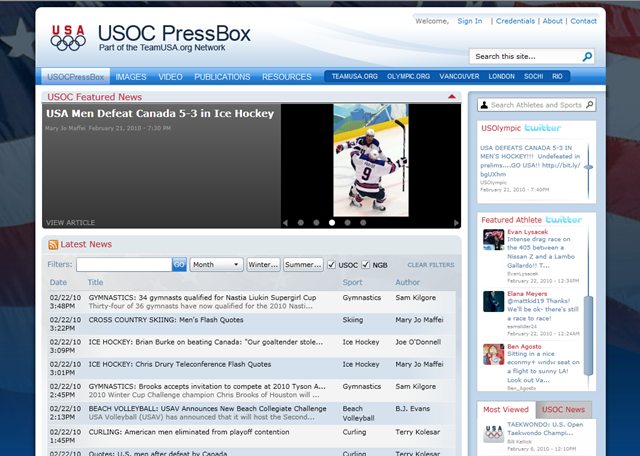
image Check out the new website developed for the U.S. Olympic Committee (USOC) for the media:

The USOC was faced with an issue of how to support all of the journalists information needs in a timely fashion.  They wanted to create a truly rich experience with real-time access to athlete information spanning history, event coverage, and live Twitter feeds.

Slalom created the Virtual Press Room built on Microsoft SharePoint 2010 with Silverlight technology utilizing Search.  These new technologies utilize web parts to assess information from all sources, the new search capability allows them to quickly find their data needs and the Silverlight web browser works on all major browsers including Chrome, Firefox, Safari and Internet Explorer.  This site is also hosted on Microsoft’s new Business Productivity Online Service (BPOS) and demonstrates how computing in the cloud can be scaled to support fluctuating volumes.

To explore the new site and to check out the latest features designed to enrich the media experience, visit online at: http://pressbox.teamusa.org and read the press release issued by the USOC.  

Below are quotes from the Press Release from the USOC, Microsoft and Slalom Consulting:

  • “The new generation of Pressbox is one element of the USOC’s digital media strategy designed to motivate Olympic fans to engage in the Olympic Movement online,” said Trevor Miller, USOC Managing Director of Information Technology.  “Using Microsoft technology, this re-designed site showcases our commitment to innovation and captures the power of new media technologies and audiences to enable journalists to bring the best stories of Team USA to Americans.”
  • “Microsoft SharePoint 2010 is providing the USOC the power to create a dynamic, easy-to-use Web site for press covering one of the biggest sporting events in the world,” said Janice V. Kapner, Senior Director of Communications, Information Worker Product Management Group.  "The Pressbox.org site demonstrates why more customers are choosing SharePoint’s enhanced capabilities for Internet sites including the ability for customers to build solutions that support rich media capabilities such as video, audio, and Silverlight.” 
  • “The USOC’s Virtual Press Room is a terrific example of how Microsoft platforms can integrate social with traditional content for a new kind of media experience,” said Jerry Kaczmarowski, general manager for Slalom Consulting.  “At Slalom, our expertise with Microsoft technologies runs wide and deep, and it’s rewarding to couple that proficiency with our social media and web site development knowledge to produce an easy-to-use resource for the National Governing Bodies uploading content to the site, and for media covering the Olympics.”

Slalom Consulting is a business and technology consulting firm headquartered in Seattle, with offices across the United States including Los Angeles to support its unique client service model:  local expertise with national reach.  

image The bottom line is that people whose computer fail after applying patch 971486 were unknowingly infected with the Alureon rootkit.  No Windows 7 x64 or Windows Server 2008 R2 (x64) installations were affected.  This was the conclusion of the Microsoft Security Response Center, the braintrust of the best minds that Microsoft has in antimalware, security, & PC protection. 

SUMMARY:
Applying the patch for the vulnerability known as “Vulnerabilities in Windows Kernel Could Allow Elevation of Privilege (971486)” will cause a "bug check” or a “blue screen” when the Alureon rootkit is installed on your machine.

Windows 7 x64 or Windows Server 2008 R2 (x64) are not effected due to kernel-level rootkit detection built into those products.

The Microsoft Security Response Center (MSRC) wrote a very detailed explanation of their testing methodology and how they’ve arrived at the conclusion that the people affected are victims of “Alureon rootkit infection” but just didn’t know it until today.

Update – Restart Issues After Installing MS10-015 and the Alureon Rootkit

Posted Wednesday, February 17, 2010 6:29 PM by MSRCTEAM

Hi,

We wanted to provide you with an update on our ongoing investigation into the “blue screen” issues affecting a limited number of customers who installed MS10-015.  We have been working around the clock with our customers, partners and several teams at Microsoft to determine the cause of these issues.  Our investigation has concluded that the reboot occurs because the system is infected with malware, specifically the Alureon rootkit.  We were able to reach this conclusion after the comprehensive analysis of memory dumps obtained from multiple customer machines and extensive testing against third party applications and software.  The restarts are the result of modifications the Alureon rootkit makes to Windows Kernel binaries, which places these systems in an unstable state.  In every investigated incident, we have not found quality issues with security update MS10-015.  Our guidance remains the same: customers should continue to deploy this month’s security updates and make sure their systems are up-to-date with the latest anti-virus software.

Customers continue to emphasize the importance of quality updates, and that high quality updates encourages quicker deployment.  While the issue customers are experiencing with MS10-015 was caused by a malware infection and not a problem with the security update, we wanted to use this event as an opportunity to explain why this issue was not caught during testing, and how we respond to reported issues in our security updates.

This issue was not caught as part of our testing because oftentimes when malware is present, infected systems are put in an unstable state.   These types of infections often leave the machine in such an unstable state that it cannot be reliably tested.   This is because Malware writers use unsupported and potentially destabilizing methods for compromising machines because they want to keep their malware hidden from anti-malware software. In the particular case of Alureon, malware writers modified Windows behavior by attempting to access a specific memory location, instead of letting the operating system determine the address which usually happens when an executable is loaded.  The chain of events in this case was a machine became infected, during which the malware made assumptions as to the layout of the Windows code on the machine.  Subsequently MS10-015 was downloaded and installed, during which the location of Windows code changed.  On the next reboot the malware code crashed attempting to call a specific address in Windows code which was no longer the intended OS function.

Microsoft has taken steps to deter tampering with the Windows Kernel using technologies like Kernel Patch Protection (sometimes referred to as PatchGuard) and Kernel Mode Code Signing (KMCS), both of which are enabled in 64-bit systems.  These technologies make it possible to detect when integrity checks fail. The different versions of Alureon that we have investigated only infect 32-bit systems and would fail to infect 64-bit systems. That said, it is important to note that running as a standard user instead of using an administrator account is a best practice that in most cases will prevent kernel mode malware from infecting a system. Similarly, keeping anti-virus signatures current will also prevent most malware from infections. Additionally, since we have determined that 64-bit systems are not affected, we are opening Automatic Updates for these platforms.

Customers who are interested in additional technical details of what the Windows Kernel is can learn more here.

…more available at source

FULL ARTICLE:  Update – Restart Issues After Installing MS10-015 and the Alureon Rootkit
http://blogs.technet.com/msrc/archive/2010/02/17/update-restart-issues-after-installing-ms10-015-and-the-alureon-rootkit.aspx

image

What is Microsoft Semblio?
Semblio is a new set of tools designed to provide the education community the ability to easily author, assemble and publish rich interactive content.

The Semblio toolset is comprised of three building blocks:

  1. Semblio SDK: Are a set of API’s and developer tools which allow content professionals to develop and design digital content
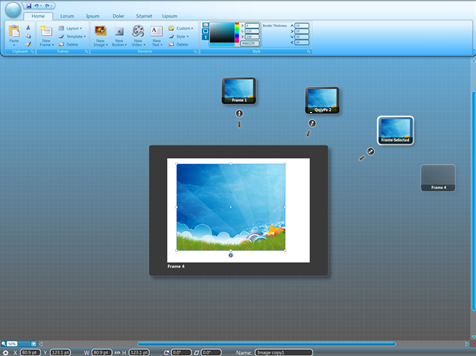
  2. Semblio Assembly Tool: Is an interactive canvas which allows teachers, students, and subject matter experts to create and assemble rich digital content
  3. Semblio Player: Is designed to both display content and allow users to interactively engage with the rich digital content

image What are some of the product highlights of the Semblio Assembly Tool?

  • Enables you to create, within a single application, multi-media based classroom lessons  or out-of-class assignments incorporating audio, video, animation, illustration, pictures and text
  • Features familiar navigation, icons, tools, templates, and menus, making it quick and easy to learn and use
  • Provides access to an online educational content exchange where you can find, share, and download ready-made available educational materials from your peers or content professionals
  • Features simple but powerful design tools for creating your own multi-media content and customizing existing materials
  • Includes features and tools for creating buttons, links, and setting actions that allow you to control the navigation of a lesson or assignment 
  • Includes built-in functionality for creating and automating the grading of quizzes within lessons
  • Provides tools for testing student comprehension and re-directing students to additional content based on their responses
  • Includes technologies that integrate and work with existing learning management systems and educator and student file sharing systems

What is the Microsoft Learning Content Development System?
Learning Content Development System provides the Microsoft Learning Communities with an easy-to-use, form-based tool that allows them to create e-learning in the Official Microsoft Learning user experience. Another goal of the LCDS is to showcase Silverlight technology. All interactive elements and interactive media in LCDS v2.2 are Silverlight-based.

What are some of the product highlights of LCDS v2.2?

  • Creates courses in the Official Microsoft e-learning user experience
  • Follows a proven instructional design model used to develop more than 2000 hours of e-learning courses on Microsoft.com
  • Includes an automatic preview and automated build process that is seamless to the user
  • Provides 20 templates for creating a variety of e-learning content in the following categories: Interact, Watch, Play, Read, Try.
  • Allows users to easily create Silverlight-based interactive games and other components by filling out simple forms
  • Provides support for Silverlight animations, demos, videos, and simulations and Silverlight-based media players.
  • Outputs content in SCORM 1.2 
  • Provides SCORM tracking for assessments, including multiple choice single correct, True/False, and essay question
  • Allows the Microsoft Learning Communities to easy customize Official Microsoft e-learning courses by simply loading the course into the LCDS

How does the LCDS tool differ from the Semblio Assembly Tool? 
The fundamental differences between LCDS and the Semblio Assembly Tool center on four main areas; audience, extensibility, delivery platform, and support.  

Audience:

  • The LCDS tool is for the Microsoft  Learning communities. Output generated from the LCDS is constrained to the Official Microsoft e-learning user experience and supports the MSL instructional design model and Microsoft Learning standards and styles.   
  • The Semblio Assembly Tool is for a non-technical educators and subject matter experts to create and assemble rich-interactive learning objects. Output generated from Semblio will not restrict users to one specific instructional design model and is flexible enough to work both in the classroom as well as out of the classroom.   

Extensibility:

  • The LCDS tool is for creating e-learning courses according to the Microsoft Learning Official e-learning user experience and instructional design model.  The LCDS provides a templatized version for structuring e-learning courses according to the Microsoft Learning style, user experience, and instructional design model.  
  • The Semblio Assembly Tool provides an open and flexible way to create interactive learning materials which the user controls. Users have several ways they can customize the interactive canvas in Semblio Assembly to suit the needs of their project and work habits.

Platform:

  • The LCDS tool is primarily focused on enabling web based e-learning courses and leverages Silverlight technologies.  Courses created with the LCDS can be deployed in an LMS, on a web server, on a user’s hard drive, and on CD.  For deployment on a web server, CD, or hard drive there are additional configuration steps that must be followed.
  • Semblio is designed for rich media content and provides the best experience by leveraging Windows desktop capabilities via WPF; however Semblio will also target a lighter web- based experience via Silverlight.

Support:

  • The LCDS is a community supported tool. The LCDS is not supported by Microsoft Product Support and one uses the LCDS at their own risk as it is not an official Microsoft Product. 
  • Semblio will be a fully supported Microsoft product and will be targeted to all Microsoft customers.

Web sites:

image

Blah blah blah.  Press announcement.  Blah blah blah.  Video clips.  Blah blah blah.  Windows Phone Blogs.  BLARGH.  Now then.  The $64 question is:

“What the heck is Windows Phone 7 Series and why should I care?”

————-

THE PHONE IS NOT A PC
First of all, we’re getting away from one concept that we tried earlier:  The Phone Is NOT a PC.  Apparently, after 10 years in the industry, we’ve come to the conclusion that for the mass market consumer, you can’t shoehorn the PC model – either the user interface or the traditional “I can do anything” usage paradigm into the phone form factor.

  • On a PC, you have precision with a mouse & keyboard – On a Phone, you have the inaccuracy of a finger & sometimes a thumb keyboard
  • On a PC, you’re focused mostly on the PC & it’s interface – On a Phone, you’re more than likely multitasking, be it walking, driving, etc.
  • On a PC, you have lots of display space (“screen real estate”) – On a Phone, you have only a few thing you can display at a time, regardless of resolution
  • On a PC, you expect limitless capabilities – On a Phone, you expect to commonly use some very specific capabilities
  • On a PC, you have endless bandwidth – On a Phone, you have 3G bandwidth

…and it goes on and on.  We’ve tried and met some success to merge these two worlds together:  The best of your PC with you on your Phone.  Windows Mobile 6.53 is that effort and for 18% of the market, it does a solid job of providing both that PC functionality using a PC usage paradigm in the compact form factor of the phone.

PEOPLE GENERALLY DON’T NEED THEIR PC 24×7
For the average consumer however there just isn’t that expectation.  Our studies have shown that consumers generally want & expect a very focused and consistent set of functionality.  And that functionality should be immediately available at the user’s fingertips, woven into every single object that the phone stores.

Thus our focus on Windows Phone 7 Series has revolved around two principles:

  • User-centric design
    • Personal experience – Information specifically pertinent to you & you alone presented up front
    • Multi-touch for maps

      wp7seires

    • Desktop IE – With Silverlight coming, Adobe announces Flash support as well
    • Beyond Cleartype – Uses new pixel-positioning technology for improved character clarity
    • Outlook – Multi-select w/ attachment view/edit support
    • “Hubs”
      • People – Outlook, Facebook, Gmail.  View w/ Facebook & Twitter integration
      • Pictures – PC sync & cloud sync access (Facebook, Flikr)
      • Office – OneNote view, Sharepoint view
      • Music & Video – EVERY 7 SERIES PHONE WILL BE A ZUNE
        (Music, Video, Podcast, Audiobook, Radio, Marketplace… Pandora integration!)
      • Marketplace – Find & load certified applications & games
      • Games – Xbox LIVE, Gamercard, In-game notifications, current activity
  • Integrated experience
    • Calendar – Overlay of RED personal calendar (WindowsLive) & BLUE professional calendar (Exchange)


    • Browser – Detection of phone numbers & addresses to click-to-send to dialer or Bing Maps
    • GPS – Autolocate and send to Bing Maps; find regional restaurants
    • HW Partners –Qualcomm, LG, Samsung, Garmin, HTC, HP, Dell, Sony Ericsson, Toshiba
      (Provide keyboards, slates, big, small… however with a consistent experience)
    • Carriers – T-Mobile, AT&T, Verizon, Sprint, Vodafone, Orange, Telefonica, SFR, Telstra, Deutche-Telecom
    • Microsoft – More accountability for the end-to-end experience (Setting minimum hardware, design & features requirements)

One thing that was important:  We will continue to invest in Windows Mobile 6.5 as the defacto platform for Enterprise customers.

Now what we did NOT show?
Equally important was what we chose not to show at Mobile World Congress.  It is said that more will be learned over time, and in particular at MIX, our developer event in Vegas.  But to enumerate through what was not discussed or shown:

  • Phone Dialer & Integration
  • Applications
  • Marketplace
  • Games & Xbox LIVE integration
  • Development Tools

—————

Gizmodo articles:

Engadget review

« Newer Posts - Older Posts »

Categories