image The Windows 7 Start Button Changer application was developed to be a small tool that will allow you to change the Windows 7 Start Orb or Button easily.

If you are bored of look at the same old Windows 7 Start Orb, you can now change it easily. Click on Select & Change Start Button to select a custom Start Orb.

The program will backup you original explorer.exe, change the start button and restart explorer.exe. To restore the default Start Orb and explorer from the backup, click Restore Original Explorer Backup.

image This was sent out to Software Assurance customers yesterday around the upcoming retirement of the “Employee Purchase Program” SA benefit:

Dear Software Assurance Customer,

Software Assurance Update on Employee Purchase Program Retirement
Microsoft will retire the Microsoft Software Assurance Employee Purchase Program (EPP) in November 2010.

EPP was first introduced in 2003, and its customer use has gradually declined. For all Software Assurance customers eligible for EPP, the number of individual product licenses purchased on average by organizations is less than one. In addition, the vast majority of product licenses purchased are for Microsoft® Office, making up 90 percent of the EPP orders today.

During the same timeframe the Home Use Program (HUP) for Microsoft Office has provided millions of organizations’ employees with Office at home via a convenient download service, providing Microsoft Office at cost recovery at around $10 per employee (local currency pricing varies). We believe this offers your employees an easier and more affordable program for using Microsoft Office at home.

Retirement Steps
EPP will continue to be available between now and November 2010, with the current range of products and the Windows® 7 operating system. From April 1, 2010 to June 30, 2010 the Windows 7 operating system products in EPP will be available at a 10% reduced rate of standard EPP pricing, as a one-time offer. Starting in June 2010, the Home Use Program will upgrade to include the latest version of Office – Office 2010 Professional Plus, while Office 2007 SKUs will remain available through EPP.

Recommended Steps
If your organization actively uses EPP, we recommend that you notify your employees so that they can use EPP as needed before November 2010. We also recommend you evaluate using the Home Use Program for providing Microsoft Office to your employees. You can find further details on the HUP site at http://www.microsoft.com/licensing/software-assurance/home-use-program.aspx.  If you have any questions about EPP retirement or using HUP, please contact your Microsoft representative.

Sincerely,
Microsoft Software Assurance Team

image In case you hadn’t heard, there were a number of significant announcements today that positively impact Microsoft and our partner strategies for delivering lower cost desktop virtualization solutions with a richer client experience. Feel free to contact me directly if you are a customer of mine and have any questions or would like to explore these announcements in more detail.

Summary:

  • Improved licensing model for virtual Windows desktop.
    Beginning July 1, 2010, Windows Client Software Assurance customers will no longer have to buy a separate license to access their Windows operating system in a VDI environment, as virtual desktop access rights now will be a Software Assurance benefit.
  • New roaming use rights improve flexibility.
    Beginning July 1, 2010, Windows Client Software Assurance and new Virtual Desktop Access license customers will have the right to access their virtual Windows desktop and their Microsoft Office applications hosted on VDI technology on secondary, non-corporate network devices, such as home PCs and kiosks.
  • Windows XP Mode no longer requires hardware virtualization technology.
    This change simplifies the experience by making virtualization more accessible to many more PCs for small and midsize businesses wanting to migrate to Windows 7 Professional or higher editions, while still running Windows XP-based productivity applications.
  • Two new features coming in Windows Server 2008 R2 service pack 1.
    • Microsoft Dynamic Memory will allow customers to adjust memory of a guest virtual machine on demand to maximize server hardware use.
    • Microsoft RemoteFX will enable users of virtual desktops and applications to receive a rich 3-D, multimedia experience while accessing information remotely.

More Information:

Technical References:

Posted by: kurtsh | March 19, 2010

DOWNLOAD: Games for Windows Live v3.2.0217.0

imageGames for Windows Live has a new client available for download.

Games for Windows Live provides an all-in-one service for PC gamers that want to have:

  • The flexibility of having a consistent experience across games regardless of hardware
  • Easy online multiplayer matching, Internet gameplay, downloadable content, and Games-on-demand
  • The opportunity to amass Gamerscore points from your Windows PC as well as your Xbox 360

Games available for purchase on-demand include:

  • Dawn of War 2
  • Batman: Arkham Asylum
    • Batman:  Insane Night Map Pack
  • Tinker <—FREE (59MB Download)
  • Fallout 3
    • Fallout 3: Operation: Anchorage
    • Fallout 3: The Pitt
    • Fallout 3: Broken Steel
    • Fallout 3: Point Lookout
    • Fallout 3: Mothership Zeta
  • Bioshock 2
    • Bioshock 2: Sinclair Solutions Tester Pack
  • Resident Evil 5
  • Street Fighter 4
    • Street Fighter 4: Shadaloo Pack
    • Street Fighter 4: Shoyuken Pack
    • Street Fighter 4: Classic Pack
    • Street Fighter 4: Complete Alternate Costume Pack
    • Street Fighter 4: Brawler Pack
  • DiRT 2
  • Battlestations Pacific
    • Battlestations Pacific: Carrier Battles Map Pack
    • Battlestations Pacific: Mustang Unit Pack
    • Battlestations Pacific: Volcano Map Pack
    • Quantum of Solace
    • Kane & Lynch: Dead Men
    • Grand Theft Auto 4
    • Viva Pinata
    • Osmos
    • FUEL
    • Dawn of War 2: Chaos Rising
    • World of Goo
    • Universe at War
    • Section 8
      • Section 8: Seek & Destroy Map Pack
    • Shadowrun
    • Halo 2
    • Mahjong wisdom
    • Vancouver 2010
    • Red Faction:  Guerrilla
    • Juiced 2: HIM
    • Gears of War
    • Where’s Waldo
    • Stormrise
    • Lost Planet: Colonies
    Posted by: kurtsh | March 19, 2010

    BETA: Internet Explorer 9.0 Technical Preview

    image Normally I wouldn’t get too giddy about another browser release but this is pretty damned cool.

    Why?  Check out the technology that’s going to be built into Internet Explorer 9:

    • COMPILED JAVASCRIPT
      Sure, accessing Internet web sites from dumb/no-CPU hardware is possible however if you do have a good hardware locally on your Windows PC, why not take advantage of the power of your CPU by background compiling Javascript for execution speeds on web sites that blow doors off of interpreted script? 

      Internet Explorer 9.0 will provide ultra fast execution of Javascript on complex pages by just-in-time compiling the code and running it as a lower level executable on your system providing web page script performance that exceed that of Firefox 3.6.

    • MULTICORE OPTIMIZATION
      I don’t think people fully understand how important this is – Internet Explorer 9 has been rearchitected to take advantage of multi-core systems, which of course is the standard today for desktops.  There are many optimizations that have increased core usage to improve usage densities such as improvements in multi-threading however the example that is brought up most frequently is that IE9 separates out the Javascript engine as a separate process and allows execution to run on a core separate from the rest of the processing required for other browser operations. 

      Since the separate core used by the engine in many respects has a higher dedication to Javascript instead of sharing cores which are known to be used by both IE and other processes, cache swapping on the CPU is minimized, allowing for greater performance.

    • HTML5 COMPLIANCE
      The web will be powered in the near future by HTML5, providing a rich Web standard for a variety of new interactions & visuals with users – many of which are unique to Flash or Silverlight-based experiences today. 

      Internet Explorer 9.0 will natively support HTML5 and with it web standards for sites that use it.  Providing a ACID3 score of 55/100 out of the box delivers a level of compatibility with recent web standards unseen by modern browsers today.

    • GPU-POWERED GRAPHICS RENDERING
      With the emergence of HTML5 comes HTML5-rendered graphics & animations.  Using the local GPU on the system, Internet Explorer 9 provides users with an accelerated view of HTML5 graphics simply by using the local hardware of your PC, most specifically the GPU. 

      This is incredibly important because the difference in performance for sites that take advantage of Javascript & HTML5 rendered graphics is huge.  In a test does with Ars Technica, Chrome, Safari, & Internet Explorer 8 can’t display fast moving high fidelity imagery at anything more the 8 fps.  Opera & Firefox’s current versions were able to operate closer to 50-60fps however the image quality was terrible.  Meanwhile, Internet Explorer 9 was able to display perfect image quality at a full 60fps – because of the engineering in the engine that allows it to tap the Windows PC’s GPU.

    DOWNLOAD:
    http://ie.microsoft.com/testdrive/

    Last chance to save $245 on registration for the Microsoft Management Summit 2010!

    REMEMBER: MMS will cover…

    • Desktop Deployment & using MDT
    • Application packaging
    • VDI & Desktop Virtualization
    • Thin Client & Citrix/TS
    • OS Imaging & WDS
    • Powershell scripting
    • Application Compatibility & ACT
    • Group Policy Management & AGPM
    • Application Virtualization via App-V
    • The new OPALIS acquisition (Cross-system workflow)
    • etc.

    …and of course all the System Center Management & Forefront Security technologies.

    ———————

    clip_image001

    Register by March 24th and save $245!
    Reserve your place now at the premiere technical event for IT Management Professionals. Register before Wednesday, March 24th and you’ll save $245 on the regular price.

    Early-bird registration for MMS 2010 is open, and can be accessed from the event web site at www.mms-2010.com.  The site provides a complete overview of the event as well as full details of the event schedule.

    Check out the online Session Catalog to see why you can’t miss MMS 2010
    This year’s sessions and labs are packed with technical information on recent and new releases, product updates and best practices.  In addition to exciting new versions of the existing System Center products, MMS 2010 will offer in-depth coverage of a variety of new solutions, including management of private and public Clouds. Visit the event website and check out the Session Catalog where you’ll find details of the many Breakouts, Expert Panels and Hands-on Labs planned for this year’s event.

    Session Types and Product Coverage
    In addition to offering over 140 deep technical breakout sessions, MMS 2010 will also provide over 7,000 Instructor-led Lab places and over 70 different Hands-on Lab topics. Daily Speaker Q&A sessions allow you to meet that day’s presenters to discuss their sessions in a 1:1 format. All of Microsoft’s management solutions, together with those provided by Partners, will be on show at the MMS 2010 Expo where you’ll have the opportunity to review the latest solutions and discuss your specific requirements with leading industry experts and your peers within IT Management.

    Deep Technical Content – Take a look for yourself!
    Full details of all the Breakouts, Expert Panels, Self-paced and Instructor-led Labs sessions are provided on the event web site Sessions Page.  There also a number of downloadable documents to help review the sessions available and build your schedule for MMS 2010.  These reports include the:

    Registration and Accommodation
    This year the summit is returning to The Venetian Hotel in Las Vegas, Nevada.  Accommodation can be booked separately from your registration or during the on-line registration process.  The MMS 2010 Event Team has negotiated a special rate at the Venetian Hotel, available only through the registration web site. Details of the accommodation on offer are provided on the MMS 2010 Registration Page.

    REGISTER EARLY AND SAVE!

    Secure your place at MMS 2010, and save $245 when you register by March 24th!  Visit the conference website at www.mms-2010.com to explore the Session Catalog and register today!

     

    clip_image001


    Microsoft New Technology Tips & Tricks Training featuring Windows 7 and Office 2010
    Learn some Windows 7 tips. Preview Office 2010. This Lively Training is for End-Users/Business Professionals who are curious about new technology.
     

    Date/Time

    April 8th, 9:00 a.m. PST (10:00 a.m. Mountain/Arizona)

    Location

    Online (Please Register to Receive Webcast Link)

    Duration

    1 hour

    RSVP

    Save your spot by registering today.  Tell others in your organization!
    (If you are a customer of mine and are interested in participating, please contact me for registration information.)

     
    Featured Professional Trainer: Chris Bertelson

    The presenter, Chris Bertelson, is a 12 year veteran of Microsoft. He runs a training company which specializes in Microsoft Office training.  Traveling from coast to coast, he presented over 15,000 tips last year. Chris lives with his wife and four daughters near the covered bridges of Madison County, Iowa.

    Windows 7 Tips & Tricks
    Simplify everyday tasks by using the taskbar, jump lists, libraries and integrated search. The mobility center, quick wake form sleep, and simple connections to a wireless network help you work anywhere. 

    Office 2010 Preview
    In this quick preview, discover how basic everyday tasks in Word like font selection, pasting and printing can be done faster than ever before.  Number crunchers will love the new ways to spot trends in Excel and slice through complex data with just a couple of clicks.  Outlook has powerful new ways to tame and trim endless email conversations.  Presentation deadline?  PowerPoint will help you meet and exceed expectations with new tools for video editing, capture and broadcasting.

    Raffle: You will be given an opportunity to enter to win some Great Prizes including full copies of Windows 7 32-bit, the popular Microsoft ARC mouse and other prizes!

    image_thumb[2]Ready, Set, Virtualize.

    Join Microsoft and IT Leaders at the Microsoft Virtualization Summit to explore trends in virtualization and how they impact your desktop and datacenter strategy, now and in the future.

    During this Summit you will engage with colleagues to discuss how to reduce costs and enable business flexibility with virtualization. We will share best practices for deploying and managing these technologies to accelerate your Windows 7 migration and streamline IT management on the desktop and in the datacenter.

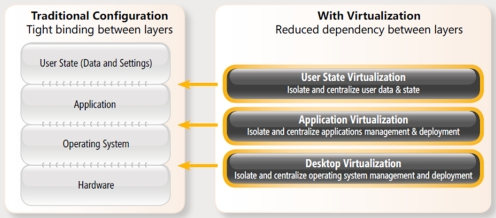
    image This Summit includes separate tracks on server and desktop virtualization and will cover the following topics:

    • Building a desktop virtualization management strategy. Learn how using Application Virtualization (App-V) and Microsoft Enterprise Desktop Virtualization (MEDV) as part of your Windows 7 migration can simplify application delivery and management and reduce compatibility issues.
    • Delivering a comprehensive Virtual Desktop Infrastructure (VDI). See how Microsoft VDI provides a flexible and secure way to manage and deliver desktops, applications, and data to end-users.
    • Sharing best practices for datacenter virtualization. Discover how Windows Server 2008 R2 Hyper-V and Microsoft System Center provide a dynamic foundation for delivering applications and services as needed while increasing IT efficiency by managing both physical and virtual resources together.

    We hope you will participate in this Summit and learn how Microsoft can help you discover virtualization choices that preserve and extend your existing investments.

    Agenda:

    Briefing Agenda – US Virtualization Summit Roadshow

    7:30am – 8:15am

    Registration and Continental Breakfast

    8:15am – 8:30am

    Welcome & Kick-Off

    8:30am – 9:30am

    Keynote Presentation (Microsoft’s “Virtualization Summit Keynote”)

    9:30am – 10:15am

    Joint VDI Session with Citrix (Deck available 3/1)

    10:15am-10:30am

    Break

    10:30am – 11:15am

    DV: Desktop Virtualization 360 Deck (available 2/22) SV: Building a Foundation for Private Cloud w/ the Dynamic Infrastructure Toolkit

    11:15am – 12:00pm

    DV: App-V and Med-V Overview with Windows 7 SV: Dynamic Datacenter: Physical to Virtual Management with System Center

    12:00pm – 12:30pm

    Panel Discussion & Closing Remarks

    Registration:
    http://msevents.microsoft.com/CUI/InviteOnly.aspx?EventID=B7-83-6E-54-58-51-7A-C9-2E-A9-25-88-94-0D-14-41&Culture=en-US

    image

    Sneak Peek Event: Welcome to the New World of Business Collaboration with Microsoft SharePoint 2010
    Guest Speaker: Joel Oleson, Industry Renowned SharePoint Evangelist.

    When: Thursday, March 25, 2010

    Where:
    Hyatt Regency
    17900 Jamboree Road
    Irvine, CA 92614

    As an IT leader in your organization, you are invited to this exclusive complimentary luncheon seminar at The Hyatt Regency in Irvine, hosted by Ensynch, Microsoft, and Quest Software, to learn about the latest collaboration tools and technologies delivered in Microsoft® SharePoint® 2010, the business collaboration platform for the enterprise and the web.

    Join industry renowned SharePoint Evangelist and frequent industry speaker, Joel Oleson, of Quest Software, for a candid and engaging thought leadership presentation on SharePoint 2010 the future of business collaboration.

    Get the SharePoint 2010® product rundown from Microsoft, and how the platform can help your business:

    • Collaborate and innovate. Organizational knowledge gets where it needs to go. With advanced social computing tools, you can build more flexibility into your business. Ideas cross-pollinate, sparking innovation, empowerment, and new perspectives.
    • Intimate Integration with Office 2010 – The Office Ribbon user interface (UI) now in SharePoint, Easy use of content and data across client and server. In-context collaboration through the Microsoft Office Backstage, In Browser co-editing
    • Gain business insights and act. People across your organization get the ability to monitor and analyze up-to-date information. They can make informed decisions and speed up response times, both of which can give your business a competitive edge.
    • Cut Costs with a unified infrastructure
    • Reduce risk. You control security levels and usage policies. Information is findable and useable by the right people, and content has policy and process attached.

    Gain insight from Ensynch’s experts on best practices approaches for launching and maintaining a successful collaboration platform

    • Deployment of SharePoint 2010
    • Tips for transforming your existing SharePoint environment to SharePoint 2010
    • User and organization wide adoption best practices
    • How to prevent information chaos by implementing effective taxonomy and governance of information architecture

    Space is extremely limited. Please register ASAP to guarantee your seat.

    Registration:
    If you’re a customer of mine in a SharePoint leadership role and interested in this event, please let me know and I will provide you with registration information as well as start times.

    image I got this mail from Flexera, the makers of AdminStudio, and their new product intrigued me because they have a great reputation for packaging tools and they now support both 64-bit repackaging as well as App-V 4.6.  Very exciting!

    AdminStudio Now Repackages 64-Bit Applications
    It’s rapidly becoming a 64-bit world. Office 2007® now has a 64-bit version, and many other vendors are following suit. For IT teams that want an easy way to prepare these 64-bit applications for reliable deployment to Windows 7, there’s the new AdminStudio 9.5 Service Pack 1.

    Released last month, AdminStudio 9.5 Service Pack 1 makes it easy to repackage 64-bit applications to Windows Installer (MSI) packages.

    ———–

    Microsoft App-V 4.6 Now Available, Move to it Faster with AdminStudio
    Microsoft App-V 4.6 is now publicly available as part of MDOP 2010. With the release of AdminStudio 9.5 Service Pack 1, AdminStudio now supports App-V 4.6 and can convert applications to 64-bit App-V 4.6 packages 9 times faster than manual sequencing.

    New features in App-V 4.6 include:

    • App-V 4.6 is now compatible with 64-bit Windows client and server platforms, enabling IT to take advantage of x64 for client hardware refresh and deploy App-V to Windows Server 2008 R2 Terminal Services. 
    • App-V 4.6 enables Windows 7 mobile users to access apps on the road – virtual applications can be made available offline and can be streamed over the Internet.
    • App-V 4.6 and SCCM 2007 R2 SP2 now deliver virtual applications faster to users at logon.  Users no longer need to wait for policy refresh to gain access to their applications.
    • App-V 4.6 saves on SAN storage space by using a cache of virtualized applications that is shared across all your VDI desktops.

    Want to move your applications to App-V 4.6?

    « Newer Posts - Older Posts »

    Categories