imageLifehacker published a great article that goes over what they believe to be the good, bad, and useless techniques for maintaining Windows. 

Particularly interesting about this is their usage of a “Gartner-ian” like 4 quadrant chart that depicts what are actually good and bad ideas relative to what conventional wisdom says “seems to be good” or “seems to be bad” ideas.

This is a pretty long article.  Reviewed topics include:

  • Sleeping/Hibernating Instead of Shutting Down
  • Microsoft Security Essentials
  • Not having Windows "Ultimate
  • Not having "Admin" access
  • Automating backup to external drive
  • Automating backup to a web location
  • Install more RAM
  • Physically clean your system and peripherals
  • Automating maintenance tools
  • Using Revo Uninstaller
  • Disabling QoS in Windows XP
  • Running defragment apps
  • Loading Internet Explorer with add-ons
  • Loading Internet Explorer with add-ons
  • RAM/memory optimizers
  • "Trick" Vista into multi-core booting
  • Enable SuperFetch in XP
  • Clean out Windows prefetching
  • Reinstall Windows regularly
  • Registry "Cleaning"
  • Disable Shadow Copy or System Restore
  • Disable unneeded services
  • Installing lots of alpha apps
  • Type rm -rf / in Cygwin
  • "Would you like to install the X toolbar to make searching easier?"
  • Drinking while Registry editing
  • Uninstalling apps you don’t recognize
  • Installing software from unverified torrents
  • Installing software from .ru sites
  • Skipping updates from Adobe or Java

LINK:  Lifehacker – “Windows Maintenance Tips – The Good, Bad, and Useless”
http://lifehacker.com/5520447/windows-maintenance-tips-the-good-bad-and-useless

image The PoC Jumpstart provides resources to deploy a desktop PoC with Windows 7, Office 2010, Internet Explorer 8, and Application Virtualization with Microsoft Desktop Optimization Pack technology.

This self-contained, self-service kit will help you complete a Proof-of -Concept (PoC) at your organization, allowing you to quickly evaluate the new Microsoft desktop technologies, including Windows 7, Office 2010 Pro Plus, Internet Explorer 8, and Application Virtualization with Microsoft Desktop Optimization Pack technology App-V. It will also familiarize you with some of the important deployment tools provided by Microsoft to assist with your broader deployment efforts. This PoC is not meant to be comprehensive training mechanism but rather an introductory set of modules to familiarize you with tools and technologies.

  • Microsoft Windows Server 2008 Enterprise Edition – A platform that helps IT Professionals increase the flexibility and reliability of their server infrastructure.
  • Microsoft Assessment and Planning Toolkit (MAP) – A tool to assess your hardware readiness for Windows 7 and Office 2010.
  • Microsoft Application Compatibility Toolkit (ACT) – A tool to assess your software readiness for Windows 7 and Office 2010.
  • Microsoft Office Migration and Planning Manager (OMPM) – A tool to assess and upgrade Office versions and files.
  • Microsoft Deployment Toolkit – A tool to create, configure, and deploy custom images, applications, and components.
  • Windows 7 Enterprise 90-day Trial image – This evaluation edition forms the base image for deployment on client computers.
  • Microsoft Office Professional Plus 2010 – This system is the best productivity experience across the PC, Phone, and Web.
  • Office 2010 with Application Virtualization – This system is deployed virtually to streamline and centralize operations.
  • Microsoft SQL Server 2005 Express Edition – This database system is used to store application compatibility and Microsoft Office assessment data for the ACT and OMPM tools.
  • Microsoft SQL Server 2008 Express Edition – This database system is used to store image and task sequence data for MDT Deployment Workbench.
  • Microsoft SQL Server 2008 Evaluation Edition – This database system is used to store hardware assessment data for the MAP tool.

The PoC Jumpstart is intended to show you that an upgrade to new Microsoft Optimize Desktop technologies can be seamless, feasible, easy and cost-effective. The PoC Jumpstart will also shed light on the deployment process (tools and technologies) and give your organization confidence for undertaking a broader deployment motion. After completion of the PoC, you should have a test environment setup that will allow you to evaluate the various features of the Microsoft Optimized Desktop and help you make informed decisions to meet your business needs.

Supported Operating Systems: Windows 7; Windows Server 2008; Windows Server 2008 R2; Windows Vista; Windows XPWindows XP, Windows Vista, Window 7, Windows Server 2008, Windows Server 2008 R2

Software Requirements
Deployment Server:

    • Microsoft Virtual PC 2007 with Service Pack 1 (SP1)
      On the computer that you designate to run the virtual deployment server, Microsoft Virtual PC 2007 SP1 is not required on client/target compute

Deployment Clients:

    • Windows XP with Service Pack 3 (SP3)
    • Microsoft .NET Framework 2.0

Hardware Requirements
Deployment Server Computer Specifications

  • Processor: 1.4 GHz or faster processor recommended
  • Memory: 2 GB RAM minimum; 4 GB RAM recommended
  • Hard Disk Space: 32 GB free minimum; 60 GB recommended

Client Computer Specifications

  • Processor: 1.4 GHz or faster processor minimum
  • Memory: 1 GB RAM minimum; 2 GB RAM recommended
  • Hard Disk Space: 30 GB free minimum; 60 GB recommended

———————

DOCUMENTATION:  Building a Technical Proof of Concept
http://technet.microsoft.com/en-us/windows/ff603537.aspx

DOWNLOAD:  Proof of Concept Jumpstart Kit v1.0
http://www.microsoft.com/downloads/details.aspx?displaylang=en&FamilyID=26301cd1-cc72-4dd8-819e-12ef48322743

image As you know, we have completed the development of our 2010 Information Worker products, namely:

  • Office 2010
    • Word 2010
    • Excel 2010
    • Powerpoint 2010
    • Outlook 2010
    • OneNote 2010
    • Access 2010
    • InfoPath 2010
    • Sharepoint Designer 2010
    • Sharepoint Workspace 2010
    • Publisher 2010
    • Communicator 2010
  • SharePoint Server 2010 (& SharePoint Foundation Services)
    • InfoPath Forms Services
    • Visio Services
    • Excel Services
    • Word Automation Services
    • Access Services
  • Project 2010
    • Project Server 2010
    • Project Portfolio Server 2010
  • Visio 2010

Our Volume License customers with active Software Assurance (SA) on these products will be one of the first to receive the 2010 set of products. They will be able to download the product in English, French, Spanish, German, Russian, and Dutch via the Volume Licensing Service Center starting April 27. Other languages will be available on a rolling timeline.

Customers without SA will be able to purchase the new products through Volume Licensing from Microsoft partners starting May 1.

image WHAT IS WINDOWS INTUNE:
Windows Intune simplifies how businesses manage and secure PCs using Windows cloud services and Windows 7—so your computers and users can operate at peak performance. Windows Intune delivers cloud-based management and security capabilities that can be administered through a single Web-based console, enabling your end users and your IT staff to work from virtually anywhere-all that’s required is an Internet connection.

Use the Windows Intune cloud service beta to:

  • Manage updates
  • Protect PCs from malware
  • Proactively monitor PCs
  • Provide remote assistance
  • Track hardware & software inventory
  • Set security policies

The Windows Intune console (below) is a Silverlight client that provides a rich administrative experience that provides both guidance as well as configuration management for the devices that you are managing using the Intune cloud service:image

This beta is limited to 1,000 customers in the United States, Canada, Mexico, and Puerto Rico. Customers will be able to sign up until May 16, 2010. The beta may be used on up to 20 devices.

If you’re participating in the beta program and have questions, you can visit the Windows Intune IT Professional Forums on TechNet and for technical guidance visit the Windows Intune area on the Springboard Series on TechNet.

Posted by: kurtsh | April 16, 2010

RELEASE: Silverlight 4 Runtime for Windows & Macs

image Silverlight is a powerful development platform for creating engaging, interactive user experiences for Web, desktop, and mobile applications when online or offline. Silverlight is a free plug-in, powered by the .NET framework and compatible with multiple browsers, devices and operating systems, bringing a new level of interactivity wherever the Web works. For information on the new features in Silverlight, and how it compares to previous versions, be sure to visit the overview and feature matrix page. For additional information, including details on the features, visit the Silverlight 4 Information Page.

Silverlight and XNA are the two programming models for Windows Phone 7 devices. Once you have the bits, visit our section on developing for Windows Phone 7 with Silverlight. Silverlight is also available for Nokia Symbian mobile phones.

image

You and your team are invited to an exclusive Microsoft® SQL Server® 2008 R2 event. Come and discover powerful new capabilities that enable your organization to scale your operations with confidence, boost productivity, and deliver business insight that empowers your end-users.

Topics covered are:

  • SQL Server 2008 Top Features & R2 Overview
  • Multi Server Management Demo
  • PowerPivot Demo
  • Bing Maps in Reporting
  • Parallel Data Warehouse & Virtualization
  • SQL Server 2008 R2 Licensing Options

Learn how businesses like yours can use the significant new capabilities of SQL Server 2008 R2 to run your most demanding mission-critical applications, increase IT and developer efficiency, and deliver business insight where and when your users need it.

Select for your preferred location and day:

  • Irvine
    May 18th
  • San Diego
    May 20th
  • Los Angeles
    May 27th

Registration:
If you are a customer of mine, please contact me for registration information for this invite only event.

image
If you can’t make it to the big “banner” ALL-DAY launch event we’re having in Costa Mesa on May 18th for Office 2010 & SharePoint 2010, you may want to consider one of our “highlight” events happening in Los Angeles on May 11th or San Diego on May 3rd. 

These “highlight” events are split into a morning and an afternoon tracks with the IT Pro Track taking place in the morning followed by the Developer Track in the afternoon.  These events are more like our TechNet / MSDN Events than like a traditional launch event.  The content in the “highlight” event cities will also be abbreviated as we will be condensing a about 5 hours of content in 3 1/2 to 4 hours.

Here’s a sampling of what you can expect:

  • See how Office 2010 and SharePoint 2010 work together as an integrated platform.
  • Get an introduction to the next wave of productivity via integrated platform demonstrations.
  • Take home information on tools and resources that will help you plan by evaluating your current infrastructure.
  • Learn about infrastructure decisions that pave the way for implementing a rich business productivity platform.
  • Explore tools that can help you optimize desktop deployment.
  • Additional products that will be highlighted at the event include Visio 2010, Project 2010, SQL Server 2008 R2, and Exchange Server 2010.

REGISTRATION:

Los Angeles, CA   May 11
Microsoft Los Angeles Office
333 South Grand Ave, Suite 3300
Los Angeles California 90071

San Diego, CA   May 3
Microsoft San Diego Office
SD MPR
9255 Towne Center Drive, 4th Floor
San Diego California 92121

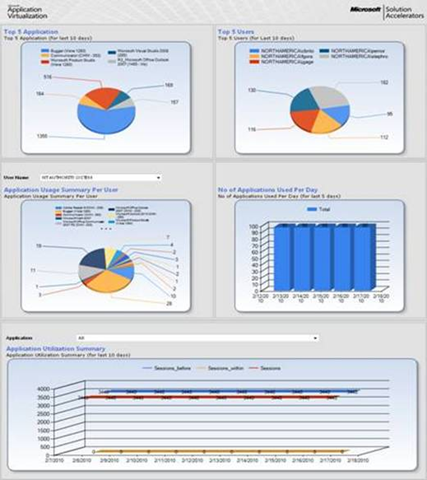
image The Microsoft® Application Virtualization Dashboard helps you monitor virtualized software applications across your organization. The dashboard’s built-in charts, gauges, and tables let you track any APP-V dataset in near-real time, so you can easily stay on top of the usage, health, and compliance of all your virtualized applications.

The App-V Dashboard is designed and built on Windows SharePoint Services 3.0 as the application platform by using Microsoft Application Virtualization 4.5/4.6.  

Key Benefits

Benefits of the dashboard include:

  • Actionable information out of the box. The dashboard comes with a wide range of valuable, built-in reports like top 5 applications used, top 5 users, applications never used, application usage for a specific user, system utilization, and many more.
  • Near-real-time access to key information. The graphical dashboard lets customers view any App-V dataset in near-real time.
  • Easy to build and configure. The dashboard’s wizard-based tools let customers easily create new dashboards in minutes. 
  • Easy to customize. The dashboard can easily be customized to meet the needs of different departments and other groups. Any data set in the Microsoft Application Virtualization database can be presented on the dashboard, in chart, gauge, and table formats.  
  • Flexible & interactive. Users can easily filter data and create ad hoc, custom views. Filters allow users to quickly drill down from high-level to more specific data.

How the Dashboard Works

The Application Virtualization Dashboard is designed to work with an existing Application Virtualization 4.5 or 4.6 infrastructure. The Dashboard queries the Application Virtualization database and uses the resulting data set to present key infrastructure metrics in a graphical format.

The Application Virtualization Dashboard uses SharePoint Web parts to manage and display data sets:

  • Microsoft Dashboard Configuration Web Part. Use this Web part to create and modify the SQL queries that produce the data sets and the other properties that govern how the Dashboard displays the data sets.
  • Microsoft Dashboard Viewer Web Part. Use this Web part to display the data sets. A Dashboard Viewer Web Part displays one data set at a time. The Application Virtualization Dashboard can contain multiple copies of the Dashboard Viewer Web Part at once, each copy displaying a different data set.

For more information, visit:  http://technet.microsoft.com/en-us/library/ff424455.aspx

image
Find out firsthand how to plan for, implement, and deploy the new wave in business productivity with the Launch 2010 Highlights events. Learn what an integrated platform means for the productivity of you and your people—across PC, phone, and browser.  You’ll also see how this latest wave of technologies provides a better experience. Explore tools that’ll help you optimize desktop deployment.

Here’s a sampling of what you can expect:

  • See how Office 2010 and SharePoint 2010 work together as an integrated platform.
  • Get an introduction to the next wave of productivity via integrated platform demonstrations.
  • Take home information on tools and resources that will help you plan by evaluating your current infrastructure.
  • Learn about infrastructure decisions that pave the way for implementing a rich business productivity platform.
  • Explore tools that can help you optimize desktop deployment.
  • Additional products that will be highlighted at the event include Visio 2010, Project 2010, SQL Server 2008 R2, and Exchange Server 2010.

Session Details:  Launch 2010 Technical Readiness Series – The Next Wave of Business Productivity

  • 7:30-8:30am Registration and Continental Breakfast
  • 8:30-9:00am The Future of Productivity… Today

    The next wave of business productivity provides the best experience across PC, phone, and browser. Learn how this latest wave of technologies provides revolutionary user experience and how it takes us into a future of greater productivity.
  • 9:05-9:55am A Day in the Life in the Next Wave of Business Productivity

    Come and see first-hand how the next wave of products like Office 2010, SharePoint Server 2010, Exchange Server 2010, Visio 2010, and SQL Server 2008 R2 can optimize the way you work every day. This session will introduce the next wave of technologies and include a demonstration that highlights how these solutions can be integrated to produce the best user experience across PC, phone, and browser.
  • 10:00-10:20am Partner Presentation & Giveaway
  • 10:20-10:30am Break
  • 10:30-11:45am Planning for the Next Wave of Business Productivity

    Now that you’ve seen the technologies in action, what are the next steps that you should consider in making this a reality for your organization? This session will cover how you can plan for this next wave of technology. From project plan templates to Visio diagrams, we will show some of the best tools available today to plan for the next wave of productivity.
  • 11:45-12:45pm Lunch and Partner Pavilion
  • 12:45-2:00pm Implementing the Next Wave of Business Productivity

    Planning is the first step toward adopting the Business Productivity Platform. Come and learn more about the architectural considerations that must be made to implement the full productivity platform. We will examine the advances in administration as well as upgrade considerations for Office 2010 and SharePoint 2010, as well as SQL Server 2008 R2 and Exchange Server 2010.
  • 2:05-3:20pm Deploying the Next Wave of Business Productivity

    The plan is in place, architecture has been documented and the day has come to deploy. In this session we will look at the tools and enhancements for deploying the Business Productivity Platform, focused particularly around desktop deployment including Office 2010, Visio 2010, and Windows 7. We will also look at deployment and migration of SharePoint sites. Learn more about the best tools and resources available to make your deployments successful.
  • 3:25-4:10pm The Next Wave of Business Productivity Success Stories

    This session will highlight customers who are in the process of implementing and deploying this next wave of productivity – and realizing productivity benefits as a result.
  • 4:15-5:00pm Evaluation and Giveaway Pick-Up
  • 5:00pm Event Close

REGISTRATION:   Los Angeles/Costa Mesa – May 18, 2010
Technical Readiness Series – A full-day event featuring technical presentations as well as interaction with product experts, community and partners.

image

If you’re a SQL Server Administrator, you really should make every attempt to make this event.  This thing is HUGE and the number of sessions being delivered are crazy… all focused on SQL Server.

DESCRIPTION:
“SQLSaturday is a training event for SQL Server professionals and those wanting to learn about SQL Server. This event will be held Apr 24 2010 at Golden West College, 15744 Goldenwest St, Huntington Beach, CA 92647-3197. Admittance to this event is free, but we do charge a lunch fee of 10.00 so that we can provide a lunch – not pizza! Please register soon as seating is limited, and let friends and colleagues know about the event.”

SCHEDULE:

DATE/TIME/LOCATION:
Huntington Beach, April 24th 8:00AM-5:00PM
Golden West College, 15744 Goldenwest St., Huntington Beach, CA 92647-3197

REGISTRATION:
http://www.sqlsaturday.com/44/register.aspx

« Newer Posts - Older Posts »

Categories