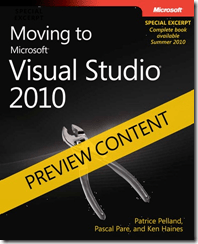
image[taken from the MSPress blog]
We’re pleased to announce another free offering (following Charles Petzold’s Programming Windows Phone 7 Series (DRAFT Preview), which we released on March 15): Moving to Microsoft Visual Studio 2010 (DRAFT Preview).

This DRAFT Preview contains three chapters from what will be a ten-chapter ebook when it’s released this summer. The three chapters make up Part II, “Moving from Microsoft Visual Studio 2005 to Visual Studio 2010.”

You can download the DRAFT Preview of this ebook in XPS format here.

Introduction
Every time we get close to a new release of Microsoft Visual Studio we can feel the excitement in the developer community. This release of Visual Studio is certainly no different, but at the same time we can feel a different vibe. In November 2009, at Microsoft Professional Developer Conference in Los Angeles, participants had the chance to get their hands on the latest beta of this Visual Studio incarnation. The developer community started to see how different this release is compared to any of its predecessors. This might sound familiar, but Visual Studio 2010 constitutes, in our opinion, a big leap and is a true game changer in that it has been designed and developed from the core up.

Looking at posts in the MSDN forums and many other popular developer communities also reveals that many of you—professional developers—are still working in previous versions of Visual Studio. This book will show you how to move to Visual Studio 2010 and will try to explain why it’s a great time to make this move.

Posted by: kurtsh | April 1, 2010

RELEASE: Bing Maps “March 2010” release with

image Bing Maps got revved in March with 5 new/improved features to check out!

  • Walking Directions
  • Draggable Routing Flags
  • Expanded Streetside Mini-maps
  • Application Gallery Redesign
  • Local Search Enhancements

Read about them on the Bing Maps blog:

image
Streetside Mini-maps to tell you where you are!

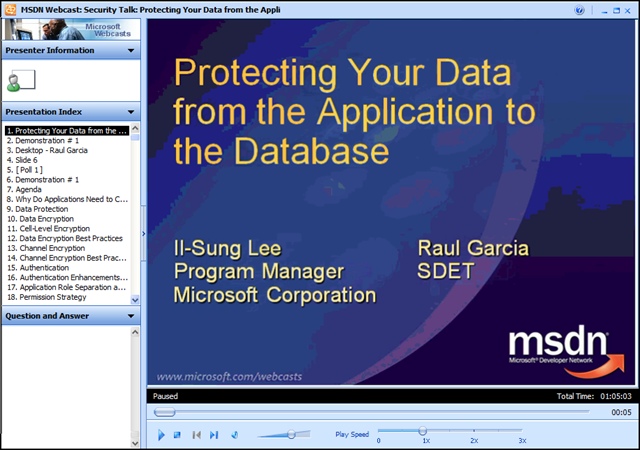
image Ooh.  Cool presentation:  “Security Talk: Protecting Your Data from the Application to the Database”

The SQL Security Team’s Raul Garcia and Il- Sung Lee presented on SQL Security in this online webcast.  It’s a good 300-level discussion on how to secure SQL Server. Among other things, Raul has a nice demo of SQL injection and some discussion on how to mitigate it.

MSDN Webcast: Security Talk: Protecting Your Data from the Application to the Database (Level 300)

Event Overview
Securing a database is a difficult task and most efforts typically focus on locking down the server while still allowing authorized connections to occur. Application developers need to be security conscious also, not only because applications can be a target of attack, but also because applications can facilitate the further lockdown of the server.  

In this webcast, Il-Sung Lee and Raul Garcia discuss some of the considerations that both the application developer and the database administrator should consider to help increase data security. Topics they discuss include securing the network channel, using proper authentication, new authorization features introduced in Microsoft SQL Server 2005, execution contexts, database encryption, and common errors and problems related to Microsoft SQL Server security.

(The recorded presentation video as well as the Powerpoint deck (as a .PDF file) is available for download  from the on-demand site)

image I can’t resist.  Anyone interested in some cool new desktop wallpaper?

Here are some wallpaper miages with the message ‘I Love Windows Phone’ and ‘We Love Windows Phone’ in celebration of the announcement of Windows Phone 7 series at MWC, MIX, and CTIA.

The following dimensions are all packaged together in a single ZIP file:
1024 X 768, 1280 X 1024, 1920 X 1200, 1920 X 1080

Posted by: kurtsh | April 1, 2010

NEWS: Bing Maps for Broadcast is now FREE!

[taken from the Bing Maps blog]
A couple months ago we changed the Bing Maps Terms of Use in a post called Bing Maps Terms of Use Changes; Benefit Educators, Not-for-Profits and Developers.

Well, we’ve gone a done it again. This time all you TV anchors are going to look so much hotter with a Bing Map playing behind your talking head. Oh, the ideas you can come up with for using anything in Bing Maps for free on your broadcast. King 5 in Seattle just happens to be a bit ahead of the game – Using Bird’s Eye on Broadcast. Or, check out the idea of using Streetside to broadcast your reporters location and playback the video with a GPS breadcrumb like I’ve seen with Inca X’s Geocasting.

King5_0

In addition to licensing the Bing Maps Platform to build interactive mapping applications on Web sites, broadcasters can also use Bing Maps in video broadcasts for free, under the following conditions.

  • Use includes images and video to be broadcast
  • Excludes use of traffic data

Broadcasters using the Bing Maps Platform for free receive:

  • Full choice of Bing Maps APIs
  • Bird’s eye, aerial, road, hybrid, and StreetsideTM
  • Access to user forums, developer documentation, and articles
  • Access to product information, including updates and news

So, what do you do? Get cracking! Use a scan converter. Integrate it into your video software. Use Bing Maps to bring your programs to life!

image The Windows 7 Deployment Learning Portal is designed to help you identify the strengths and gaps in your knowledge around Windows 7 deployment and provide some targeted learning to help you reach the top of your game.

The Deployment Learning Portal is an online assessment and learning tool administered by The Test Factory on behalf of Microsoft Ltd. It requires a separate registration and login process than the Windows Live login process used by TechNet. By registering for the assessment you are agreeing to be entered into the Early Bird competition.

How to Use This Portal:
  1. Login or, if you are a new user to the portal, complete the registration process.
  2. Select a module from the list below. Each module takes only a few minutes to complete.
  3. At the end of each module, you will receive a score and recommendations for further learning to help you develop your knowledge around Windows 7 deployment.
  4. Complete and pass all modules to receive a Certificate of Achievement, and to be eligible for Early Bird promotions.

“Early Bird” Competition
The first 150 individuals to pass all modules will receive a free Microsoft Press Microsoft Certified IT Professional (MCITP) self-study guide. The first 500 individuals to pass all modules will receive a free certification exam voucher. Terms and conditions apply.  (9 a.m. 18th March 2010 till 9 a.m. 30th April 2010)

image Windows Phone 7 Series promises to be an amazing mobile phone operating system given its innovative user interface and functionality, as well as its great development platform upon which you can quickly and easily build games and applications.

With a myriad of new devices, a powerful and immersive software platform, and a new marketplace to attract developers and provide easy access to applications, consumer demand for Windows Phones will be high, and developers will quickly adopt the Windows Phone platform to capitalize on this growing mobile marketplace.

This Training Kit will give you a jumpstart into the new Windows Phone world by providing you with a step-by-step explanation of the tools to use and some key concepts for programming Windows Phones.

Prerequisites:
This training kit is geared for beginners who want to get started with developing applications for the latest Windows Phone operating system. Even if you don’t know Silverlight or XNA Framework, you’ll find this Training Kit useful. More seasoned Silverlight developers should also find this kit useful, as it explains some of the differences between Silverlight and Silverlight for the phone.

  • Audience Prerequisites
    Experience using previous versions of Visual Studio .NET and the .NET Framework
  • Technical Prerequisites
    Windows Vista or Windows 7

Modules:

  1. Getting Started with Windows Phone
  2. Silverlight for Windows Phone
  3. XNA Framework 4.0 for Windows Phones

DOWNLOAD:  Windows Phone 7 Series Developer Training Kit (46.5MB)
http://channel9.msdn.com/learn/courses/WP7TrainingKit/

image Wow.  Yet another free eBook from the nice people at Microsoft Press.

This is a draft mind you and not the complete book however Charles Petzold (THE Charles Petzold of Windows Programming fame) has written part of his book “Programming Windows Phone 7 Series” and it already looks great.  Weighing in at 153 pages and only complete up to Chapter 6, “Programming…” is a great start for folks interested in learning to program for the next generation of Microsoft’s mobile platform.

Complete with the inevitable “Hello World” application, this book takes readers through the following areas:

  1. INTRODUCTION
  2. PART I:  Getting Started
    1. Phone Hardware + Your Software
    2. Hello Windows Phone
  3. PART II:  Silverlight
    1. Code & XAML
    2. Presentation & Layout
  4. PART III:  XNA
    1. Principles of Movement
    2. Textures & Sprites
Posted by: kurtsh | March 31, 2010

NEWS: Zune 4.5 firmware adding new features to Zune HD

image Got a Zune HD?  You’re in luck!  There’s a cool set of new features coming free with the new update and it’s especially good news if you’ve got a Zune Pass… like you should.  Ahem.

  • Smart DJ. Currently available in the PC software, Smart DJ provides on-the-fly playlists that are similar to (but more powerful than) the iTunes DJ and Genius features in iTunes. Why is it better? Because these playlists can consist of selections from your own songs as well as content from the millions-strong Zune Marketplace.
  • Music streaming to your TV. Those Zune HD owners with a Zune HD A/V dock will be able to stream music from the Zune Marketplace directly to the TV. This wasn’t available before because, with the Zune HD for the first time, the UI you see transmitted to the TV is actually completely separate from the main device UI. With this feature enabled, you’ll get more of an Apple TV-like experience and be able to browse New Releases, Picks, Artists, and so on, search for content, and create new Smart DJ playlists via the TV. Note that you will need a Zune Pass subscription for this to work.
  • Picks. Another feature from the Zune PC software, Picks is a music recommendation service that examines what you listen to and provides personalized recommendations. Now you’ll be able to get this functionality directly on the Zune HD.
  • More codecs. Previously announced at CES, Zune 4.5 will add support for MPEG-4 Part 2 Advanced Simple Profile (ASP)–including Xvid and AVI–to the Zune HD.

The firmware rev is slated for release in the next couple weeks.

Posted by: kurtsh | March 31, 2010

NEWS: Zune HD 64GB… coming April 12th

image GAH!  Now I’m gonna have to upgrade my 32GB Zune HD.  DAMMIT!  (Notice the plug for Zune firmware 4.5 at the end of the blog post and the upcoming video from the Zune Insider Podcast.)

Zune HD 64GB Coming April 12

What can hold up to 16,000 songs, or 20 hours of high definition video, or 25,000 pictures?

A Zune HD 64GB that’s what!

This morning we announced that starting April 12th you will be able to order a 64GB version Zune HD from Zune Originals for $349.99. All colors and custom etching will be available for you to create the ultimate Zune HD to your liking. 

In addition to the new capacity, we are lowering the estimated retail price on the Zune HD 16GB to $199.99 and Zune HD 32GB to $269.99.

You may have also seen a little news around the forthcoming 4.5 firmware update, make sure to check out the Zune Insider podcast (video edition) this Friday. Matt and Jessica interview Nate Muller, project manager for the 4.5 firmware and get an inside look at the firmware update.

[taken from the Zune Insider blog]

« Newer Posts - Older Posts »

Categories