image We have already begun planning for Tech·Ed 2011 in Atlanta, Georgia on May 16-19th, 2011 and you can too. Register now, and and save $300 on the full conference fee.

The full conference registration fee for attendees includes breakfast, breaks, and lunch each day of the program Mon-Thu, attendee bag, notebook, pen, shirt, name badge, lanyard, reception food, and access to the Closing Attendee Party.

Registration Type Prices Availability
$300 Early Bird Savings $1895 Register by Dec 31, 2010
$200 Early Bird Savings $1995 Register by February 28, 2011
Standard Registration $2195 Registration beginning March 1, 2011


image Some of you know that we hired Justin Bieber to open our Mission Viejo, CA store back when he wasn’t a household name. on the cusp of ‘blowin’ up’.  He did a concert for some 1000 screaming fans when we opened the store to much fanfare.  Say what you want about all of that:  You can’t deny that we bet on the right “up and comer”. 

But so did Justin.  We at Microsoft now sponsor his world tour and he opens every show with a demonstration of Kinect on Xbox 360.

It’s apparently made quite an impression on the Moms & daughters that attend.  Feedback from attendees has been basically that they all wanted to know “What was that?  Can we get it?  When?” 

Here’s a shaky cam video so that you know what your wives & daughters are all talking about when they come home from the concert talking about the opening act.  I think this product placement was quite well produced.

image Citrix Connector for System Center Configuration Manager 2007 Released

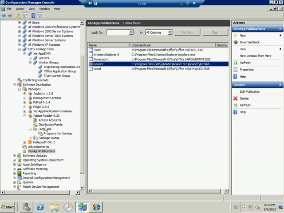
Citrix® XenApp™ 6 introduces integration with Microsoft System Center Configuration Manager 2007 R2 giving organizations a single, integrated view and management of all applications across the enterprise including on-demand apps by XenApp. The Citrix XenApp Connector leverages the Configuration Manager console to deploy and publish applications and updates to XenApp servers with zero disruption to users and extends the reach of Configuration Manager applications to a broader set of users, devices and access scenarios.

Unifying application management
The Citrix XenApp Connector for Configuration Manager simplifies application management by enabling System Center administrators to publish and manage enterprise applications across the desktop and XenApp server farm environment from the Configuration Manager console. By leveraging existing Configuration Manager components to orchestrate application deployment to XenApp Servers, administrators can manage all enterprise applications with a single management infrastructure, toolset, and set of administrative tasks.

Delivering XenApp and App-V applications
Publish both Microsoft App-V and Citrix XenApp applications to XenApp servers directly from the Configuration Manager console. Users can choose the applications and IT resources they need from the Citrix Dazzle storefront, enabling instant, self-service access to corporate apps and business information. Learn more

Enabling more users, devices and access scenarios
The Citrix XenApp Connector for Configuration Manager extends Systems Center application management to a broader user base and new class of devices. Users can access any application managed by System Center Configuration Manager, including corporate and employee owned assets as well as a wide array of mobile platforms with Windows, Mac or Linux operating systems.

Application Deployment is no longer bound to multiple toolsets, whether it is MSI based, App-V, RDS and now Citrix hosted the tool to deploy applications should be System Center Configuration Manager

This feature is a co-release by SystemCenter and Citrix and is available from the Citrix website

image Does your company license Microsoft Office broadly throughout the company WITH SOFTWARE ASSURANCE?

If you don’t know, you may want to ask someone because business that license Microsoft Office under Software Assurance (a.k.a. maintenance contract) are eligible for a very special benefit called the “Microsoft Home Use Program”.

WHAT’S THE HOME USE PROGRAM?  (HUP)
It allows end users to purchase a copy of Office 2010 Professional Plus for use on their home computer for $9.95.  The license includes a download link for the software as well as a fully operational retail license key.

Alternatively, for $21.95, you can have a retail key made available to you as well as have a physical CDROM mailed to you with the Office 2010 Professional Plus software on it if you prefer to take physical media.

WHAT’S IN OFFICE 2010 PROFESSIONAL PLUS?
Office 2010 Professional Plus is the special version of Office 2010 that is available for licensed customers that purchase in volume.  “ProPlus” contains:

  • Word 2010
  • Excel 2010
  • PowerPoint 2010
  • Outlook 2010
  • Access 2010
  • Publisher 2010
  • InfoPath 2010
  • OneNote 2010
  • Sharepoint Workspace 2010
  • Communicator 2010

WHAT DO I NEED TO GET STARTED?
You need to take to the contract manager of your company responsible for the Microsoft licensing agreement or the Microsoft benefits administrator of your company.  They should be able to tell you if in fact you have this “Software Assurance Benefit” and if so, provide you with the Program Code you will need to take advantage of this offer.  You will need to use your company domain email address to register as well at the web site below and follow the instructions:

  1. Enter your work email address and program code.
  2. If you’re eligible, you’ll receive an email with purchase details.
  3. Click on the link provided in the email to access our store.
  4. Purchase your license/product key.
  5. Choose and purchase back-up media with your order (optional).
  6. Checkout and download!

LINK:  Microsoft Home Use Program
http://www.microsofthup.com

Please Note: This early release of Windows 7 and Windows Server 2008 R2 SP1 Beta is not available for home users. The SP1 Beta does not provide new end-user features, and installation is not supported by Microsoft.

image Windows 7 and Windows Server 2008 R2 SP1 Beta helps keep your PCs and servers on the latest support level, provides ongoing improvements to the Windows Operating System (OS), by including previous updates delivered over Windows Update as well as continuing incremental updates to the Windows 7 and Windows Server 2008 R2 platforms based on customer and partner feedback, and is easy for organizations to deploy a single set of updates.

Windows 7 and Windows Server 2008 R2 SP1 Beta will help you:

  • Keep your PCs supported and up-to-date
  • Get ongoing updates to the Windows 7 platform
  • Easily deploy cumulative updates at a single time
  • Meet your users’ demands for greater business mobility
  • Provide a comprehensive set of virtualization innovations
  • Provide an easier Service Pack deployment model for better IT efficiency

In order to download and install the Windows 7 and Windows Server 2008 R2 SP1 Beta you must currently have a Release to Manufacturing (RTM) version of Windows 7 and Windows Server 2008 R2 already installed.

To learn more about piloting, deploying and managing Windows 7, visit the Springboard Series on TechNet.

To learn more about SP1 Beta and Windows Server 2008 R2, visit the SP1 Details Page.

kinectmeportalWanna check out the new Xbox Kinect? 

Turns out that it’ll be coming around on the “Kinect Experience Tour” on Sept. 24–26 in Los Angeles, CA at Universal City Walk.  According to a post made on the Gamerscore blog, the tour will be starting on the East coast on July 17th and circling over to the West coast around September.

So… show up at City Walk if you want to have a go at Kinect!  (Or you can go to the Mission Viejo Microsoft store.)

Kinect for Xbox 360 Brings Fun for the Whole Family to a City Near You

REDMOND, Wash. — July 15, 2010 — This summer, you can be the first to try Kinect for Xbox 360 before it arrives on store shelves Nov. 4. Microsoft Corp. today announced that it is bringing Kinect for Xbox 360 to a city near you through the Kinect Experience mobile demo tour. Throughout the next 14 weeks, the mobile tour will be stopping in 32 cities across North America. From the California State Fair to the Mall of America, the Kinect Experience will let you be among the first to play Kinect games and control your music and HD movies and videos with just your voice or the wave of your hand — no controller required.

Only Kinect for Xbox 360 makes it possible to play in a whole new way by identifying your movement and body position to create a truly immersive entertainment experience. See a ball? Just kick it. Begin a movie by simply saying “Xbox, play,” or browse through a music list with the wave of a hand. With the Kinect Experience Mobile Demo Tour, you can hone your skills before anyone else by playing fun new games, such as “Kinect Sports,” “Kinectimals,” “Kinect Joy Ride,” “Kinect Adventures” and MTV Games’ and Harmonix’s “Dance Central.” Share the fun with family members and friends through photos and video captured at the Kinect Experience and retrieve your videos and photos from the Kinect Experience tour at http://www.Kinect.me, then comment on your experience and share your videos on all of your favorite social networking sites including Facebook.com/kinect.

The full Kinect experience will be available in North America beginning Nov. 4, 2010, and will roll out to additional markets by the end of the year. Visit http://www.xbox.com/kinect and http://www.facebook.com/kinect for more details on how you can be the first to experience Kinect for Xbox 360 games and entertainment come to life in a city near you. Kinect is also available to demo in all four Microsoft Retail Stores, located in Scottsdale, Ariz.; Mission Viejo, Calif.; Denver; and San Diego.

For more information on Kinect, visit http://xbox.com/kinect.

http://gamerscoreblog.com/team/archive/2010/07/15/mt715.aspx

Posted by: kurtsh | July 19, 2010

RELEASE: Microsoft Deployment Toolkit 2010 Update 1

Microsoft Deployment Toolkit 2010 Update 1 – Now Available!
If you’re making the move to Windows 7, Windows Server 2008 R2, and/or Office 2010, you need tools and guidance to help you through the process. Microsoft Deployment Toolkit (MDT) 2010, a free Solution Accelerator, is designed to fill that need.

The latest MDT 2010 Update 1 release, now available for download, offers something for everyone:

For System Center Configuration Manager 2007 customers:clip_image002[4]

    • New “User Driven Installation” deployment method. An easy-to-use UDI Wizard allows users to initiate and customize an OS deployment on their PCs that’s tailored to their individual needs.
    • Support for Configuration Manager R3 “Prestaged Media.” For those deploying Windows 7 and Office 2010 along with new PCs, a custom OS image can easily be loaded in the factory and then customized once deployed.

For Lite Touch Installation:

    • Support for Office 2010. Easily configure Office 2010 installation and deployment settings through the Deployment Workbench and integration with the Office Customization Tool.
    • Improved driver importing. All drivers are inspected during the import process to accurately determine what platforms they really support, avoiding common inaccuracies that can cause deployment issues.

For all existing customers:

    • A smooth and simple upgrade process. Installing MDT 2010 Update 1 will preserve your existing MDT configuration, with simple wizards to upgrade existing deployment shares and Configuration Manager installations.
    • Many small enhancements and bug fixes. Made in direct response to feedback received from customers and partners all around the world, MDT 2010 Update 1 is an indispensible upgrade for those currently using MDT (as well as a great starting point for those just starting).
    • Continued support for older products. MDT 2010 Update 1 still supports deployment of Windows XP, Windows Server 2003, Windows Vista, Windows Server 2008, and Office 2007, for those customers who need to be able to support these products during the deployment of Windows 7 and Office 2010.

Next Steps

  • Download MDT 2010 Update 1 from the Microsoft Download Center.
  • Learn more about MDT 2010 by visiting the MDT site on TechNet.
  • Get the latest news by visiting Microsoft Deployment Toolkit Team Blog.
  • Ask questions, post answers, and share your insights in the MDT Forum.

[shamelessly stolen from http://blogs.technet.com/b/msdeployment/archive/2010/07/07/microsoft-deployment-toolkit-2010-update-1-now-available.aspx… cuz I just don’t have the time.]

image The new Microsoft Assessment and Planning (MAP) Toolkit 5.0 is now available for download!

MAP 5.0 is an agentless tool designed to simplify and streamline the IT infrastructure planning process across multiple scenarios through network-wide automated discovery and assessments. This Solution Accelerator performs an inventory of heterogeneous server environments and provides you with usage information for servers in the Core CAL Suite and SQL Server, SQL Server 2008 discovery and assessment for consolidation, Windows 2000 Server migration assessment, and a readiness assessment for the most widely used Microsoft technologies—now including Office 2010.

What’s new with MAP Toolkit 5.0?

  • Heterogeneous server environment inventory
  • Software usage tracking for Windows Server, SharePoint Server, System Center Configuration Manager, Exchange Server, and SQL Server
  • Microsoft Office 2010 readiness assessment
  • SQL Server discovery and assessment for consolidation
  • Windows 2000 Server migration assessment

Includes a 27.8MB TRAINING KIT for those interested in learning how to use MAP 5.0 to it’s fullest.

DOWNLOAD: Microsoft Assessment and Planning Toolkit 5.0
http://go.microsoft.com/fwlink/?LinkId=194787

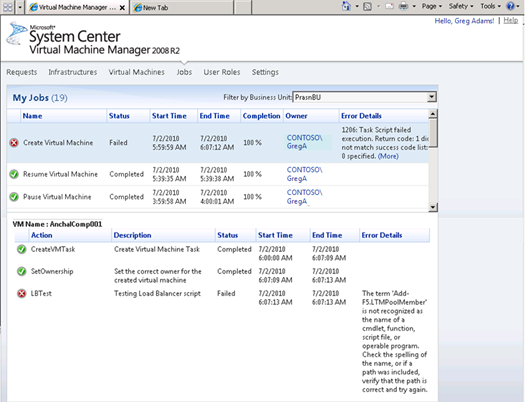
image VMMSSP (also referred to as the self-service portal) is a fully supported, partner-extensible solution built on top of Windows Server 2008 R2, Hyper-V, and System Center VMM.
You can use it to pool, allocate, and manage resources to offer infrastructure as a service and to deliver the foundation for a private cloud platform inside your datacenter. VMMSSP includes a pre-built web-based user interface that has sections for both the datacenter managers and the business unit IT consumers, with role-based access control.
VMMSSP also includes a dynamic provisioning engine. VMMSSP reduces the time needed to provision infrastructures and their components by offering business unit “on-boarding,” infrastructure request and change management. The VMMSSP package also includes detailed guidance on how to implement VMMSSP inside your environment.
Important: VMMSSP is not an upgrade to the existing VMM 2008 R2 self-service portal. You can choose to deploy and use one or both self-service portals depending on your requirements.
The self-service portal provides the following features that are exposed through a web-based user interface:
  • Configuration and allocation of datacenter resources: Store management and configuration information related to compute, network and storage resources as assets in the VMMSSP database.
  • Customization of virtual machine actions: Provide a simple web-based interface to extend the default virtual machine actions; for example, you can add scripts that interact with Storage Area Networks for rapid deployment of virtual machines.
  • Business unit on-boarding: Standardized forms and a simple workflow for registering and approving or rejecting business units to enroll in the portal.
  • Infrastructure request and change management: Standardized forms and human-driven workflow that results in reducing the time needed to provision infrastructures in your environment.
  • Self-Service provisioning: Supports bulk creation of virtual machines on provisioned infrastructure through the web-based interface.Helps business units to manage their virtual machines based on delegated roles.


Posted by: kurtsh | July 19, 2010

BETA: Windows Intune Beta 2

[As announced at the Windows Intune blog at http://blogs.technet.com/b/windowsintune/]

Microsoft Windows Intune PC Management & SecurityWindows Intune simplifies how businesses manage and secure PCs using Windows cloud services and Windows 7—so your computers and users can operate at peak performance, from virtually anywhere.

Windows Intune is a comprehensive solution that includes PC management, malware protection, Windows upgrades, and more.

Use the Windows Intune cloud service beta to:

  • Manage updates
  • Protect PCs from malware
  • Proactively monitor PCs
  • Provide remote assistance
  • Track hardware & software inventory
  • Set security policies

INFORMATION:  http://www.microsoft.com/windows/windowsintune/default.aspx

WHAT’S NEW
We had many partners in the first beta who told us they wanted to use Windows Intune to manage several of their customers all at the same time. Based on their feedback, we’ve added a feature in this beta called the Multi-Account Console, which is designed to help partners manage multiple accounts through the single Web-based console.

From the account selection screen, partners will have an aggregate view of the environments they manage, so they can easily monitor the status and health of client PCs, including Agent Health, Alerts, Anti-Malware, and Updates. Partners can change the filter to view by health status, so customers in need of urgent assistance will rise to the top of the list. This addition makes the experience simple for partners to scale and will hopefully save them time, and ultimately money.

MORE INFO AT:  http://windowsteamblog.com/windows/b/business/archive/2010/07/12/windows-intune-second-public-beta-available-today.aspx

REQUIREMENTS
The Windows Intune client software is supported on both 32-bit and 64-bit versions of:

  • Windows 7 Enterprise, Ultimate and Professional
  • Windows Vista Enterprise, Ultimate, and Business
  • Windows XP Professional Service Pack (SP) 2 or SP 3 (recommended)

The Windows Intune client software has no additional hardware requirements for Windows 7 or Windows Vista-based computers. However, to install the client software on Windows XP-based computers you will need a CPU clock speed of 500 MHz or greater and at least 256 MB of RAM.

You will also require Administrator rights on the computer to complete the Windows Intune client software installation.

To access the Windows Intune Web console, administrators will need access to a Web browser that supports Silverlight 3.0, such as Internet Explorer 7.0 or higher.

PRICING
Today we are also announcing pricing for Windows Intune. Windows Intune will include the cloud management service with integrated antimalware (AV and antispyware) plus Windows 7 Enterprise upgrade rights all in a single subscription for $11 USD per PC, per month.

Businesses get a great deal with Windows Intune for several reasons. Because Windows Intune is built on a cloud service, customers and partners can realize the benefits of having a modern PC management and security system without the upfront software licenses, server hardware, and IT labor costs that are required to setup a traditional on-premise solutions.

PRICING DETAILS:  http://windowsteamblog.com/windows/b/business/archive/2010/07/12/windows-intune-second-public-beta-available-today.aspx

BETA ENROLLMENT
The purpose of this beta is to collect feedback and identify potential issues in advance of the final release. Thus only 10,000 accounts will be available. This number is limited so we can make certain that we get the feedback and testing required to ensure the quality of the final release.

To participate in the Windows Intune Beta, we ask that you meet the following requirements:

  • Deploy Windows Intune to manage at least five PCs.
  • Deploy and begin testing the beta within one week of signup.

Sound like you? Please sign up to use the Windows Intune Beta.

BETA REGISTRATION:  http://www.microsoft.com/online/windows-intune.mspx

« Newer Posts - Older Posts »

Categories