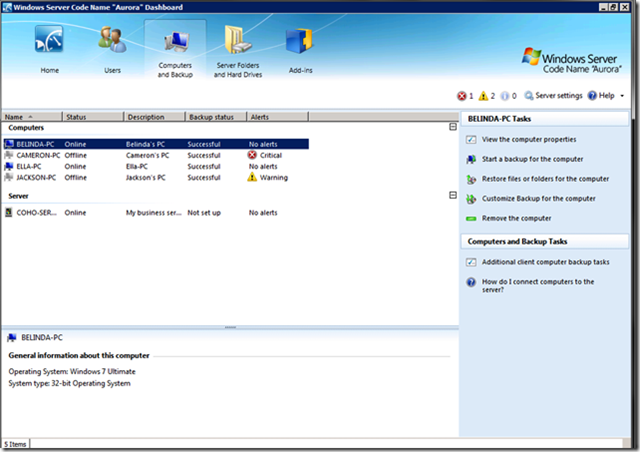
imageThis new product we’re coming out with, “Aurora” is notable because it’s truly the future of Small Business computing IMHO.  It’s sort of like a combination of:

  1. Today’s Small Business Server
  2. Windows Home Server
  3. Active Directory
  4. Microsoft Online Services

image Introducing Windows Small Business Server Code Name “Aurora”
Windows Small Business Server Code Name “Aurora” is a new edition of Windows Small Business Server that introduces cross-premise functionality, providing small businesses with on-premise file and print, security, backup, remote access, and identity management services, combined with optional off-premise services.

Windows Small Business Server Code Name “Aurora” has been specifically designed based on the best practices of a small business. It is highly tailored in both deployment and administration, and has specific management dashboards and wizards to enable easy management. While it doesn’t t provide the flexibility in platform installation options that traditional Windows Servers may, it makes it cost efficient for small business to deploy and host effective IT solutions. Rather than requiring customers to identify, purchase, install, and manage multiple products or technologies, Windows Small Business Server Solutions bring these technologies together into a single-server installation and management experience – reducing time to deployment, and cost of management.

Windows Small Business Server Code Name “Aurora” is a new edition of Windows Small Business Server that introduces cross-premise functionality, providing small businesses with on-premise file and print, security, backup, remote access, and identity management services, combined with optional off-premise services.

A Cross-Premise Small Business Solution
Windows Small Business Server Code Name “Aurora” incorporates best-of-breed 64-bit product technologies to deliver a server environment well suited for most small businesses. The product technologies include:

  • Server Operating System: Windows Server 2008 R2 product technologies provide the core foundation of Windows Small Business Server Code Name “Aurora”. Windows Server 2008 R2 is the most flexible and robust Windows Server operating system to date.
  • Network Monitoring and Protection: Windows Small Business Server Code Name “Aurora” monitors its own health status and the status of client computers running Windows XP, Windows Vista®, Windows 7, and Mac OS X version 10.5 and above. Health status notifies you of issues or problems related to computer backups, server storage, low disk space, and more.
  • Flexible Storage: Windows Small Business Server Code Name “Aurora” Drive Extender is a technology that simplifies server storage management. It enables you to easily expand the server’s storage capacity using internal and/or external hard drives of varying sizes and types, and it helps protect your data from many silent hard drive data errors.
  • Database: The optional Small Business Server Premium Add-on includes a licensed copy of Windows Server 2008 R2 Standard technologies and Microsoft SQL Server® 2008 R2 Standard Edition for Small Business, providing customers and partners with a comprehensive data management and analysis solution.

WeGotServed.com has a nice video posted about Aurora:

Get Microsoft Silverlight

DCSIMG

Posted by: kurtsh | July 22, 2010

WHITEPAPER: ESB for SharePoint (a paper by Motion 10)

image Microsoft® SharePoint® is one of the most successful Microsoft server products. Most people know this product primarily as an environment for collaboration and document sharing. Many people will also know it to be a platform to build websites, while others see it as a portal.

The fact is that SharePoint provides a central location for people to work from. It brings together all required user functionality. This white paper examines the combination of SharePoint and the Microsoft BizTalk® Enterprise Service Bus Toolkit (BizTalk ESB Toolkit), in order to achieve a manageable overall solution for universal access to all relevant information and business processes.

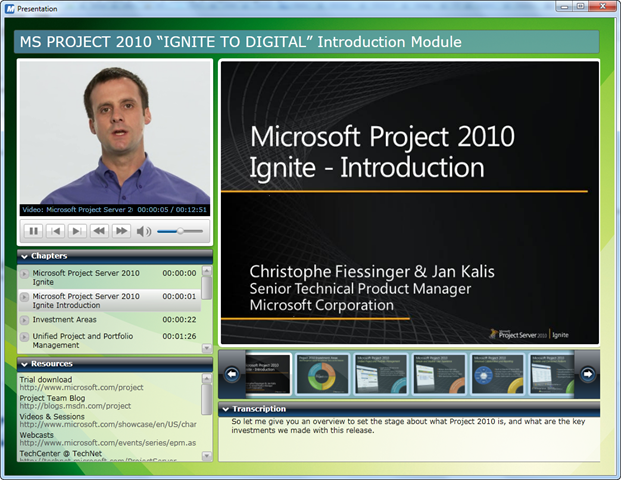
image The recordings included in this download are:

  • Introduction
  • Planning, Design, and Deployment
  • Upgrade and Migration
  • Demand Management
  • Portfolio Strategy
  • Timesheets and Statusing
  • Reporting, Part 1
  • Reporting, Part 2
  • Administration
  • Operations
  • Development/Extensibility
  • Conclusion

The recordings above represent a total of 8.5 hours of valuable recording available at your fingertip that you should all watch (5.5 hours of presentation and 3 hours of product demonstrations).

Each module is conveniently delivered using a Silverlight player that gives you the ability to view the presenter and the slides as the same time as well as give you a chapter breakdown and full transcription of presentation. Please note that the primary goal of the Ignite content was to enable technical readiness prior to launch, focusing specifically on what’s new with respect to EPM 2007, hence we highly encourage you invest in training for a successful implementation of this exciting release of Microsoft Project 2010.

You can view video presentations of each Ignite training module on the Microsoft Project 2010 Ignite Online Recordings page in the Project 2010 web site. PowerPoint slides used in the training can be downloaded at the following location: Microsoft Project 2010 “Ignite” training slide presentations. For additional technical information referenced in the slides, see the Project Server 2010 TechCenter (TechNet) or the Project 2010 Resource Center (MSDN). For more information about Project 2010, see the Project 2010 Web site.

image

[As taken from the Client Security blog]

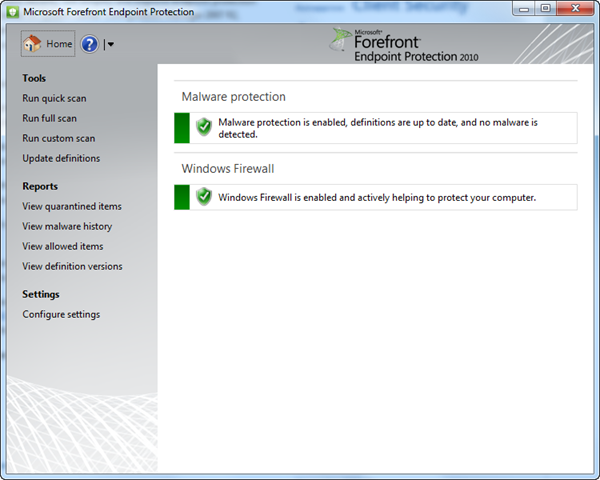
I am pleased to announce that Forefront Endpoint Protection 2010 Beta is publicly available for everyone to download.

FEP, the next generation release of Forefront Client Security, will simplify and improve endpoint protection while greatly reducing infrastructure costs. It builds on System Center Configuration Manager 2007 R2, enabling you to use the existing client management infrastructure to deploy and manage endpoint protection.  This shared infrastructure lowers ownership costs while providing improved visibility and control over endpoint management and security.

Key new features that you will be able to evaluate in this beta release are:

  • Integration with Configuration Manager –  Single interface for managing and securing endpoints reduces complexity and improves troubleshooting and reporting insights.
  • New Antivirus Engine –  Highly accurate and efficient threat detection protects against the latest malware and rootkits with low false positive rate.  
  • New behavioral threat detection –  Protection against “unknown” or “zero day” threats provided through behavior monitoring, emulation, and dynamic translation.
  • Dynamic Cloud Updates – On-demand signature updates from the cloud for suspicious files and previously unknown malware
  • Windows Firewall management –  Ensures Windows Firewall is active and working properly on all endpoints, and allows administrators to more easily manage firewall protections across the enterprise.

The download is available now on our download center (http://www.microsoft.com/downloads/details.aspx?FamilyID=8b46c3ff-d9a0-4741-8ba5-458c1b3d2257) and I invite you to install and test in your environment today. We look forward to hearing what you think. 

Posted by: kurtsh | July 21, 2010

WEBCASTS: SQL Server 2008 R2 Power Sessions

image We are sponsoring a set of exclusive Microsoft® SQL Server® 2008 R2 training webinar series.  Come and discover powerful new capabilities that enable your organization to scale your operations with confidence, boost productivity, and deliver business insight that empowers your end-users. 

  • imageSQL Server 2008 R2 for DBA’s Wednesday, July 21, 2010, 12:15pm (EDT) – Patrick LeBlanc
    Microsoft SQL Server 2008 provides a number of enhancements and new functionality, building on previous versions. Administration, database maintenance, manageability, availability, security, and performance, among others, all fall into the roles and responsibilities of the database administrator.  Patrick Leblanc will go over the new features and functionality that will impact the DBA. 
  • SQL Server 2008 R2 Business Intelligence Wednesday, August 4, 2010, 12:15pm (EDT) – Brian Knight
    With upcoming release of the latest version of Microsoft SQL Server, SQL Server 2008 R2, Microsoft continues to build on the Information Platform Vision by enabling businesses to deliver near real-time information through rich applications. Not only does SQL Server offers a complete approach to managing, accessing and delivering information across the organization; but now the power of SQL Server is extending to the Cloud through SQL Azure. SQL Azure provides a consistent program model and common tools while offering new business opportunities, high availability, and massive scale through distributed data services.
  • SQL 2008 R2 PowerPivot Wednesday, August 18, 2010, 12:15pm (EDT) – Brian Knight
    PowerPivot gives users the power to create compelling self-service BI solutions, facilitates sharing and collaboration on user-generated BI solutions in a Microsoft SharePoint Server 2010 environment, and enables IT organizations to increase operational efficiencies through Microsoft SQL Server 2008 R2-based management tools.
  • SQL Server R2 Enterprise Edition– SharePoint 2010 EE Wednesday, September 1, 2010, 12:15pm (EDT) – Adam Jorgensen
    Microsoft SharePoint Server 2010 Enterprise Edition is the business collaboration platform for the enterprise and the Web. The combination of SQL Server 2008 R2 EE and SharePoint 2010 EE delivers an optimized platform for self-service business intelligence.. Organizations can use the platform to connect and empower people, and facilitate collaboration among colleagues, partners, and customers. To see what’s new in SharePoint Server 2010 and what’s possible in combination with SQL Server R2 EE, please join Adam Jorgensen for this presentation.
  • Fast Track Wednesday, September 15, 2010, 12:15pm (EDT) – Brian Knight
    This presentation an overview and guide to SQL Server® Fast Track Data Warehouse, a new set of reference architectures created for scale-up (SMP) SQL Server based data warehouse solutions. It includes a summary of the resources available in the reference configuration, the distinguishing features of the approach, and the steps necessary to take full advantage of the new architectures.
  • Parallel Data Warehouse Wednesday, September 29, 2010, 12:15pm (EDT)  – Mike Clark
    SQL Server 2008 R2 Parallel Data Warehouse is a highly scalable appliance for enterprise data warehousing. It is the next step in the evolution of the data warehouse appliance created by DATAllegro. SQL Server 2008 R2 Parallel Data Warehouse uses massively parallel processing (MPP) to deliver the high performance and scalability on SQL Server 2008 R2, Windows Server® 2008 and industry-standard hardware. The MPP architecture helps enable better scalability, better and more predictable performance, reduced risk and a lower cost per terabyte than other DW solutions.

Learn how businesses like yours can use the significant new capabilities of SQL Server 2008 R2 to run your most demanding mission-critical applications, increase IT and developer efficiency, and deliver business insight where and when your users need it.

REGISTRATION: 
Registration is limited to my customers.  If you are a customer of mine, please contact me for details on how to enroll.

image Wow.  This is a first. 

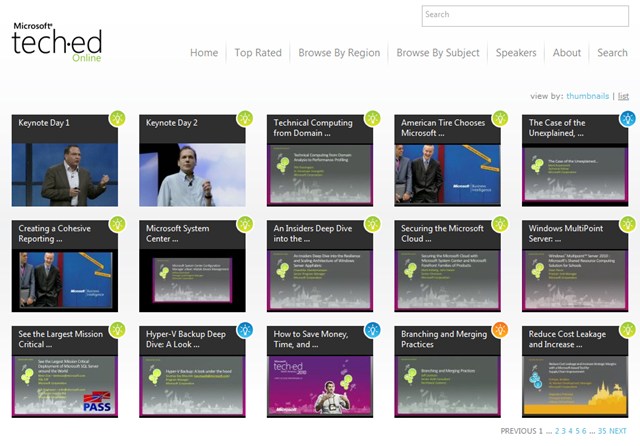
We made all the presentations delivered at TechEd 2010 available for people to view online at no cost.  That’s 525 presentations:  Keynote presentations & breakout sessions.  Slides, demos, talking heads, with full audio.  All available ONLINE at no charge.

Folks – this is a REALLY big deal.  This stuff used to cost $500 for a DVD set.  Now in an effort to be more environmentally conscious, we’re apparently streaming all of it and making it possible for everyone to get educated if you couldn’t otherwise be at the event.

FINDING CONTENT OF INTEREST
If you’re just interested in content about Sharepoint for example, you can “BROWSE BY SUBJECT” across 20 different categories including:

You can download:

  • the VIDEO of the presentation in both lo-res and hi-res
  • the Powerpoint slides for the presentation! 

What a deal!

Also if you’re interested in just the very best rated sessions, you can browse by “TOP RATED” sessions.  What was the HIGHEST rated session this year, you may ask?  Why it was Mark Russinovich’s session of course!

So take advantage of this while it’s up… because I don’t believe it will be up forever!

image We’ve made available an 18 page eBook specifically on the topic of Remote Working called “Work Without Walls”  by Rieva Lesonsky.

All you need to do, in order to download the eBook, is register for the Microsoft Business Resource Center.  See the link below.

As taken from the emailer:

As technology for teleconferencing, collaboration, and productivity continues to advance, so does the need for small and medium business owners to become familiar with this new technology so that they can compete more effectively in today’s connected business environment. Microsoft’s Business Resource Center hopes to bridge that gap by providing business owners with a  wealth of free information to help you bring technology to your small and medium business.

After providing details about your role and the industry you are in, you will notice that the content you encounter on the site is customized to the type of business you’re in which makes finding the information you need relevant and easier to locate. Aside from the countless articles, links, training, and resources available on the site you will also be able to partake in Live Meetings hosted by Rieva Lesonsky, a small business expert, about topics related to small and medium businesses. As an added bonus, once you sign up you will be able to download a free eBook from Microsoft Work Without Walls that talks about best business practices to enable remote working.

It’s easy to join the Microsoft Business Resource Center so go and check it out for yourself. Once you join the site you will be able to download the Work Without Walls eBook from Microsoft.

As announced on Major Nelson’s blog, Kinect’s pricing has been released!

Today we have officially confirmed pricing for Kinect. Plus, we have also announced a new 4GB Xbox 360 Console and a special Kinect Holiday Bundle.

Here are the details:


Kinect Pricing
: Existing Xbox 360 owners can purchase Kinect and Kinect Adventures for $149.99 (U.S. ERP). Remember, Kinect will work with every Xbox 360 ever made.


Xbox 360 4GB Console
: The new Xbox 360 4GB Console includes built in Wi-Fi N, 4GB of internal flash memory and a black matte finish. The console begins shipping August 3rd and will be available for $199.99 (U.S. ERP).


Kinect Holiday Bundle
: Available later this year will, the bundle will contain: Xbox 360 4GB console, the Kinect sensor and Kinect Adventures packaged together for $299.99 (U.S. ERP).

Pre-order Kinect or the Xbox 360 Kinect Console Bundle today, and at launch receive a token to download three exclusive game levels for Kinect Adventures, the game included with Kinect.

Kinectimals, Kinect Sports and Kinect Joy Ride will retail for $49.99 (U.S. ERP) and are part of the 15 Kinect games that will be available at launch.

Looks like we finally announced Microsoft Security Essentials v2.0. (Build 2.0.0375.0)

I’ve been running the pre-Beta build (2.0.278.0) for the past couple months now and it’s been running like a rock star.  The thing that excites me the most about this is the incorporation of Network Inspection, which examines network adapter activity in real-time to protect your system from attempts to compromise your system.

I think this is easily gonna become the gold standard for Windows antimalware technology.  Here’s the announcement as posted on the Windows Blog:

Today we are announcing the beta for the next version of Microsoft Security Essentials. Microsoft Security Essentials was first released in September 2009 and is our award-winning no-cost light weight anti-malware service. It’s designed to help address the ongoing security needs of PCs running genuine Windows – helping keep people protected from viruses, spyware, and other malicious software.

mse2

New features in the beta of Microsoft Security Essentials include:

  • Windows Firewall integration – During setup, Microsoft Security Essentials will now ask if you would like to turn the Windows Firewall on or off.
  • Enhanced protection for web-based threats – Microsoft Security Essentials now integrates with Internet Explorer to provide protection against web-based threats.
  • New protection engine – The updated anti-malware engine offers enhanced detection and cleanup capabilities with better performance.
  • Network inspection system – Protection against network-based exploits is now built in to Microsoft Security Essentials.

To download the beta of Microsoft Security Essentials, click here to visit the Microsoft Connect page to register for the beta. Once completed – you will find the instructions for downloading and installing the beta. We value your feedback – beta participants are encouraged to provide feedback about their experiences with Microsoft Security Essentials through Microsoft Connect. Please note that this is a limited beta available in English (U.S.), Israel, and Brazilian Portuguese (the beta will also be available in China in Simplified Chinese later this year) and is available to genuine Windows users on a first come, first serve basis until the allotted spots for the beta have been reached.

Posted by: kurtsh | July 20, 2010

INFO: My Favorite Windows Gadgets

I find that I’ve become much more productive since the introduction of Windows Gadgets.  I’ve created a list here:  http://cid-00da410c7f7e038d.profile.live.com/Lists/cns!DA410C7F7E038D!7410/

Here’s a quick run down of my faves:

7 Sidebar
The missing ‘sidebar’ for Windows 7 that keeps your gadgets on screen.  Automatically crams as many gadgets along the side of your desktop as possible utilizing desktop space most efficiently.  Also allows pagination across multiple “bars” of gadgets.  Keeps the gadgets exposed on your desktop even when you’ve ‘full screened’ applications.  Works with x86/x64.
http://nes.bplaced.net/sidebar7.html
image
Auction Sidebar Tool
An eBay bid/watch monitor for items you’re buying or selling.  Great for making sure you stay aware of when the auctions are ending to ensure you’re the top bidder.  Clicking on an item provides a brief update.  Clicking and holding on an item provides an indepth “fly out” window about the auction. Also allows you to search for items and read your eBay mail.
http://gallery.live.com/liveItemDetail.aspx?li=32713212-570c-4666-b5ac-85918c31582f&bt=1&pl=1
image
Calculatorium
A powerful calculator to keep on your desktop/sidebar to do quick math.
http://gallery.live.com/liveItemDetail.aspx?li=b7c42497-8bef-4f9e-b9fb-ece199ed40a9&bt=1&pl=1
image
System Information
Keep your systems hardware, network, & OS details on the desktop at all times.
http://gallery.live.com/liveItemDetail.aspx?li=6945a3ce-2c1e-4641-9032-0d237dc62815&bt=1
image
Countdown
Generic countdown gadget for vacation, conferences, or anything you’re counting down to.
http://gallery.live.com/liveItemDetail.aspx?li=51322391-fefd-43ce-b1e5-b57f191dde8d&bt=1&pl=1
image
Drives Meter
A solid monitor for drive capacity across all drives on your system.
http://gallery.live.com/liveItemDetail.aspx?li=19f3ac79-f0b5-479f-9885-3371a51fe247&bt=1&pl=1
image
Indexer Status
Monitor & manage the Windows Indexing engine. Stop, start, accelerate, and see how many items are being indexed.
http://gallery.live.com/liveItemDetail.aspx?li=45c441a6-edbc-454d-9262-d264728d6a3a&bt=1&pl=1
image
Longer Notes
Keep long stick’em notes on your desktop for things you constantly have to refer to. Priceless.
http://gallery.live.com/liveItemDetail.aspx?li=1da6c6eb-14f2-4003-9559-3461651e0278&bt=1&pl=1
image
Multi Meter (Dual Core)
Shows OS bit level, RAM usage, Core activity in a tight little gadget.
http://gallery.live.com/liveItemDetail.aspx?li=7d321f7a-d53c-4a71-9b41-7fc18e0825b1&bt=1&pl=1
image
Stocks 3.4
Monitor 20+ stocks in a small gadget using Yahoo stats. Provides valuation updates and shows updates in percentages or dollars.
http://gallery.live.com/liveItemDetail.aspx?li=61b9dca8-214c-41bf-b972-b2050aeaab9c&bt=1&pl=1
image
Top Processes
Why use Task Manager? Show the 3+ most active processes on your system in a small gadget.
http://gallery.live.com/liveItemDetail.aspx?li=681102c2-5dde-44d2-a33a-96dbff32517a&bt=1&pl=1
image
Twitter Explorer
The best Twitter client gadget I’ve found. Stable & compact.
http://gallery.live.com/liveItemDetail.aspx?li=562df1fe-af72-4aa3-90ef-029502ed7794&bt=1&pl=1
image
Woot
Smallest most flexible Woot monitor. Purchase directly from gadget, auto-alert during Wootoffs, autobuy for Bag o’ Crap.
http://gallery.live.com/liveItemDetail.aspx?li=d62c2c6a-37cf-4ec1-b069-9897db8f5e06&bt=1&pl=1
image
Online Services
Access Windows Live web-based services – Messenger, Mail, Skydrive, Contacts – all from a single gadget.
http://gallery.live.com/liveItemDetail.aspx?li=50cd8f0a-7c08-442b-b14c-b98e342d1f38
image

« Newer Posts - Older Posts »

Categories