image Recently we released 3 new papers that may be of interest to folks in security.

  • Vulnerability Management at Microsoft whitepaper (July 2010)
    Vulnerabilities are weaknesses in software that enable an attacker to compromise the integrity, availability, or confidentiality of that software.  Microsoft uses a process to investigate and release security updates that address vulnerabilities in the software it produces.

    In this paper you’ll learn about this process and how Microsoft uses a multipronged approach to help its customers manage their risks.  This approach includes three key elements: (1) High quality security updates – using world class engineering practices to produce high quality security updates that can be confidently deployed to over a billion diverse systems in the PC eco-system and help customers minimize disruptions to their businesses; (2) Community based defense – Microsoft partners with many other parties when investigating potential vulnerabilities in Microsoft software. Microsoft looks to mitigate exploitation of vulnerabilities through the collaborative strength of the industry and through partners, public organizations, customers, and security researchers.  This approach helps to minimize potential disruptions to Microsoft’s customers’ businesses; (3) Comprehensive security response process – employing a comprehensive security response process that helps Microsoft effectively manage security incidents while providing the predictability and transparency that customers need in order to minimize disruptions to their businesses.

    DOWNLOAD the free Vulnerability Management at Microsoft whitepaper (July 2010) now

  • MSRC Progress Report ( July 2010)
    Find out how three programs launched by the MRSC in August 2008 have helped customers, partners and third-party software developers improve the security of users of Microsoft software. The three programs – Microsoft Active Protections Program (MAPP); Microsoft Exploitability Index, and; Microsoft Vulnerability Research (MSVR) – collectively share more information with partners and customers.

    DOWNLOAD the free MSRC Progress Report (July 2010) now

  • The Microsoft Vulnerability Research Program (July 2010)
    The Microsoft Vulnerability Research (MSVR) program, launched in 2008, leverages Microsoft knowledge and experience in securing software to help other software and hardware vendors deal with vulnerabilities reactively as well as develop proactive internal programs to improve the overall security of their products. This whitepaper explains how MSVR works with software and hardware vendors around the world and reports progress made to date.

    DOWNLOAD the free Microsoft Vulnerability Research Program whitepaper now

Posted by: kurtsh | August 16, 2010

WEBCAST: Visio 2010 Core Concepts Tips & Tricks

clip_image001

Microsoft Office Visio 2010 is rich with new tools to assist in creating rich, data-connected diagrams faster and easier than ever before.

With this Tips and Tricks session you will gain the insight and insider information to quickly and easily create, edit, maintain, and publish Visio diagrams as well as visualize your important corporate data and processes. You will learn shortcuts for productivity, techniques for high quality presentation and tools for collaborative use of your mission-critical diagrams.

Speakers:

Mr. David A. Edson, M.Arch., MCP, Microsoft Visio MVP CTE / Director of Consulting Services, Visibility.biz David A. Edson was trained as an Architect, holding degrees in both Architecture and Architectural History. Dave first began utilizing Visio and became a Visio employee, with its introduction in 1992. Dave has spent the last several years traveling all over the world training other developers in the use of both Visio and VBA as a development and solutions platform. Dave continued his evangelism efforts for Microsoft as a Technical Product Manager within the Developer Tools Division, focusing on Visual Studio for Applications, and VBA. Dave is currently the Director of Consulting Services and CTE with Visibility.biz. Dave was the recipient of the Microsoft 2006, 2007, 2008, and 2009 MVP (Most Valued Partner) award in recognition of his outstanding achievement in support of Visio technology, and Visio customers. Dave is also a Microsoft Certified Professional (MCP) in Data Visualization

Matthew Rodeman has over 18 years of software industry experience which include 9 years at Microsoft. Prior to Microsoft, Matt worked for Visio for 2½ years and 5 ½ years with Autodesk where he learned CAD for the Architectural and Civil Engineering industry. Matt is now President and founder of Tips & Techniques L.L.C which provides an alternative to traditional software training. Our focus is to provide technical demonstrations and presentations to companies who can benefit from learning about visual application tools to help streamline and document their technical business processes.

Registration:
If you are a customer of mine, please contact me for details on dates/times/registration.

clip_image001Microsoft would like to invite you to join us for a breakfast discussion at the new Microsoft Store in Mission Viejo featuring Microsoft Business Intelligence and Ad Hoc Reporting.

Microsoft Business Intelligence (BI) Solutions build on your existing technology investments so employees gain access to accurate, up-to-date information for better, more relevant decision-making.  Our BI Solutions integrate the strengths of SQL Server, SharePoint and Office on a single platform to empower informed decision-making that moves your business forward.   During this two hour discussion, you can expect the following:

  • A discussion around Microsoft BI Solutions
  • Demonstration of Ad Hoc Reporting
  • Guidance on how you can get started

Breakfast Discussion featuring Microsoft Business Intelligence and Ad Hoc Reporting

Date & Registration:  Please contact me if you are a customer of mine for further details.
Time:  8:00 AM – 10:00AM
Location: Microsoft Mission Viejo Store

The Shops at Mission Viejo
578 The Shops at Mission Viejo
Mission Viejo, CA 92691
Phone: (949) 325-6100

In addition to being entered into a raffle for some great Microsoft prizes, we are also offering a friends and family 10% discount on all Software and 5% off everything else in the MS Store on the day of the event!

image Interested in a help desk ticketing system?

Looking for something that integrates with Configuration Manager & Operations Manager?

Need a solution that slides right into environments leveraging Microsoft technologies like Sharepoint, Exchange, SQL Server, Active Directory, and Windows?

…you sound like a candidate for Microsoft System Center Service Manager!

A great place to recent information around Service Manager is the SCSM Blog at http://blogs.technet.com/servicemanager.

TRAINING MATERIALS
Here are some ramp up materials for people that want to get to learning this great new system:

The following link is to a series of recorded Live Meeting sessions covering different areas in Service Manager

Additionally, all materials on the product can be found here:

And any videos that we’ve produced around Service Manager are viewable here:

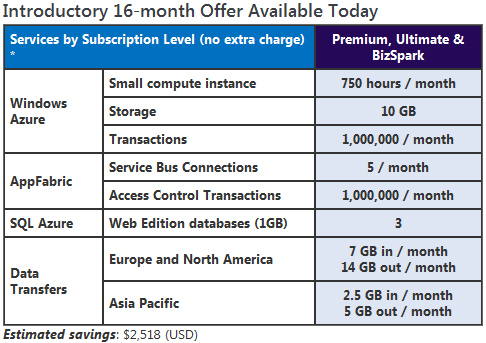
image The Windows Azure Platform is an internet-scale cloud computing and services platform hosted in Microsoft data centers. The platform provides a range of functionality to build applications from consumer web to enterprise scenarios.

MSDN subscribers can take advantage of this platform to build and deploy their applications.

What to Know Before You Sign Up

The first phase of this introductory offer will last for 8 months from the time you sign up, then you will renew once for another 8 months. After that, you’ll cancel this introductory account and sign up for the ongoing MSDN benefit (see below) based on your subscription level. Here’s how to manage your account settings after you’ve signed up:

  1. Sign in to the Microsoft Online Services Customer Portal.
  2. Click on the Subscriptions tab and find the subscription called “Windows Azure Platform MSDN Premium”.
  3. Under the Actions section, make sure one of the options is “Opt out of auto renew”.  This ensures your benefits will extend automatically.  If you see “Opt in to auto renew” instead, select it and click Go to ensure your benefits continue for another 8 months.
  4. After your first 8 months of benefits have elapsed (you can check your start date by hovering over the “More…” link under “Windows Azure Platform MSDN Premium” on this same page), you will need to come back to this page and choose “Opt out of auto renew” so that your account will close at the end of the 16-month introductory benefit period.  If you keep this account active after 16 months, all usage will be charged at the normal “consumption” rates.

You’ll need your credit card to sign up. If you use more than the amount of services included with your MSDN subscription, we’ll bill your card for these overages. You can visit the Microsoft Online Services Customer Portal to look up your usage at any time.

image Wednesday, August 18th
10:00 AM – 10:30 AM PST (30 minutes)

Is your organization looking to upgrade to Exchange 2010?
Microsoft® Exchange Server 2010 introduces integrated email archiving, retention, and discovery capabilities that can help you simplify the process of preserving your business communications. These build-in features help you reduce .PST file proliferation and ease meeting e-Discovery requests, while delivering a familiar experience for your users.  Exchange 2010 also adds retention policies that automate the deletion and archiving of email, and a new Web-based, multi-mailbox search that can be delegated to your specialist users, such as a compliance officer.
Attend this webcast to learn more about:

  • Personal Archive
  • Granular Retention Policies
  • Litigation Hold
  • Single Item Restore
  • Web-Based Multi-Mailbox Search
  • Role-based Access Control
  • Case Studies

Who should join: 

IT Directors, Telecom Managers/Directors, Directors of Infrastructure  
Attend this webcast to find out how to enter to win a Microsoft Webcam!

(Live Meeting and dial-in information will be sent via email a couple days prior to the webcast.)

Find out more about Compliance Capabilities with Exchange Server 2010 HERE. Also, check out the following Case Studies:

  • Carnival Cruise Lines – eliminate PSTs, grow mailbox sizes, centralize email storage
  • Global Crossing – grow mailbox sizes (500MB to 2GB), cheaper storage (DAS), eliminate need for PST and third-party archive solution
  • Katten Muchin Rosenman LLP – Law firm taking advantage of improved retention policies
  • Anonymous University – Using native Litigation Hold capabilities, rather than expensive third-party solution

Registration:
Please contact me, if you area a customer of mine, for details on registration.

Posted by: kurtsh | August 11, 2010

RELEASE: August 2010 Security Release ISO Image

image This DVD5 ISO image file contains the security updates for Windows. The image does not contain security updates for other Microsoft products. This DVD5 ISO image is intended for administrators that need to download multiple individual language versions of each security update and that do not use an automated solution such as Windows Server Update Services (WSUS). You can use this ISO image to download multiple updates in all languages at the same time.

Important: Be sure to check the individual security bulletins at http://www.microsoft.com/technet/security prior to deployment of these updates to ensure that the files have not been updated at a later date.

This DVD5 image contains the following updates:

Supported Operating Systems: Windows 7; Windows Server 2003 Service Pack 2; Windows Server 2003 Service Pack 2 for Itanium-based Systems; Windows Server 2003 Service Pack 2 x64 Edition; Windows Server 2008; Windows Server 2008 R2; Windows Server 2008 Service Pack 2; Windows Vista 64-bit Editions Service Pack 1; Windows Vista Service Pack 1; Windows Vista Service Pack 2; Windows XP Professional x64 Edition ; Windows XP Service Pack 3

image Looks like both Gartner & Forrester have taken a liking to our offering in the customer relationship management market. 

Microsoft Dynamics CRM provides customers with a method of reducing cost and driving simplicity (Our CRM solution effectively becomes a part of Outlook) over solutions like Siebel or Salesforce.  By providing a strong integrated solution at a low cost, Dynamics becomes a natural choice for customers using Outlook today.)

August 4, 2010
Analysts Give Microsoft Dynamics CRM High Marks
By Stuart J. Johnston

Two leading analyst firms have rated Microsoft’s customer relationship management (CRM) software as a leader in that market.

Microsoft (NASDAQ: MSFT) announced that Gartner has rated its Dynamics CRM package as a leader in its Magic Quadrant for Sales Force Automation in July.

Additionally, Forrester Research placed Dynamics CRM in a leadership position in its Forrester Wave: CRM Suites Customer Service Solutions (available as a PDF) for the third quarter of 2010.

The next version of the package — officially named Dynamics CRM 2011 but codenamed Dynamics CRM 5 — is out to testers in a third community technology preview (CTP) with the public beta test of the update slated to begin in September, Microsoft said last month.

"With the upcoming release of Microsoft Dynamics CRM 2011, customers will reach new levels of productivity and collaboration with a low total cost of ownership, and partners will unlock new opportunities with a single development environment for cloud-based and on-premises deployments," Brad Wilson, Microsoft general manager of Dynamics CRM, said in a statement.

[read more at http://www.ecrmguide.com/article.php/3896841]

Posted by: kurtsh | August 9, 2010

DOWNLOAD: Halo Desktop Customization Tools

Sarah from the Microsoft On10 blog wrote a post that I thought was worth stealing:

image With Halo:Reach’s launch only weeks away (it arrives Sept. 14th), when I came across the How-To Geek’s latest regarding a complete desktop customization guide for Halo fans, I thought it was worth sharing.

Here, one of my favorite “how-to” bloggers offers up custom wallpapers, icon packs and Halo fonts, all of which can be used to create the perfect Halo-inspired desktop. The wallpapers feature Master Chief, of course, as well as other scenes from Halo games. Also, there are several different icon packs to choose from, which work on Windows 7, Vista or XP. And if you want to go all out, there are three different Halo fonts available for download as well.

Download the tools referred to above from Sarah’s original post at:
http://on10.net/blogs/sarahintampa/Get-Halo-Desktop-Customization-Tools/

Posted by: kurtsh | August 9, 2010

NEWS: Kinect will interpret sign language

I lifted the introduction to this article from Neowin.net:

image Microsoft filed a patent for Xbox 360 Kinect that allows users to use pre-defined hand gestures (sign language) to be captured by the camera for use as a keyboard.

The patent, called “Gesture Keyboarding,” will be able to read American Sign Language (ASL) and translate it into keystrokes without the need for a keyboard. This confirms that Kinect will be able to detect small movements of your fingers, turning sign language into individual letters, words or even phrases.

[read the rest at http://www.neowin.net/news/kinect-will-interpret-sign-language]

NOT JUST A TOY
I think it’s important that people understand the power of Kinect as a technology.  This is NOT a toy, despite the configuration in which it’s currently used.  Kinect’s recognition technology FAR AND AWAY exceeds the state-of-the-art for visual recognition above and beyond even that which is available in professional circles – much less to consumers.

If you don’t believe me, read Carnegie Mellon PhD Researcher Johnny Lee’s comments, who was famous for producing interactive 3D head tracking technology using the Nintendo Wii: (Note:  Johnny is now a scientist in the Applied Sciences division of Microsoft Research.)

Speaking as someone who has been working in interface and sensing technology for nearly 10 years, this is an astonishing combination of hardware and software. The few times I’ve been able to show researchers the underlying components, their jaws drop with amazement… and with good reason.

The 3D sensor itself is a pretty incredible piece of equipment providing detailed 3D information about the environment similar to very expensive laser range finding systems but at a tiny fraction of the cost. Depth cameras provide you with a point cloud of the surface of objects that is fairly insensitive to various lighting conditions allowing you to do things that are simply impossible with a normal camera.

But once you have the 3D information, you then have to interpret that cloud of points as "people". This is where the researcher jaws stay dropped. The human tracking algorithms that the teams have developed are well ahead of the state of the art in computer vision in this domain. The sophistication and performance of the algorithms rival or exceed anything that I’ve seen in academic research, never mind a consumer product. At times, working on this project has felt like a miniature “Manhattan project” with developers and researchers from around the world coming together to make this happen.

Read more at:  http://procrastineering.blogspot.com/2009/06/project-natal.html

« Newer Posts - Older Posts »

Categories