Posted by: kurtsh | September 7, 2010

RELEASE: Forefront Protection Server Script Kit

image We’re excited to announce that a new solution for multi-server management of Forefront Server Protection products is now available for download!

The Microsoft® Forefront® Protection Server Script Kit provides multi-server management for Forefront Protection 2010 for Exchange Server and Forefront Protection 2010 for SharePoint®. In addition to the ability to manage multiple Forefront servers from a single location, this Solution Accelerator provides easily extensible command-line scripts that help enable server discovery, configuration, deployment, and integration with existing management technologies. It also offers basic reporting capabilities to detect configuration drift and monitor server statistics.

Supported Products

  • Forefront Protection 2010 for Exchange Server
  • Forefront Protection 2010 for SharePoint

Configuration Management and Reporting

  • Capture server configuration snapshots and push snapshots to any number of servers
  • Compare configuration of any number of servers or baselines
  • Obtain statistics from one or many servers, including information about infected files, detected malware, server health, and more
  • See summary and/or server detail views

Ease of Use

  • Discover Forefront Protection Servers and export information to a .CSV file
  • Use customizable Windows PowerShell™ scripts to enhance your existing automation

Full documentation in the TechNet library
http://technet.microsoft.com/en-us/library/ff830371.aspx

After you check out this new Solution Accelerator—and we hope you will—tell us what you think. Please send your honest and constructive feedback to secwish at microsoft dot com.

[taken from http://blogs.technet.com/b/fss/archive/2010/08/09/microsoft-forefront-protection-server-script-kit-now-available-for-download.aspx]

Posted by: kurtsh | September 6, 2010

DOWNLOAD: Bing’s Dynamic Wallpaper Theme

image This is pretty cool, if not a little old being that I’ve got a PILE of mail and RSS that I’m still trying to plow my way through.  It’s the BING Dynamic Wallpaper Theme.

Simply put, every week 2 new photos rotate through as your desktop wallpaper via RSS subscription from Bing, which is known for its beautiful and colorful photography. Designed for Windows 7, the theme plugs in and just automatically does its thing – no config necessary.

image I suppose this shouldn’t surprise me per se however when I stumbled upon this, I was so awestuck that it compelled me to write a post about it.

If you like comedy, having a media player like a Zune is a great way to always have new content on your device to listen to.  Until now, one of my favorite means of getting that comedy fix was to subscribe to the ROFL podcast RSS feed at http://revision3.com/rofl/feed/wmv-large/, which meant every week I’d get another 15 minutes of “short attention span theatre” comedy on my Zune.

ENTER:  THE ZUNE COMEDY PLAYLISTS
Little did I know that not just music but also comedy bits were available for download on Zune.  There are custom playlists that are published on Zune Marketplace for people to view, listen, and even subscribe to.  These playlists are simply lists of tracks taken from various comedy albums.  In this case, one playlist called “Comedy Collection” is a selection of 86 of the Zune community’s favorite comedy bits from various comedians available on Zune Marketplace.

Now, if you have ZunePass ALL OF THESE ARE DOWNLOADABLE/LISTENABLE FOR FREE

  1. Simply select the playlist “Comedy Collection” from within the Zune client and click on the SUBSCRIBE button. 
  2. You’re done. 

All 86 tracks of the content will download to your PC and sync with your Zune if you’d like at no cost to you.  Adam Sandler, Carlos Mencia, Cheech & Chong, Chris Rock, Christopher Titus, Dane Cook, Dave Attell, Billy Connolly, Eddie Izzard, Demetri Martin, Lenny Bruce, Jerry Seinfeld, Kathleen Madigan, Lewis Black, Frank Caliendo, etc.

There’s also another playlist called “Zune Tune Playlist #4:  Favorite Comedy”.  Same thing… if you have ZunePass.  32 tracks from Denis Leary, Mitch Hedberg, Monty Python, Patotn Oswalt, Jimmy Fallon, George Carlin, Bill Engvall, Joe Rogan, etc.

Take a look at the playlists available on Zune Marketplace now:
http://social.zune.net/music/playlists/genre/comedySpokenWord

WHERE DO THESE BITS COME FROM?
But it gets better.  Each of these is a list of bits that are a single track from entire albums.  If you like a comedian, simply follow the track selection from the list, back to the album it came from and WALLA.  You can download the ENTIRE COMEDY ALBUM AT NO CHARGE.

Since discovering this ability, I’ve downloaded the following albums at no charge through my subscription ZunePass, and it just boggles my mind because I doubt I would have bought these otherwise:

  1. image Eddie Izzard’s “Dress to Kill”
  2. Denis Leary’s “No Cure for Cancer”
  3. George Lopez’s “America’s Mexican”
  4. Jerry Seinfeld’s “I’m Telling you for the Last Time”
  5. George Carlin’s “Class Clown”
  6. Chris Rock’s “Bigger & Blacker”
  7. Christopher Titus’ “Normal Rockwell is Bleeding”
  8. Adam Sandler’s “Shhh… Don’t Tell”
  9. Lewis Black’s “The Carnegie Hall Performance”
  10. Mitch Hedberg’s “Mitch All Together”
  11. Richard Belzer’s “Another Lone Nut”
  12. Robin William’s “Night at the Met”
  13. Sarah Silverman’s “Jesus is Magic”
  14. Triumph the Insult Comic Dog’s, “Come Poop With Me”
  15. Ron White’s “Tater Salad”

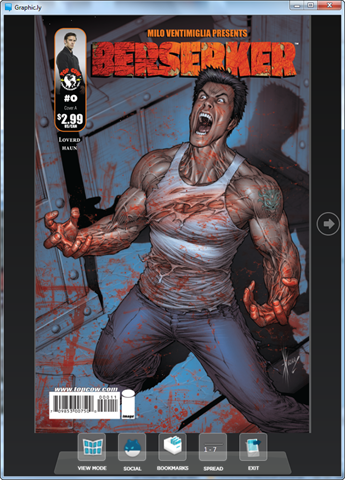
image The screen capture of the WPF application below is pretty much all you need to know.  Graphic.ly is a Windows 7 application that allows you to download digital graphic novels (the grown up word for comics) and view them in all their glory on your desktop, laptop, or touch-enabled Windows tablet.

SELECT & DOWNLOAD FROM THOUSANDS OF TITLES
What makes it special is that it provides you with a rich catalog of comics – including many of those from Marvel for you mainstreamers – that you can purchase for .99- $1.99 each.  Delivery is rapid and you can even collaborate with other readers by leaving behind comments in the comic which get rolled up to Graphic.ly.

(For those of you interested, there’s also a Windows Phone 7 client coming too!)

I’m really impressed with the selection – but I think that has a little to do with the fact that I didn’t expect much.  For example, here’s a few of the titles available:

  • Kick Ass
  • Daredevil
  • Wanted
  • Star Trek
  • Irredeemable
  • Avengers
  • Amazing Spiderman
  • Astonishing X-Men
  • Captain America
  • Incognito
  • Ironman

WHAT IF I’M CHEAP & I LIKE “FREE”
And yes, there’s lots of free content.  Take “Berserker” for instance:  The person behind is its Milo Ventimiglia, of NBC’s “Heroes” fame.  The series appears to be available entirely for free and the artistry is tremendous… although the story seems a bit dark for my tastes.

image

NO ADOBE AIR REQUIRED
To be clear – there’s an Adobe Air version of this app.  Adobe Air is a semi-new cross platform application development platform similar to Flash or Silverlight that requires the installation of Adobe Air’s engine in addition to the Graphic.ly applications.

If you have Windows Vista or Windows 7, YOU DO NOT NEED TO INSTALL ADOBE AIR.

Simply download the Windows WPF version of the app, which is not only faster, has less overhead, uses less CPU, memory, and storage, and simply looks great.

Posted by: kurtsh | September 6, 2010

BETA: Microsoft P2V Migration Tool for Software Assurance

imageThe Microsoft Deployment Toolkit team is working on a new solution incorporating Sysinternals Disk2VHD into the desktop migration process: P2V Migration for Software Assurance, and we’d like your feedback on it!

CLARIFICATION: 
The “…for Software Assurance” part of the title is specifically because P2V’ing a Windows desktop & using that virtualized image requires Software Assurance for that license in corporate usage.  To quote the original Connect source mail I got:

“Physical-to-virtual hard drive migration of a Windows installation is a valid operation for customers with Software Assurance and full retail copies of Windows XP, Windows Vista, and Windows 7. Software Assurance provides users valuable benefits. Windows XP, Windows Vista and Windows 7 installed by Original Equipment Manufacturers (OEM) using OEM versions of these products may not be transferred to a virtual hard drive in accordance with Microsoft licensing terms.”

Even the most skilled IT shops, with resources to work through application compatibility challenges, often find a few users blocking roll-outs to entire sites or larger numbers of users due to:

  • Compatibility of specialized, region or user-specific applications, browser customizations or USB device drivers.
  • Missing installation files or media to install applications or drivers for testing or redelivery.
  • Critical users who cannot risk losing any functionality of their current desktop environments and require a working backup before moving to Windows 7.

These types of issues make it difficult to completely replace existing systems with Windows 7 without causing user disruption. Allowing users to retain their current desktop environments while moving to Windows 7 can smooth the transition while mitigating or delaying investments required for making applications and hardware natively compatible with Windows 7. 

P2V Migration for Software Assurance automates the delivery of an updated and personalized Windows 7 operating system while backing up and converting legacy Windows XP or newer desktop and its applications for seamless use within Windows 7.

Key benefits:

  • Reduces Windows 7 deployment time, by helping unblock targeted users
  • Extends the timeframe to mitigate application compatibility
  • Users can access their legacy applications and customized Web browsers

While P2V Migration can help in targeted cases, by design it is not scalable to large percentages of users in an organization. The best practice is to ensure native compatibility with applications, Web sites and hardware devices for Windows 7 and Internet Explorer 8. Microsoft Enterprise Desktop Virtualization scales to deliver and manage more compact and standardized Windows XP virtual machines to more users requiring a managed set of Windows XP-dependent applications. P2V Migration is recommended in cases where the user requires specific components from their current PC and those components cannot run in Windows 7 and do not warrant being part of a standardized and managed virtual machine environment for broad use. Licensing for P2V Migration requires that the converted Windows XP desktop and Windows 7 environment were installed by Volume License media and covered by Software Assurance.

Download the beta now. This is your opportunity to have a direct influence on an important new Solution Accelerator from Microsoft. Please submit your feedback through Connect and direct any support questions you may have to satfdbk@microsoft.com. This will help us improve product feature and functions, benefitting your organizations in the future. Your time and assistance is much appreciated.

Join the Beta Program
To participate in P2V Migration for Software Assurance Beta program, download and test the tool in your environment then provide timely feedback and suggestions to our development team. This is an open beta download. If you are not already a member of the MDT Beta Program and would like to join, follow these steps:

  1. Go here to join the beta program: http://connect.microsoft.com/site14/InvitationUse.aspx?ProgramID=1646&InvitationID=P2VM-C49K-PQHR. If the link does not work for you, copy and paste it into the Web browser address bar.
  2. Sign in using a valid Windows Live ID.
  3. Enter your registration information.
  4. Continue to the P2V Migration for Software Assurance Beta page.

Already a member of the MDT beta programs? Go here to get the latest beta downloads:
https://connect.microsoft.com/site14/Downloads/DownloadDetails.aspx?DownloadID=30989

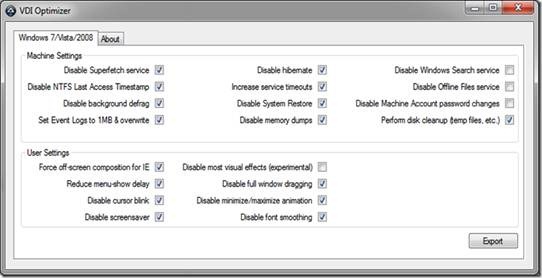
One of our MCS deployment guys in the UK – Jonathan Bennett (you may know Jonathan as the author of the autoit tools and GImageX) has developed a tool for configuring Windows 7/Windows Vista/Server 2008 images for use in a VDI environment. The tool called VDI Optimizer outputs a VBScript (based on the selections you make in the GUI interface), which can then be used to apply performance and configuration settings to images that will be deployed via VDI platforms – this is particularly useful if you are using MDT 2010 for your image engineering process as the VBScript can bolted into the task sequence using a Run Command Line task.

clip_image002
You can make machine based selections for turning off services and functions that may not be required when the operating system is running in a VDI environment such as hibernation, system restore, and background defrag, as well as adjusting some user based settings such as visual effects, font smoothing and off-screen composition for Internet Explorer.

The beta of this tool is available from http://www.autoitscript.com/files/tools/VDIOptimizer.zip but please remember The tool is provided "AS IS" with no warranties, confers no rights, and is not supported by the authors or Microsoft Corporation.

This post was contributed by Richard Smith, a Senior Consultant with Microsoft Services UK

Disclaimer: The information on this site is provided "AS IS" with no warranties, confers no rights, and is not supported by the authors or Microsoft Corporation. Use of included script samples are subject to the terms specified in the Terms of Use.

[taken from http://blogs.technet.com/b/deploymentguys/archive/2010/08/31/optimising-windows-7-images-for-use-in-vdi.aspx]

image We have posted two new Virtual Labs for you to complete!

  • Monitoring SharePoint 2010
  • Monitoring Exchange 2010

Learn how to use Operations Manager 2010 to monitor Sharepoint Server 2010 and Exchange Server 2010!

“But we’re not running Sharepoint 2010 or Exchange 2010!”

So? Like you’re not gonna pick some ideas up? This lab is running for a limited time and isn’t going to be available forever so jump on it while it’s there!

————

Woohoo!  The Family Pack… is BACK!

image Family Pack Returns in time for the Anniversary of Windows 7

All summer long we’ve given you some great reasons to purchase a new PC and make the move to Windows 7, an operating system loved by a whopping 94% of folks who use it! Here’s one more: starting October 3 in the U.S., Windows 7 Family Pack will be available for purchase at participating retailers and online at the Microsoft Store. Purchasing the Windows 7 Family Pack gives you three upgrade licenses of Windows 7 Home Premium for the low price of $149.99. To take advantage of Family Pack, you’ll need a PC running a genuine copy of either Windows Vista or Windows XP that is capable of running Windows 7. The Windows 7 Upgrade Advisor can tell you which features and editions of Windows 7 will run on your computer(s).

For those of you who don’t live in the U.S., Family Pack may be coming your way too. It goes on sale in Canada, UK, Germany, France, Australia and many other markets on or after Oct. 22 (Windows 7’s 1 year anniversary!)

According to IDC’s Consumerscape 360 data, there are 2.1 PCs per household in the U.S., but, as we all know, networking isn’t easy. Windows 7 has built in features – like HomeGroup– that make it easy and quick to get all of your home PCs connected and sharing files, music, photos and printers.

So, don’t delay. The Windows 7 Family Pack will be available soon while supplies last.

[taken from http://windowsteamblog.com/windows/b/windowsexperience/archive/2010/09/01/family-pack-returns-in-time-for-the-anniversary-of-windows-7.aspx]

Posted by: kurtsh | September 4, 2010

OFFER: Opalis Customer Evaluation Program

image The System Center team is pleased to announce the Opalis Community Evaluation Program (CEP).  The goal of this program is to provide customers with a streamlined approach to evaluating Opalis. 

For customers and partners who want to efficiently manage implementation, test scenarios, discover and contribute to Best Practices, the CEP provides a structured approach for connecting with the product group and a community of peers.  Members of the CEP community will be asked to participate through the sharing of learning’s, questions and experiences.

Program Participation

Here’s what you can expect from the program:

From Microsoft

  • Provide guided learning activities
  • Product installation media and eval licenses
  • Ready-built evaluation VHD (Hyper-V)
  • Product group access via virtual chalk talks
  • CEP community access

From Customers

  • Participation in theme activities
  • Implementation of products in test environment*
  • Sharing of Best Practices
  • Review of readiness materials
  • Willingness to share experiences

*Please note:  Microsoft will not provide CEP participants with additional support for those wishing to deploy the product in production or upgrade subsequent product releases.  As an in-market product, Opalis is supported through the standard Microsoft support structures.  If customers wish to deploy or upgrade Opalis into production during the CEP, they should feel welcome to do so and are encouraged to share their experiences with the community.

Want to be involved?

Visit the Opalis Microsoft Connect site and fill out the CEP application.**

**All applications received by September 10, 2010, will be informed of their acceptance through receipt of an invitation email to their Windows Live ID account by September 13.  Late applications will be reviewed, but accepted members will be asked to review any missed activities and materials independently.

[taken from http://blogs.technet.com/b/systemcenter/archive/2010/08/28/announcing-the-opalis-customer-evaluation-program.aspx]

Posted by: kurtsh | September 1, 2010

DOWNLOAD: Office 2010 Resource Kit

image The Office 2010 Resource Kit released to the web in a variety of forms:

Everything you need to know about deployment, maintenance, planning, etc. for Office 2010.

« Newer Posts - Older Posts »

Categories