Posted by: kurtsh | February 20, 2011

OFFER: Free eBook – “Windows Phone Blue Book”

imageSo Rob Miles wrote an eBook called the “Windows Phone Blue Book” and published it to the web.  In his words:

This is kind of a companion to the "C# Yellow Book” which has been around for a while. However, it has a lot more stuff with it. There are demo programs and also a whole set of presentations and exercises that you could use to create a complete course on Windows Phone 7.

The problem?  The files are no longer hosted where he hyperlinked to.  Here’s the new location:

Posted by: kurtsh | February 19, 2011

INFO: Why is Microsoft Lync 2010 so cool?

Internally, Lync is taking Microsoft by storm.  Exchange was a pretty big deal back in the mid 90’s and everyone was either talking about it, deploying it, or finding new uses for it.  Then I thought SharePoint was a big deal.  It spread like wildfire throughout Microsoft practically eliminating the use of file shares:  Everything is hosted on SharePoint now.

But now it’s Lync.  Our Unified Communications technology must have turned a corner or something because everyone is using the heck out of Lync 2010.  Phone calls, desktop integrated conference calls, internal presentations, external desktop sharing, online meeting with 100+ people on line… you name it.
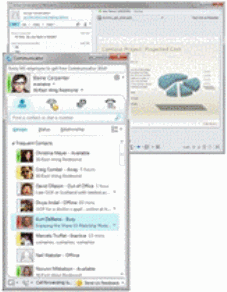
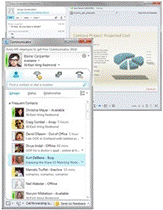
clip_image002Which begs the question… why is Lync so cool relative to other Unified Communications clients, even it’s predecessor “Office Communicator”?

——————

Single Application, Three Great Ways to Connect

  • One tool, many ways to connect – Lync combines the conversation features of Communicator with the collaboration and presentation functionality of Live Meeting and more in a single tool.
  • Easy online meetings – Easily join online meetings, revise and compare content, and present information from wherever you are.
  • Natural collaboration – Transform every day conversations into fully-fledged collaboration sessions with shared comments, documents, applications and media.
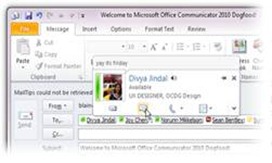
clip_image004Bring your work and people together.

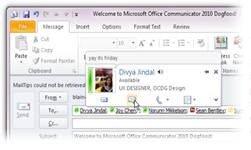
  • Connect and share your work directly from within Microsoft Office applications – send your document through Lync or share your desktop from Save & Send in the File Menu.
  • Experts at your fingertips – Advanced search features help you find the people you need chat, meet or collaboration with using names or keywords.
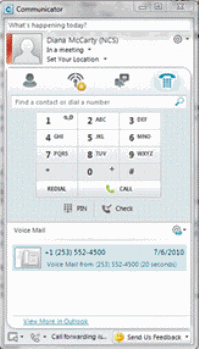
clip_image006Lync is Your Phone.  Your Phone is Lync.

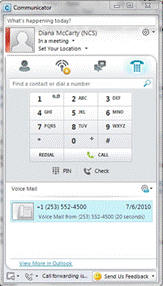
  • The phone you know but better – Lync is a phone on your PC that works the way you’d expect, but does so much more.  Lync has in-line access to voicemail, single click calling, and calling by name rather than number.
  • Conversations with context – Start your phone calls from within any document and frame the context of your conversation with the document title.
  • Experience greater clarity – Rich panoramic and HD video paired with HD audio give nuance to your communications. (must have HD capable hardware)

So give it a try!  The next time you get a conference call request from someone and you notice that the body mentions the Lync client, try downloading and installing the ‘Lync attendee client’.  (The ‘attendee client’ is the version of Lync’s desktop software for folks without Lync deployed in their organization)  It’ll allow you to participate in the Lync-originated conference call over VOIP directly from your PC, see remote desktop visuals, work on shared whiteboards & fill out polls, view/lead PowerPoint presentations, see video camera feeds from participants, download documents shared within the meeting, and of course, send & receive instant messages between participants… all over the open Internet. (Using a secure protocol & well-know ports, of course)

imageA week ago, we announced “Windows Thin PC”, the next version of “Windows Fundamentals for Legacy PCs”… for volume licensing customers with Software Assurance on Windows Client.

WHAT IS IT?
Windows Thin PC provides a special, scaled down configuration of Windows Embedded 7 for installation on existing older PCs.  The operating system is light and designed to operate on lower end machines while still providing all the traditional manageability of a Windows desktop – including compatibility with:

  • Optional Components at install
    • Internet Explorer 8.0
    • Windows Media Player
  • Local installs of Allowed Microsoft Applications
    • Desktop management agents – like SCCM2007R2
    • Windows Firewall
    • Anti-virus software – like Forefront Endpoint Protection 2010
    • .NET Framework
    • Office Viewers
  • Allowed 3rd party ISV apps
    • Thin client software like Remote Desktop Connection or Citrix Receiver
    • Terminal Emulation products
    • Java Virtual Machines
    • Acrobat Reader
    • etc.

WHAT BENEFITS DOES IT HAVE?
I believe that it’s benefits are identical to that of its predecessor except with a much richer code base being that WinFLP, the previous version of Windows Thin PC, was based on Windows XP Embedded SP3… and of course WinTPC is based on Windows Embedded 7.

  • Minimal Deployment Curve
    • Works with existing admin tools & client utilities
    • Same security & management infrastructure
  • Minimized hardware requirements on CPU/memory/disk
    • Increases performance of client-facing apps
    • Decreases workstation security risks, data loss concerns
  • Optional apps allow org-specific customization
    • Windows terminals… through Remote Desktop/Citrix
      (The client will still require appropriate Terminal Client licensing)
    • Web-based kiosks… through IE 8.0
    • Media kiosk… through Windows Media Player

WHO CAN USE “WINDOWS THIN PC”?
To reiterate – this is ONLY for use by volume licensed customers with Software Assurance on Windows Client.  This is typically a 3 year or more spread payment contract between a volume license customer and Microsoft for the use of the currently released revision of the Window OS. (And any past releases that are supported)

It should be available for download from the Microsoft Connect test site later in the first calendar quarter of 2011.

More about WinTPC is written here:

Posted by: kurtsh | February 19, 2011

TOOL: System Restore Manager 2.0 for Windows 7

imageLee Wittington, one of the guys at the Windows Club, produced a tool that provides frankly better management of the Windows 7 System Restore function than the native Control Panel user interface.

Leveraging existing Windows APIs, the System Restore Manager v2.0 tool provides a graphical way of:

  • Creating Restore Points
  • Deleting individual Restore Points
  • Restoring the system to a Restore Point
  • Writing Restore Points to a different drive
  • Changing the max space used for Restore Points
  • Changing the frequency of restore point snapshots
  • Changing the length of time a restore point is kept

TOOL:  System Restore Manager 2.0
http://www.thewindowsclub.com/downloads/SRM.zip

POST:  Managing Restore Points with System Restore Manager 2.0
http://www.thewindowsclub.com/system-restore-manager-for-windows-released

Posted by: kurtsh | February 19, 2011

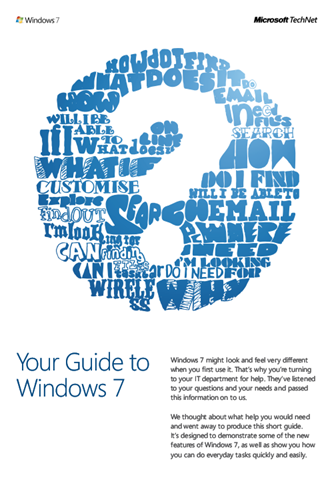
OFFER: Free eBook–“Your Guide to Windows 7”

image

A short 8-page eBook/document’s been released for Windows 7 by the usability group here at Microsoft that goes over some of the fundamental differences between Windows Vista & Windows 7.

Subjects covered in this guide, include:

  • “Where have all my gadgets gone?”
  • “I need to find a file.  How do I search for it now?”
  • “Help!  How do I switch to Projector Mode?”
  • “How can I see everything I’ve got open without clicking each individual window?”
  • “How do I quickly get to the files and apps I use most?”
  • “How can I get help from my IT deparment without them being able to see my screen?”

Go check it out.  After all, it’s free.

imageI don’t need to reiterate what everyone’s already written.  I’m so far behind on blog updates because of illness, it’s disgusting.

Here’s some things I know regarding the timeline:

  • February 9:  RTM
  • February 16: Windows 7 and Windows Server 2008 R2 SP1 will be available to MSDN/TechNet subscribers and Volume Licensing customers.
  • February 22: It will be generally available through Windows Update and the Download Center.

Functional improvements:

  • Windows 7 SP1 includes minor updates, including some made previously available through Windows Update, as well as client-side support for two new virtualization features enabled in Windows Server 2008 R2 SP1.
  • Windows Server 2008 R2 SP1will include:
    • RemoteFX: A platform feature with the ability to virtualize the Graphical Processing Unit (GPU) on the server side and deliver next-generation rich media and 3D user experiences for Virtual Desktop Infrastructure (VDI).
    • Dynamic Memory: A free, built-in feature of Hyper-V that allows customers to increase their virtual machine density, using the resources they already have, without sacrificing performance or scalability.

Key notables about SP1:

  • NO UPGRADES. There’s no upgrade from the beta or RC of Service Pack 1.  You need to uninstall the SP prerelease before installing the final bits.
  • NO IE9. Internet Explorer 9.0 is not in the Service Pack.  Internet Explorer will be released later in the year, separate from Service Pack 1.
  • COMBINED SERVICE PACK:  The service pack is a combined installer for both Windows 7 and Windows Server 2008 R2.

Supporting Docs:

image

We published an eBook for individuals interested in the trend toward cloud computing, why it’s happening and how customers should approach this change in the industry.

  • Cloud Computing Basics
    • Cloud Computing
      • Software as a Service (SaaS)
    • Public Cloud
      • Infrastructure as a Service (IaaS)
      • Platform as a Service (PaaS)
    • Private Cloud
    • Hybrid Approach
  • Is Cloud Computing Right for my Business?
    • Core Issues to Consider
  • Microsoft’s Unique Approach to Cloud Computing
    • Applications/Software as a Service (SaaS)
      • Live Services
      • Online Services
      • Business Productivity Online Services
    • Platform as a Service (PaaS)
    • Private Clouds

[opening paragraph]

An Industry Shift Toward Cloud Computing
Since inception, the IT industry experienced a variety of natural evolution points, most marked with rapid change followed by years of internalization and consumption. According to most observers, the industry is rapidly evolving toward services as a core component of how consumers and business users interact with both software and one another. This is being referred to, in different contexts, as “software as a service,” “cloud computing,” “Web 2.0,” or simply “services,” and it represents a new deployment choice for the industry. The hype is deafening in places, and the key to success is recognizing that “cloud” adoption does not represent an all-or-nothing proposition.

image

We’ve released a new 17 page document entitled “Discover Productivity Without Boundaries – Your guide to what’s new in the Office 2010 suites available through Volume Licensing.”

It provides a very thorough comparison between the 3 most recent releases of Office and demonstrates the improvements between each.

Here’s a summary of the contents:

  • Top New Capabilities (Highlights)
  • Compare Microsoft Office 2010 to Previous Versions
    • Use Office Virtually Anywhere
    • Work Better Together
    • Bring Ideas to Life
    • Gain a Practical Productivity Platform for IT
  • Which Edition is Rights for My Business (Office Standard 2010 vs Office Professional Plus 2010)
  • Differences in Features Between Editions
    • Information Rights Management & Policy Capabilities
    • Contextual Access to Business & Social Networking
    • Integrated Enterprise Content Management
    • Publish Data Insights
    • Unified Instant Messaging, Presence & Voice
    • Managed E-Mail Folders & Retention Policy
    • Integrated Electronic Forms

WHITEPAPER:  Feature Comparison – Office 2003, Office 2007, Office 2010
http://www.microsoft.com/downloads/en/details.aspx?FamilyID=4fbcd1ec-269b-4aa3-9866-315a6d3d1284

Taken from the Global Foundation Services blog:

imageToday, I am pleased to announce that Microsoft’s cloud infrastructure has achieved another milestone in receiving its Federal Information Security Management Act of 2002 (FISMA) Authorization to Operate (ATO).  Meeting the requirements of FISMA is an important security requirement for US Federal agencies. The ATO was issued to Microsoft’s Global Foundation Services organization. It covers Microsoft’s cloud infrastructure that provides a trustworthy foundation for the company’s cloud services, including Exchange Online and SharePoint Online, which are currently in the FISMA certification and accreditation process. 

This ATO represents the government’s reliance on our security processes and covers Microsoft’s General Support System and follows NIST Special Publication 800-53 Revision 3 “Recommended Security Controls for Federal Information Systems and Organizations.”

…

Read more about the announcement at the source:

imageThe Microsoft Security Development Lifecycle (SDL) team has released a new Quick Security Reference white paper addressing “Exposure of Sensitive Information.”

The Exposure of Sensitive Information paper is intended to help information professionals gain a more thorough understanding of how to identify and address exposure of sensitive information vulnerabilities in software.

This compliments the two previous security quick references published on Security Development Lifecycle to help you better understand and address common attacks that may be affecting your software, Web sites, and users.

  • Cross-Site Scripting
  • SQL Injection

DOWNLOAD:  SDL Quick Security References – “Exposure of Sensitive Information”
http://www.microsoft.com/downloads/en/details.aspx?FamilyID=79042476-951f-48d0-8ebb-89f26cf8979d&displaylang=en

« Newer Posts - Older Posts »

Categories