We recently released an updated list of Office applications and features available in Government plans such as Office 365 Government Community Cloud (GCC).  It presents a table that specifically goes over:

  • Excel
  • Forms
  • OneNote
  • Outlook
  • PowerPoint
  • Whiteboard
  • Word

image

Visit the following site for the full table:

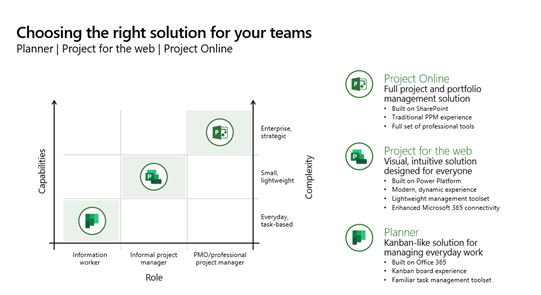
imageThe following solutions are a scalable part of the Project family, depending on expertise & intensity of an individual’s project management role.  All integrate with Azure AD identity, Outlook & Teams, and provide a path for Project Management growth for the end user.

The following presentation reviews both Planner & Project for the Web & the use cases:

Here’s a summary of some resources for Planner & Project for the Web:

  1. Microsoft Planner
    Natively integrated into Microsoft 365, Microsoft Planner costs nothing additional to use by M365 G3+ customers.  It’s designed for casual task & timeline management but is the future of Microsoft Project Management solutions.  It’s being connected into “Project for the Web” & expanded to take advantage of all the power of Project.
    1. Roadmap: The new Microsoft Planner: A unified experience bringing together to-dos, tasks, plans and projects
      https://techcommunity.microsoft.com/t5/planner-blog/the-new-microsoft-planner-a-unified-experience-bringing-together/ba-p/3977998
    2. Learning: Video training for Microsoft Planner
      https://support.microsoft.com/en-us/office/microsoft-planner-video-training-4d71390f-08d8-4db0-84ea-92fb078687c7
    3. Help: Online help & assistance for Microsoft Planner (Integration with Teams, Android/iOS, Outlook, Accessibility, etc.)
      https://support.microsoft.com/en-us/planner
    4. IT Admins: Administrative information for IT
      https://learn.microsoft.com/en-us/office365/planner/planner-for-admins
  2. Microsoft Project for the Web
    “Project for the Web” is Microsoft’s web-based project management solution for Enterprises.  It’s targeted at informal project manager & designed for simplicity & has an intuitive interface – while still embracing Enterprise collaboration & integration requirements like usage with Microsoft Teams, Outlook, SharePoint, etc. It is licensed through Project Plan 1+ & retails for $10/user/mo.  It will be integrated into Microsoft Planner in Spring 2024.
      1. Overview: A simple, end user explanation of Project for the Web is available here: What is Project for the web? – Microsoft Support
      2. Video overview: https://aka.ms/ProjectforthewebandProjectOnline
      3. Learning:
        1. Unified Support workshop – See attached datasheet
        2. Project for the Web – Youtube Videos
          1. Introducing Microsoft Project for the web
          2. Getting started with Project for the web
          3. Agile, Goals, Workloads, and more in Project for the web
          4. Leverage Microsoft Project for the web with the Project Accelerator
          5. Project for the web for work management
          6. Advanced deployment for Project for the web
          7. Extensibility in Project for the web – YouTube
      4. Help:
          1. Admin help – https://learn.microsoft.com/en-us/project-for-the-web/projectforweb-admin-hom
          2. End user help – https://support.office.com/project
      1. IT Admins:
        Project for the Web – Getting Started & Deployment
        https://learn.microsoft.com/en-us/project-for-the-web/project-for-the-web-get-started-guide-for-admins
  3. Microsoft Project
    Microsoft Project is usually considered the “easy” project management solution for full-featured, Enterprise class customers – but has the benefit of integrating with purpose-designed Project Management solutions like the Project Online service, Primavera, etc. as well as Portfolio Management & Power BI visualization & reporting.
    1. Product: Project management built to keep track of all your work (microsoft.com)
    2. Synopsis: Overview of Microsoft Project – YouTube
    3. Video: Microsoft Project Management video series – Microsoft Project

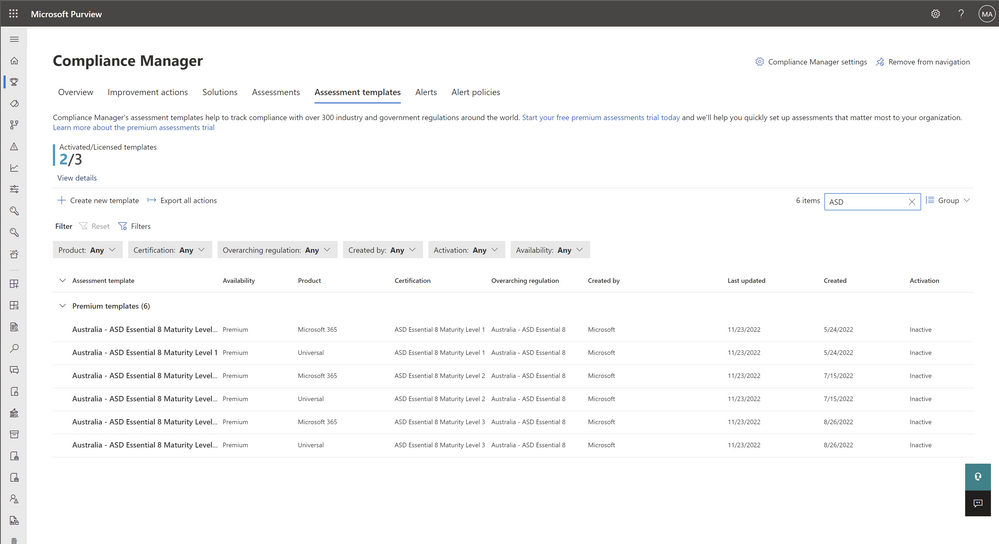
imageIt’s a bit buried in our documentation however customers subscribing to Microsoft 365 E3 are entitled to 3 Premium templates of their choice for Purview Compliance Manager at no charge.

These templates can be interchanged as needed as long as no greater than 3 templates are used at any given time.  If more than that 3 templates are required, additional template entitlements can be “purchased” or subscribed to to increase the quantity available.

For example, I installed the CJIS, IRS 1075, & HIPAA Hitech compliance templates which ran its audit scan regularly. I swapped out the HIPAA Hitech scan for GDPR a month later without an additional charge or penalty.

For more details, read the following documentation:

Posted by: kurtsh | December 7, 2023

INFO: Windows 10 Extended Security Update availability

imageYesterday, we announced that options for Windows 10 licensees/users that can’t upgrade to Windows 11 by the end of life date – October 14, 2025.

These Windows 10 customers will have 3 options:

  1. Move out-of-support Windows 10 users to cloud-based desktops using Azure Virtual Desktop running Windows 10 where they will receive ESUs at no additional cost – only in Azure.
  2. Allow out-of-support Windows 10 users to remote/”RDP” into cloud-based Windows 365 PCs running Windows 11 & receive ESUs for their on-prem Windows 10 devices at no additional cost.
  3. Purchase Extended Security Updates (ESUs) per qualified Windows 10 device in 1-year subscription increments.

WARNING: Be aware, if past history is any metric:

  • Extended Security Updates for the 1st year generally costs roughly the same amount as repurchasing the entire Windows OS license.
  • Extended Security Updates for a 2nd year are typically 2x the cost of the 1st year.  The 3rd year is usually 4x the cost of the 1st year.  There are no ESUs available beyond 3 years.

Here’s the clip from the announcement:

Extended Security Update program for Windows 10

While we strongly recommend moving to Windows 11, we understand there are circumstances that could prevent you from replacing Windows 10 devices before the EOS date. Therefore, Microsoft will offer Extended Security Updates.

Like the Windows 7 ESU program, your organization will be able to purchase a yearly subscription to security updates. The yearly commitment is renewable for three years. Devices enrolled in ESUs will receive monthly security updates to keep these Windows 10 PCs secure.

The ESU program for Windows 10 will include critical and/or important security updates. ESUs do not include new features, customer-requested non-security updates, or design change requests. Technical support beyond the ESU itself is also not available.

  • For Windows 365 customers, ESUs will be provided for the Windows 10 devices that connect to a Cloud PC running Windows 11 at no additional cost.
  • If you run a Windows 10 instance in Azure Virtual Desktop, ESUs will also be available at no additional charge on those virtual machines (consumption not included).

Stay tuned for more ESU program updates as we approach availability, including an ESU program for individual consumers

For more details, visit:

Posted by: kurtsh | December 7, 2023

DOWNLOAD: Microsoft Copilot Adoption Kit

imageAre you interested in Microsoft Copilot but not sure how to get started? Download the "Copilot Adoption Kit"!

  • Learn how to use Copilot with a user-training PowerPoint deck
  • Discover 5 tips for maximizing the benefits of Copilot at work
  • Explore the features of Copilot with an interactive intro
  • Get support from IT Admins with adoption kit instructions & change mgmt templates
  • Communicate the value of Copilot with email templates

Get the kit here!

imageEasily create images with generative AI for free!

Microsoft Designer comes with a number of capabilities including:

  • Image Creator
  • Design Creator
  • Brand Kit Generator
  • Generative Erase
  • Remove background
  • Blur background

Here’s the avatar I created for myself. You can use and edit the prompt I used below: (Use the link below on a desktop browser.)

https://designer.microsoft.com/image-creator?p=cartoon+Asian+man+with+a+smile+on+the+front%2C+wearing+a+blue+collared+shirt%2C+brown+eyes%2C+wears+black+large+wire+frame+glasses+and+short+black+classic+slick+backed+hair.+Holding+a+Microsoft+laptop.+text+3D+rendering%2C+typography%2C+illustration%2C+painting%2C+photo%2C+poster%2C+3d+render

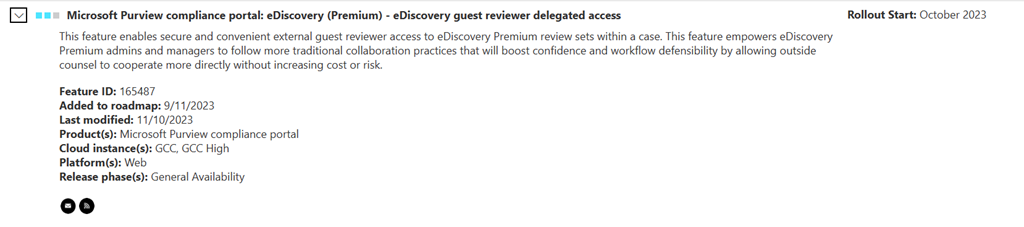
imageA major feature for Government/GCC eDiscovery Premium users was released last month: “eDiscovery guest reviewer delegated access”

This feature allows Government customers to share read-only eDiscovery packages with external guests directly over the cloud.

Here is the entry from the Microsoft 365 Roadmap for the GCC/Government cloud instance:

Microsoft Purview compliance portal: eDiscovery (Premium) – eDiscovery guest reviewer delegated access (GCC)

This feature enables secure and convenient external guest reviewer access to eDiscovery Premium review sets within a case. This feature empowers eDiscovery Premium admins and managers to follow more traditional collaboration practices that will boost confidence and workflow defensibility by allowing outside counsel to cooperate more directly without increasing cost or risk.

https://www.microsoft.com/en-us/microsoft-365/roadmap?featureid=165487

DOCUMENTATION
Documentation on Guest Reviewer delegated access is available here:

Posted by: kurtsh | December 4, 2023

RELEASE: Microsoft Copilot Studio

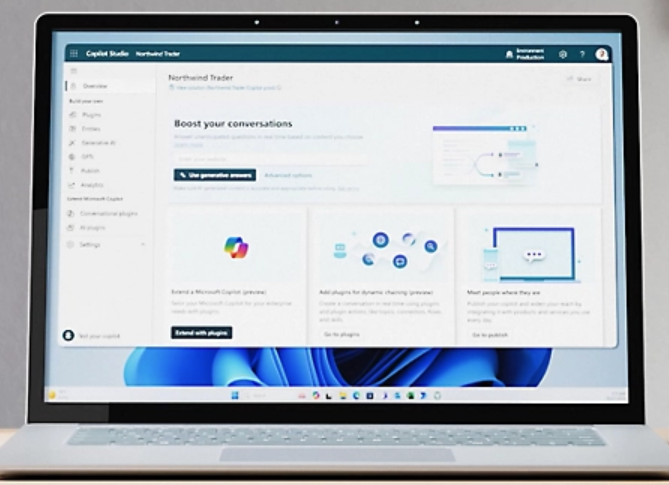
imageIntroducing Microsoft Copilot Studio – Customize Microsoft Copilot for Microsoft 365 or build your own copilot experiences.

Copilot Studio offers graphical development environment to build copilots using generative AI, sophisticated dialog creation, plugin capabilities, process automation, and built-in analytics that work with Microsoft conversational AI tools.

#microsoft #ai #copilot #copilotstudio

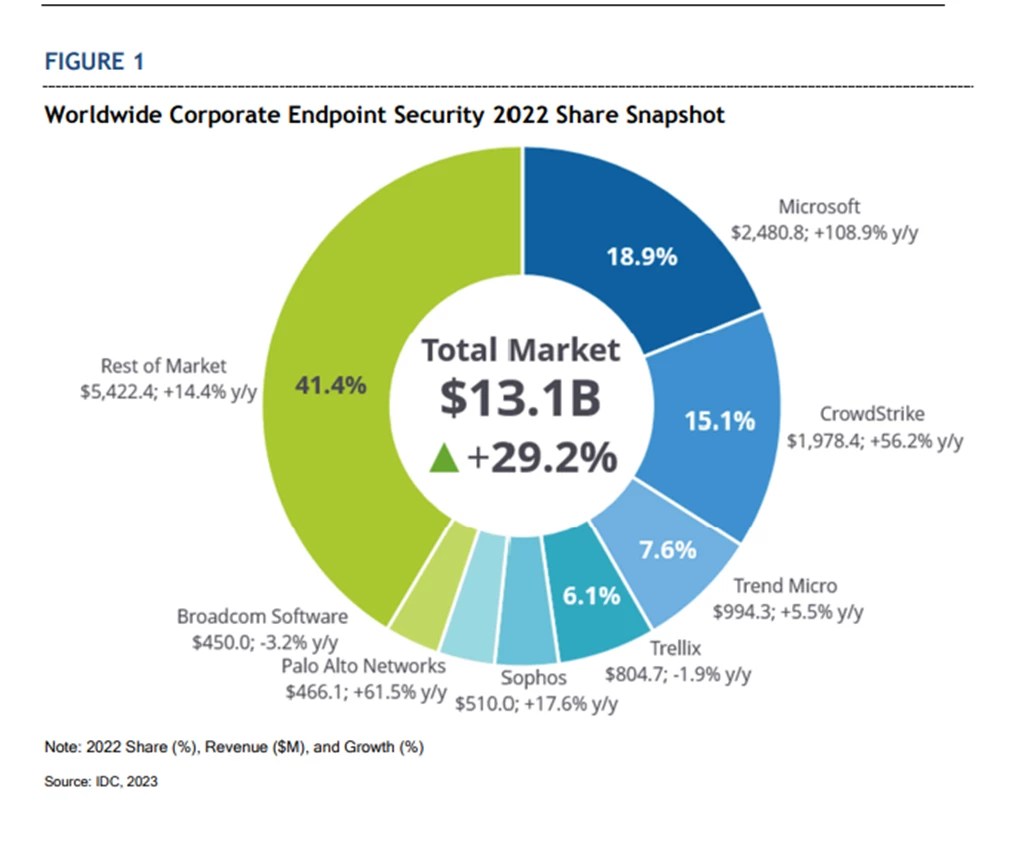
Microsoft is ranked #1 in market share in the IDC Worldwide Corporate Endpoint Security Market Shares report, 2022. More customers choose and trust Microsoft Defender for Endpoint to defend their multiplatform devices than any other vendor.

Microsoft Defender for Endpoint is an enterprise endpoint protection platform that enables security teams to gain a holistic view into their device estate across multiplatform endpoints, servers, as well as enterprise Internet of Things (IoT) devices, and mitigates threats with key capabilities including:

✅ Endpoint detection and response (EDR).
✅ Vulnerability management.
✅ Attack surface reduction.
✅ Next-generation protection.
✅ Auto investigation and response.

While prevention capabilities and vulnerability management are critical for endpoint security solutions, protection capabilities are key for defenders to help keep their organization safe. That’s why Defender for Endpoint protection goes far beyond traditional antivirus technologies. Our next-generation protection combines machine learning models trained on cloud-scale data and behavior-based detection to protect in real-time against malware, polymorphic threats, and other malicious activity.

Download the report here:
“IDC ranks Microsoft Defender for Endpoint first in market share” | Microsoft Security Blog
https://www.microsoft.com/en-us/security/blog/2023/07/06/microsoft-defender-for-endpoint-is-ranked-number-one-in-market-share-in-the-idc-worldwide-corporate-endpoint-security-market-shares-report-2022/


#defender #Microsoft #idc #endpointprotection

Posted by: kurtsh | November 30, 2023

BETA: Microsoft 365 Archive

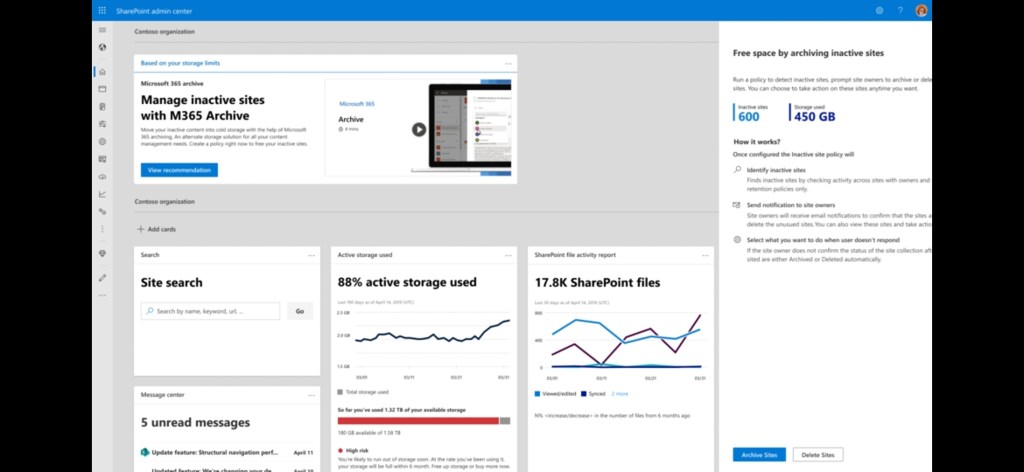
Introducing “Microsoft 365 Archive”: Low cost storage of inactive SharePoint sites. Retain inactive data in a SharePoint cold storage tier & keep the same searchability, security & compliance at a much reduced cost.

✅ Introducing Microsoft 365 Archive
https://techcommunity.microsoft.com/t5/sharepoint-premium-blog/welcome-to-microsoft-inspire-2023-introducing-microsoft-365/ba-p/3874887

✅ Overview of Microsoft 365 Archive
https://learn.microsoft.com/en-us/microsoft-365/syntex/archive/archive-overview

✅ Set up Microsoft 365 Archive
https://learn.microsoft.com/en-us/microsoft-365/syntex/archive/archive-setup

✅ Adoption
https://adoption.microsoft.com/en-us/microsoft-365-archive/

✅ Pricing
https://learn.microsoft.com/en-us/microsoft-365/syntex/archive/archive-pricing

#Microsoft #msftadvocate #Microsoft365 #Archive

« Newer Posts - Older Posts »

Categories