Posted by: kurtsh | November 21, 2025

RELEASE: Windows Autopatch available for GCC

UPDATE 1/7/26:
For GCC customers using M365 G3 or G5, Windows Autopatch doesn’t appear automatically in the suite. To enable Autopatch, customers need to activate their Windows Enterprise entitlement using the $0 Windows Enterprise (OLS) activation SKU.

After the customer’s admin orders the $0 activation SKU from their licensing vendor, they will receive a service activation email confirming that the Windows Enterprise license has been provisioned on the tenant. From there, the admin can assign the licenses to users using multiple methods (i.e., group‑based, seat‑level).

This step ensures the correct Windows service plans, including Autopatch, are provisioned in the tenant and aligns with the typical approach for most Windows Enterprise value in M365 G3/G5 for GCC customers. Once the activation SKU is applied and licenses are assigned, Autopatch will become available and no additional purchase is required.

For step-by-step guidance on how to assign and activate Windows Enterprise licenses, please follow the instructions in this Microsoft Learn article: https://learn.microsoft.com/en-us/windows/deployment/deploy-enterprise-licenses?pivots=windows-11

ORIGINAL POST: 11/21/25
Keep devices at your government organization secure and productive with minimal disruption to users with Windows Autopatch!

MANAGED SERVICE FOR WINDOWS 10/11 PATCHING AT NO ADDITIONAL COST
If you have a Microsoft 365 GCC cloud instance, you will be able to enroll in a true managed service, operated from the Microsoft cloud, fully funded by your Microsoft 365 licensing without any additional cost.

Windows Autopatch provides a rich set of automated patching/update services, driven by Microsoft Intune, that rolls out patches gradually via IT-defined “update rings” to ensure installation is safe, while providing telemetry around machines that do have problems so you can eliminate similar machines from your rollout. Updates can include OS version releases, quality updates, feature updates and drive/firmware updates with comprehensive reporting.

Watch the following introduction to Windows Autopatch through Microsoft Mechanics:

Windows Autopatch includes the following:

  • Windows Autopatch provides control over which content is approved for deployment to which devices through Windows Update.
  • Windows Autopatch groups help you automate a safe rollout process. You can distribute devices into rings and recommend release schedules, leaving you with the final say.
  • Get secure faster with hotpatching: apply security patches without waiting for a restart.
  • Pause or expedite monthly quality updates or drivers for groups of devices in your environment.
  • Simplify update compliance reporting. Windows Autopatch reporting tracks which devices have the latest updates installed with less than 4-hour latency.
  • Manage policy and see reporting through the Microsoft Intune admin center.

DEPLOY WITH FASTTRACK FOR MICROSOFT 365 AT NO ADDITIONAL COST
FastTrack for Microsoft 365 will provide customers both remote planning & guidance for the deployment of both Microsoft Intune & Windows Autopatch through a Deployment Engineer at no additional cost. Contact your Account team for details.

Watch this video from the Windows Autopatch team about how FastTrack for Microsoft 365 can help you get the service deployed:

Resources:

Read more at the announcement post:

Microsoft has established new strategic partnerships with Anthropic and NVIDIA to help all 3 companies optimize all 3 layers of the AI ecosystem – silicon, systems, models – for cost, latency, performance by announcing:

  • Customers using Microsoft Foundry will be able to access Anthropic’s AI models
  • Microsoft will deliver access to Anthropic Claude across the Copilot family
  • Anthropic is committing to both leverage an initial Gigawatt of Azure cloud capacity for model training & partnering with Microsoft to deliver Enterprise AI solutions
  • Nvidia is establishing a strategic partnership to support Anthropic’s future growth through it’s accelerators to optimize future AI models

Watch Anthropic co-founder and CEO Dario Amodei, Microsoft Chairman and CEO Satya Nadella, and NVIDIA founder and CEO Jensen Huang discuss what’s coming in this 10min video.

Posted by: kurtsh | November 20, 2025

NEWS: Announcing “Microsoft Agent Factory” @Ignite2025

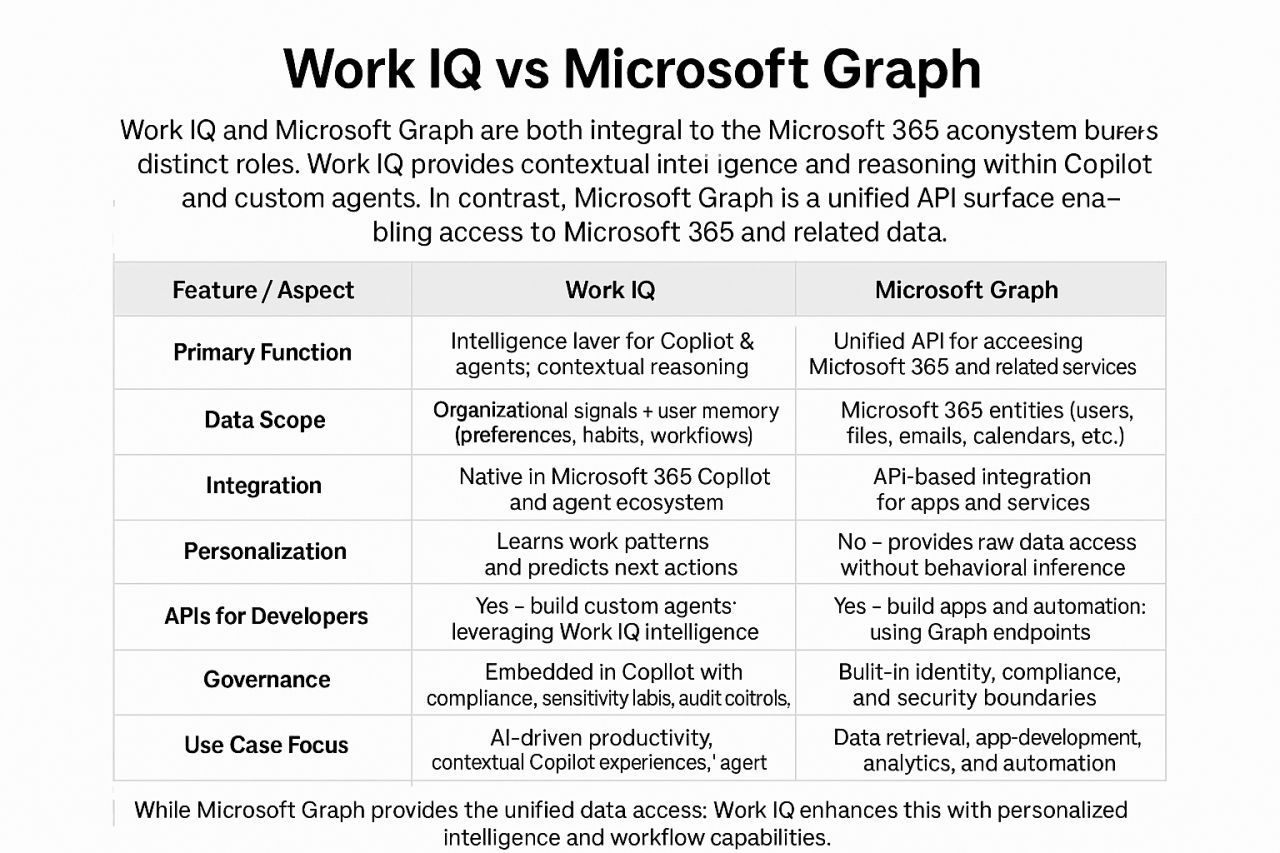
At Microsoft Ignite, we introduced Work IQ, Fabric IQ, and Foundry IQ to provide the context agents need to reason, act, and deliver business value. In addition, we introduced Agent 365—the control plane for AI agents—to help organizations observe, manage, and secure their agents, delivering observability at every layer.

Microsoft Agent Factory (MAF)
Microsoft Agent Factory is a program that brings Work IQ, Fabric IQ, and Foundry IQ together to help organizations build agents with confidence. With a single metered plan, organizations can build with IQ using Microsoft Foundry and Copilot Studio – which means you can deploy agents anywhere, including Microsoft 365 Copilot, with no upfront licensing and provisioning required. Eligible organizations can also tap into hands-on support from top AI Forward Deployed Engineers (FDEs) and access tailored role-based training to boost AI fluency across teams.

For more information, visit the blog announcement here:
http://aka.ms/maf-blog

GitHub was named the leader of leaders for the second year in a row in Gartner’s second Magic Quadrant for AI Code Assistants, published on September 17, 2025. 

Gartner positioned GitHub as a Leader for the second year in a row—highest and furthest in both Ability to Execute and Completeness of Vision.

As organizations race to adopt AI, many encounter challenges such as tool sprawl, fragmented governance, and a lack of platform strategy. GitHub takes a different approach: by embedding GitHub Copilot into everyday developer workflows, enabling advanced capabilities like Agent Mode, and centralizing development on GitHub Enterprise Cloud, GitHub helps teams move faster, stay secure, and scale AI adoption with confidence.

Download the Gartner Magic Quadrant for September 2025 below to discover how vendors were evaluated and why GitHub was recognized as a Leader:

Microsoft Ignite 2025 is upon us and for those people joining us in San Francisco this year, (to make your evenings a little easier to coordinate) I’ve listed out all the upcoming off-menu lunches, cocktail hours & after hours parties.  Remember most of these require registration or requests for invites so plan ahead.  (There’s unfortunately no strings I can pull, if a reg list is full – even for the Microsoft events.)

(Can’t attend in person? Be sure to register for FREE for the ‘virtual conference’ (aka Online Digital Pass), so you can remotely see the sessions live when they’re broadcast & also on-demand when the conference is over!)

  • Tuesday, November 18, 2025
    • Microsoft Ignite 2025 Lunch & Learn – Strim
      Tuesday, November 18, 2025 – 12-1:30PM
      Fogo de Chão Brazilian Steakhouse – 201 3rd St. Suite 10
      Invite req/RSVP: https://go2.striim.com/microsoft-ignite-ai-roundtable
    • Microsoft & CyberProof – Lunch & Learn Session at The Harlequin
      Tuesday, November 18, 2025 – 12–2:30PM
      The Harlequin Restaurant – 68 4th St
      Invite req/RSVP: https://www.cyberproof.com/microsoft-ignite-2025-lunch-and-learn/
    • Time Capsule Club: A VIP Happy Hour – Eon & Soma Capital
      Tuesday, November 18, 2025 – 5:30–7:30PM
      The Harlequin Restaurant – 68 4th St
      Invite req/RSVP: https://www.eon.io/event/happy-hour-microsoft-ignite-2025
    • The Ignite Mixer at Novela – Honeycomb, Catchpoint & Liatrio
      Tuesday, November 18, 2025 – 6:30–9:30PM
      NOVELA – 662 Mission St
      Invite req/RSVP: https://events.honeycomb.io/IgniteHHNovela-Honeycomb
    • Data After Dark Happy Hour – Cyera & Cohesity
      Tuesday, November 18, 2025 – 7:30–9:30PM
      The Grove – Yerba Buena – 690 Mission St
      Invite req/RSVP: https://events.cyera.io/thegrovehappyhour
    • Microsoft Ignite: FinOps Community Celebration! – ProsperOps
      Tuesday, November 18, 2025 – 6:30-9:30pm PT
      Tropisueno – 75 Yerba Buena Ln, San Francisco, CA 94103
      Invite req/RSVP: https://www.prosperops.com/event/microsoft-ignite-finops-community-celebration/?utm_source=conferenceparties
    • Zetta Bites, Brews, Billiards & More – Numecent        
      Ignite Your Night with Numecent
      Tuesday, November 18, 2025 – 7:30–10:30PM
      Hotel Zetta – Playroom – 55 5th St
      Invite req/RSVP: https://info.numecent.com/ignite-party
    • #AvePointRED Party – AvePoint        
      Tuesday, November 18, 2025 – 8–11PM
      San Francisco Museum of Modern Art – 151 3rd St, San Francisco, CA 94103
      Invite req/RSVP: https://www.avepoint.com/events/avepoint-red-party
    • Microsoft Security Experiences SF – Microsoft Security
      Tuesday, November 18, 2025 6:00PM-10:00PM
      Security is a team sport—and Microsoft Ignite is your chance to connect with the best in the business. There will be multiple community events throughout the week. Don’t miss the Secure the Night party—our signature celebration with customers and partners on Tuesday, November 18, 2025. Register here (please note, the party requires a separate registration from the main conference).
      Invite req/RSVP: https://aka.ms/MSIgnite_SecurityExperiencesSF
      (To learn more about connecting with Microsoft Security while at Microsoft Ignite 2025, visit Connect with the security community at Microsoft Ignite 2025.)
      • Note: Identification as public sector
        Attendees from the public sector (defined as employees of the US federal government, state and local government, non-US international government, State Owned Entity, and education employees) should consult their internal compliance requirements and obtain approval from the appropriate ethics or compliance official prior to accepting an invitation to any event offering gratuitous items such as meals and other business courtesies. If you have any questions about this event, you may reach out to securityevents@microsoft.com.
         
    • Microsoft Security Leaders Dinner – Microsoft Security
      Tuesday, November 18, 2025 at 6:00 PM-8:30PM
      Join Microsoft Security leaders on Tuesday, November 18, 2025, at the Palace Hotel in San Francisco for an evening of good food and great conversation. Network with peers from across the industry, share ideas, and build new connections. After dinner, join us for Secure the Night—a casual evening of music, drinks, and continued networking.
      Invite req/RSVP: http://microsoftsecurityevents.eventbuilder.com/events/11f05b4923c44190971bb1ab5e8aabf3/
      (To learn more about connecting with Microsoft Security while at Microsoft Ignite 2025, visit Connect with the security community at Microsoft Ignite 2025.)
      • Note: Identification as public sector
        Attendees from the public sector (defined as employees of the US federal government, state and local government, non-US international government, State Owned Entity, and education employees) should consult their internal compliance requirements and obtain approval from the appropriate ethics or compliance official prior to accepting an invitation to any event offering gratuitous items such as meals and other business courtesies. If you have any questions about this event, you may reach out to securityevents@microsoft.com.
         
    • Evening events in the Hub at Microsoft Ignite
      On November 18 and 19, after the day’s sessions end, the Hub transforms into a social destination. Join us for two exciting evenings of connection, conversation, and celebration, complete with curated bites and drinks, live music, interactive activities, and plenty to explore.
  • Wednesday, November 19, 2025
Posted by: kurtsh | November 6, 2025

DOWNLOAD: Microsoft 365 Message Center Agent

The M365 Copilot Message Center Agent allows you to search the Microsoft 365 Admin Center messages with Copilot chat using natural language prompts. Includes details regarding related features in the Microsoft 365 Roadmap.

Not only can admins and ‘Message Center Readers’ search for messages, but you can also use the power of generative AI to summarize them and draft internal communications. Here are some examples of what you can do:

  • Search for messages: Find specific messages in the Microsoft 365 Admin Center message center. Search by keywords, date ranges, and message types. Search is case-insensitive. Search by message Title (default) or message body.
  • Summarize messages: Get a summary of the latest messages in the message center.
  • Draft internal communications: Generate draft emails or messages to share information about updates with your team.
  • Get insights: Gain insights regarding impact of updates for your organization.
  • Get alternatives Get suggested alternatives for deprecated features.
  • Get suggested actions: Get suggested actions for updates that require your attention.
  • Roadmap Detail Included: Results include related Microsoft 365 Roadmap details to provide additional context about upcoming features and changes.

Visit the following for more details:

The Microsoft 365 Community Conference is the premier event for professionals who want to maximize their investment in Microsoft 365, Copilot, and related technologies.

Attend the 2026 conference & take advantage of what M365Con has to offer:

1. Exclusive Access to Microsoft Experts

  • Hear directly from Microsoft engineers, product managers, and thought leaders shaping the future of Microsoft 365.
  • Get insider updates on Copilot, SharePoint, Teams, Viva, and Power Platform innovations.
  • Participate in Ask Me Anything (AMA) sessions with Microsoft MVPs and technical specialists.

2. Hands-On Learning and Deep-Dive Workshops

  • Attend technical labs, scenario-based workshops, and certification prep sessions.
  • Learn best practices for Copilot adoption, security and compliance, and governance frameworks.
  • Gain practical skills to accelerate cloud migration, AI integration, and employee experience initiatives.

3. Networking with the Global Microsoft 365 Community

  • Connect with thousands of IT leaders, developers, and business decision-makers.
  • Share strategies and success stories with peers from government, enterprise, and SMB sectors.
  • Build relationships that extend beyond the conference through community meetups and social events.

4. Future-Ready Insights

  • Discover how AI-powered productivity will transform work in 2026 and beyond.
  • Explore roadmaps, new features, and partner solutions that drive innovation.
  • Learn how organizations are leveraging Copilot for Teams, SharePoint Premium, and Microsoft Fabric for data-driven decision-making.

5. Unmatched Value

  • Access hundreds of breakout sessions, keynotes, and hands-on demos in one place.
  • Take home actionable strategies to improve efficiency, security, and employee engagement.
  • Enjoy Orlando’s vibrant setting while investing in your professional growth.

Register today & book your reservation for one of the limited, discounted hotel blocks for the conference before they fill up!

  • Date:
    April 21 – 23, 2026
  • Location:
    Orlando, FL – Loews Sapphire Falls and Loews Royal Pacific Resorts
  • Registration:
    Microsoft 365 Community Conference
    https://m365conf.com/

We’re excited to announce that SQLCon 2026 is coming as part of the Microsoft Fabric Community Conference, March 16-20, 2026!

We’ve created a premier level conference for data professionals, featuring 50 breakout sessions and 4 expert-led workshops covering SQL Server, Azure SQL, SQL in Fabric, SQL Tools, migration & modernization, optimization, database security, AI Apps with SQL and much more.

  • Same expo hall, same registration desk, same conference app as FabCon. 
  • Registering for one gets you full access to the other. 
  • Attend any of the sessions you want, hang out in the same community lounge. 
  • Attend both keynotes in the State Farm Arena. 
  • You’re invited to the same attendee party at the Georgia Aquarium.

This is going to be a BIG event so register for the conference & get into one of the hotel blocks NOW before it’s too late!

  • Dates:
    March 16-20, 2026
  • Location:
    Georgia World Congress Center
    285 Andrew Young International Blvd NW, Atlanta, GA 30313
    Building C
  • Registration:
    http://aka.ms/sqlcon
    (Early Access Pricing Extended to November 14th and save $200 with the code SQLCMTY200)

For individuals looking for documentation referencing Microsoft 365 Copilot, Copilot Chat & their adherence to FBI Criminal Justice Information Systems regulatory compliance (CJIS), the following is referenced in the article, “Data, Privacy, and Security for Microsoft 365 Copilot“.

Microsoft 365 Copilot & Copilot Chat are operated within the same service boundary & the same governance as the rest of Microsoft 365, and as such, is covered by the same attestations applied to other Microsoft 365 services including Exchange Online, SharePoint Online, OneDrive for Business, Microsoft Teams, etc.

Specifically, with Microsoft’s documentation:

“Microsoft 365 Copilot, including Microsoft 365 Copilot Search, is compliant with our existing privacy, security, and compliance commitments to Microsoft 365 commercial customers, including the General Data Protection Regulation (GDPR) and European Union (EU) Data Boundary.”

Additionally, within the section dedicated to “Meeting regulatory compliance commitments“:

“Copilot is integrated into Microsoft 365 and adheres to existing privacy, security, and compliance commitments to Microsoft 365 customers.”

Microsoft 365 GCC has attestations from Microsoft that the service has been evaluated as having the necessary functions & attributes to be configured to adhere to FBI CJIS regulatory compliance requirements.

  • The FBI does not offer certification of Microsoft compliance with CJIS requirements. Instead, a Microsoft attestation is included in agreements between Microsoft and a state’s CJIS authority, and between Microsoft and its customers.
  • Microsoft provides certain government cloud services (“Covered Services”) in accordance with the FBI Criminal Justice Information Services (“CJIS”) Security Policy (“CJIS Policy”). The CJIS Policy governs the use and transmission of criminal justice information. All Microsoft CJIS Covered Services shall be governed by the terms and conditions in the CJIS Management Agreement.
  • Microsoft signs an Information Agreement with a state CJIS Systems Agency (CSA); customers may request a copy from your state’s CLETS Administration Section (CAS). In California, this is: cas at doj dot ca dot gov.
  • Customers may also review security and compliance reports prepared by independent auditors so they can validate that Microsoft has implemented security controls (such as ISO 27001) appropriate to the relevant audit scope.

References:

It’s not clear to many that Copilot Studio Lite (formerly called “Copilot Studio agent builder”) is available to GCC cloud instances, so I’m putting this right here to make sure folks know:

Copilot Studio Lite is used to build “Declarative Agents” or special purpose agents for specific use cases. The creator simply types in English what they want the agent to do & points to the data source to operate on. It requires NO CODING and can immediately access any files, emails or Teams chats you have access to. It also provides access to any additional data sources, external to M365, that your IT organization has provided, such as Dynamics, ServiceNow, Workday, Salesforce, etc.

The following was written prior to the renaming of “Copilot Studio agent builder” to “Copilot Studio Lite”.

Microsoft Copilot Studio agent builder now generally available in Office 365 Government Community Cloud (GCC)

Copilot Studio agent builder is now generally available for U.S. Government Community Cloud (GCC) customers. This release enables users to build lightweight agents by simply describing their needs in natural language, with no coding or technical expertise required.

With Copilot Studio agent builder, you can tailor Microsoft 365 Copilot by building agents that embed specific instructions, capabilities, and knowledge for your organization’s needs. For example, create an onboarding agent that guides new hires and connects to sources like SharePoint, Teams, Outlook, the web, and external systems to ensure responses are accurate, relevant, and permission-aware. Once published, agents can be used individually or across teams, accessible via dedicated chat or @mention in Microsoft 365 Copilot.

To get started, GCC admins can enable agents in the Microsoft 365 admin center . Once enabled, users can begin building and using agents directly within Microsoft 365 Copilot.

Support and Resources

We are committed to equipping government workforces with the tools and guidance needed to adopt Copilot confidently. Explore our resources below.

Documentation and Admin Controls: Detailed documentation and admin controls are available to help you manage and configure Copilot’s features effectively, helping to ensure that your deployment aligns with your security policies and operational requirements.

Service Description: Copilot Service Description

Adoption Resources:

Overview: Microsoft 365 Copilot

Short explainer videos: Microsoft’s Data and Security Commitments

Technical whitepapers:

« Newer Posts - Older Posts »

Categories