imageBitLocker Administration and Monitoring (MBAM) is a BitLocker management solution that will enable IT to more easily deploy and manage BitLocker volume encryption technology across the enterprise. Using MBAM:

  • IT can automate the process of encrypting volumes on client machines across enterprise
  • Helpdesk can reduce the time required for BitLocker PIN and Recovery Key information
  • Security officers can quickly produce reliable evidence that indicates the compliance state of individual computers or even the enterprise itself.
  • Security Officers can easily audit access to Recover Key information.
  • Windows Enterprise users are empowered to continue working anywhere knowing their corporate data is protected.

With the release of the beta, there are 4 downloads:

  • MBAM (Malta) Beta Build and Documentation
    The MBAM (Malta) Build and Documentation package contains all of the files for the Beta release. The package includes:
      • Release Notes
      • Deployment Guide
      • Planning, Deployment, and Operations Guide
      • MBAM Server (64-Bit)
      • MBAM Client (64-Bit/32-Bit)
  • MBAM (Malta) Beta Release Notes
    The Release Notes contain important information about the MBAM (Malta) Beta. Please review them carefully before attempting to install the MBAM (Malta) Beta Server and Client components.
  • MBAM (Malta) Beta Customer Scenario Guide
    The Customer Scenario Guide contains step by step procedures that will help you successfully evaluate and test your MBAM (Malta) Beta deployment.
  • MBAM (Malta) Beta Planning, Deployment, and Operations Guide
    The Planning, Deployment, and Operations Guide includes information that will help you successfully plan, deploy, and operate MBAM (Malta). Please carefully review and follow the deployment procedures when installing the MBAM (Malta) Server and Client components.

BETA:  Microsoft BitLocker Administration and Monitoring
http://windowsteamblog.com/windows/b/springboard/archive/2011/03/23/microsoft-bitlocker-administration-and-monitoring-beta-available.aspx

Posted by: kurtsh | March 25, 2011

BETA: App-V Package Accelerators

imageHoly cow.  Look at what I stumbled upon. 

Have you ever wished someone had already had all the configuration templates set up to sequence a software package?  After all – the software’s the same.  All you need is the sequencing configuration files and you should be able to create a sequenced package just by using someone else’s config files, right?

That’s what these Package Accelerators are!

LINK:  App-V Package Accelerators Gallery
http://gallery.technet.microsoft.com/site/search?f%5B0%5D.Type=RootCategory&f%5B0%5D.Value=App-V

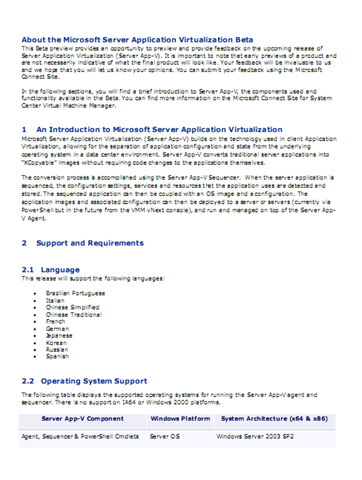
imageMicrosoft Server Application Virtualization (Server App-V) builds on the technology used in client Application Virtualization, allowing for the separation of application configuration and state from the underlying operating system in a data center environment.

Server App-V converts traditional server applications into “XCopyable” images without requiring code changes to the applications themselves. The conversion process is accomplished using the Server App-V Sequencer. When the server application is sequenced, the configuration settings, services and resources that the application uses are detected and stored. The sequenced application can then be coupled with an OS image and a configuration. The application images and associated configuration can then be deployed to a server or servers with System Center Virtual Machine Manager 2012 and managed on top of the Server App-V Agent.

DOWNLOAD:  Microsoft Server Application Virtualization Beta Documentation
http://www.microsoft.com/downloads/en/details.aspx?FamilyID=d24bbf9b-9d9c-4966-90e5-575852c9258b

Posted by: kurtsh | March 25, 2011

BETA: System Center Virtual Machine Manager 2012

imageSystem Center Virtual Machine Manager 2012 delivers industry leading fabric managment, virtual machine management and services deployment in private cloud environments.

Virtual Machine Manager 2012 offers key new features that include hypervisor creation and management, network management, storage management, private cloud creation, self-service usage and service creation. It features deep investments in server application virtualization, service design and service modeling all of which can be used to efficiently offer an on-premises private cloud.

Feature Summary

  • Fabric Management
    • Hyper-V and Cluster Lifecycle Management – Deploy Hyper-V to bare metal server, create Hyper-V clusters, orchestrate patching of a Hyper-V Cluster
    • Third Party Virtualization Platforms – Add and Manage Citrix XenServer and VMware ESX Hosts and Clusters
    • Network Management – Manage IP Address Pools, MAC Address Pools and Load Balancers
    • Storage Management – Classify storage, Manage Storage Pools and LUNs
  • Resource Optimization
    • Dynamic Optimization – proactively balance the load of VMs across a cluster
    • Power Optimization – schedule power savings to use the right number of hosts to run your workloads – power the rest off until they are needed
    • PRO – integrate with System Center Operations Manager to respond to application-level performance monitors
  • Cloud Management
    • Abstract server, network and storage resources into private clouds
    • Delegate access to private clouds with control of capacity, capabilities and user quotas
    • Enable self-service usage for application administrator to author, deploy, manage and decommission applications in the private cloud
  • Service Lifecycle Management
    • Define service templates to create sets of connected virtual machines, os images and applica tion packages
    • Compose operating system images and applications during service deployment
    • Scale out the number of virtual machines in a service
    • Service performance and health monitoring integrated with System Center Operations Manager
    • Decouple OS image and application updates through image-based servicing
    • Leverage powerful application virtualization technologies such as Server App-V

DOWNLOAD: System Center Virtual Machine Manager 2012 Beta – Evaluation
http://www.microsoft.com/downloads/en/details.aspx?FamilyID=E0FBB298-8F02-47E7-88BE-0614BC44EE32

DOCUMENTATION:  System Center Virtual Machine Manager (VMM) 2012 Beta Documentation
http://www.microsoft.com/downloads/en/details.aspx?FamilyID=F7C174F2-1D39-4FED-9778-3F41B84F744B

Posted by: kurtsh | March 24, 2011

TOOL: Appointment World Times – Outlook 2010 Add in

[taken from http://coolthingoftheday.blogspot.com/2011/03/avoid-i-forgot-you-were-8-time-zones.html]

image

"After some bad experience scheduling meetings with people in different time zones I decide to write a simple add-in for outlook that will allow me to see times differences while writing the appointment.

If you have to schedule meetings around the world you probably familiar with the http://www.timeanddate.com/worldclock/ and several more that will help you see the time and date difference between your location the the other attendees.”

You may want to read the warning about the ZIP file on CoolThingOfTheDay:

Posted by: kurtsh | March 24, 2011

OFFER: “Angry Birds” for Windows… for FREE.

clip_image002 Cool. Angry Birds for Windows… for free, for a limited time.

Download Intel AppUp Center, get free Angry Birds

Best Buy and Intel are partnering to slingshot a free Windows version of Rovio’s mobile hit to US residents via the Intel AppUp Center. The only catch is that, you know, you have to use the AppUp store.

clip_image001If you’re seasoned in Windows IT management and looking to expand the way your environments leverage virtualization, this special event is for you. Following just one week after Microsoft Management Summit 2011 (MMS), this three-day Jump Start class is specially tailored for VMware and Microsoft technology pros. Here’s a glimpse of what we’ll cover:

Who should attend this training?
Suggested prerequisite skills include real-world experience with Windows Server 2008 R2, virtualization and datacenter management. The course is tailored to these types of roles:

  • IT Professional
  • IT Decision Maker
  • Network Administrators
  • Storage/Infrastructure Administrators & Architects.

What’s the high-level overview?

  • This cutting edge course will feature expert instruction and real-world demonstrations of Hyper-V and brand new releases from System Center 2012 (many of which will be announced just one week earlier at MMS).
  • Day 1 will focus on “Platform” (Hyper-V, differentiating VMware terminology/features, high availability & clustering)
  • Day 2 will focus on “Management” (System Center Suite, SCVMM 2012, Opalis, Private Cloud solutions)
  • Day 3 will focus on “VDI” (VDI Infrastructure/architecture, v-Alliance, application delivery via VDI)
  • Full outline available on the registration page

Every section will be team-taught by two of the most respected authorities on virtualization technologies: Microsoft Technical Evangelist Symon Perriman and leading Hyper-V, VMware, and XEN infrastructure consultant, Corey Hynes

Event ID: 1032479939

Registration on web:
https://msevents.microsoft.com/CUI/WebCastEventDetails.aspx?EventID=1032479939&EventCategory=2&culture=en-US&CountryCode=US

clip_image001[4]

Live Webcast
Tuesday April 5 at 2:00 P.M. GMT / 9:00 A.M. EST

clip_image001

Gone are the days when IT dictates which technologies the enterprise implements. The proliferation of mobile devices and social technologies is transforming business processes and employee productivity. Ignoring emerging mobile and social technologies presents risk; embracing them presents opportunity.

Join us for this informative and educational roundtable to help you prepare for the consumerization of IT and social computing. This will be an interactive discussion, including audience Q&A. Please join us for this dynamic session.

Attend this live webcast, to explore and discuss:

  • The increasing variety of mobile devices that IT must support,
    manage, and secure.
  • The impact on employee productivity.
  • The importance of striking a balance between enabling new technologies and securing data.
  • How to establish clear policies for social networking use.
  • How to integrate social computing with enterprise business processes.
  • How to use social computing to engage customers.

clip_image002

clip_image003

clip_image004

clip_image005

Chris Capossela
Sr. VP, Information
Worker Product Management,
Microsoft

Andy Lees
President, Mobile Communication
Business,
Microsoft

Tony Scott
Corporate VP
and CIO,
Microsoft

Stephanie Stahl Executive Editor, TechWeb

imageMSDN Events Presents: Understanding Azure
Cloud Development is one of the fastest growing trends in our industry. Don’t get left behind. In this event, Rob Bagby and Bruno Terkaly will provide an overview of developing with Windows Azure. They will cover both where and why you should consider taking advantage of the various Windows Azure’s services in your application, as well as providing you with a great head start on how to accomplish it. This half-day event will be split up into 3 sections. The first section will cover the benefits and nuances of hosting web applications and services in Windows Azure, as well as taking advantage of SQL Azure. The second section will cover the ins and outs of Windows Azure storage, while the third will illustrate the Windows Azure AppFabric.

  • Audience(s): NonProfessional Developer, Pro Dev/Programmer and Tester.
  • Date/Time: Thursday, April 21, 2011 1:00 PM-5:00PM
  • Event ID: 1032480163
  • Location:
    Microsoft LA Office
    MPR 1&2
    333 S Grand Ave
    Suite 3300Los AngelesCalifornia90071
    United States
  • Register by Phone: 1-877-MSEVENT (9AM-7PM EST M-F)

Register by Web:
https://msevents.microsoft.com/CUI/EventDetail.aspx?EventID=1032480163&Culture=en-US

imageMSDN Events Presents: SharePoint

Event Overview
Join SharePoint architects, developers and other experts that work with Microsoft SharePoint 2010.

This is an educational and fun-filled half day event with sessions from SharePoint team members & MVPs covering a wide variety of SharePoint developer topics.

This MSDN event is FREE, open to the public, and is your chance to learn how to build custom SharePoint solutions using Visual Studio 2010!

  • Audience(s): Pro Dev/Programmer.
  • Date/Time:  March 31, 1-5PM
  • Event ID: 1032473243
  • Location:
    Microsoft Irvine Office
    3 Park Plaza
    Suite 1600
    Irvine, California 92614
  • Register by Phone: 1-877-MSEVENT (9AM-7PM EST. M-F)

Register by Web:
https://msevents.microsoft.com/CUI/EventDetail.aspx?EventID=1032473243&Culture=en-US

« Newer Posts - Older Posts »

Categories