imageBuy a PC for college,
get an Xbox 360

Students can buy a PC valued at $699 or more and receive a complimentary Xbox 360 4GB.* Game on.

*Limited time offer valid only on eligible products thru 11:59 PM PT on 9/3/2011 or while supplies last. Requires purchase of a qualifying Windows 7 PC priced $699 or higher from Microsoft Store. Xbox 360 with qualifying purchase is an Xbox 360 4GB. Only available to higher education students with a valid and verifiable .edu email address. Customer will be sent a promo code to the .edu address provided, which may then be used to redeem offer. Not valid on previous orders. Offer cannot be transferred, redeemed for cash or combined with any other offer or promotion. In-store and online offer terms may vary. U.S. residents only. Limit 1 per person.

imageAs one of the Core Infrastructure specialists covering Mid-Atlantic, I have repeatedly heard the request for more clarification on how best to license Microsoft Servers and System Center in virtualized environments.
Additionally, we discuss the impact of vMotion, Live Migration, disaster recovery, clustering, etc. and the most cost-effective way to license the datacenter.

Please join our Friday Lunch Series where we will be sharing best practices on how to:

  • Maximize your savings when licensing Windows Server and System Center in virtual environments
  • Simplify and minimize the time you spend on licensing

Our speakers will speakers include:

  • Solution Specialist – Michael Van Cleave
  • Datacenter Specialist Team
    • Luis Botero
    • Dwayne Hall
    • Todd J. Furst

LINK FOR WEBCAST: 
https://msevents.microsoft.com/cui/WebCastEventDetails.aspx?EventID=1032484529&EventCategory=2&IO=g5LynEd4y%2bVbLNgPUQfhQw%3d%3d&culture=en-US&CountryCode=US

Windows7logoSign up for our Hands-on Lab Online (HOLO) event today.
Learn about Microsoft Deployment Toolkit (MDT), the recommended process and toolset to automate desktop and server deployment and the Windows Automated Installation Kit (Windows AIK), which is designed to help IT professionals deploy the Windows 7 operating system.

Introduction to Deploying Windows 7 Using the Windows Automated Installation Kit: Windows Automated Installation Kit (AIK) is a collection of tools and documentation that you can use to create system images and automate the deployment of the Windows operating system.

Getting Started with Microsoft Deployment Toolkit 2010: Microsoft Deployment Toolkit 2010 (MDT 2010), the recommended process and toolset to automate desktop and server deployment, provides a common console with the comprehensive tools and guidance needed to efficiently manage deployment of Windows 7.

Zero Touch Installation Using Microsoft Deployment Toolkit 2010 and System Center Configuration Manager: The Zero Touch Installation process requires no interaction during deployment and is fully automated through Microsoft System Center Configuration Manager 2007 R2. We recommend this strategy if your IT organization has experts in deployment, networking, and Configuration Manager 2007 R2 products, and your organization has a managed network with 500 or more client computers.

Join us to learn more!

Date/Time/Registration:
Contact me for details if you are a customer of mine.


What is a HOLO event? It’s an online event where you listen to a live presentation and work on lab exercises. As you work on your labs, Microsoft experts can assist and provide guidance by chatting with you one-on-one or by virtually taking control of your lab.
Sign up soon as registration and seating is limited.

Prerequisites for running the lab:
BEFORE THE EVENT – Check to make sure the virtual lab works on your computer here: http://go.microsoft.com/?linkid=9770642

Posted by: kurtsh | May 26, 2011

RELEASE: System Center Updates Publisher 2011

imageSystem Center Updates Publisher is an application that enables independent software vendors or line-of-business application developers and IT administrators to import software update catalogs, create and modify software update definitions, export update definitions to catalogs, and publish software updates information to a configured update server.

By using Updates Publisher to define software updates and publish them to the update server, administrators can begin detecting and deploying published updates with System Center Configuration Manager to client and server computers in their organization.

Feature Summary

  • Updates Publisher enables IT Administrators the ability to do the following:
    • Import software update catalogs created by non-Microsoft organizations or from within administrators organization
    • Create custom software update definitions for EXE, MSI and MSP based updates
    • Export software update catalogs that can be imported by other Update Publisher consoles
    • Manage (duplicate, delete, expire, publish) software update definitions
  • New in System Center Updates Publisher 2011
    • Improved user interface that allows better control of managing software updates
    • New “Automatic” publication type that enables Updates Publisher to decide whether to publish software updates as metadata only or full content based on Configuration Manager data
    • New Software Update Cleanup wizard which enables expiring of unreferenced software updates
    • Ability to create Software Update Bundles
    • Ability to define prerequisite updates and superseded updates as part of an software update definition

DOWNLOAD:  System Center Updates Publisher 2011
http://www.microsoft.com/downloads/en/details.aspx?FamilyID=083f45ca-1ede-4f7a-be74-77854c3a9b01&utm_source=feedburner&utm_medium=feed&utm_campaign=Feed%3A+MicrosoftDownloadCenter+%28Microsoft+Download+Center%29

Thursday, June 2, 8:00 AM Pacific / 11:00 AM Eastern / 4:00 PM GMT
 

Event Date

As governance and compliance play increasingly essential roles in records management (RM) strategy, organizations worldwide are replacing their legacy RM systems with SharePoint.

Register Now ButtonWhat is driving this change?

Join Ryan Duguid, Senior Product Manager, ECM and Compliance at Microsoft, for an inside look at the extensive records management (RM) capabilities of SharePoint 2010.

Ryan will be joined by Art Bellis, VP Sales and Marketing, GimmalSoft, who will review the role of DoD 5015.2-compliance in an enterprise RM strategy, and Trevor Dyck, Director, Product Management, Colligo, to explain the importance of always retaining, organizing and managing corporate email as records.
During this one-hour webinar, you’ll explore:

  • Leveraging the new records management capabilities of SharePoint 2010
  • Utilizing the Records Center and in-place records management
  • Deploying the Content Organizer and enterprise-managed metadata
  • Extending SharePoint 2010 for DoD 5015.2-compliance
  • Integrating Outlook and SharePoint for email management

Find out how you can unleash the power of SharePoint 2010 for records management, governance and compliance.

Register Now Button

Busy on the day? Register Now to receive the on-demand recording.

Upcoming SharePoint 2010 Training happening online.  Contact me for details on the date of the training and how to register:

imageHands-on Lab Online: Overview, Upgrading, Installing, and Configuring SharePoint 2010

Language(s): English.

Product(s): Microsoft SharePoint Server 2010.

Audience(s): IT Generalist.

Microsoft SharePoint 2010 makes it easier for people to work together. Using SharePoint 2010, your people can set up web sites to share information with others, manage documents from start to finish, and publish reports to help everyone make better decisions.

Lab 1: You are the SharePoint administrator for Contoso Ltd. You have three years of experience administering a large Microsoft Office SharePoint 2007 deployment and supporting a large number of users, some of whom create and manage their own sites and site collections. You have been tasked with evaluating the benefits of migrating to SharePoint 2010; you begin by researching the key new features for IT professionals in SharePoint Server 2010. SharePoint Server 2010 includes many new features that are designed to assist server farm administrators. These features include an enhanced user experience and navigation model, tools to help you manage availability and monitor performance, a more flexible service model, and full support for scripting in Windows PowerShell. This lab provides an introduction to these features.

Lab 2: This lab introduces you to the installation and configuration process for SharePoint Server 2010. You begin by installing SharePoint Server 2010 and running through the Configuration Wizard. Next, you work in Central Administration to build a web application and a site collection so you can begin using SharePoint.

Lab 3: This lab introduces the Microsoft SharePoint Server 2010 upgrade infrastructure and demonstrates some changes and improvements in the upgrade and patching system. Learn about the administration experience for upgrading from Microsoft Office SharePoint Server 2007 to Microsoft SharePoint Server 2010, including verification of upgrade readiness at the farm and content database levels, using command-line upgrade actions, and reviewing upgrade status and logs.

imageAs posted on the Office Updates blog:

SP1 releases for both Office client suites and SharePoint server products will be made available. All language versions of SP1 will release simultaneously. Initially, Service Pack 1 will be offered as a manual download from the Download Center and from Microsoft Update, and no sooner than 90 days after release, will be made available as an Automatic Update.

SP1 will include many interesting changes. Across the client suites and server products, SP1 offers a sprinkling of improvements to make a strong 2010 release wave even stronger. During TechEd and beyond, teams on http://blogs.office.com will update their blogs with more specific details of 2010 Service Pack 1 contents.

There are far too many changes in SP1 to list here, but the list below is a sample of SP1 highlights to get things started. This is a list of things that you can do now that you couldn’t before, or things that are just better than they were with the original release:

  • Outlook fixes an issue where “Snooze Time” would not reset between appointments.
  • The default behavior for PowerPoint "Use Presenter View" option changed to display the slide show on the secondary monitor.
  • Integrated community content in the Access Application Part Gallery.
  • Better alignment between Project Server and SharePoint Server browser support.
  • Improved backup / restore functionality for SharePoint Server
  • The Word Web Application extends printing support to “Edit Mode.”
  • Project Professional now synchronizes scheduled tasks with SharePoint task lists.
  • Internet Explorer 9 “Native” support for Office Web Applications and SharePoint
  • Office Web Applications Support for Chrome
  • Inserting Charts into Excel Workbooks using Excel Web Application
  • Support for searching PPSX files in Search Server
  • Visio Fixes scaling issues and arrowhead rendering errors with SVG export
  • Proofing Tools improve spelling suggestions in Canadian English, French, Swedish and European Portuguese.
  • Outlook Web Application Attachment Preview (with Exchange Online only)
  • Office client suites using “Add Remove Programs” Control Panel, building on our work from Office 2007 SP2

Read more at the Office Updates Blog:
http://blogs.technet.com/b/office_sustained_engineering/archive/2011/05/11/announcing-service-pack-1-for-office-2010-and-sharepoint-2010.aspx

imageAs taken from the Exchange team blog:

The Exchange Team is pleased to announce that in the second half of calendar year 2011 we will be releasing Exchange Server 2010 Service Pack 2 (SP2) to our customers. With SP2, the following new features and capabilities will be included:

  • Outlook Web App (OWA) Mini: A browse-only version of OWA designed for low bandwidth and resolution devices. Based on the existing Exchange 2010 SP1 OWA infrastructure, this feature provides a simple text based interface to navigate the user’s mailbox and access to the global address list from a plurality of mobile devices.
  • Cross-Site Silent Redirection for Outlook Web App: With Service Pack 2, you will have the ability to enable silent redirection when CAS must redirect an OWA request to CAS infrastructure located in another Active Directory site. Silent redirection can also provide a single sign-on experience when Forms-Based Authentication is used.
  • Hybrid Configuration Wizard: Organizations can choose to deploy a hybrid scenario where some mailboxes are on-premises and some are in Exchange Online with Microsoft Office 365. Hybrid deployments may be needed for migrations taking place over weeks, months or indefinite timeframes. This wizard helps simplify the configuration of Exchange sharing features, like: calendar and free/busy sharing, secure mailflow, mailbox moves, as well as online archive.
  • Address Book Policies: Allows organizations to segment their address books into smaller scoped subsets of users providing a more refined user experience than the previous manual configuration approach. We also blogged about this new feature recently in GAL Segmentation, Exchange Server 2010 and Address Book Policies.
  • Customer Requested Fixes: All fixes contained within update rollups released prior to Service Pack 2 will also be contained within SP2. Details of our regular Exchange 2010 release rhythm can be found in Exchange 2010 Servicing.

Read more at the Exchange Blog:
http://blogs.technet.com/b/exchange/archive/2011/05/17/announcing-exchange-2010-service-pack-2.aspx

Posted by: kurtsh | May 19, 2011

BETA: Forefront Endpoint Protection 2012

imageAs taken from the download page:

Forefront Endpoint Protection 2012 continues to deliver on the promise of Forefront Endpoint Protection 2010, simplifying and improving endpoint protection while also greatly reducing infrastructure costs.

It builds on System Center Configuration Manager, allowing customers to implement endpoint protection as part of a unified infrastructure for securing and managing physical, virtual, and mobile client environments.

This shared infrastructure lowers ownership costs while providing improved visibility and control over endpoint management and security.

New features in the beta release include:

  • Support for System Center Configuration Manager 2012
  • Role-based administration
  • More efficient delivery of security updates

BETA:  Forefront Endpoint Protection 2012
http://www.microsoft.com/downloads/en/details.aspx?FamilyID=b64c2029-0f56-4606-ba0c-ea92e03541f5

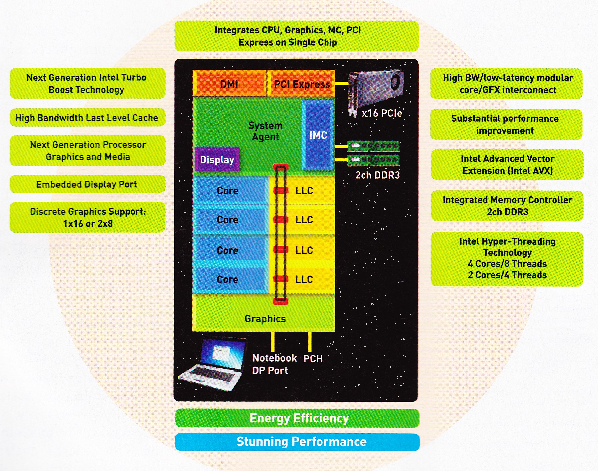
imageMuch has been made of Intel’s new Sandy Bridge architecture but a question that I got asked recently, “What is it?  In 60 seconds or less?”

Put simply:  “Sandy Bridge” is a new Intel processing microarchitecture.  It’s very special in that it provides the following new capabilities or improvements:

  • IMPROVED die shrink to 32nm
    (Reduced trace size from 42nm in previous generation; die shrinkage reduces heat generation & power consumption)
  • IMPROVED bandwidth between compute cores (CPU)
    (Previous multicore architectures were somewhat loosely coupled with marginal bandwidth between cores resulting in lesser performance)
  • IMPROVED graphics processing integration (GPU)
    (Previous integrated GPUs were not in all processors and again, marginal bandwidth between graphics & compute cores diminished performance.  Additionally, the graphics processor now shares cache with the compute cores making data sharing faster.)
  • NEW “Advanced Vector Extensions instruction set (AVX)” for CPU
    (Increases efficiency of compute core usage by allowing operating system to issue specific condition sensitive instructions.  Only available on Windows 7 Service Pack 1.)
  • NEW “Turbo Boost 2” Overclocking
    (Previous chips overclocking effects would get marginalized when all cores were in use; Turbo Boost 2 now overclocks for performance consistently except when processor is detected to be overheating.)
  • NEW “SATA 6Gb/s” Storage Support
    (Support for SATA 6GB/sec is now built into the microarchecture chipset enabling high performance throughput to SATA 6GB/sec capable storage devices – in particular, SSD drives)

There’s some other things but these are the big items.  More can be read about Sandy Bridge below:

« Newer Posts - Older Posts »

Categories