image

This is just wicked cool.

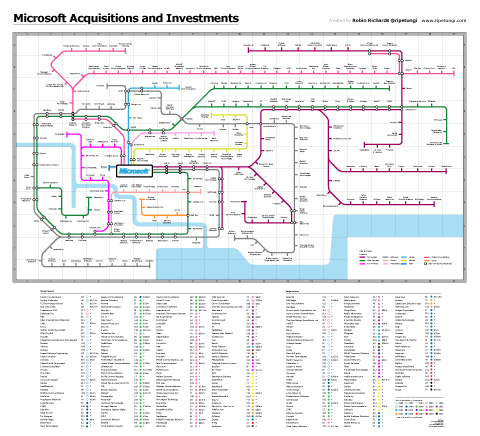
Robin Richards produced a ‘subway map’ of many of Microsoft’s acquisitions & investments.  A tight snapshot of the map is pictured to the right and as you can see… it’s HUGE.

It includes such famous acquisitions & investments as:

  • Bungie
  • Jellyfish
  • Apple
  • Facebook
  • etc.

The entire map is downloadable as an Acrobat .PDF file so you can print it out in full fidelity.  Check it out at Robin’s site:

Posted by: kurtsh | July 26, 2011

EVENT: BUILD | 2011.09.13-16 | Anaheim, CA

[again, horribly stolen from BUILD 2011.09.13-16 Anaheim, CA]

clip_image002BUILD is the event that shows you how to take advantage of the future of Windows. Get insight on creating touch-centric user experiences, fast, fluid, and dynamic applications that leverage the power and flexibility of the core of Windows, used by more than a billion people around the world.

Learn how to create powerful new apps while retaining the ability to use your existing apps. See how web-connected and web-powered apps built using HTML5 and JavaScript have full access to the power of the PC.

Explore how the full power of hardware-accelerated Internet Explorer 10 transforms your experiences with the web. See how the UI was designed to work seamlessly with a diversity of devices and form factors. BUILD is the first place to dive deep into the future of Windows.

If you are a contemporary developer, who thrives on the newest and coolest, who loves the freedom of the web and the power of all devices from mobile to desktop, you need to join us to help BUILD the future. Our approach means no compromises—you get to use whatever kind of device you prefer to run the apps you love.

Register by August 1st and save $500.

In 1995, Windows changed the PC. BUILD will show you that Windows 8 changes everything.

[as taken from http://blogs.msdn.com/b/dachou/archive/2011/07/26/free-html5-training-august-19-2011-los-angeles.aspx]

clip_image001

As developers, you keep hearing a lot about HTML5, but many don’t know what it actually means or is truly capable of. If you want to learn about it, your choices are limited; you can either pick up a book or attend an expensive conference that often only scratches the surface. The HTML5 Web Camp is an opportunity to connect with designers and developers and show you what’s possible, and how you can start using it today. HTML5 WebCamp is a completely free event, and will start with demos and presentations, and will end with hands on lab sessions, that will allow you to walk through materials and get your questions answered! Space is limited.

Date: August 19, 2011; 8:30am – 5:30am

REGISTER HERE

Here is a list of topic will be covered at the Los Angeles WebCamp:

  • Introduction to HTML 5 and IE9
  • Introduction to CSS3
  • Overview of HTML5 Graphics with Canvas & SVG
  • Adding Video, and Sound with HTML5
  • Practical HTML5: Using It Today
  • Hands on Labs

clip_image002

Posted by: kurtsh | July 25, 2011

DOWNLOAD: Kinect PowerPoint Control

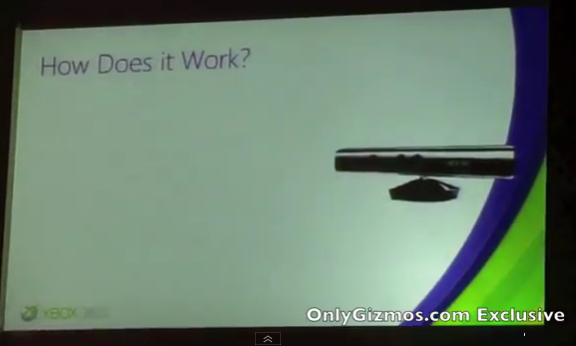
imageDon’t get too excited now…  If you don’t have a Visual Studio development environment with the Kinect SDK loaded, you’re not gonna go anywhere with this being that it’s uncompiled source code.

That being said:  If you know how to compile this… SWEET.  Change slides with only your hand & arm motions.

Posted by: kurtsh | July 17, 2011

NEWS: Internet Explorer 9 FTW for malware blocking

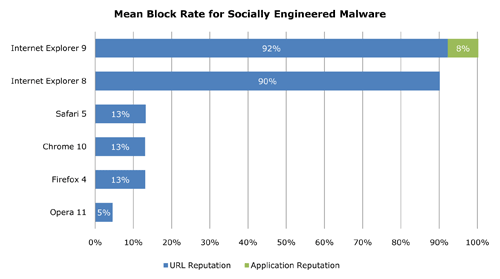
Most customers are infected with malware through deceptive HTML email links & browsing infected web pages.  All of these links rout through the desktop’s web browser.

image

FACTS:

  • Internet Explorer 8 & 9 block 90-100% of known web malware.
  • Safari, Chrome, and FireFox: just 13%.

Most web-borne outbreaks could have been stopped by simply having the right browser deployed.  Antivirus software isn’t strong or fast enough.  If your company wants to be secure, they need to deploy Internet Explorer 9.

clip_image002Looking to get your company off of Windows XP?

Use this not-so-subtle, handy gadget for your desktop to count down the number of days until Windows XP End of Support (EOS) in 2014.

UPDATE 4/4/12
I got this from a reader and thought it might be important for some of you to see:

“It worked!  I ordered that part and it was for sure Rev 02. It worked on everything I threw at it. Big auditorium, messy, spaghetti, set up and boom. It was up without a hitch. Now I get whey they stopped production of the old one!  Places like Zones as it listed by it’s US part number AA-AH1NAMB/US (but not ever in stock). Which is not the Samsung KOREAN number, which is the one that you took a pic of, BA39-01122A. So by pure accident I happen to find an identically described part of very similar cost on the samsungparts.com (US company but official Samsung parts supplier) that happen to match the label on your dongle.”

——————-

UPDATE 10/28/11:
I posted this earlier and thought everyone should see what the new VGA dongle looks like in case some of you coming in from Quora didn’t know that this new improved dongle is available.
https://kurtsh.com/2011/10/28/info-new-improved-vga-dongle-for-samsung-series-9-is-available/

———————

UPDATE 7/27/11:
Well, I tested the Plugable USB-VGA-165 USB to VGA Adapter and lo-and-behold, it WORKS consistently on all projectors and all VGA cable lengths so that’s the good news.  The bad news is that its performance isn’t fantastic.  Its rendering is done using your system’s actual CPU so you’ll notice that highly-intensive graphics like PowerPoint 2010’s new ‘flashy’ transitions do in fact work, but they’re not QUITE as smooth as your Samsung’s native display adapter.  I bet you get 24fps instead of 30fps.

But it does work and for $45, it’s worth the investment to be able to always connect to a projector.  Think of it as insurance.

————————
imageORIGINAL POST:
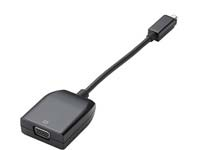
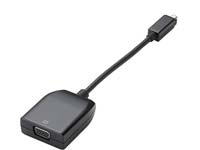
The Samsung Series 9 has a “micro HDMI” port on its left side instead of a VGA port which is what most folks are used to for external displays or projectors.  The question comes up, how do you connect to a projector if it doesn’t have an HDMI port of some sort?

The answer is basically that Samsung sells a dongle that converts the micro-HDMI-to-VGA for around $30-$40.  This answer is well known if you do a number of searches on the Internet.  Here’s where you can purchase the dongle from Zones: http://www.zones.com/site/product/index.html?id=003830626

SIGNAL LEVELS
An issue sometimes arises when you attempt use the dongle with a projector.  It turns out that there are a couple revisions of this dongle and early versions may not work with your situation:

  1. REV01This dongle works for short VGA cables like those used with portable projectors.  The dongle might have difficulty successfully transmitting a signal across longer cables however like those in pre-cabled conference rooms with projectors mounted to the ceiling.
  2. REV02This dongle is brand new as of July 2011 and may not be readily available.  I’ve read that it works for most lengths of VGA cabling. (I don’t’ own one yet, so I can’t say for certain but this comes to me on very good authority)

HOW TO TELL WHAT DONGLE REVISION YOU HAVE
This is the tricky part.  The dongle’s revision is on the bar code label of the plastic material that initially wraps the dongle when it’s shipped to you.  There are no other indications as to what revision you have so if you lost the packing material, there’s doesn’t appear to be any way to visually tell near as I know other than to test the dongle itself and see if it works over long VGA cables.

To be honest, the REV02 dongle is very new so if you didn’t receive the dongle in July 2011, you most likely have REV01.

ALTERNATIVE SOLUTIONS
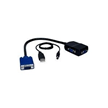
imageIn the meantime, I’ve been working on finding an alternative solution for this being that I have REV01 in my laptop bag.  A coworker suggested this VGA signal booster which I purchased:
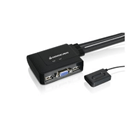
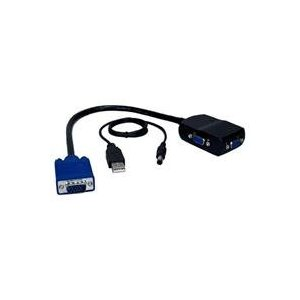
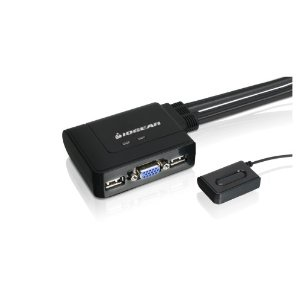
imageI also picked up a portable KVM from IOGear that provides VGA signal boosting since I thought this might be more useful in the long run when working with two laptops.

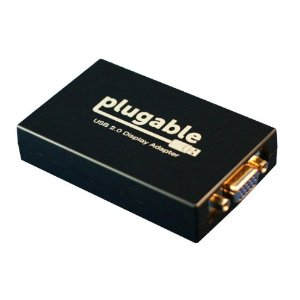
I also have an EXTERNAL USB 2.0-based VGA display adapter on order to see if that will work well.

  • imagePlugable USB-VGA-165 USB to VGA Adapter ($45)
    http://www.amazon.com/gp/product/B004D0QC0A
    (I selected the “Plugable” (sic) brand because of the consistently good reviews I’ve seen about their products.  You can also install multiple Plugable adapters on a single computer to get up to 6 additional displays)

Honestly… I haven’t been able to prove that any of the USB signal booster solutions work consistently because I haven’t had enough time.  When I do find something that works with everything (and I receive the Plugable device and test it), I’ll be sure to post my permanent solution.
Posted by: kurtsh | July 16, 2011

NEWS: The newly announced Samsung Series 9 models

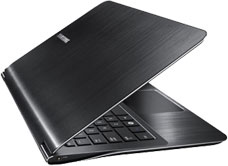
imageSamsung announced on July 1st a series of new models in the Samsung Series 9 line of ultrathin laptops.

NEW 2nd Gen 11-inch configurations:

  • NP900X1B-A01US ($1,249, available in August) Intel Core i3-2357M CPU, 4GB RAM, 128GB SSD
  • NP900X1B-A02US ($1,049, available in August) Intel Core i3-2357M CPU, 2GB RAM, 64GB SSD

NEW 2nd Gen 13-inch configurations:

  • NP900X3A-A05US ($2,049, available now) Intel Core i7-2617M CPU, 6GB RAM, 256GB SSD
  • NP900X3A-B02US ($1,649, available now) Intel Core i5-2467M CPU, 4GB RAM, 256GB SSD
  • NP900X3A-B01US ($1,349, available now) Intel Core i5-2467M CPU, 4GB RAM, 128GB SSD

Some differences should stick out:

  1. CORE I7 AVAILABILITY
    The A05US model has an Intel Core i7 processor in it.  For those unaware – that’s a QUAD CORE chip.
  2. 6GB STOCK MEMORY
    The same A05US model has 6GB RAM stock.  All Samsung Series 9 machines are upgradable to 8GB of RAM however so this doesn’t really matter much to folks with a little tinkering skills.
  3. 256GB SOLID STATE DRIVES (SSD)
    The A05US and the B02US ship with 256GB SSD drives.  These drives are actually “mini-PCI-Express Full Slot” cards and… to be honest, I haven’t found them sold anywhere so upgrading to this “DIY” is not an option right now.  Besides, buying an SSD only to replace it with a larger one isn’t a really good way to spend cash.
  4. CORE I5 2467M USE
    This is an odd thing.  The processor used in the first generation of Samsung Series 9 laptops used the Intel Core i5 2537M 1.40GHz, 3MB L3 cache w/SpeedBoost to 2.3Ghz.  The second gen used the Intel Core i5 2467M 1.60GHz, 3MB L3 cache w/SpeedBoost to 2.3GHz… meaning that the stock speed without managed overclocking is about 15% faster but the top speed is the same.

This incidentally is the reason for the drop of the in-store non-advertised price of the Samsung Series 9 at the Microsoft Store:  They’re getting rid of the previous generation.  There’s nothing really distinguishing the next gen much though other than the shipping 256GB drive and the availability of the i7 CPU.

So if I were you and was interested in a Ultrathin Laptop… I’d get down to the Microsoft Store and pick one up while you still can.

Posted by: kurtsh | July 14, 2011

RELEASE: SQL Server 2008 R2 Service Pack 1

imageSQL Server 2008 R2 Service Pack 1(SP1) is now available for download. SQL Server 2008 R2 service packs are cumulative updates and upgrade all service levels of SQL Server 2008 R2 to SP1. This service pack contains the cumulative updates of SQL Server 2008 R2 cumulative update packages 1 thru 6. You can use these packages to upgrade any of the following SQL Server 2008 R2 editions:

    (1) SQL Server 2008 R2 Datacenter Edition
    (2) SQL Server 2008 R2 Enterprise Edition and Developer Edition
    (3) SQL Server 2008 R2 Standard Edition
    (4) SQL Server 2008 R2 Web Edition
    (5) SQL Server 2008 R2 Workgroup Edition
    (6) SQL Server 2008 R2 Express Edition

Note : To upgrade SQL Server 2008 R2 Express Edition, obtain the SP1 version of Express Edition or Express Edition with Advanced Services.

What’s New in SQL Server 2008 R2 Service Pack 1 ?

  • Dynamic Management Views for increased supportability: sys.dm_exec_query_stats DMV is extended with additional columns to improve supportabilities over troubleshooting long-running queries. New DMVs and XEvents on select performance counters are introduced to monitor OS configurations and resource conditions related to the SQL Server instance.
  • ForceSeek for improved querying performance
    Syntax for FORCESEEK index hint has been modified to take optional parameters allowing it to control the access method on the index even further. Using old style syntax for FORCESEEK remains unmodified and works as before. In addition to that, a new query hint, FORCESCAN has been added. It complements the FORCESEEK hint allowing specifying ‘scan’ as the access method to the index. No changes to applications are necessary if you do not plan to use this new functionality.
  • Data-tier Application Component Framework (DAC Fx) for improved database upgrades:
    The new Data-tier Application (DAC) Framework v1.1 and DAC upgrade wizard enable the new in-place upgrade service for database schema management. The new in-place upgrade service will upgrade the schema for an existing database in SQL Azure and the versions of SQL Server supported by DAC. A DAC is an entity that contains all of the database objects and instance objects used by an application. A DAC provides a single unit for authoring, deploying, and managing the data-tier objects. For more information, see Designing and Implementing Data-tier Applications.
  • Disk space control for PowerPivot
    This update introduces two new configuration settings that let you determine how long cached data stays in the system. In the new Disk Cache section on the PowerPivot configuration page, you can specify how long an inactive database remains in memory before it is unloaded. You can also limit how long a cached file is kept on disk before it is deleted.
  • Fixed various issues:
    This update fixes many knowledge base issues that are listed in this Master KB article .
    For a detailed list of new features and improvements that are included in SQL Server 2008 R2 SP1, review the What’s New Section in Release Notes.

imageWindows Thin PC is now generally available to our Software Assurance customers for download from the Microsoft Volume Licensing site.

Taken from the Windows Team Blog announcement:

As VDI deployments continue to grow, customers told us they needed an easy way to repurpose their existing PCs as thin clients, leading to the evolution of Windows Thin PC. Windows Thin PC helps reduce the cost of VDI at the endpoint, enabling IT with an enterprise ready platform to provide end users with an excellent thin client experience through the many unique features offered on their repurposed PCs. Some of these features include:

  • RemoteFX support, which ensures that users have a local-like virtual desktop experience.
  • Write Filters that improve security by preventing any writes to the deck.
  • BitLocker and AppLocker features that help strengthen the device for enterprises.
  • FEP support, which makes it possible to use a common set of malware protection tools for your desktops and thin clients.

[taken from http://windowsteamblog.com/windows/b/business/archive/2011/07/01/here-s-the-skinny-windows-thin-pc-available-for-download-today.aspx]

For more detail on what is in Windows Thin PC’s RTM release, visit:
http://windowsteamblog.com/windows/b/business/archive/2011/06/07/windows-thin-pc-rtms.aspx

« Newer Posts - Older Posts »

Categories