Posted by: kurtsh | October 9, 2011

INFO: Uninstalling Ghostery for Internet Explorer 9.0

imageA while back I was trying a browser add-in for Internet Explorer 9.0 called “Ghostery”.  Basically, it displays what “tracking” services are being used on you whenever you visit a web site.  The simple explanation is that it monitors the Javascript on each web site for known tracking cookies & techniques & blocks them if you wish. 

For example, whenever you go to a web site using tracking services like “Doubleclick” or “Google AdSense”, your actions and details are transmitted to a central site, completely separately from the web site you’re visiting.  So if you visit Galpin Toyota’s web site, you might enter your zip code.  If you go to ESPN.com you might enter your birthdate to be allowed to access certain areas.  In GAP.com you might enter your sex.  These tracking services will aggregate that you are a 35 year old Male from Los Angeles, CA – and continue to learn more about you depending on what other sites you visit using the same tracking service. 

Ghostery would tell you what tracking service was being used and allow you to specifically BLOCK that tracking service.  Cool ‘eh?

SO WHAT’S THE PROBLEM?
The problem was, Ghostery could REALLY slow down your browser.  I found that pages could take 2x-3x as long to bring up as Ghostery would rifle through the Javascript to produce a summary of what services were in use.

Worse yet, in many cases Ghostery became very difficult to remove from your system.  On several systems, simply using “CONTROL PANEL – PROGRAMS & FEATURES –> GHOSTERY [UNINSTALL]” wouldn’t remove the plug in.  IE would still load the plug in, the registry entries for the plug in would remain, etc.

The alternative is to use IE9’s Tracking Protection which would allow you to ‘subscribe’ to a list of services to block – by default.  This list evolves and expands as time goes by and your browser automatically pulls in the new list to block these service’s cookies & trackers.

HOW DO YOU UNINSTALL GHOSTERY THEN?
It basically comes down to following this rather sloppy process:

  1. Open Internet Explorer. 
  2. Open TOOLS – Manage Add-Ons
  3. Right click on “Ghostery” & select ‘Disable’
  4. Right click on “Ghostery BHO” & select ‘Disable’
  5. Close Internet Explorer & shutdown your computer.
  6. Power it up again and hold F8.  You should start in the SAFE MODE here.
  7. Login and go to c:\program files (x86)\GhosteryIEplugin
  8. Delete the folder
  9. Reboot

This leaves behind the reference to Ghostery in "Manage Add Ins" but at least the plug ins aren’t loading any more so they won’t slow down your browser.

CONCLUSION:
This would really be a valuable plug in for Internet Explorer 9.0 if it was faster & executed an uninstall cleanly.  I really hope they fix the uninstall procedure for IE & improve the plug in performance in the future.  It seems like such a great idea to provide real-time notification of privacy concerns to the end user but it’s really hard to justify using Ghostery considering it’s issues versus using IE9’s built-in Tracking Protection.

Posted by: kurtsh | October 6, 2011

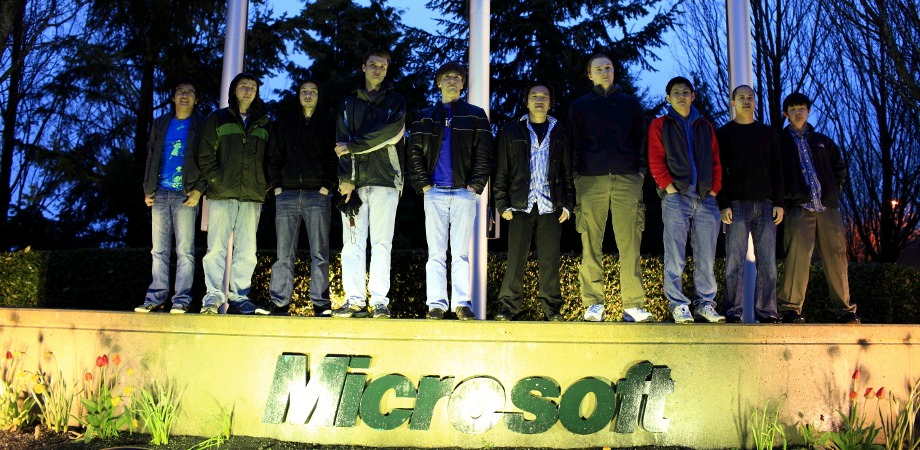
A tribute to a great man.

301305_2326453194075_1032008114_32633798_1343614477_n[1]

Company flags are being flown at half mast today across all Microsoft campuses.

Posted by: kurtsh | October 5, 2011

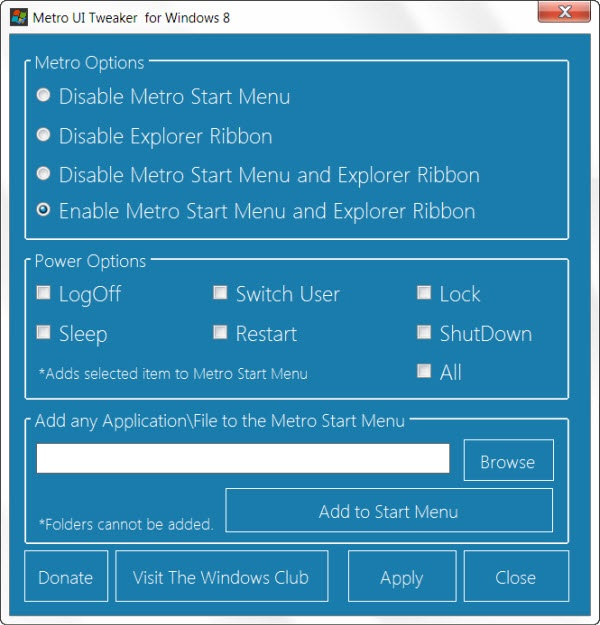
TOOL: Metro UI Tweaker for Windows 8 Dev Preview

image

Windows Club went and built a tweaking tool for Windows 8 Dev Preview.

They list the following tweaks:

  1. Disable Metro Start Menu: Disables only Metro Start Menu Screen. This function requires editing a System File. It does not remove the file.
  2. Disable Metro Ribbon: Disables only the Metro Ribbon UI. This function I discovered myself. It requires Taking Ownership of a System File. It does not remove this file.
  3. Disable Metro Start Menu and Ribbon: Disables the Metro Start Menu UI, Ribbon UI, Metro Task Manager UI and the Lock Screen.
  4. Enable Metro Start Menu and Ribbon: Re-enables all available Metro UI options.
  5. Add Power Options to the Metro Start Menu Screen: Logoff, Switch User, Lock, Sleep, Restart and Shutdown
  6. Add any Application/File to the Metro UI Start Menu Screen: Some Applications/Files may not be available to you to add to the Metro Start Menu Screen. This program allows you to add those Applications/Files which would otherwise be unavailable.

Looks good.

imageThis is pretty incredible.   Mike Ormond, Developer Evangelist for Windows Phone, wrote a book with the assistance of Colin Eberhardt, Pete Vickers, Andy Gore, Mike Hole, Gergely Orosz, Sasha Kotlyar, Dominic Betts, Will Johnson, Ben Cameron, James Bearne, Samidip Basu, Paul Marsh, Stuart Lodge.

Here’s the result: 
Building Windows Phone Apps: A Developer’s Guide

This book combines useful, technical information about the platform, written by those who’ve been there and done it, with some stories about the people and the apps they’d written. The book will act as a handy reference that gives you a “puddy up” into developing on the platform and, importantly, helps you to avoid making the same mistakes others have made.

Posted by: kurtsh | October 5, 2011

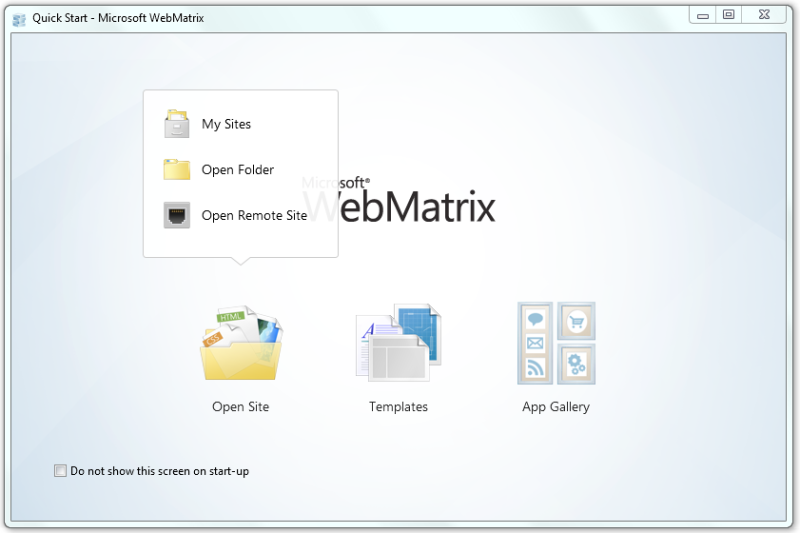
BETA: WebMatrix 2.0 Development Suite Beta 2

image

A new web development tool is being made available called “WebMatrix” from Microsoft.  It’s a brand new web development tool from Microsoft that includes everything you need for website development. Start from open source web applications, built-in web templates or just start writing code yourself. It’s all-inclusive, simple and best of all free.

WebMatrix is the easiest way to build, test and deploy Web sites. WebMatrix installs in minutes and elegantly integrates a Web server, database and programming frameworks into a single integrated experience. Connect from WebMatrix to Visual Studio or SQL Server Express to take advantage of Microsoft’s professional tools and servers.

README:
http://www.microsoft.com/web/post/webmatrix-2-beta-readme

FEATURES:
http://www.microsoft.com/web/webmatrix/betafeatures.aspx

DOWNLOAD:
http://www.microsoft.com/web/gallery/install.aspx?appid=webmatrix&prerelease=true

I forgot to write a post about this but I’m so proud of our team, I’m gonna do it way, way late.  Pffffht.

image

Microsoft competed in the “After Hours Gaming League”, a Starcraft 2 competition for charity featuring competitors from some of the biggest names in the tech industry, including:

The final results?

FINAL RANKING TEAM WINS LOSSES
1 Microsoft 7 0
2 Google 5 2
3 Zynga 5 2
4 Amazon 5 2
5 Twitter 3 4
6 Dropbox 2 5
7 Facebook 1 6
8 Yelp 0 7


Yup.  A perfect record – beating Google, Amazon, Facebook, and most importantly Zynga in the tournament finals. 

In recognition of Microsoft’s win, $5000 was donated to their charity.  Congratulations to Amnesty International & the Microsoft Starcraft 2 team on your FLAWLESS VICTORY.

  • LINK: Long Zheng’s post on Microsoft’s Undefeated Win in the After Hours Gaming League on istartedsomething.com
    http://t.co/1SgWTaE
Posted by: kurtsh | September 25, 2011

INFO: Microsoft signs patent agreement with Casio & Samsung

UPDATE (10/23/11):
Wow!  Yet another announcement – this time from Taiwan’s Compal:

Today Microsoft announced its tenth license agreement providing coverage under our patent portfolio for Android mobile phones and tablets. Today’s agreement is with Compal, one of the world’s largest Original Design Manufacturers, or ODM. Compal is based in Taiwan, where it produces smartphones and tablet computers for third parties and has revenue of roughly $28 billion per year.

Today’s announcement marks Microsoft’s ninth Android agreement in the last four months. More important, today’s announcement means that companies accounting for over half of all Android devices have now entered into patent license agreements with Microsoft.

UPDATE (9/29/11):
Whoops!  There goes another rubber tree plant!  An even BIGGER announcement – dare I say, the biggest one could imagine!

imageMicrosoft announced today that it has signed a definitive agreement with Samsung Electronics Co. Ltd., to cross-license the patent portfolios of both companies, providing broad coverage for each company’s products. Under the terms of the agreement, Microsoft will receive royalties for Samsung’s mobile phones and tablets running the Android mobile platform. In addition, the companies agreed to cooperate in the development and marketing of Windows Phone.

“Microsoft and Samsung see the opportunity for dramatic growth in Windows Phone and we’re investing to make that a reality,” said Andy Lees, president, Windows Phone Division, Microsoft. “Microsoft believes in a model where all our partners can grow and profit based on our platform.”

——————–

ORIGINAL POST (9/28/11):
Big announcement on Sept 20th:

imageMicrosoft Corp. and Casio Computer Co. Ltd. have entered into a broad, multiyear patent cross-licensing agreement that, among other things, will provide Casio’s customers with patent coverage for their use of Linux in certain Casio devices. This licensing agreement is an extension of the long-standing relationship between the two companies; Casio utilizes a wide variety of Microsoft software for its products, including its industrial handheld terminals and business information systems. Although the details of the licensing agreement are confidential, the parties acknowledge that Microsoft is being compensated by Casio.

I’m a big fan of Casio’s and I hope this could mean greater collaboration between them and Microsoft without the messiness of patent issues.  I just love their consumer grade rapid shot cameras.  Makes it so easy to take photos of the little one who’s always on the move!

Incidentally, here’s the patent agreements between Microsoft and users of Linux that have been announced to date near as I’ve been able to track: (Emphasis is mine)

imageFrom the BUILD Conference in Anaheim, California, Server and Tools President, Satya Nadella outlined a changing world of application development, connected devices, and continuous services, and articulated how Microsoft’s investments in these areas will enable developers to create a wealth of new opportunities by leading this transformation.

Nadella went on to highlight the opportunity for developers to build the next generation of applications by architecting new types of front-end client applications that are connected to back-end clouds using the Windows Azure Toolkit for Windows 8, which was released today at BUILD.

For more details on the Windows Azure Toolkit for Windows 8, Windows Azure SDK 1.5, Geo-Replication for Windows Azure Storage, and other announcements, check out the Windows Azure blog post on the topic:

Posted by: kurtsh | September 22, 2011

BETA: Visual Studio 11 Developer Preview Announced

imageIn his keynote at BUILD, Jason Zander announced the availability of:

  • .NET Framework 4.5 Developer Preview
  • Microsoft® Visual Studio® 11 Developer Preview
  • Microsoft® Team Server Preview

If you are an MSDN subscriber, you can download the preview immediately via this link. For everyone else, Visual Studio 11 and Team Foundation Server 11 will be generally available starting at 10:00 AM PDT on Friday.

For more details, check out the announcement on the Visual Studio Blog:
http://blogs.msdn.com/b/visualstudio/archive/2011/09/14/visual-studio-11-developer-preview-announced.aspx

clip_image001

Overview
In this lab, you will learn how Microsoft SQL Server PowerPivot for SharePoint leverages SharePoint 2010 and Excel Services to support centralized management of PowerPivot workbooks to enable collaboration.  You will also learn how to configure a PowerPivot site in SharePoint for successfully viewing PowerPivot workbooks and how to publish PowerPivot workbooks to that PowerPivot site.  In addition, you will learn about the PowerPivot Gallery views and how to change the default view, and create a linked document based on a PowerPivot workbook and configured a data refresh of the workbook.  Finally, you will learn how to build a Reporting Services report using the PowerPivot Web service as a data source, and review the PowerPivot Management Dashboard.

During this lab, we will cover:

  • Visualizing Data with Maps in SQL Server 2008 R2 Reporting Services
  • Working with ATOM Data Feeds in SQL Server 2008 R2 Reporting Services
  • Exploring PowerPivot for SharePoint
  • nalyzing and Reporting with the Excel 2010 Client
  • Developing and Consuming Shared Components in SQL Server 2008 R2 Reporting Services

Registration:  To register, please contact me for registration details as this is an invite only training for our managed customers.  This special, no charge training series will fill quickly and space is limited, so be sure to register as soon as possible to reserve your seat.

Date
Wednesday October 5th, 2011

Time
9:00am – 1:00pm Pacific Time

Location:
Virtual Hands On Lab Classroom. 

Target Audience: 
IT Pro, IT Manager

Before the Event:

What is a virtual hands-on-lab:
This isn’t your typical IT class. A hands-on lab online is an invite only event that combines LiveMeeting with a virtual lab.  Attendees and presenters login from anywhere. Attendees watch a brief LiveMeeting presentation, then spend most of the time getting hands-on experience working through all, or just self-selected modules of the entire lab – at their own pace, and receive real–time, personal, one-on-one attention from the presenter.  In addition, there’s a proctor available for technical support and to answer more attendee questions.

« Newer Posts - Older Posts »

Categories