 This is an incredible summary web site off of Technet. It’s literally EVERYTHING you need to know about PowerShell – including v3.0 CTP!
- RELEASE: "Windows PowerShell Survival Guide"
http://bit.ly/vLymZw
Here’s the table of contents:
This is an incredible summary web site off of Technet. It’s literally EVERYTHING you need to know about PowerShell – including v3.0 CTP!
Here’s the table of contents:
Comments Off on RELEASE: "Windows PowerShell Survival Guide"
Posted in Uncategorized
 Here’s a list of stuff that I’m packing for my trip to CES 2012 in Las Vegas. Hope it helps someone who’s going: (I will link this stuff to the items I have on Amazon as soon as I get the chance – since I bought most of it there anyway.)
And to get you in the mood:
Pick up a Vegas compilation on CD. Like this on:
http://www.amazon.com/Best-Vegas-Frank-Sinatra/dp/B004H0B08U/
Comments Off on INFO: My CES Preparation Checklist
Posted in Uncategorized

The new Tag app now supports Tag barcodes, QR Codes and NFC. With so many readers and formats, everyday users have been frustrated by the fragmentation in the industry. We’ve heard your concerns and have launched one app that can scan the most common 2D barcodes and NFC touchpoints. The new Microsoft Tag app for Android and iPhone lets users scan Tag barcodes and QR Codes – both those generated by Tag and third-party codes. But wait, there’s more! Android users who have NFC-enabled smartphones can use the updated app to also scan NFC touchpoints. Users of the new app will have all this as well as features such as:
Windows Phone 7.5 also supports Tag barcode and QR Code scanning through the Bing Visual Search button.
So there is no reason to have more than one reader taking up space on your mobile device… and that’s space you can use for more important apps like Angry Birds or Fruit Ninja.
DOWNLOAD: Microsoft Tag Reader – now with QR code & NFC support!
(Available for all smartphone platforms including Windows Phone 7 and 7.5, Windows Mobile, iPhone, Android, BlackBerry, Symbian, and J2ME phones)
http://tag.microsoft.com/download.aspx
Comments Off on NEWS: Microsoft releases Tag app with Tag, QR, & NFC support
Posted in Uncategorized
 I’ve historically used FeedDemon, an old RSS reader from the stone ages for Windows that does a good job but is generally a little resource heavy.
Today, I discovered this really cool RSS Reader for Windows desktops: “Mishra Reader” – a Free Metro-styled WPF RSS reader for Windows.
It has several benefits and a couple drawbacks:
Give it a try. I think this may be my newly adopted news reader!
(Incidentally, it’s co-developed by David Catuhe, a Microsoft employee that blogs at http://blogs.msdn.com/eternalcoding)
Comments Off on INFO: “Mishra Reader” – a FREE Metro-styled WPF-based RSS reader for Windows
Posted in Uncategorized
Keeping tabs on your favorite NFL teams and players just got a lot faster with Bing. Earlier this month we released an improved NFL Instant Answer to the Bing results page. With fast, up-to-the-minute scores, stats and ticket data, Bing is an easy play on Sunday.
Let’s begin and say you’re interested in getting the scoop about the Seahawks most recent game against the Redskins. The Bing NFL Instant Answer is highlighted below:
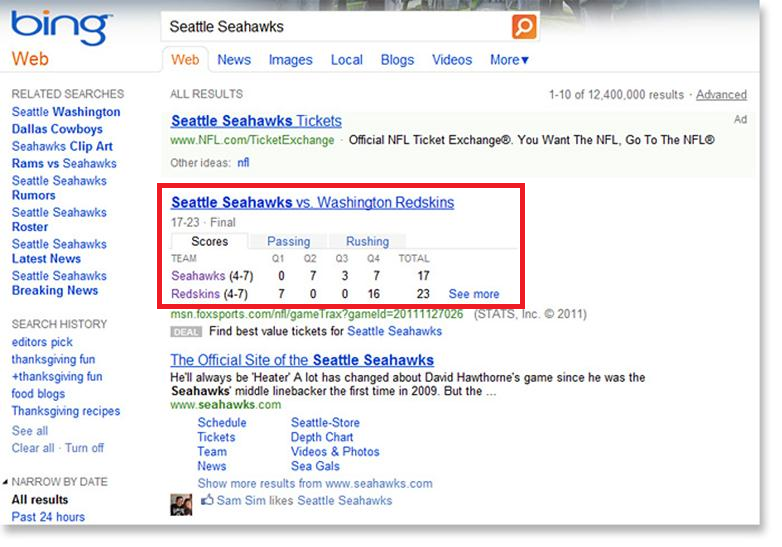
Scroll over “Passing” to see basic passing stats for the game:
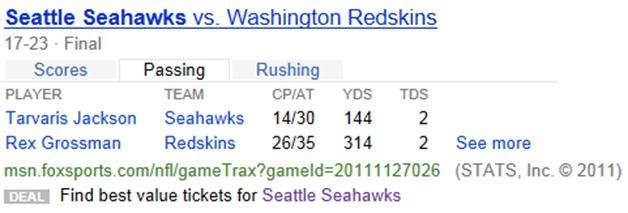
Scroll over “Rushing” to see the game’s rushing leaders:
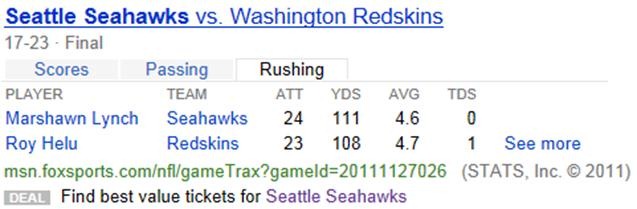
At the bottom of this search result, there is a link where you can check out upcoming Seahawks games and, more importantly, access to ticket information. Look for the DEAL icon and click on “Seattle Seahawks:”
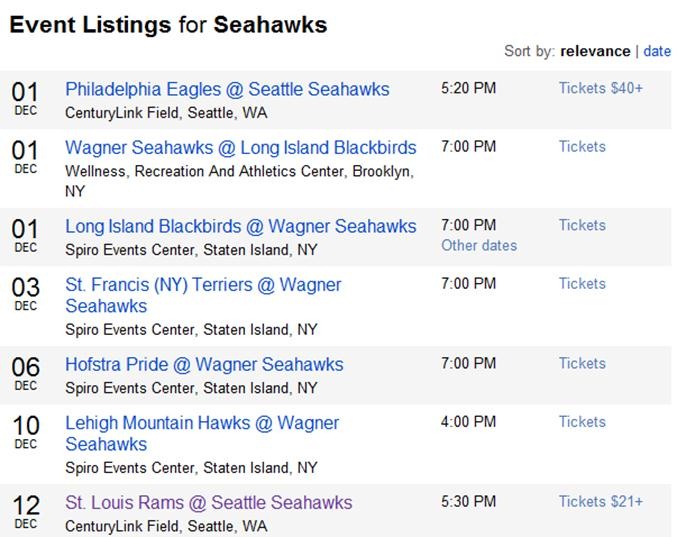
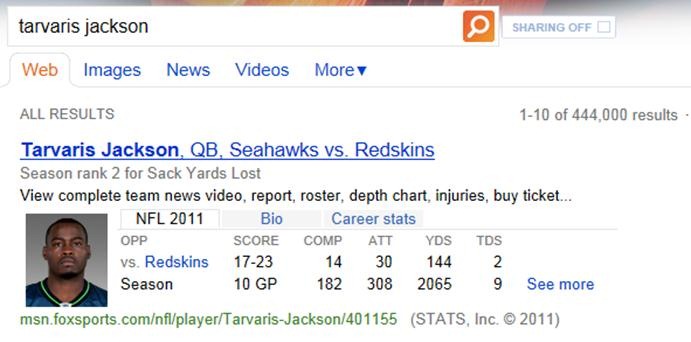
Next, let’s say you’re interested in how new ‘Hawks QB Tarvaris Jackson is doing this year. Simply search Tarvaris Jackson, and the instant answer includes stats for this season, Jackson’s entire career, and even a bio:
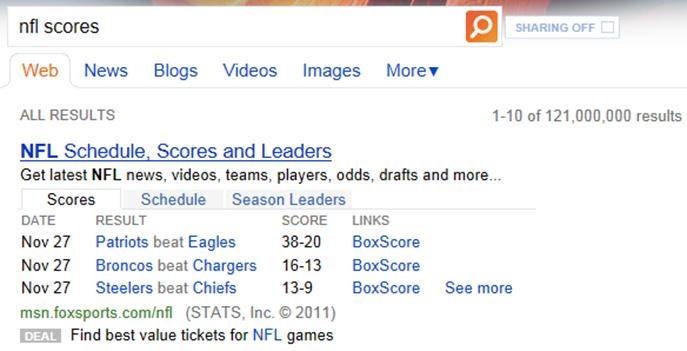
And what if you want scores fast? Search NFL Scores in the search box and get up-to-the-minute game day scores right at the top:
With lots of action left before the Super Bowl in February, be sure to use the new Bing NFL Instant Answer to get the quickest results for your NFL queries.
Comments Off on INFO: Bing “NFL Instant Answers”
Posted in Uncategorized
 I hear people even to this day complain about the existence of Internet Explorer in Windows. “Why do I have to have Internet Explorer on my machine? I use Chrome/Firefox!”
This frankly betrays a lack of understanding about just how much value Internet Explorer provides to Windows & its users. You probably use Internet Explorer every day in Windows because it’s a core technology responsible for visually presenting content on the screen virtually everywhere… you just don’t know it.
Again, just because you don’t use it to browse the web doesn’t mean you’re not using it within Windows itself. Internet Explorer – all versions – provides 2 things:
Any time any application (Microsoft or 3rd party) or component with Windows has to render HTML in some fashion – you’re using Internet Explorer. The HTML rendering engine within Internet Explorer is used everywhere within Windows… here’s a small sample of the systems that use Internet Explorer to present formatted text/graphics:
INTERNET EXPLORER: A PROGRAMMABLE HTML RENDERING SERVICE
Again, other applications take advantage of Internet Explorer and assume that the IE HTML rendering engine is available in every version of Windows to present HTML formatted content or to provide windows or dialog boxes with HTML based layouts. IE is the programmable service by which everyone presents HTML formatted content. For example: Maxthon is a browser that leverages the HTML rendering services (aka “Trident”) of Internet Explorer but provides an interface that’s completely different and in many ways better than what IE9 provides out of the box:
If Windows did not include Internet Explorer as a HTML rendering service, every application would need to include & maintain it’s own HTML rendering service. And in case you hadn’t noticed, most browsers these days are a good 50MB. Fortunately, for all of us, there is a standard available to Windows developers… it’s called IE.
Let’s be clear: Without IE, most of Windows doesn’t work.
SO WHY CAN’T I JUST REPLACE IE WITH CHROME/FIREFOX’S HTML ENGINE?
Obviously, Microsoft’s products, like Windows Help & Windows Media Player are never going to be using a 3rd party rendering engine based on WebKit or something like that. But for products like JD Edwards OneWorld, which has Win32 applications that include browser windows within them… why not WebKit? Or Gecko?
The fact is that other browser developers companies don’t seem to really care about providing their HTML rendering services programmatically to application developers in the same way that Microsoft does with Internet Explorer. There’s not really any incentive for browser vendors to do so. Sure, Mozilla encourages people to build ADD ONS for Firefox to make Firefox as a browser more useful, but to leverage Firefox as a rendering engine for other applications? Not so much.
Comments Off on INFO: Why is Internet Explorer included/embedded into Windows?
Posted in Uncategorized
 Have you presented your Lync deployment with external access? Are you interested in federating your Lync infrastructure with other companies like:
These are just some of the marquee names I recognized and picked out of the directory. Every one of these companies are using Lync/OCS technology and can be federated with.
Federation provides a means by which your company an SECURELY instant message with another company, as well as see the online presence of key contacts that have authorized you to communicate with them.
So if you want a closer relationship with these companies as a partner, customer, or a vendor… check out the Lync federation directory!
Comments Off on INFO: Lync Federation Directory
Posted in Uncategorized
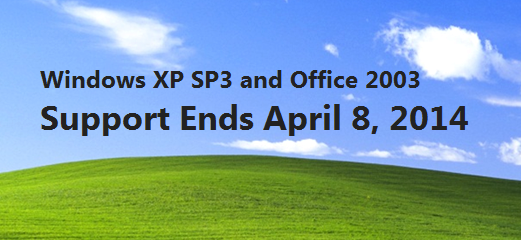 Windows XP Service Pack 3 (SP3) and Office 2003 will be reaching end of support in April 2014. The following post is designed to highlight the potential risks involved with the upcoming end of support of these products and to outline the options available to mitigate these risks.
What is the situation and potential risk?
Windows XP SP3 and Office 2003 will no longer be supported from April 8, 2014 onwards. After this date, Microsoft will not provide any public support for these products, including security patches, non-security hotfixes or incident support.
Running Windows XP SP3 and Office 2003 in your environment after their end of support date may expose your company to potential risks, such as:
What are the available options?
To help customers with the migration/deployment process, Microsoft and our consulting partners offer several options including proof of concept (POC) and production pilot programs, available through Microsoft Consulting Services or one of our Certified Service Partners, to help you achieve a successful upgrade to Windows 7 Enterprise and Office 2010.
Where can you find more information?
Comments Off on INFO: Windows XP SP3 & Office 2003 End of Support approaching quickly
Posted in Uncategorized
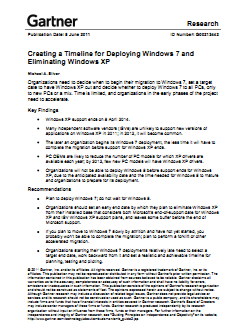
Gartner published an interesting research report about migration techniques & the imminent dangers or remaining on Windows XP in the upcoming 2012 year.
They highlight the following concerns about not migrating off of Windows XP:
Gartner’s advice around migration off of Windows XP is quite clear in their recent Research Report, "Creating a timeline for Deploying Windows 7 & Eliminating Windows XP" & it begins with, “Plan to deploy Windows 7; do not wait for Windows 8.”
There are however several other recommendations & we have received permission to distribute this analysis/report. A publicly available link to the content is attached below for your reference.
Comments Off on NEWS: Gartner on Windows XP – “Plan to deploy Windows 7; do not wait for Windows 8”
Posted in Uncategorized
We just released a new 365 page eBook from the Patterns and Practices series: “A Guide to Claims-Based Identity and Access Control, Second Edition”.
As an application designer or developer, imagine a world in which you don’t have to worry about authentication. Imagine instead that all requests to your application already include the information you need to make access control decisions and to personalize the application for the user.
In this world, your applications can trust another system component to securely provide user information, such as the user’s name or email address, a manager’s email address, or even a purchasing authorization limit. The user’s information always arrives in the same simple format, regardless of the authentication mechanism, whether it’s Microsoft® Windows® integrated authentication, forms-basedauthentication in a web browser, an X.509 client certificate, or something more exotic. Even if someone in charge of your company’ssecurity policy changes how users authenticate, you still get the information, and it’s always in the same format.
This is the utopia of claims-based identity that A Guide to Claims-Based Identity and Access Control describes. As you’ll see, claims provide an innovative approach for building applications that authenticate and authorize users.
Who This Book Is For
This book gives you enough information to evaluate claims-based identity as a possible option when you’re planning a new application or making changes to an existing one. It is intended for any architect, developer, or information technology (IT) professional who designs, builds, or operates web applications and services that require identity information about their users. Although applications that use claims-based identity exist on many platforms, this book is written for people who work with Windows-based systems. You should be familiar with the Microsoft .NET Framework, ASP.NET, Windows Communication Foundation (WCF), Microsoft Active Directory® directory service, and Microsoft Visual C#® development system.
Comments Off on DOWNLOAD: Free eBook “A Guide to Claims-Based Identity and Access Control, Second Edition”
Posted in Uncategorized

 kurtsh
 Kurt Shintaku's Blog
You must be logged in to post a comment.