imageThe Microsoft Assessment and Planning (MAP) Toolkit is an agentless, automated, multi-product planning and assessment tool for quicker and easier desktop and server migrations.

MAP provides detailed readiness assessment reports and executive proposals with extensive hardware and software information, and actionable recommendations to help organizations accelerate their IT infrastructure planning process, and gather more detail on assets that reside within their current environment.

MAP also provides private and public cloud planning assessments, and server utilization data for Hyper-V server virtualization planning; identifying server placements, and performing virtualization candidate assessments, including ROI analysis for server consolidation with Hyper-V. Other significant new features in MAP 6.5 include:

  • the discovery of active Windows devices
  • Software Usage Tracking for Forefront Endpoint Protection (FEP)
  • the discovery of Oracle instances on Itanium-based servers with HP-UX to assist in the planning of migration to SQL Server.

Learn more.

MAP is one of the tools provided by the Microsoft Solution Accelerators team. The Microsoft Assessment and Planning Toolkit, Microsoft Deployment Toolkit, and Security Compliance Manager provide tested guidance and automated tools to help organizations plan, securely deploy, and manage new Microsoft technologies—easier, faster, and at less cost. All are freely available, and fully-supported by Microsoft. Learn more.

For home users and users with a few computers to migrate, use the Windows 7 Upgrade Advisor to understand the readiness of your computer for Windows 7.
The MAP Toolkit includes the following components:

  • Microsoft_Assessment_and_Planning_Toolkit_Setup.exe. Installation package containing the tool, release notes, Getting Started Guide and toolkit help (chm file).
  • readme_en.htm. Available as a separate download. Provides information to read before installing the MAP Toolkit, including installation prerequisites and known issues.
  • Getting_Started_Guide.en.doc. Provides information about toolkit installation, environment preparation, and assessment scenarios supported by toolkit wizards and the UI.
  • MAP_Training_Kit.zip. Available as a separate download. Contains sample databases and training materials.
  • MAP_Sample_Documents.zip. Available as a separate download. Contains sample reports and proposals.

DOWNLOAD:  Microsoft Assessment and Planning Toolkit 6.5
http://www.microsoft.com/download/en/details.aspx?id=7826

imageMany organizations today rely on some degree of virtualization. Whether it is a few virtual machines running on a single physical computer or a whole server farm across multiple root servers, virtualization optimizes investment in hardware and network infrastructure by:

  • Increasing the utilization of underused hardware.
  • Improving server availability.
  • Reducing IT costs.

The purpose of this paper is to provide guidance and best practices for deploying Microsoft® Exchange Server 2010 in a virtualized environment with Windows Server® 2008 R2 Hyper V™ technology. This paper has been carefully composed to be relevant to organizations of any size.

WHITEPAPER: Best Practices for Virtualizing Exchange Server 2010 with Windows Server® 2008 R2 Hyper V™
http://www.microsoft.com/download/en/details.aspx?id=2428

Posted by: kurtsh | April 5, 2012

RELEASE: System Center 2012 Suite now available

Looks like System Center 2012’s release bits have landed on MVLS and are downloadable by VL customers and Technet/MSDN subscribers.

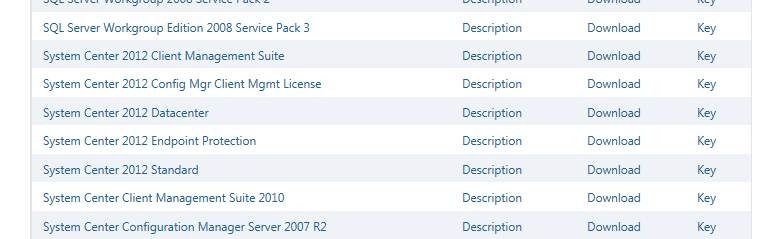
Here’s a screen shot that I just took:

clip_image002

As you can see there is a number of listed products including:

  • System Center 2012 Datacenter
    Provides all System Center management technologies for an unlimited number of virtualized server OSs on a single host that is properly licensed per processor
  • System Center 2012 Standard
    Provides all System Center management technologies for ONLY 2 server OSs (virtualized or not) on a single host that is properly licensed per processor
  • System Center 2012 Endpoint Protection
    Installable add-on to System Center Configuration Manager 2012 to provide managed anti-malware, security management, and behavioral detection. (Formerly Forefront Endpoint Protection)
  • System Center 2012 Client Management Suite
    A single suite providing Configuration Manager for clients, Operations Manager for clients, Virtual Machine Manager for clients, and Service Manager for clients.
Posted by: kurtsh | April 4, 2012

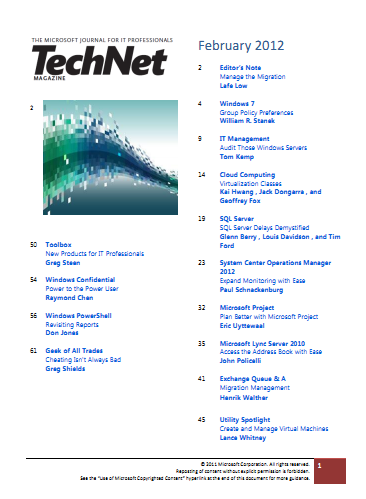
DOWNLOAD: TechNet Magazine–February 2012

imageThis month’s digital downloadable issue of TechNet Magazine is a good one.

There are articles on:

DOWNLOAD:  TechNet Magazine – February 2012
http://download.microsoft.com/download/6/C/F/6CF044F8-F13F-4F96-950F-8E5B5932EEFD/February2012.pdf

Posted by: kurtsh | April 4, 2012

BETA: Diagnostics & Recovery Toolset v8 now available

imageAh.  The nirvana of repairing PCs instead of reimaging them.  It’s finally upon us.

As Microsoft continues to help businesses get the most out of their IT environment with new tools and solutions, today we’re making available the Diagnostics and Recovery Toolset 8 (DaRT) beta release. The DaRT 8 beta is part of the Microsoft Desktop Optimization Pack (MDOP) and provides businesses using Windows 8 with a way to be more proactive with their desktop repair procedures. Using DaRT 8, businesses can develop recovery and support plans that best fit their IT staffing and infrastructure requirements to save time and reduce challenges associated with troubleshooting and repairing system failures.

DaRT 8 beta is designed to help IT professionals easily recover PCs that have become unusable, rapidly diagnose probable causes of issues, and quickly repair unbootable or locked-out systems, all faster than the average time it takes to reimage the machine. DaRT, in partnership with a desktop recovery plan, can help businesses minimize downtime of their systems, keeping employees productive. New features specific to the DaRT 8 beta that can help IT include the ability to:

  • Repair PCs instead of reimaging. The DaRT 8 beta enables IT professionals to easily recover PCs that have become unusable, rapidly diagnose probable causes of issues, and quickly repair unbootable or locked-out systems, all faster than the average time it takes to reimage the machine.
    Use scripts to enable image creation. The DaRT 8 beta has an image creation wizard that is now built on top of PowerShell cmdlets, allowing IT departments to mount, create, apply, ad dismount and burn via scripting – ultimately letting the image creation process be saved and repurposed for later use. This kind of automation should save IT departments some time.
  • Provide native support for USB media deployments. In previous versions of DaRT, additional tools were required to place DaRT images on USB drives. With DaRT 8 beta, this functionality is natively supported in the image creation wizard, minimizing the number of tools required for USB deployment.
  • Create multiple images from one device. The DaRT 8 beta is able to create both 32-bit and 64-bit images on a single machine and transfer them between.
  • Choose the output format. Now as part of the image creation process, WIM and ISO output formats are supported in the DaRT 8 beta so that IT departments are sure the right format is an option for a broader deployment plan.

BLOG: MDOP: DaRTing to the Future
http://windowsteamblog.com/windows/b/business/archive/2012/03/28/mdop-darting-to-the-future.aspx

BLOG: DaRT 8 Beta Q&A
http://windowsteamblog.com/windows/b/springboard/archive/2012/03/28/microsoft-dart-8-beta-q-amp-a.aspx

image

Wait.  I know what App-V is… but what’s User Experience Virtualization?  Well, think of it as a hyper-reliable solution to roaming profiles.  I’ll let the blog post tell the story.

We are pleased to announce that the beta versions of Microsoft Application Virtualization (App-V) 5.0 and a new MDOP product Microsoft User Experience Virtualization (UE-V) are now available for download from
Microsoft Connect.

UE-V is an enterprise-scale user state virtualization solution that delivers a user’s personal Windows experience across devices, is simple for IT to deploy, and easily integrates with existing management tools.

Some of the main features of UE-V are:

  • Users retain their application experience without having to reconfigure applications when they log in from a different Windows instance – regardless of whether it is a rich desktop or virtual desktop session.
  • Automatically delivers a personal experience to Windows 7, Windows 8, Windows Server 2008 R2, and Windows Server 8 based devices, giving users the flexibility to work from anywhere.
  • If a user accidently applies unwanted changes, IT can simply roll back to the initial state.
  • Seamlessly integrates with Microsoft desktop virtualization products to roam the user experience in heterogeneous environments.

Some of the new features in the App-V 5.0 Beta are:

  • Flexible virtualization choices let virtual applications work more like traditionally installed applications, allowing local and virtual applications to communicate and enabling control of which virtual applications can share environments.
  • There’s no dedicated drive letter required, and no 4 gigabyte maximum package size. It’s easy for IT to work with and take action on App-V diagnostic information because App-V logs Windows events instead of separate log files.
  • Easy and efficient to use in VDI environments, allowing IT to make the best use of expensive disk resources without changing the way they get their jobs done.
  • Web-based management makes it easy for busy IT professionals to get their work done while away from their desk.
  • Rich PowerShell scripting allows IT to automate repetitive tasks and to integrate App-V with existing processes.

These products will be part of a future version of the Microsoft Desktop Optimization Pack (MDOP). If you want to learn more about App-V 5.0 and UE-V now, check out the Windows for your Business Blog were we have posted even more information about the products.

BLOG:  Microsoft User Experience Virtualization and Microsoft Application Virtualization 5.0 Betas Now Available
http://blogs.technet.com/b/mdop/

BLOG:  Introducing User Experience Virtualization (UE-V) and App-V 5.0
http://windowsteamblog.com/windows/b/business/archive/2012/04/04/introducing-ue-v-and-app-v-5-0.aspx

Hortonworks is one of the most emblematic companies in the Hadoop and Big Data movement. In this episode Bruno Aziza speaks with Eric Baldeshwieler, Co-Founder and CEO, Hortonworks about the how Hortonworks came to be one of the leaders in the Hadoop and Big Data space today.

Learn more about how SQL Server 2012 delivers robust BI solutions including Hadoop support at: http://www.microsoft.com/sqlserver

Hortonworks CEO Eric Baldeschwieler talks with Microsoft Director of BI Bruno Aziza

For more interviews about Business Intelligence and real world applications, visit Microsoft’s BizIntelligenceTV at http://www.youtube.com/user/MicrosoftBI.

Visit Microsoft’s Business Intelligence site at http://www.microsoft.com/bi.

This week, legendary thought leader Guy Kawasaki chats with Bruno Aziza about his new book Enchantment: The Art of Changing Hearts, Minds and Actions. Guy shares some philosophies from the book, including how to connect with and inspire employees, when forgiveness might be easier than permission and why companies should do away with the post-mortem. He also shares his thoughts on improving any presentation. Check out this week’s episode, with one of the most celebrated business leaders of our time!

Guy Kawasaki, the renowned venture capitalist and author of the new book about influence and persuasion titled Enchantment: The Art of Changing Hearts, Minds, and Actions. It has some unusual suggestions for how to avoid BI system development pitfalls. For one thing, he believes a BI failure should be analyzed before the project has even been launched.

Enchantment: Guy Kawasaki on Changing Hearts, Minds and Actions

For more interviews about Business Intelligence and real world applications, visit Microsoft’s BizIntelligenceTV at http://www.youtube.com/user/MicrosoftBI.

Visit Microsoft’s Business Intelligence site at http://www.microsoft.com/bi.

In the latest episode of BITV, Bruno Aziza catches up with Malcolm Gladwell, author of books such as The Tipping Point, Blink, and recently, Outliers: The Story of Success. Malcolm and Bruno discussed topics from Outliers including structural dimensions of success, why certain people thrive in difficult environments, and the 10,000-Hour Rule. These principals are applied to real world examples ranging from why professional hockey and soccer players tend to be clustered around the same birth month to why some cultural differences can be an indicator in the likelihood of a plane crash. Watch the latest BITV video to learn more about Malcom’s fascinating theories.

Malcolm Gladwell and Analytics

For more interviews about Business Intelligence and real world applications, visit Microsoft’s BizIntelligenceTV at http://www.youtube.com/user/MicrosoftBI.

Visit Microsoft’s Business Intelligence site at http://www.microsoft.com/bi.

Microsoft’s Director of Business Intelligence interviewed the principal behind the primary character in the book, “Bringing Down the House”, the story of the MIT Blackjack team.

The question is:  Why?

Jeffrey Ma won millions—and inspired the Hollywood film 21—when he masterminded a card counting scheme involving his fellow MIT classmates and took on Vegas. Ma has now parlayed his love for analytics, gambling and sports into a career as an analyst, author and speaker. In the latest BITV episode, Bruno Aziza gets Ma to share what blackjack can teach us about predictive analytics and business intelligence. Can you take on the house?

The Gambler: Jeffrey Ma Brings Down the House

For more interviews about Business Intelligence and real world applications, visit Microsoft’s BizIntelligenceTV at http://www.youtube.com/user/MicrosoftBI.

Visit Microsoft’s Business Intelligence site at http://www.microsoft.com/bi.

« Newer Posts - Older Posts »

Categories